
 View on Asset Store (opens in new tab)
Package details
- Latest version
- 1.0.1
- Last updated
- First released
- Unity version
- 6000.3.14 or later
- Package size
- 159 KB
- Files
- 97
- Favorites
- 11
- Views in the past week
- 17
- Requires
Price tracking
- Last checked
- Tracked since
- Lowest recorded
- $25.00 on
Keywords

Utilities For Game Creator 2
90 new plug-and-play Instructions, Conditions & Events for Game Creator 2.
Affiliate link · Purchases support this site
Price history
Last 6 months
USDAsset preview
1 / 1
Utilities For Game Creator 2 screenshot 1
About this asset
⬆️ ALREADY OWN THIS PACK?
Upgrade to the Complete Suite | Game Creator 2 for $39.99 instead of $89.99, a $50 credit for what you've already bought.
The Complete Suite includes Utilities, Director Suite, Motion Suite and Extended Suite.
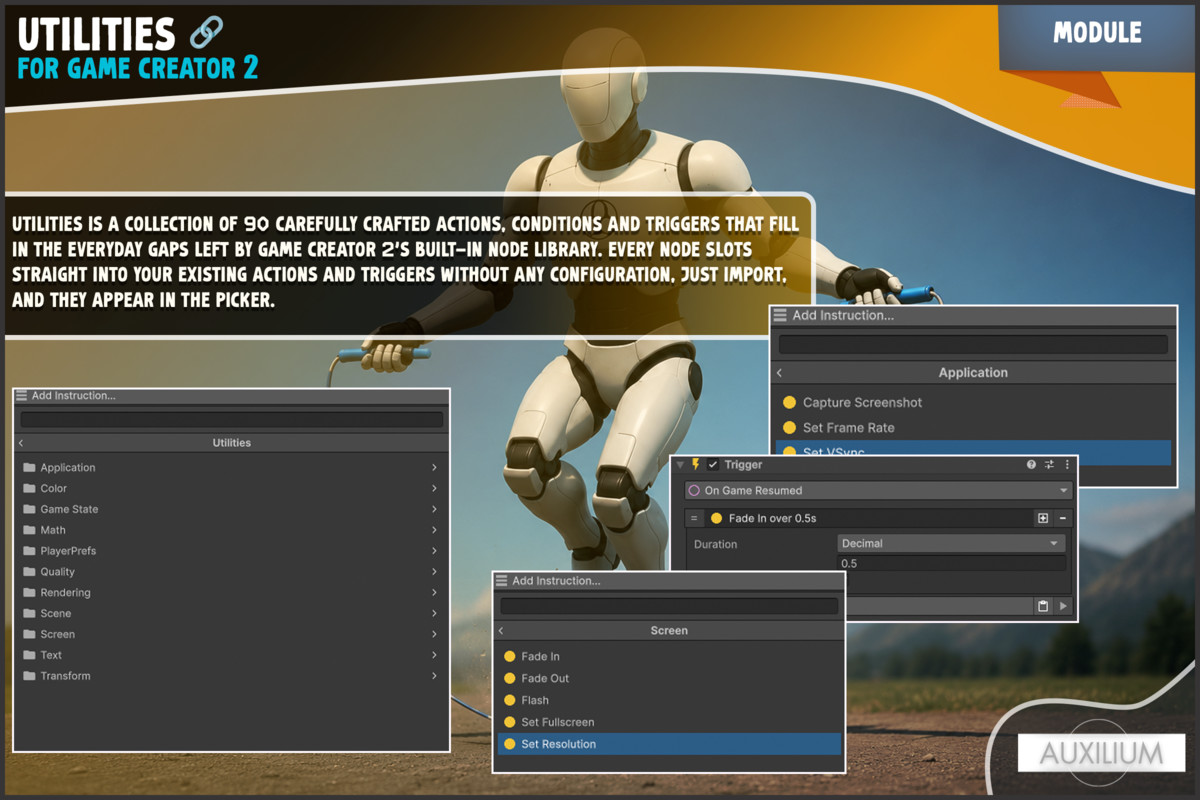
GC2 Utilities is a collection of 90 carefully crafted Instructions, Conditions,
and Events that fill in the everyday gaps left by Game Creator 2's built-in node
library. Every node slots straight into your existing Actions and Triggers
without any configuration, just import, and they appear in the picker.
The only dependency is Game Creator 2 Core, so this pack works in any project regardless of which GC2 modules you own.
——— Text ———
Stop writing custom C# just to trim a string or push text to the clipboard.
Format dialogue with {0}/{1} placeholders, convert names to uppercase for UI
headers, strip whitespace from user input, and check whether a string starts
with a prefix — all without leaving the visual scripting canvas.
——— Math ———
Round, Floor, Ceil, PingPong, Lerp, and Random Range nodes store their results
directly into any GC2 variable. Chain them together to build procedural
difficulty curves, animate values over time, or generate loot roll numbers
entirely in visual scripting.
——— Transform ———
Make a character Look At a target (with optional Y-axis-only horizontal lock),
snap an object to the ground with a single instruction, align a prop to a
slope's normal, or scatter items within a radius, all without touching a line
of code. Distance Enter and Distance Exit Events replace hand-rolled proximity
triggers and fire directly into your Action lists.
——— Game State ———
Pause, Resume, and Freeze Frame instructions give you full control over
Time.timeScale from visual scripting. Paired with On Game Paused, On Game
Resumed, and On Time Scale Changed Events (driven by an auto-initialized runtime
bridge), you can build pause menus, bullet-time effects, and cutscene lockouts
entirely node-by-node.
——— Screen ———
Fade Out, Fade In, and Flash instructions are fully async subsequent nodes
wait for the animation to finish before continuing. A built-in screen overlay
singleton handles the Canvas setup automatically; nothing needs to be placed in
the scene. Set Resolution and Set Fullscreen round out the display controls.
——— Application ———
Set the target frame rate, configure VSync, and capture screenshots to disk
all from Actions. Battery Level and Internet Reachability Conditions let you
adapt your game's behaviour to the player's device state without writing
platform-specific code.
——— PlayerPrefs ———
Game Creator 2 has no built-in PlayerPrefs nodes. GC2 Utilities fills that gap
completely. Set, Get, and Delete Int, Float, and String prefs directly from
Actions. Force a save to disk with a single node. Check whether a key exists,
compare stored values with operators like >=, ==, and <, and even do
case-insensitive string comparisons.
——— Color ———
Lerp between two colors by a 0–1 factor, generate a random color, convert to
and from hex strings for UI display or serialization, and build colors from HSV
values when you need precise hue control. A Colors Approximately Equal Condition
rounds out the set with per-channel threshold comparison.
——— Quality Settings ———
Set the active quality level by index at runtime, perfect for a graphics
settings menu. Control shadow draw distance without code. Toggle fog on or off
with a single node. Conditions let you branch on the current quality level or
check whether fog is active, so you can adapt other logic to the player's chosen
graphics tier.
——— Scene Utilities ———
Read the active scene's name or build index directly into a variable. Use the
Scene Is Active Condition to branch by scene name or index, handy for
controlling tutorial flows, per-scene music logic, or skipping setup steps that
only apply to specific levels.
——— Rendering ———
Set the scene ambient light color, fog color, and exponential fog density all
from Actions. Drive atmospheric transitions, morning-to-night color shifts,
entering a foggy swamp, emerging into clear air.
——— System Info ———
Branch on the player's hardware at runtime. Compare system RAM, GPU VRAM, and
CPU core count with threshold operators to automatically select a default quality
level, disable expensive effects on low-end devices, or gate features behind a
ray tracing check. No platform-specific ifdef blocks required.
GC2 Utilities suits any genre and any project scale. Whether you are prototyping
a jam game or shipping a commercial title, these 90 nodes are the everyday
utilities you will reach for again and again.
From the publisher's Asset Store listing.
Technical details
• 90 visual scripting nodes — 58 Instructions, 26 Conditions, 6 Events
• TEXT (5 Instructions, 4 Conditions)
- To Uppercase / To Lowercase / Trim / Copy To Clipboard / Format Text
- Is Empty / Starts With / Ends With / Length Compare
• MATH (6 Instructions, 3 Conditions)
- Round / Floor / Ceil / PingPong / Lerp / Random Range
- In Range / Is NaN / Approximately Equal
• TRANSFORM (4 Instructions, 3 Conditions, 2 Events)
- Look At Target (Y-axis lock option) / Random Offset / Snap To Ground / Align To Surface
- Is Visible / Line Of Sight / Is Grounded
- On Distance Enter / On Distance Exit
• GAME STATE (4 Instructions, 2 Conditions, 3 Events)
- Pause / Resume / Freeze Frame / Reload Scene
- Is Paused / Time Scale Compare
- On Game Paused / On Game Resumed / On Time Scale Changed
• SCREEN (5 Instructions, 1 Condition, 1 Event)
- Fade Out / Fade In / Flash / Set Resolution / Set Fullscreen
- Is Fullscreen
- On Resolution Changed
• APPLICATION (3 Instructions, 2 Conditions)
- Set Frame Rate / Set VSync / Take Screenshot
- Internet Is Reachable / Battery Level Compare
• PLAYERPREFS (9 Instructions, 4 Conditions)
- Set Int / Set Float / Set String
- Get Int / Get Float / Get String (stored into GC2 variables)
- Delete Key / Delete All / Save
- Has Key / Compare Int / Compare Float / Compare String (with ignore-case)
• COLOR (5 Instructions, 1 Condition)
- Lerp Color / Random Color / Color To Hex String / Color From Hex String
- Color From HSV (Hue, Saturation, Value)
- Colors Approximately Equal (per-channel threshold)
• QUALITY SETTINGS (3 Instructions, 2 Conditions)
- Set Quality Level / Set Shadow Distance / Set Fog Enabled
- Quality Level Compare / Fog Is Enabled
• SCENE UTILITIES (2 Instructions, 1 Condition)
- Get Active Scene Name / Get Active Scene Build Index
- Scene Is Active (match by name or build index)
• RENDERING (3 Instructions)
- Set Ambient Light Color / Set Fog Color / Set Fog Density
• SYSTEM INFO (4 Conditions)
- System Memory Compare / Processor Count Compare
- Graphics Memory Compare / Supports Ray Tracing
• Requires Game Creator 2 Core only — no additional GC2 modules needed
• Compatible with Unity 2021.3 LTS and newer
Compatibility
| Unity version | Built-in | URP | HDRP |
|---|---|---|---|
| 6000.3.14f1 | Compatible | Compatible | Compatible |
As listed on the Asset Store.