
 View on Asset Store (opens in new tab)
Package details
- Latest version
- 1.1.07
- Last updated
- First released
- Unity version
- 2021.3.33 or later
- Package size
- 331 KB
- Files
- 29
- Favorites
- 64
- Views in the past week
- 35
Price tracking
- Last checked
- Tracked since
- Lowest recorded
- Free on
Keywords
Input Icons Extension for UI Toolkit
Extension for Input Icons: Display the current bindings of your Input Action Assets as sprites in UI Toolkit texts and elements. Supports keyboard and gamepads.
Affiliate link · Purchases support this site
Price history
Last 6 months
USDAsset preview
1 / 4

Input Icons Extension for UI Toolkit screenshot 1


About this asset
Requires Input Icons for Input System to function.
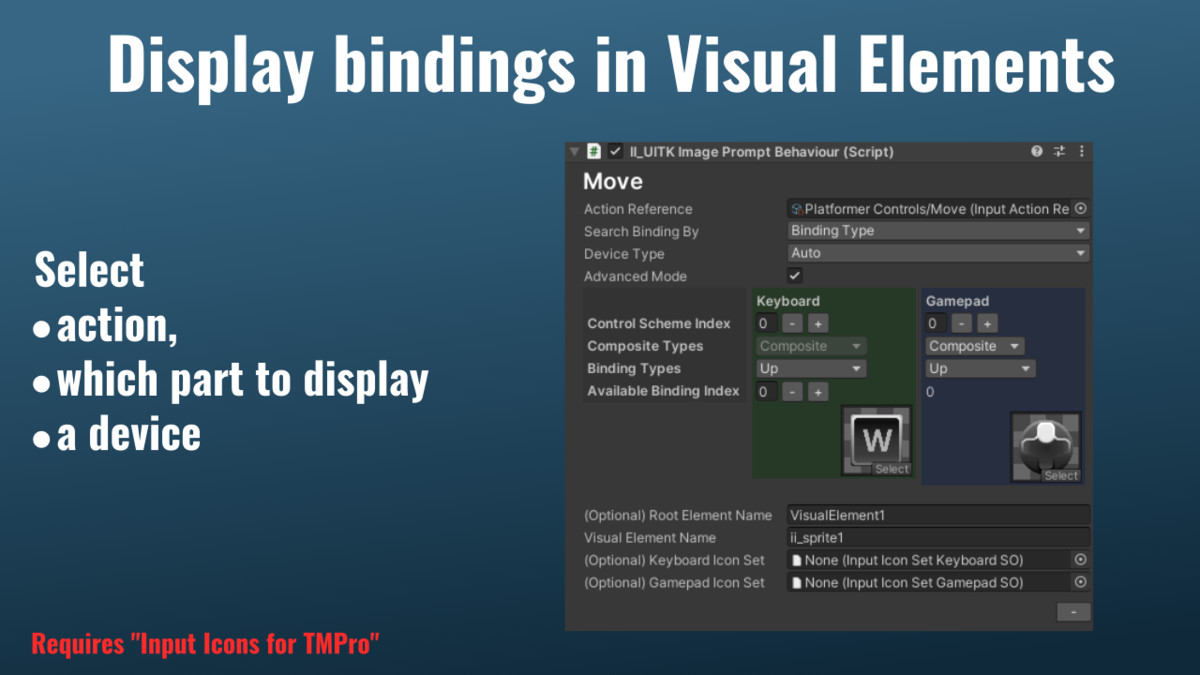
This extension brings Input Icons functionality to Unity's UI Toolkit system, allowing you to display dynamic input bindings in UI Documents without coding. Simply use <style=ActionMap/Action> tags in UI Builder text elements to show current bindings that automatically update when users switch between input devices.
Supported Devices: Keyboard & Mouse, Generic Gamepad, Nintendo Switch Pro, PlayStation 3/4/5, Xbox controllers
Two Display Methods:
- Text Integration: Use style tags in any UI Toolkit text element
- Visual Elements: Attach II_UITKImagePromptBehaviour component to UI Documents for image-based prompts
Features streamlined setup process with step-by-step guidance and automatic asset configuration. While focused specifically on UI Toolkit integration, it provides essential input prompt functionality for modern Unity UI workflows.
There is also an asset available featuring the Keyboard and Gamepad Sprites shown in the screenshots.
From the publisher's Asset Store listing.
Technical details
Requires
* Unity 2021.2 or higher
* Input Icons for TMPro
* TextMeshPro 2.1.6 or higher
* Input System 1.2.0 or higher
Compatibility
| Unity version | Built-in | URP | HDRP |
|---|---|---|---|
| 2021.3.33f1 | Compatible | Compatible | Compatible |
Requires
* Input Icons for Input System
* Unity 2021.2 or higher
* TextMeshPro 2.1.6 or higher
* UI Toolkit
As listed on the Asset Store.