
 View on Asset Store (opens in new tab)
Package details
- Latest version
- 5.0
- Last updated
- First released
- Unity version
- 6000.5.4 or later
- Package size
- 5.7 MB
- Files
- 52
- Favorites
- 105
- Views in the past week
- 38
Price tracking
- Last checked
- Tracked since
- Lowest recorded
- Free on
Keywords
Progress Bar Kit
- Price drop
Segmented and circular progress bars for Unity UI — eight drop-in prefabs, smooth animated fills, gradients and events. No coding required.
Affiliate link · Purchases support this site
Price history
Last 6 months
USDAsset preview
1 / 1
Progress Bar Kit video 1 (plays on the Asset Store)
About this asset
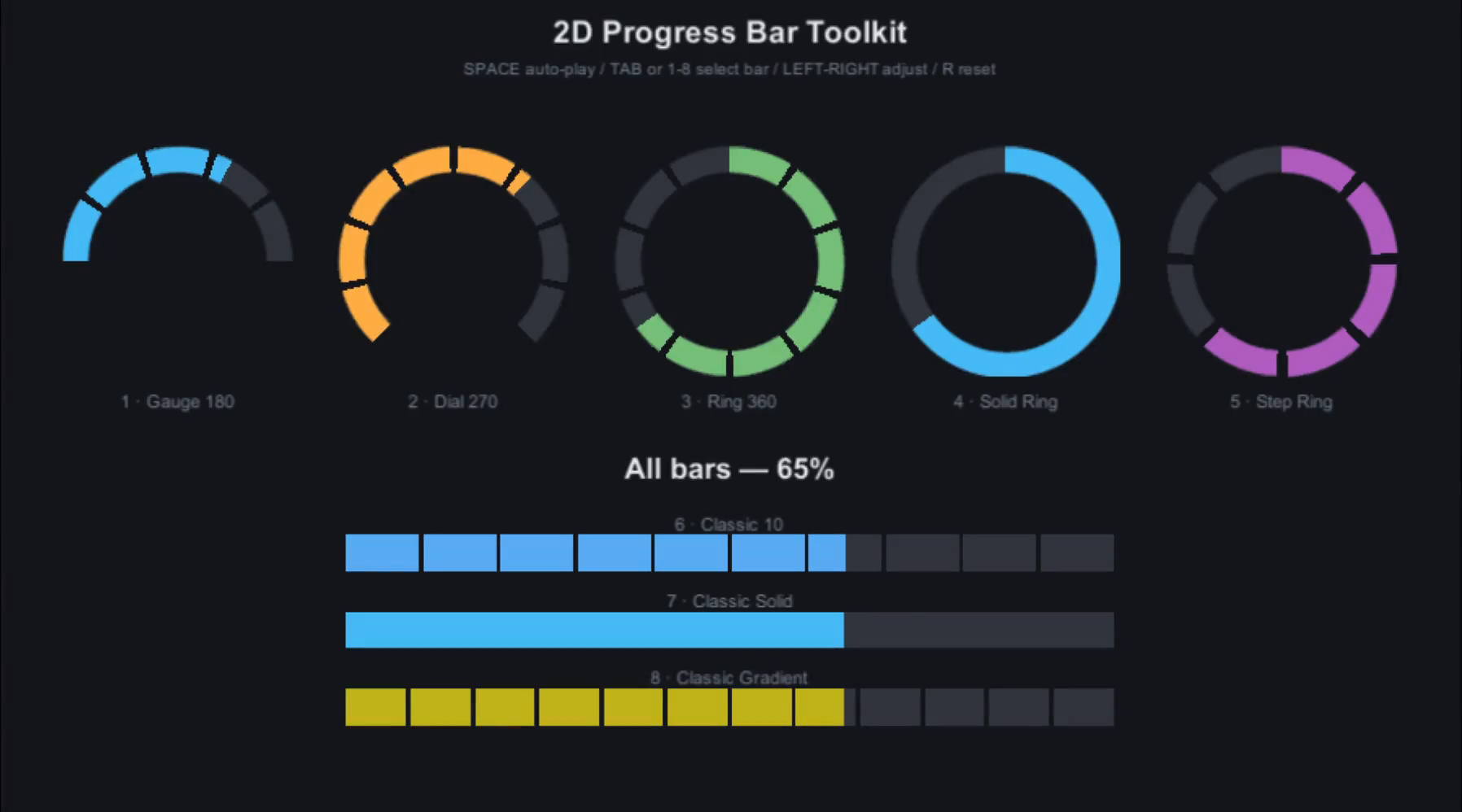
2D Progress Bar Toolkit is a lightweight set of Unity UI components for building progress, health, loading and stage indicators. Drop one of the eight ready-made prefabs into your Canvas, resize it, pick your colors — done. No scripting knowledge required, and when you do want code, a clean, fully documented C# API is waiting.
The bars fit any genre and art style: every segment is a plain uGUI Image, so you can reskin a bar with your own sprites in seconds — from casual match-3 hearts to sci-fi HUD gauges. An interactive showcase scene with every prefab is included, so you can test each bar before you use it.
WHAT'S INSIDE
- 8 ready-to-use prefabs: 180° gauge, 270° dial, full ring, solid ring, step ring, and three classic horizontal bars (segmented, solid, gradient)
- Circular bars with configurable start/end angles and segment spacing
- Classic bars with any number of segments
- Continuous or whole-segment fill modes
- Smooth animated value changes (scaled or unscaled time — bars keep moving in pause menus)
- Gradient-driven fill color (e.g. red at low health, green at full)
- C# events and UnityEvents: value changed, completed
- Interactive showcase scene and offline documentation
BUILT FOR PRODUCTION
- Performance first: idle bars cost nothing per frame and nothing is allocated after initialization
- One sprite and material per bar — a whole bar renders in a single draw call
- Resolution-independent prefabs: drop into any Canvas and just resize
- Full source code with XML documentation, shipped in its own assembly definition
- Text-serialized assets, version-control friendly
University of Games is a place for indie creators. We ship practical Unity solutions that speed up game development — tools, ready-made packages, and knowledge you can apply the same day. Everything comes from real production experience.
From the publisher's Asset Store listing.
Technical details
Features:
- Two bar types — Classic (horizontal) and Circular (radial), both segmented
- 8 drop-in, resolution-independent prefabs
- Configurable segment count, spacing, colors and circular start/end angles
- Continuous and whole-segments fill modes
- Smooth fill animation with configurable speed; unscaled-time option for pause screens
- Gradient fill color driven by the current value
- C# events + UnityEvents (OnValueChanged, OnCompleted)
- Runtime API: set values instantly or animated, recolor, rebuild, change segment counts from code
- Zero per-frame cost while idle; no GC allocations after initialization
- Single draw call per bar; Sprite Atlas friendly
- Works on overlay, camera and world-space canvases (attach bars to 3D objects)
- Built on Unity UI (uGUI) with no external dependencies — runs on every platform Unity UI supports
- Unity 6 (6000.5+) compatible
- Full source code, XML-documented, in a dedicated assembly definition
- Demo showcase scene + documentation included
Compatibility
| Unity version | Built-in | URP | HDRP | Custom |
|---|---|---|---|---|
| 6000.5.4f1 | Compatible | Compatible | Compatible | Compatible |
As listed on the Asset Store.