
 View on Asset Store (opens in new tab)
Package details
- Latest version
- 2.1
- Last updated
- First released
- Unity version
- 2019.4.40 or later
- Package size
- 533 KB
- Files
- 41
- Favorites
- 261
- Views in the past week
- 12
Price tracking
- Last checked
- Tracked since
- Lowest recorded
- $2.45 on
Keywords

Aura Glass V2
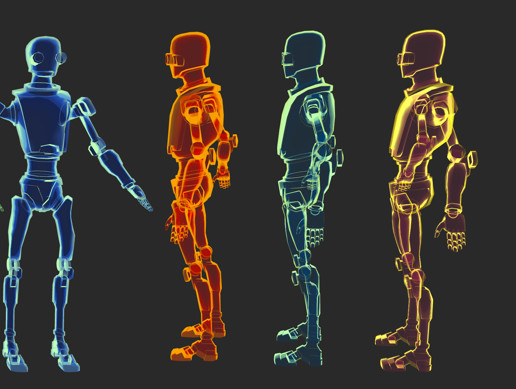
The Aura Glass shader offers an effortless way to craft stunning, transparent materials that add a touch of sophistication and visual appeal to your projects.
Affiliate link · Purchases support this site
Price history
Last 6 months
USDAsset preview
1 / 26

Aura Glass V2 screenshot 1


About this asset
The Aura Glass shader offers an effortless way to craft stunning, transparent materials that add a touch of sophistication and visual appeal to your projects. This versatile shader is compatible with both simple and intricate models, allowing for a wide range of creative applications. Tailoring the look and feel of your materials is a breeze, thanks to the easily adjustable color schemes and various shader parameters.
Enhanced Features:
- Pure Shader-Based: The effect is entirely generated with shaders. Ensuring a consistent and high-quality appearance.
- Highly Customizable: Adjust a wide range of parameters to fine-tune the material's appearance to your specific needs.
- Optimized for Performance: Designed with efficiency in mind.
- Extensive Material Library: Includes 30 pre-configured materials, ready to be used out-of-the-box or as a starting point for your own unique creations.
From the publisher's Asset Store listing.
Technical details
The Aura Glass shader is designed for Unity and creates a unique visual effect that blends colors and transparency based on the object's orientation relative to the camera. This shader is ideal for creating glass-like materials with an aura effect that changes color and opacity dynamically.
Properties
- _Color (Color): Primary color of the material. Default is white (1,1,1,1).
- _SColor (Secondary Color, Color): Secondary color that blends with the primary color based on the view direction. Default is red (1,0,0,1).
- _Rim (Float): Controls the intensity of the rim light effect. Default value is 1.0.
- _Thr (Threshold, Range(0.0, 1.0)): Threshold for opacity changes. Lower values increase the range of view angles over which the color blend and transparency change. Default is 0.3.
Usage
- Creating Material: Create a new material and assign the "Custom/Aura Glass" shader to it.
- Configuring Properties: Adjust Color, SecondaryColor, Rim, and Threshold in the material properties to achieve the desired visual effect.
- Applying to Objects: Apply the material to any mesh renderer in your Unity scene.
Notes
- This shader is best used on objects where a dynamic, view-dependent color blending effect is desired.
- Performance may vary depending on the complexity of the scene and the number of objects using this shader.
- Experiment with different property values to get the best result for your specific application.
Compatibility
| Unity version | Built-in | URP | HDRP | Custom |
|---|---|---|---|---|
| 2019.4.40f1 | Compatible | Compatible | Compatible | Compatible |
The recent versions of Aura Glass have undergone testing across various Unity versions, ranging from 2019 to 2023. However, it is also compatible with older versions.
As listed on the Asset Store.