
 View on Asset Store (opens in new tab)
Package details
- Latest version
- 1.0
- Last updated
- First released
- Unity version
- 5.4.0 or later
- Package size
- 187.0 MB
- Files
- 295
- Favorites
- 23
- Views in the past week
- 1
Price tracking
- Last checked
- Tracked since
- Lowest recorded
- $20.00 on
Home Interior Setting Bundle
Price $20.00
Buy on Asset Store (opens in new tab)
Affiliate link · Purchases support this site
Price history
Last 6 months
USDAsset preview
1 / 4

Home Interior Setting Bundle screenshot 1


About this asset
OVERVIEW
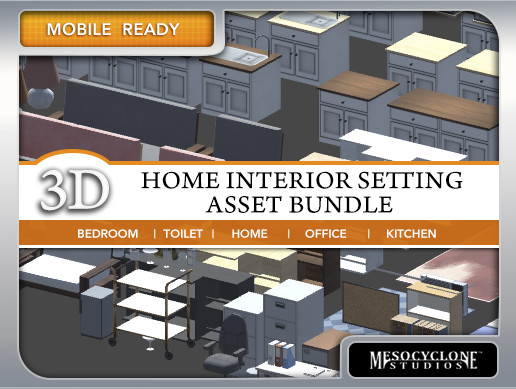
This asset package offers a sufficiently range of preset 3D models Interior Object Assets for your environment.
Our 3D Interior Models Asset Bundle is a collection of 3D model assets you can use for virtually any home, office, studio, etc. environment that you are building for your game or app.
We’ve also included an editor script with performs a basic function of giving you the ease of assigning texture on the materials used by the 3D models with just a couple clicks of buttons.
FEATURES
The 3D Interior Models Asset Package comes with the following:
A. 200+ variations of models from several categories like
• Appliances & Gadgets
• Beds
• Cabinets
• Ceiling Lights
• Chairs & Stools
• Coat Hangers
• Couches & Sofas
• Lamps
• Minibars
• Props
• Shelves & Racks
• Tables
• Toilet
• Vases
The meshes are designed and created with the minimum number of polygons for optimization.
B. 6 Sets of Textures
• UV mapping were optimized by fitting into 3 texture groups only for all of the available models included. Each set is pre-defined with a certain resolution size for your needs
• Texture resolutions ranges from 64px up to 4096px which you can also mix and match based on your needs (e.g. which models should use a hires image and which doesn’t)
C. Editor Handler Script with basic material-texture linking function
Instead of drag-and-dropping the image files you want to use on a material that is linked to a model, you can just simple activate our Texture Linker editor tab window and select and link textures onto materials using it. It’s just a couple clicks of buttons.
This asset package offers a sufficiently range of preset 3D models Interior Object Assets for your environment.
Our 3D Interior Models Asset Bundle is a collection of 3D model assets you can use for virtually any home, office, studio, etc. environment that you are building for your game or app.
We’ve also included an editor script with performs a basic function of giving you the ease of assigning texture on the materials used by the 3D models with just a couple clicks of buttons.
FEATURES
The 3D Interior Models Asset Package comes with the following:
A. 200+ variations of models from several categories like
• Appliances & Gadgets
• Beds
• Cabinets
• Ceiling Lights
• Chairs & Stools
• Coat Hangers
• Couches & Sofas
• Lamps
• Minibars
• Props
• Shelves & Racks
• Tables
• Toilet
• Vases
The meshes are designed and created with the minimum number of polygons for optimization.
B. 6 Sets of Textures
• UV mapping were optimized by fitting into 3 texture groups only for all of the available models included. Each set is pre-defined with a certain resolution size for your needs
• Texture resolutions ranges from 64px up to 4096px which you can also mix and match based on your needs (e.g. which models should use a hires image and which doesn’t)
C. Editor Handler Script with basic material-texture linking function
Instead of drag-and-dropping the image files you want to use on a material that is linked to a model, you can just simple activate our Texture Linker editor tab window and select and link textures onto materials using it. It’s just a couple clicks of buttons.
From the publisher's Asset Store listing.