
 View on Asset Store (opens in new tab)
Package details
- Latest version
- 1.6
- Last updated
- First released
- Unity version
- 5.4.2 or later
- Package size
- 534 KB
- Files
- 25
- Favorites
- 158
- Views in the past week
- 4
Price tracking
- Last checked
- Tracked since
- Lowest recorded
- Free on
Keywords
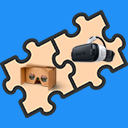
GoogleVR & GearVR Camera Setup
- Price drop
Discount -100%
Previous price
$10.00
Price Free
Get it free on Asset Store (opens in new tab)
Affiliate link · Purchases support this site
Price history
Last 6 months
USDAsset preview
1 / 5

GoogleVR & GearVR Camera Setup screenshot 1


About this asset
- GoogleVR 1.20 Compatible
- Unity 5.5.1 Compatible
* Not for Unity 5.6, or any 'Native' GoogleVR Unity version *
Developing for Mobile VR is great but porting between GoogleVR/Cardboard and GearVR can be time consuming! This asset allows you to easily switch the build target between Google VR and Gear VR with a single click.
- Easily switch between GoogleVR and GearVR
- Compatible with multiple scene games
- Gaze Input System works for both platforms
- Platform Dependent Compilation for GoogleVR / GearVR with custom #defines.
From a new project:
1. Import the package and add the “Player” prefab.
2. Now simply click the “VR Build Settings” option on the toolbar and select GoogleVR or GearVR.
Make games that are compatible with both GearVR and GoogleVR from the ground up, or import into an existing project.
Input works with Unity's Event System via the gaze, PointerEnter, PointerExit, PointerDown, PointerUp, PointerClick.
From the publisher's Asset Store listing.