
 View on Asset Store (opens in new tab)
Package details
- Latest version
- 1.0.1
- Last updated
- First released
- Unity version
- 5.0.0 or later
- Package size
- 823 KB
- Files
- 38
- Favorites
- 48
- Views in the past week
- 2
Price tracking
- Last checked
- Tracked since
- Lowest recorded
- Free on
Keywords

Object Edges 2D
Affiliate link · Purchases support this site
Price history
Last 6 months
USDAsset preview
1 / 9

Object Edges 2D screenshot 1


About this asset
Move By Pivots 2D
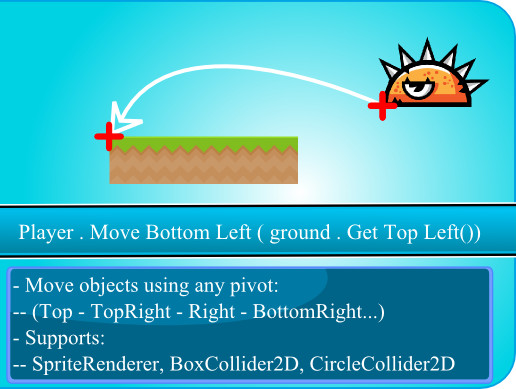
It allows you to move 2d objects without worrying about scale , sprite pivot , collider size or offset using a single line of code.
Example 1
place the player at the start of the level using a single line of code:
player.MoveBottomLeft ( ground.GetTopLeft () )
Example 2
- move the player using his foot (for exact placement) and move all the player game object with the foot.
leftFoot.MoveBottomLeft(targetPosition ,PlayerGameObject);
Supported Types
it supports:
- Sprite Renderer
- Box Collider 2D
- Circle Collider 2D
It's great for
- moving new objects to their start position
- creating random levels
- performing many 2D operations
Pivots list
you can move & get any 2D game object pivot in world position :
-- Top
-- Top Right
-- Right
-- Bottom Right
-- Bottom Center
-- Bottom Left
-- Left
-- Top Left
-- Center
Advice
when creating levels using unity physics, a character box collider 2d that moves over a group of box colliders 2d gets stuck , use a proper character controller)
Notes
1. the asset ignores rotation
(assumes objects are not rotated)
2. supported unity types
- Sprite Renderer
- Box Collider 2D
- Circle Collider 2D
3. you don't have to import any thing, it directly add the methods to the supported unity types.
- for example, simply call
myBoxCollider.MoveBottomleft(targetPoint)
4. all Move Methods can take an optional top parent parameter
- for example: if you need to move the whole car using it's back wheel
- or move a player using his left foot
backWheel.MoveBottomLeft( targetPoint , carParentGameObject)
5. all Move methods return the distance they moved as vector3
6. you can get the scaled collider or sprite size using
circleCollider.GetSizeScaled();
7. supports unity 5
8. assets are moved using their transform.position , if you want support for movement using rigidbody2D.MovePosition(), let us know with an email.
9. it works perfectly with any game object pivot, sprite pivot, any scale , any collider size or offset.
10. source code available ( with documented code )
11. online documentation
- for any requests , player maker support, or suggestions, contact us using
[email protected]
Loved it ? then you will love:
- Camera Edges : get & move any camera edge with a single line of code
- Directional Zoom : easily & smoothly zoom the camera in a single direction (example: zoom out showing more sky but not more ground)
From the publisher's Asset Store listing.