
 View on Asset Store (opens in new tab)
Package details
- Latest version
- 1.1
- Last updated
- First released
- Unity version
- 2018.1.0 or later
- Package size
- 140 KB
- Files
- 6
- Favorites
- 53
- Views in the past week
- 12
Price tracking
- Last checked
- Tracked since
- Lowest recorded
- $3.49 on

Texture Channel Packer
Price $5.00
Buy on Asset Store (opens in new tab)
Affiliate link · Purchases support this site
Price history
Last 6 months
USDAsset preview
1 / 8

Texture Channel Packer screenshot 1


About this asset
About - tool and channel packing
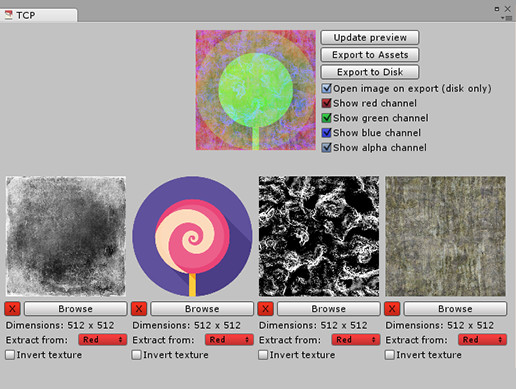
The Texture Channel Packer (TCP) is an Unity editor tool that allowes you to combine color channels of different textures and merge them into one. A great way to decrease asset memory space!
- Load from anywhere on your computer
- Export to anywhere on your computer
Four separate texture (masks) take up 4 times more space. Combining them into one only takes up the same space of one texture, the other three are practically free.
This tool supports the PNG image format.
Read the documentation.
How to open
Open the TCP via the menu items:
> Windows
> > Texture Channel Packer
How to use - It's easy and Intuitive!
* Select one or more input textures by clicking the large colored channel buttons or the ‘Browse’ button under each channel button.
* Select the color channel you wish to extract from each input texture.
* Optional: If need be, you want you can invert the image.
* Click the topmost button ‘Update preview’ to upload the input texture data to the output texture data (preview image).
* Optional: You can toggle different channel visibilities. These do not affect your export result and are purely to inspect each output color channel.
* Optional: You can select to open your exported texture immediately after it’s exported.
* Hit ‘Export to Assets’ or 'Export to Disk' to store your image.
Excluded
The textures used as an example are not included in this package.
From the publisher's Asset Store listing.