
 View on Asset Store (opens in new tab)
Package details
- Latest version
- 1.1
- Last updated
- First released
- Unity version
- 4.6.0 or later
- Package size
- 858 KB
- Files
- 8
- Favorites
- 470
- Views in the past week
- 21
Price tracking
- Last checked
- Tracked since
- Lowest recorded
- $8.50 on
Keywords
Camera Fit: Screen Handler
Price $17.00
Buy on Asset Store (opens in new tab)
Affiliate link · Purchases support this site
Price history
Last 6 months
USDAsset preview
1 / 4

Camera Fit: Screen Handler screenshot 1


About this asset
Works with Unity 4.6, 5, 2017, 2018 and above.
Camera Fit is the easy way to handle screen aspect ratio for different devices, screens and window sizes!
Works on Mobile devices and all other platforms.
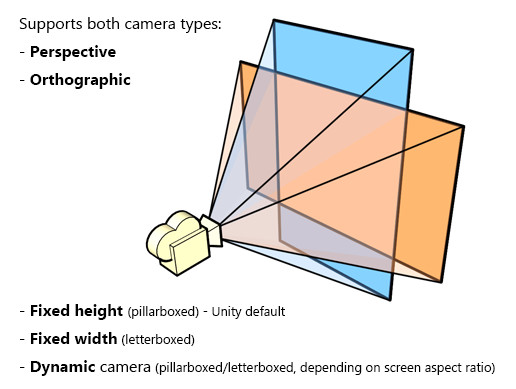
Supports both, orthographic (2D) and perspective (3D) cameras.
Has three different modes:
- Fixed height (pillarboxed) - Unity default.
- Fixed width (letterboxed).
- Dynamic (pillarboxed/letterboxed, depending on screen aspect ratio).
With the Dynamic mode, a specified area (main game area) will always be visible, no matter what screen/window size you choose - the Camera Fit component will adjust the frustum to always keep that area on-screen.
The Dynamic mode also lets you snap the main game area to the edges of the screen vertically/horizontally or always keep it in the middle.
Ask questions or discuss the plugin here.
From the publisher's Asset Store listing.