
 View on Asset Store (opens in new tab)
Package details
- Latest version
- 1.7.13
- Last updated
- First released
- Unity version
- 2023.2.22 or later
- Package size
- 221 KB
- Files
- 24
- Favorites
- 452
- Views in the past week
- 91
Price tracking
- Last checked
- Tracked since
- Lowest recorded
- Free on
Keywords

Save is easy
- Price drop
Save and load your whole game without code: pick the fields to save in the Inspector. Runtime objects, multi-scene, encryption, background threads and instant save-slot info for menus.
Affiliate link · Purchases support this site
Price history
Last 6 months
USDAsset preview
1 / 4

Save is easy screenshot 1


About this asset
Save and Load your games!
This asset allows you to save and load all kinds of variables and objects quickly and easily, it also allows you to save information so that it is available in the menu instantaneously.
The asset is also responsible for knowing in which scene the game was saved, for when you want to load it is loaded in the correct scene.
You can save items that are from the scene or that were created while the player was playing.
Documentation | Articles
Principal functions
✔️ Save and load all the scene information
✔️ Select what you want to be saved
✔️ Save and load from another thread
✔️ Multi-Scene support
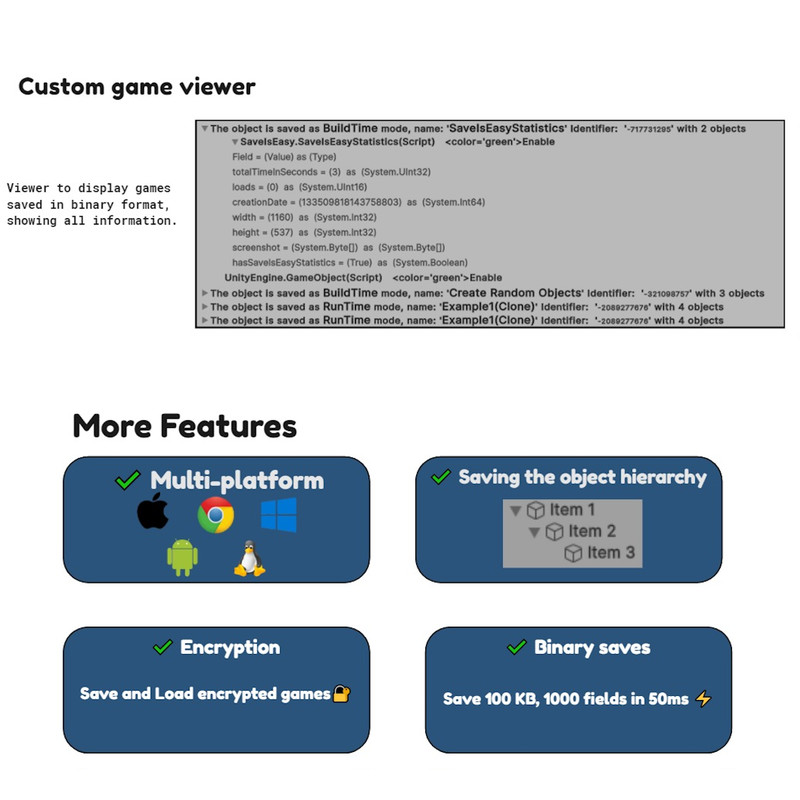
✔️ Encryption tools
✔️ Explore saved games
✔️ Inspect at field level without loading the game
✔️ Configure everything from the editor
✔️ Save GameObject created at run-time or always present in the scene
✔️ Save Quick Access information
✔️ Save game statistics
✔️ Supported platforms: Windows, Linux, Mac, Android and IOS
✔️ You can save the children of objects, and if they are objects you can do this up to 6 levels
Useful functions
✔️ Autosave
✔️ Duplicate Save
✔️ Auto Load On Play
✔️ On Exit Save
✔️ Custom names
✔️ Load events
✔️ List games saved with their basic information
✔️ Save screenshots
✔️ It supports saving GameObjects disabled
✔️ Programming is optional
✔️ Adapters to save even the most complicated components of unity
✔️ The same DLLs for any version of unity
✔️ You can save references to Components or GameObjects that are loaded
Documentation
✔️ All the public methods of the Asset have documentation
✔️ Two game examples
✔️ One example menu
✔️ A custom help window
✔️ Readme.html with the full documentation
✔️ Web documentation
✔️ Web articles
Contact
✔️ Report problems and improvements in Github issues, only english: Link.
✔️ Support for non-technical issues by email in English or Spanish
How to use it
In a GameObject of the scene add the component “SaveIsEasyManager” and in this select the Prefabs that you want that can be loaded in the game by the asset.
Add to your GameObjects or Prefabs the component “SaveIsEasyComponent” and in the list select the fields that you want to save and load.
Read more.
Main class of the Asset
The main class of the Asset is “SaveIsEasyAPI”, Examples: SaveIsEasyAPI.SaveAll(), SaveIsEasyAPI.LoadAll().
Read more.
Statistics
The asset comes with a component called “SaveIsEasyStatistics” designed to store statistics of the game and using quick access that information is available in the menu.
Read more.
Multi-Scene support
This allows you to use the asset in situations where there are multiple scenes loaded at the same time and you can handle them independently, load or save them, without affecting the other scenes, this is useful for more complex saves.
Read more.
QuickAccess
This allows you to save certain attributes separately from the game, so that they are available without having to load the entire file. It is used for the menu that lists the saved games. You can save all kinds of information and this is available in the menu instantly as it is not required to load all the information in the file. The types of data that Quick Access supports at the moment are: bool, char, double, float, int, long, short, sbyte, uint, ulong, ushort, string, byte, byte[].
Read more.
Event
To use the events OnLoad and OnSave you have to implement the “ISaveIsEasyEvents” interface in your code.
Read more.
Attributes
You can use attributes in your fields to use some extra features, The available attributes are the following: AlwaysSaveAttribute, AvoidSavingAttribute and QuickAccessAttribute .
From the publisher's Asset Store listing.
Technical details
Key features
- Save and load the whole scene: choose in the Inspector which components and fields of each GameObject are saved, no code needed
- Restores objects created at runtime (from the prefabs registered in the SaveIsEasyManager) and the objects already in the scene
- Saves references to other GameObjects and Components, and children up to 6 levels deep
- Save and load in a background thread
- AES encryption of the save files
- Multi-scene support: save and load each loaded scene independently, DontDestroyOnLoad objects included
- Quick Access: data saved apart from the game, readable instantly to build save-slot menus without loading the whole file
- Statistics for each save: play time, number of loads, creation date and a screenshot
- File Viewer window: browse the saves and inspect them field by field without loading them
- Autosave, auto load on play, save on exit and a backup copy of every save
- OnSave and OnLoad events, and the AlwaysSave, AvoidSaving and QuickAccess attributes
- Adapters for complex Unity components, and an API to write your own
- Full scripting API (SaveIsEasyAPI) with XML documentation
Compatibility
- Unity 2023.2.22 or newer, including Unity 6
- Windows, Linux, macOS, Android and iOS
- Any render pipeline: Built-in, URP, HDRP or custom (the example scenes render in Built-in and URP)
- Enter Play Mode with or without domain and scene reload
- The examples work with both the Input System package and the old Input Manager
Included
- Two example games and an example menu with save slots
- Documentation in the package (Readme.html and Window > Save is easy > Help) and online at https://saveiseasy.runtools.link
Compatibility
| Unity version | Built-in | URP | HDRP | Custom |
|---|---|---|---|---|
| 6000.0.85f1 | Compatible | Compatible | Compatible | Compatible |
| 2023.2.22f1 | Compatible | Compatible | Compatible | Compatible |
As listed on the Asset Store.