
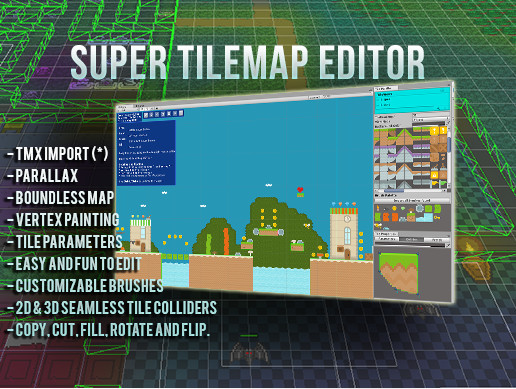
 View on Asset Store (opens in new tab)
Package details
- Latest version
- 1.7.9
- Last updated
- First released
- Unity version
- 2022.3.62 or later
- Package size
- 9.2 MB
- Files
- 177
- Favorites
- 2,101
- Views in the past week
- 73
Price tracking
- Last checked
- Tracked since
- Lowest recorded
- $4.50 on
Keywords

Super Tilemap Editor
A tilemap and level editor for what Unity's Tilemap leaves to you: merged 2D and 3D colliders, data and prefabs on any tile, and a runtime API. Unity 2022.3 to Unity 6.
Affiliate link · Purchases support this site
Price history
Last 6 months
USDAsset preview
1 / 24

Super Tilemap Editor screenshot 1


About this asset
✅ Updated for Unity 6. Works from Unity 2022.3.62f2 up to Unity 6, with the Built-in Render Pipeline and URP.
Unity's built-in Tilemap is fine for painting. Then you need colliders a character doesn't snag on, your own data on individual tiles, prefabs that arrive with the tiles that place them, or a level your game builds while it runs, and you end up writing that layer by hand.
Super Tilemap Editor is that layer. It has been on the Asset Store since 2015 and it is still maintained.
💬 Discord | 📕 Manual | ▶️ Video Tutorials | 🗣️ Forum
⚡ What you get on top of the built-in Tilemap
- Merged tile colliders, in 2D or 3D physics. Each tile's collider shape is joined into one collider per chunk of 60x60 cells, so a character running along a floor doesn't catch on the joins between tiles. Add a Composite Collider 2D to merge the whole map into one outline. The tilemap sets its chunks up for it, and the Collider tab has a fix button for each setting the composite needs
- Your own data on any tile or brush. Int, float, bool, string or object parameters. Set them in the inspector and read them at runtime with one call, instead of keeping a dictionary of cell positions next to your map
- Prefabs attached to tiles. Paint the tile and the GameObject comes with it: doors, torches, pickups, spawn points
- Tilemap groups with parallax. Several layers under one parent, and the painting tools aim at whichever layer you're working on
- Grid pathfinding. An A-star pathfinder that reads its walls from the tile colliders of a whole tilemap group
- Everything works at runtime. The same API that builds a map in the editor builds one in a running game, for procedural levels and player level editors
- Big maps open fast. Each part of a map is built the first time a camera draws it, so a 512x512 map loads in 3 ms instead of the 139 ms it took before 1.7.9, and colliders are ready straight away. Measured in the editor on Unity 2022.3.62f2 with an i7-10700K
- Tilemap prefabs you can keep editing. Applying one changed tile to a 512x512 tilemap prefab takes 170 ms here and 2,940 ms with Unity's Tilemap, because Unity rewrites and reimports the whole prefab, 66 MB at that size against 2.5 MB here. Measured in the editor on Unity 2022.3.62f2 with an i7-10700K, colliders off on both
🎨 Painting & editing
- Start Painting in the welcome window copies a sample tileset and adds a tilemap in one click, so you can paint straight away
- Autotiling with self, other and group modes, plus subdivided autotiling
- Built-in brushes for roads, carpets, animated tiles and random tiles, or write your own
- Copy, cut, fill, rotate and flip
- Tile vertex painting, tint, pixel snap and sorting options, Sprite Mask interaction
- A tile seam fix you can find. When an atlas has no padding, the tilemap inspector warns about the hairline gaps it causes and fixes them with one button
- Tile views to organize big tilesets in the palette
- Hover a cell in the Scene view to read its tile and brush parameters
- Export any tilemap or tilemap group to PNG
🔁 Importing
- Tiled TMX: rectangular tiles and tile layers. Objects, animations, collisions and tile properties are not imported
- Pyxel Edit: experimental
🧰 Source & samples
- Full C# source code
- Demo scenes with sample tilesets, including a platformer you can play and a roguelike, built from Kenney's CC0 art, and the platformer again at night with URP 2D lights
- AI Skills for coding agents. Ask Claude Code, Cursor or Unity AI for a tile level and it builds it with Super Tilemap Editor instead of Unity's Tilemap
- The manual is online and also ships as a PDF inside the package. If you know Unity's Tilemap, its Coming from Unity Tilemap page matches each part to its counterpart here
🖥️ Unity versions
- Unity 2022.3.62f2 through Unity 6
- Built-in Render Pipeline and URP. HDRP is not supported
- On anything older than 2022.3.62f2, this version won't work for you. Better to know that here than after buying it
🙏 Credits
- Special thanks to Kenney for the CC0 graphic assets used in the samples: www.kenney.nl
- Special thanks to AndyGFX (CubesTeam) for the Pyxel Edit importer
💬 Support: Discord | Support page | [email protected]
🌐 Web: www.creativespore.com
🐦 Twitter: @CreativeSpore
From the publisher's Asset Store listing.
Technical details
Key features:
- Tile editor built into the scene view, with the toolbar and the layer list as dockable overlays
- Start Painting button in the welcome window: a sample tileset and a tilemap ready to paint in one click
- Autotiling modes: self, other, and group, plus subdivided autotiling
- Built-in brushes for roads, carpets, animated tiles and random tiles, and an API to write your own
- Copy, cut, fill, rotate, and flip
- Tint, pixel snap, and sorting render options
- Tile vertex painting
- Attach a prefab to any tile, so it works as a level editor as well as a tilemap
- Tile Views and tile prefabs for fast painting
- Tile and brush parameters: int, float, bool, string, and object, shown in the Scene view when you hover a cell
- Tilemap Groups (tilemap layers) with parallax
- 2D and 3D tile colliders, merged into one collider per chunk and built on the fly
- Composite Collider 2D support, to merge every chunk into one outline, with inspector warnings and fix buttons for its setup
- Chunks are built the first time a camera draws them, so large maps open fast
- Grid pathfinding (A-star) over a tilemap group
- Build and change tilemaps at runtime with the same API the editor uses
- Tile seam warning in the inspector, with a one click fix, for atlases without padding
- Sprite Mask interaction, including tilemaps with the URP 2D lit and unlit sprite shaders
- Export any tilemap or tilemap group to PNG
- Tiled TMX import: rectangular tiles and tile layers only, no objects, animations, collisions, or tile properties
- Pyxel Edit import (experimental)
- Full C# source code
- Demo scenes with sample tilesets, including a playable platformer and a roguelike using Kenney's CC0 art, and a night version of the platformer lit with URP 2D lights
- AI Skills: instruction files that teach coding agents such as Claude Code, Cursor or Unity AI to build levels with this asset
- Manual online and as a PDF in the package
Compatibility:
- Unity 2022.3.62f2 through Unity 6
- Built-in Render Pipeline and URP. HDRP is not supported
- Needs the 2D Sprite package (com.unity.2d.sprite), which is declared as a dependency
- Works with Enter Play Mode Options and Reload Domain turned off
- Samples and runtime helpers work with the Input System package, the old Input Manager or both
- Small scene files: each cell is stored as a single packed integer
Compatibility
| Unity version | Built-in | URP | HDRP | Custom |
|---|---|---|---|---|
| 2022.3.62f2 | Compatible | Compatible | Not listed | Compatible |
As listed on the Asset Store.