
 View on Asset Store (opens in new tab)
Package details
- Latest version
- 2022
- Last updated
- First released
- Unity version
- 5.1.2 or later
- Package size
- 64.9 MB
- Files
- 47
- Favorites
- 304
- Views in the past week
- 11
Price tracking
- Last checked
- Tracked since
- Lowest recorded
- $7.50 on
Keywords
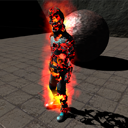
Dissolve effect
Dissolve Effect for Unity adds burn, teleport, corrosion, or fade transitions to any object. Mobile ready, supports skinned meshes, 10 noise styles, event callbacks, PlayMaker integration, source code
Affiliate link · Purchases support this site
Price history
Last 6 months
USDAsset preview
1 / 5

Dissolve effect screenshot 1


About this asset
🔥 Dissolve Effect for Unity – Burn, Teleport, Corrode and More
Add a versatile dissolve effect to any object in your game. Perfect for fire burns, teleportation, corrosion, magic fades, or any creative transition you imagine.
✅ Mobile friendly
✅ Works with Unity Free & Pro
✅ Supports skinned meshes and Mecanim animations
✅ Easy integration with PlayMaker and other third-party tools
✅ Full C# source code and demo scene included
🚀 Key Features
- 🎨 10 unique dissolve noise styles
- ⏱ Configurable dissolve time, thickness, and color
- ⚡ Simple setup – just drag the script and call Dissolve() or Undissolve()
- 🎬 Event callbacks: StartDissolve, EndDissolve, StartUndissolve, EndUndissolve
- 🧩 Compatible with animations and complex meshes
- 🌑 Affects shadows for added realism
- 🎥 Demo video and scene included
🎮 Why use it
- Create cinematic transitions for characters or objects
- Enhance combat, magic, or sci-fi effects with immersive visuals
- Control the effect precisely through code or third-party systems
🧪 Built with a Shader Forge custom shader for maximum flexibility.
🎯 Bring your objects to life with smooth, customizable dissolve effects.
From the publisher's Asset Store listing.