
 View on Asset Store (opens in new tab)
Package details
- Latest version
- 1.0.0
- Last updated
- First released
- Unity version
- 6000.3.9 or later
- Package size
- 55 KB
- Files
- 25
- Views in the past week
- 21
Price tracking
- Last checked
- Tracked since
- Lowest recorded
- $19.99 on
Keywords
ClickTrace — uGUI Click & Raycast Diagnostics
Diagnose why a Unity uGUI Button misses a click with real raycast evidence, input observations, and reversible fixes.
Affiliate link · Purchases support this site
Price history
Last 6 months
USDAsset preview
1 / 1
ClickTrace — uGUI Click & Raycast Diagnostics screenshot 1
About this asset
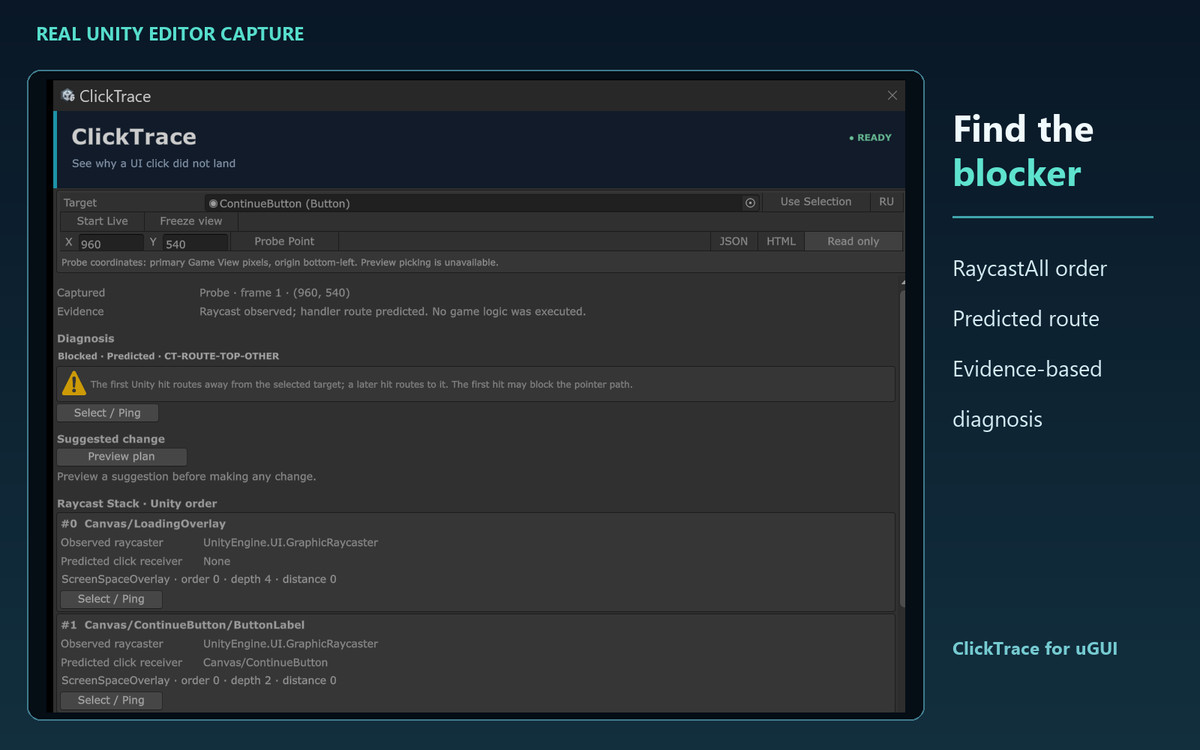
A button looks clickable, but nothing happens. ClickTrace shows the evidence at the point you test.
Select a uGUI Button, enter a point in Game View screen pixels, and inspect Unity's EventSystem.RaycastAll order. ClickTrace separates the graphic that received the raycast from the predicted IPointerClickHandler receiver, so a child label is not mistaken for a blocker. Findings cover hierarchy, masking, CanvasGroup, raycast, navigation, and input problems.
In Play Mode, Live Capture records observed input edges. An optional Button.onClick observer records UnityEvent invocations separately. A read-only probe does not send a click to the game. Suggested one-property changes are previewed first; Edit Mode application supports Undo, while Play Mode trials can be reverted.
Included: English and Russian Editor UI, raycast stack and history, JSON and HTML evidence reports, editable C# source, offline documentation, and six controlled uGUI sample scenes.
Scope: uGUI only; UI Toolkit is not diagnosed. A predicted route is evidence, not proof that game logic ran. Custom input modules and unusual raycast filters may require manual investigation.
From the publisher's Asset Store listing.
Technical details
Unity 6000.3.9f1 verified. Editor-only tool; diagnostic code is excluded from player builds.
Unity UI (com.unity.ugui 2.0.0) is included in the .unitypackage dependency manifest and installs on import. Input System 1.20.0 integration is optional; Legacy, New and Both input modes were tested.
Six sample scenes: Healthy UI, Transparent Blocker, CanvasGroup Chain, Input Configuration, Mask and Sorting, Navigation and Drag. Built-in Render Pipeline sample scenes; the diagnostic window inspects uGUI state and has no render pipeline-specific code. URP and HDRP are compatible in design, but have not been separately verified.
The point probe uses primary Game View pixels with the origin at bottom left. It does not include a visual picker or secondary-display conversion. Runtime UnityEvent listeners cannot be enumerated through Unity's public API. The package contains no bundled third-party code or artwork.
Compatibility
| Unity version | Built-in | URP | HDRP |
|---|---|---|---|
| 6000.3.9f1 | Compatible | Compatible | Compatible |
Editor-only uGUI diagnostic. Works with the Built-in Render Pipeline, URP and HDRP. Requires Unity UI (com.unity.ugui), which is included in the package dependency manifest. Input System support is optional.
As listed on the Asset Store.