
 View on Asset Store (opens in new tab)
Package details
- Latest version
- 1.0
- Last updated
- First released
- Unity version
- 6000.4.9 or later
- Package size
- 416 KB
- Files
- 76
- Views in the past week
- 7
Price tracking
- Last checked
- Tracked since
- Lowest recorded
- $4.99 on
Keywords
Low Poly Furniture Pack 3D
35 low-poly interior props sharing one 256×256 atlas: one material, one draw call, and real-world metric scale verified by an automated check.
Affiliate link · Purchases support this site
Price history
Last 6 months
USDAsset preview
1 / 1
Low Poly Furniture Pack 3D screenshot 1
About this asset
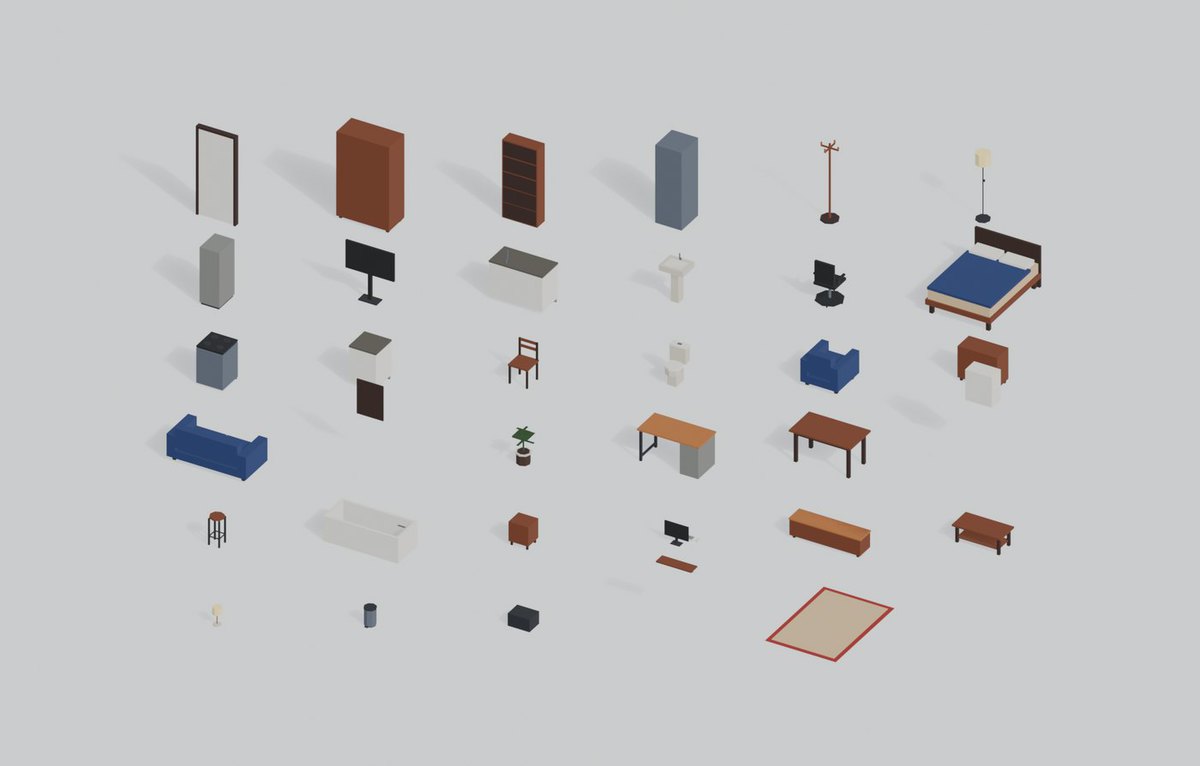
Furnish a whole house with 35 low-poly props — living room, bedroom, kitchen, bathroom and office. The entire pack is 3,760 triangles and one 256×256 texture.
One material, one texture, one draw call
All 35 models sample the same palette atlas. There are no per-model materials to reconcile and no texture folder to wire up. Drop the whole set into a scene and the batcher treats it as one.
Real-world scale, and it is checked
Proportions come from the dimensions real furniture has to have:
- Dining chair seat at 0.45 m, dining table top at 0.75 m — the 0.30 m of legroom an adult needs.
- Kitchen counter, cooker and base cabinets all at 0.90 m, so they line up in a continuous run.
- Wall cabinets from 1.45 m, leaving 0.55 m of clearance above the counter.
Every model declares its intended measurements in its source, and an automated check confirms the geometry matches within 10–15 mm. All 35 pass. The per-model report ships with the pack as report.json.
Origin at the base
Every pivot sits at the centre of the footprint, on the floor plane. Drop a prefab in at y=0 and it stands on the ground — no offsets to dial in, no rotation baked into the prefab root.
Customisable
The whole pack is coloured by one 256×256 palette atlas of 24 flat swatches. Recolour that single 1 KB image and all 35 models change at once — a warm oak set, a Scandinavian set, a dark set — at no cost in memory or draw calls. No per-model material editing, ever.
Because the models are plain meshes with no baked shading, they also take any shader you already use: toon, flat-lit, vertex-coloured, or your own.
What it suits
Anything with interiors: first-person exploration, life and management sims, top-down RPGs, escape rooms, VR walkthroughs, mobile puzzle games, and greybox passes where you need real proportions before the art exists.
The stylised look sits next to both realistic and cartoon characters, and the triangle budget is safe on mobile and standalone VR.
Contents
- Living room (10) — sofa, armchair, coffee table, rug, TV stand, television, bookshelf, floor lamp, wall shelf, potted plant
- Bedroom (7) — double bed, nightstand, wardrobe, dresser, table lamp, wall mirror, coat stand
- Kitchen (9) — counter with sink, cooker, base cabinet, wall cabinet, refrigerator, microwave, dining table, dining chair, bar stool
- Bathroom (4) — bathtub, toilet, bathroom sink, interior door
- Office (5) — desk, office chair, filing cabinet, desktop computer, trash can
How it was made
Written as Python for Blender: every model is code, not a sculpt. That is why the measurements are exact and why the set is internally consistent.
No generative AI was used for the geometry, the textures, the layout or the preview images.
From the publisher's Asset Store listing.
Technical details
Geometry
- 35 meshes, 3,760 triangles for the entire pack
- 107 triangles average, 292 maximum, 24 minimum
- Zero non-manifold edges; predominantly quads
- Built to real-world metric dimensions, verified by an automated check (report.json lists every model's declared and measured size)
Materials and textures
- 1 material and 1 texture (256×256 PNG, 24 flat colours, ~1 KB)
- 1 draw call for the whole set when batched
- Texture filter must be set to Point (Nearest) — the atlas is flat colour
- Mipmaps enabled, 9 levels; swatches carry 8 px of margin so mips never blend neighbouring colours
Prefabs
- 35 prefabs, all with root transform at position 0, rotation 0, scale 1
- Pivot at the centre of the footprint, on the floor plane
Project setup
- Render pipeline: Built-in. For URP or HDRP, select the material and run Edit > Rendering > Materials > Convert Selected Built-in Materials to URP
- No Asset Store package dependencies
- Demo scene included
- Total download under 400 KB
Compatibility
| Unity version | Built-in | URP | HDRP |
|---|---|---|---|
| 6000.4.9f1 | Compatible | Not listed | Not listed |
As listed on the Asset Store.