
 View on Asset Store (opens in new tab)
Package details
- Latest version
- 1.0
- Last updated
- First released
- Unity version
- 6000.2.10 or later
- Package size
- 200 KB
- Files
- 12
- Views in the past week
- 27
- Requires
Price tracking
- Last checked
- Tracked since
- Lowest recorded
- $7.00 on
Keywords

RCC Racing AI
Professional racing AI for RCC. Physics-based cornering, obstacle avoidance, waypoint navigation, mobile-optimized. Full custom inspector.
Affiliate link · Purchases support this site
Price history
Last 6 months
USDAsset preview
1 / 7

RCC Racing AI screenshot 1
About this asset
🏎 RCC RACING AI — Autonomous Racing Driver for Realistic Car Controller
Transform any RCC vehicle into a professional racing AI in minutes.
RCC Racing AI is a lightweight, high-performance autonomous driver
designed specifically for Realistic Car Controller.
━━━━━━━━━━━━━━━━━━━━━━━━━━━━━━━━━━━━━━━━━━━━━━━━━━━━━━━━━
✨ KEY FEATURES
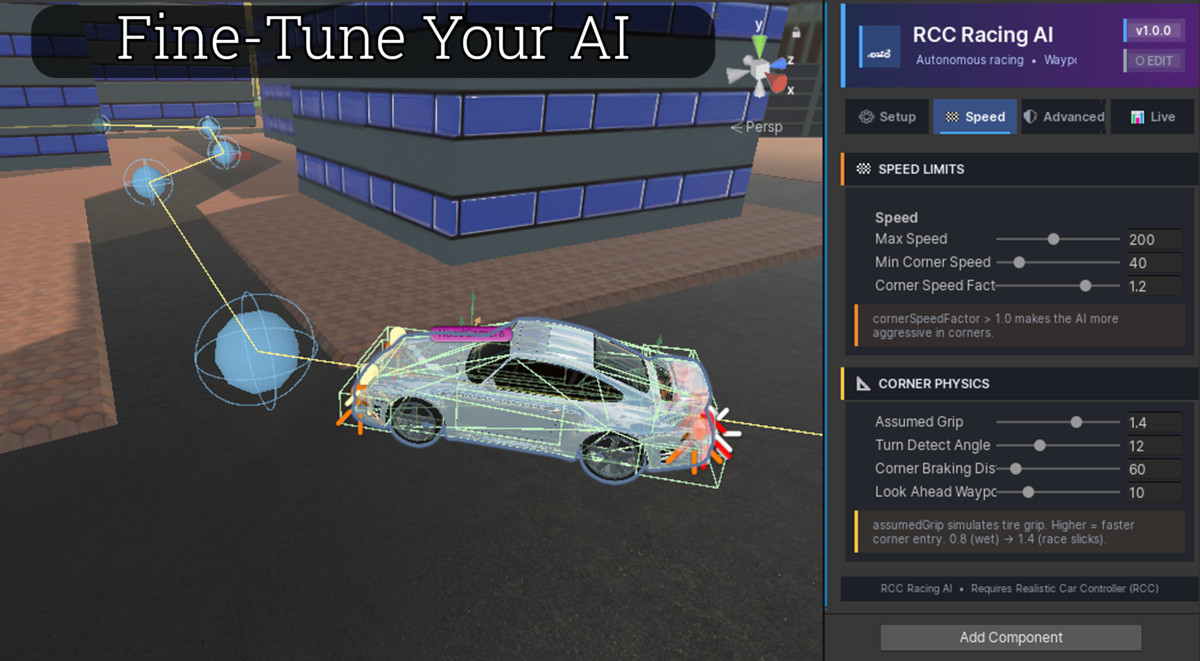
🏁 PHYSICS-BASED CORNERING
Corner speed is calculated using real physics (v = √(grip × g × radius)),
not guesswork. The AI brakes late, enters corners fast, and accelerates
out early — just like a human racer.
🎯 TRAIL BRAKING
The AI lifts throttle in corners instead of slamming the brakes,
preserving momentum and delivering race-grade lap times.
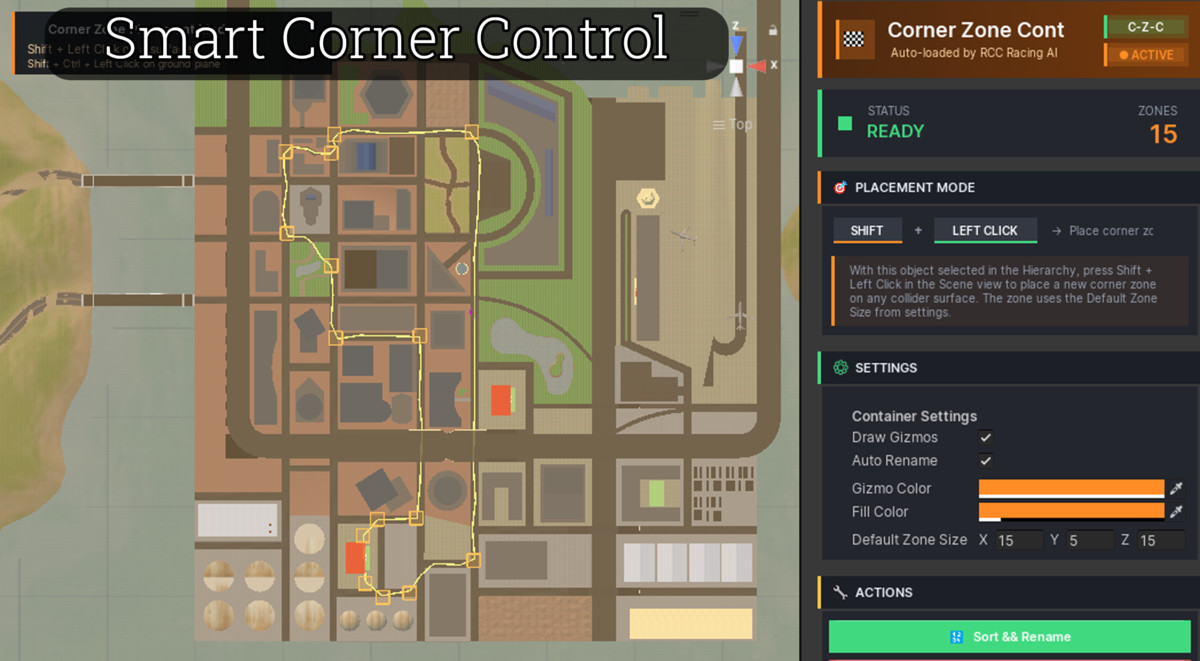
🏁 CORNER ZONES
Per-area speed caps with smooth transitions. Set a target speed for
hairpins, chicanes, or technical sections — the AI handles the rest.
🛡 OBSTACLE AVOIDANCE
Forward and side raycasts detect other cars, walls, and debris.
The AI steers around obstacles without braking unnecessarily.
🔄 AUTO RECOVERY
3-phase reverse state machine automatically unsticks the AI when
it hits a wall or gets stuck. No manual intervention needed.
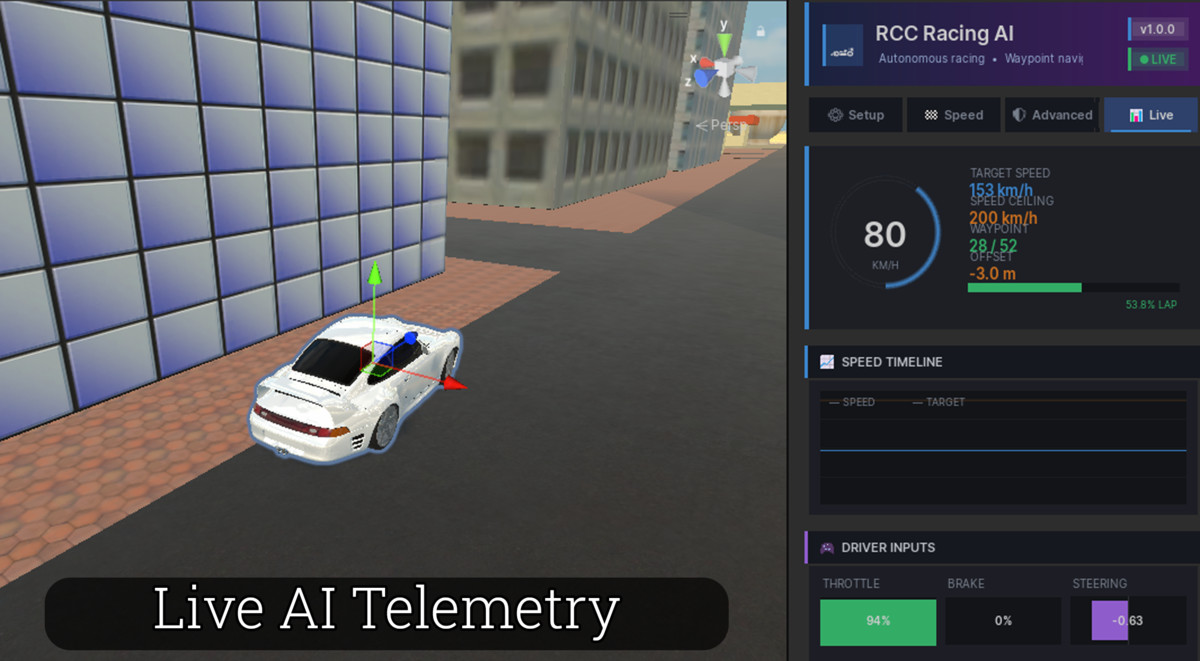
📊 CINEMATIC INSPECTOR
Full tabbed interface with Setup / Speed / Advanced / Live tabs.
Real-time speed gauge, speed timeline graph, pedal indicators.
Live HUD displays in-game with speed ring, telemetry, and inputs.
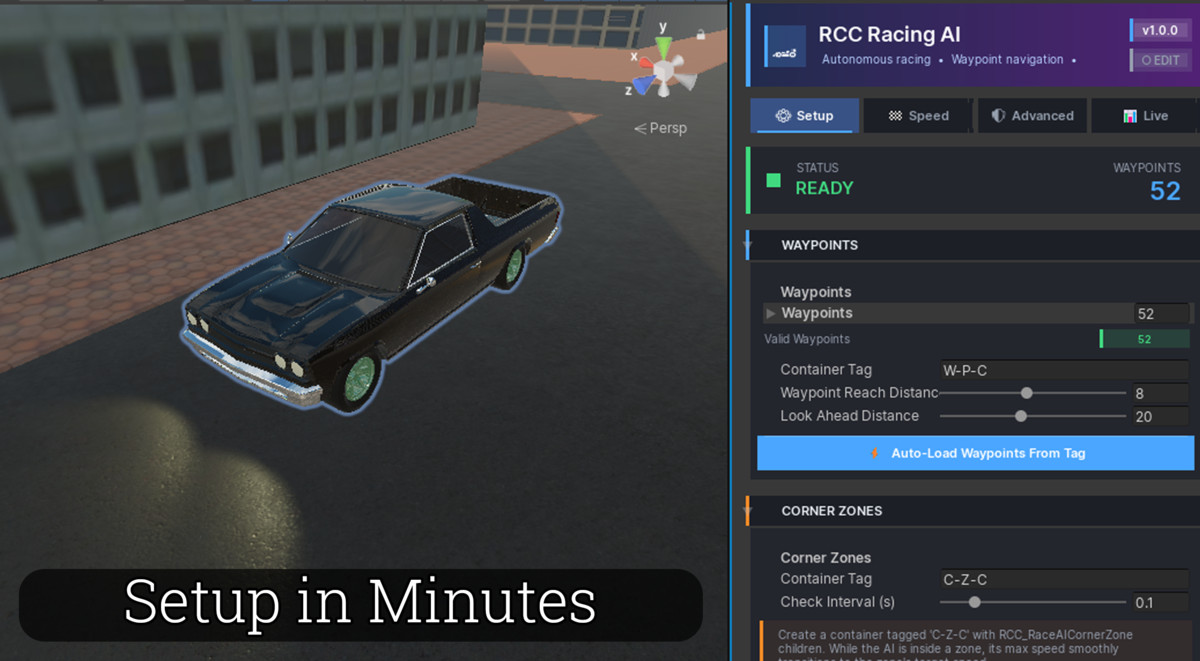
⚙️ ONE-CLICK SETUP
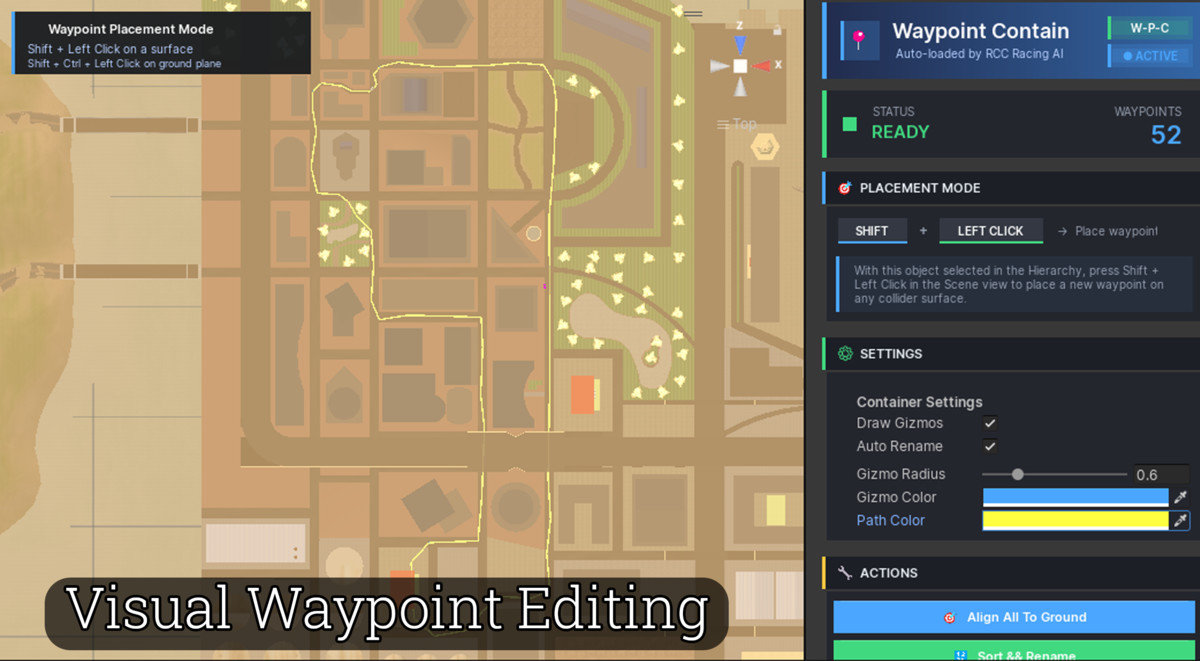
Tools menu creates waypoint and corner zone containers for you.
Shift + Left Click in Scene to place waypoints and zones instantly.
📱 MOBILE-OPTIMIZED
- Zero GC allocations per frame
- Throttled sensor updates (20Hz default)
- Cached references (no GetComponent in Update)
- Tested on Android at 60 FPS with 8+ AI cars
━━━━━━━━━━━━━━━━━━━━━━━━━━━━━━━━━━━━━━━━━━━━━━━━━━━━━━━━━
🎮 PERFECT FOR
✅ Racing games (arcade or simulation)
✅ Open-world traffic systems
✅ Mobile racing (Android & iOS)
✅ Pursuit / chase scenarios
✅ Demolition derby
✅ AI showcase scenes
━━━━━━━━━━━━━━━━━━━━━━━━━━━━━━━━━━━━━━━━━━━━━━━━━━━━━━━━━
🛠 HOW IT WORKS
1. Drop RCC_RacingAI.cs onto any RCC vehicle
2. Use Tools menu to create containers (one click!)
3. Shift+Left Click in Scene to place waypoints
4. Press Play — done.
The AI takes full control of throttle, brake, and steering inputs
through RCC's externalController API. No modifications to RCC required.
━━━━━━━━━━━━━━━━━━━━━━━━━━━━━━━━━━━━━━━━━━━━━━━━━━━━━━━━━
📦 WHAT'S INCLUDED
- RCC_RacingAI.cs — The complete AI controller
- RCC_WaypointContainer.cs — Waypoint container with editor
- RCC_CornerZoneContainer.cs — Corner zone container with editor
- RCC_RaceAICornerZone.cs — Per-zone speed cap
- 4 Custom Editors with cinematic UI
- Welcome Window with one-click setup
- Demo Scene (ready to play)
- README.pdf + README.txt
- Full commented C# source code
━━━━━━━━━━━━━━━━━━━━━━━━━━━━━━━━━━━━━━━━━━━━━━━━━━━━━━━━━
⚙️ REQUIREMENTS
- Realistic Car Controller (RCC) — sold separately
- Unity 2021.3 LTS or newer
- Any render pipeline (Built-In, URP, HDRP)
━━━━━━━━━━━━━━━━━━━━━━━━━━━━━━━━━━━━━━━━━━━━━━━━━━━━━━━━━
🤖 AI/ML USAGE DISCLOSURE
ChatGPT (OpenAI) was used as a writing and coding assistant for
documentation, comments, and architecture planning. All core
algorithms, physics systems, and architectural decisions were
made by the developer.
━━━━━━━━━━━━━━━━━━━━━━━━━━━━━━━━━━━━━━━━━━━━━━━━━━━━━━━━━
💬 SUPPORT
We answer every email personally — usually within 24 hours.
━━━━━━━━━━━━━━━━━━━━━━━━━━━━━━━━━━━━━━━━━━━━━━━━━━━━━━━━━
⚡ VERSION 1.0.0
Made with ❤ by Target Entertainment
From the publisher's Asset Store listing.
Technical details
KEY FEATURES
━━━━━━━━━━━━━━━━━━━━━━━━━━━━━━━━━━━━━━━━━━━━━━━━━━━━━━━━━
🤖 AI DRIVING SYSTEM
• Physics-based cornering (v = √(grip × g × radius))
• Physics-based braking envelope — brakes at the exact right distance
• Trail braking — enters corners fast, brakes late, accelerates early
• Predictive corner detection with configurable look-ahead
• Auto-unstuck recovery with 3-phase reverse state machine
• Speed-adaptive steering limiter (prevents high-speed spinouts)
• Framerate-independent exponential smoothing
🏁 CORNER ZONE SYSTEM
• Per-zone maximum speed caps with smooth transitions
• Priority-based zone resolution for overlapping zones
• Configurable entry/exit transition speed (km/h per second)
• Auto-discovery via scene tag (C-Z-C)
• Live preview in editor with speed ring
🎯 WAYPOINT NAVIGATION
• Manual array or auto-discovery via scene tag (W-P-C)
• Auto-sorted by trailing number in child names
• Configurable reach distance and look-ahead distance
• Works with any track shape (circuit, sprint, figure-8)
• Loop or single-lap modes
🛡 OBSTACLE AVOIDANCE
• Forward raycast for primary obstacle detection
• Dual side rays for path finding
• Stable direction memory (no jitter)
• Throttle-lift strategy — no unnecessary braking
• Layer-mask filtering
📊 CINEMATIC INSPECTOR
• 4-tab layout: Setup / Speed / Advanced / Live
• Real-time speed gauge with animated progress ring
• Live speed timeline graph (12-second history)
• Pedal indicators (Throttle, Brake, Steering)
• Pulsing status dots with state feedback
• Rounded cards, gradient banner, hover effects
• Multi-object editing support
• Full Undo/Redo integration
🖥 IN-GAME HUD
• Speed ring with real-time fill
• Speed timeline graph
• Target / Ceiling / Waypoint stats
• Progress bar with lap percentage
• Pedal indicator bars
• Corner zone display
• 4 screen positions (TopLeft, TopRight, BottomLeft, BottomRight)
• Adjustable scale (0.5x – 2.5x) and opacity (0.3 – 1.0)
🎨 CUSTOM EDITORS FOR ALL COMPONENTS
• RCC_RacingAI — 4 tabs, live telemetry, HUD preview
• RCC_RaceAICornerZone — compact card layout with speed ring
• RCC_WaypointContainer — Shift+LeftClick scene placement
• RCC_CornerZoneContainer — Shift+LeftClick scene placement
• All editors share consistent visual design language
⚡ ONE-CLICK SETUP TOOLS
• Tools > Target Entertainment > RCC Racing AI menu
• Create AI Waypoint Container (auto-tags as W-P-C)
• Create AI CornerZone Container (auto-tags as C-Z-C)
• Add Missing Tags to Tag Manager automatically
• Welcome Window with quick-start guide
🔧 SCENE PLACEMENT WORKFLOW
• Shift + Left Click on collider surface = place waypoint/zone
• Shift + Ctrl + Left Click = place on ground plane (y=0)
• Auto-renaming (Waypoint_0, Waypoint_1, ...)
• Auto-sorting by trailing number
• Undo/Redo for every placement action
• Ignore-hierarchy check (won't place on self)
📱 MOBILE OPTIMIZATION
• Zero GC allocations per frame
• Throttled sensor updates (default 20Hz)
• Cached references (no GetComponent in Update)
• No LINQ in hot paths
• Tested on Android at 60 FPS with 8+ AI vehicles
• ~0.1ms CPU cost per AI on Snapdragon 6xx
🔌 RCC INTEGRATION
• Uses RCC's externalController API
• No modifications to RCC required
• Compatible with RCC V3 and V4
• Auto-configures RCC in Awake
• Works with all RCC behaviors (Drift, Racing, Arcade, ...)
🎬 DEMO CONTENT
• Ready-to-play demo scene
• Pre-configured AI vehicles
• Working waypoint path
• Working corner zones
• Camera and UI setup included
📖 DOCUMENTATION
• README.pdf
• Full XML documentation on all public methods
• Inline code comments
• Email support: [email protected]
━━━━━━━━━━━━━━━━━━━━━━━━━━━━━━━━━━━━━━━━━━━━━━━━━━━━━━━━━
COMPATIBILITY
━━━━━━━━━━━━━━━━━━━━━━━━━━━━━━━━━━━━━━━━━━━━━━━━━━━━━━━━━
• Unity 2021.3 LTS or newer (including Unity 6)
• Built-in Render Pipeline ✅
• Universal Render Pipeline (URP) ✅
• High Definition Render Pipeline (HDRP) ✅
• Windows / macOS / Linux (Editor) ✅
• Android / iOS / WebGL ✅
• No custom shaders required
━━━━━━━━━━━━━━━━━━━━━━━━━━━━━━━━━━━━━━━━━━━━━━━━━━━━━━━━━
TECHNICAL SPECS
━━━━━━━━━━━━━━━━━━━━━━━━━━━━━━━━━━━━━━━━━━━━━━━━━━━━━━━━━
• Language: C#
• Namespace: RCCAIRacing
• Main Class: RCC_RacingAI
• Editor Classes: 5 custom inspectors
• Total Files: 10 core files + demo
• Total Size: ~250 KB
• Lines of Code: ~3,500 (including comments)
• No DLLs, no obfuscation
• Fully commented source code
━━━━━━━━━━━━━━━━━━━━━━━━━━━━━━━━━━━━━━━━━━━━━━━━━━━━━━━━━
REQUIREMENTS
━━━━━━━━━━━━━━━━━━━━━━━━━━━━━━━━━━━━━━━━━━━━━━━━━━━━━━━━━
• Realistic Car Controller (RCC) — sold separately
• RCC V3.5+ recommended
• Required Tags: W-P-C, C-Z-C
• No additional packages required
━━━━━━━━━━━━━━━━━━━━━━━━━━━━━━━━━━━━━━━━━━━━━━━━━━━━━━━━━
SUPPORT
━━━━━━━━━━━━━━━━━━━━━━━━━━━━━━━━━━━━━━━━━━━━━━━━━━━━━━━━━
• Full documentation included
• Personal email support: [email protected]
• Response time: typically within 24 hours
• Free updates for life
━━━━━━━━━━━━━━━━━━━━━━━━━━━━━━━━━━━━━━━━━━━━━━━━━━━━━━━━━
⚡ VERSION 1.0.0 • Made with ❤ by Target Entertainment
Compatibility
| Unity version | Built-in | URP | HDRP | Custom |
|---|---|---|---|---|
| 6000.2.10f1 | Compatible | Compatible | Compatible | Compatible |
As listed on the Asset Store.