
 View on Asset Store (opens in new tab)
Package details
- Latest version
- 1.0
- Last updated
- First released
- Unity version
- 6000.5.0 or later
- Package size
- 86 KB
- Files
- 17
- Views in the past week
- 18
Price tracking
- Last checked
- Tracked since
- Lowest recorded
- $7.99 on
Keywords

Mobile Playtest - Test Your Gameplay On Phone Quickly
Professional gameplay testing tool. Press one button in Unity, scan the QR code, and your game runs on any phone. No Xcode, no certificates, no TestFlight, no waiting.
Affiliate link · Purchases support this site
Price history
Last 6 months
USDAsset preview
1 / 2
Mobile Playtest - Test Your Gameplay On Phone Quickly screenshot 1
About this asset
Showing your mobile game on a real phone should take seconds. Instead it
takes a Mac, a developer certificate, a provisioning profile, a list of
UDIDs, and a TestFlight queue.
Mobile Playtest replaces all of that with one button. Press Build & publish,
scan the QR code, and the game is running on the phone in your hand — real
touch, real pixels, the real frame rate of that device.
HOW IT WORKS
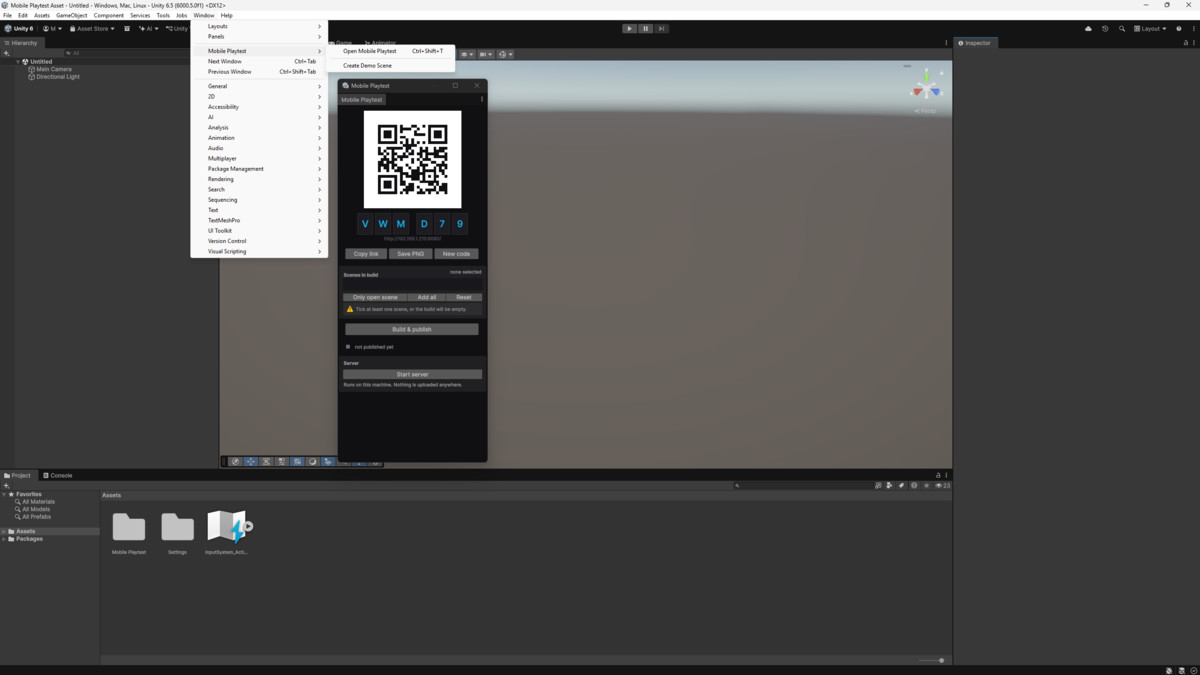
1. Open Window > Mobile Playtest > Open Mobile Playtest and press Start server
2. Tick the scenes you want to build
3. Press Build & publish
4. Scan the QR code with your phone
That is the whole workflow. Change something, press the button again, and
the phone reloads by itself — both on the session page and while the game
is running. You never touch it.
WHAT YOU GET
• Works on Windows, macOS and Linux — no Mac required to test on iPhone
• Nothing is uploaded anywhere. Everything runs on your own machine
• No account, no subscription, no internet connection needed
• Share the address with anyone on your Wi-Fi — they need no install
• Pick exactly which scenes to build, and drag to reorder them
• Web build settings are tuned automatically and restored afterwards
• Your Build Settings and project files are never modified
• A six-character session code you can roll to cut off old links
• The build loads while you are still looking at the Play button, so
tapping it starts the game instead of a download
• Add it to the phone's home screen and it runs full screen, with no
address bar and no tabs
• A demo scene created from a menu item, so its materials match your render
pipeline — your first build takes a minute, not fifteen
• Works with Built-in, URP and HDRP — it never touches your rendering setup
• Full C# source, editor-only, in its own assembly definition and namespace
WHY BUILD ONE SCENE
Building your whole project takes minutes. Building the one scene you are
working on takes far less, and the result is a fraction of the size.
Mobile Playtest keeps its own scene list, separate from your Build Settings,
so switching between them costs nothing.
HONEST LIMITATIONS
The game runs on the phone, so touch, pixels and frame rate are real. It
runs inside a browser, so native plugins, in-app purchases and push
notifications do not work, and motion sensors need an HTTPS connection.
Both devices have to be on the same network — this is a local tool, not a
hosting service.
It is for testing gameplay, interface and feel, not a replacement for your
store build. If that is what you need, it will save you hours every week.
REQUIREMENTS
• Unity 2022.3 or newer
• Web Build Support module (Unity Hub > Installs > Add modules)
• A phone on the same Wi-Fi network
Full documentation in English and Russian is included in the package.
From the publisher's Asset Store listing.
Technical details
COMPATIBILITY
- Unity 2022.3 LTS, Unity 6 and newer
- Render pipelines: Built-in, URP, HDRP — Mobile Playtest does not touch
your rendering setup
- Editor OS: Windows, macOS, Linux
- Devices: any phone or tablet with a modern browser, iOS and Android alike
- Requires the Web Build Support module (Unity Hub > Installs > Add modules)
WHAT IS IN THE PACKAGE
- 11 C# scripts, about 3,600 lines, fully commented
- One assembly definition (MobilePlaytest.Editor), Editor-only — no runtime
code reaches your player builds
- All code in the MobilePlaytest namespace
- A demo scene generated from a menu item to match your render pipeline
- Manuals in English and Russian
DEPENDENCIES
- None. No third-party libraries, no UPM packages, no external services,
and no network traffic beyond your own local network.
HOW IT WORKS
The Editor builds your project for Web and serves it from a small HTTP
server running inside the Editor itself, bound to the one network adapter
you pick. The phone opens that address over your local Wi-Fi. Nothing is
uploaded anywhere and no executable ships with the package.
DOCUMENTATION
Documentation/Manual-EN.md and Documentation/Manual-RU.md, included.
Compatibility
| Unity version | Built-in | URP | HDRP | Custom |
|---|---|---|---|---|
| 6000.5.0f1 | Compatible | Compatible | Compatible | Compatible |
Mobile Playtest is editor-only and does not touch your rendering setup: it
builds your project for Web and serves it from the Editor, so it works the
same on Built-in, URP and HDRP.
Requires the Web Build Support module (Unity Hub > Installs > Add modules).
As listed on the Asset Store.