
 View on Asset Store (opens in new tab)
Package details
- Latest version
- 1.0.5
- Last updated
- First released
- Unity version
- 2022.3.62 or later
- Package size
- 105 KB
- Files
- 20
- Views in the past week
- 20
Price tracking
- Last checked
- Tracked since
- Lowest recorded
- $9.99 on
Keywords

Quick Audio Level Pro - Loudness Meter (LUFS)
by Krykftn | Advanced Editor Tools & Systems (opens in new tab)
- Price drop
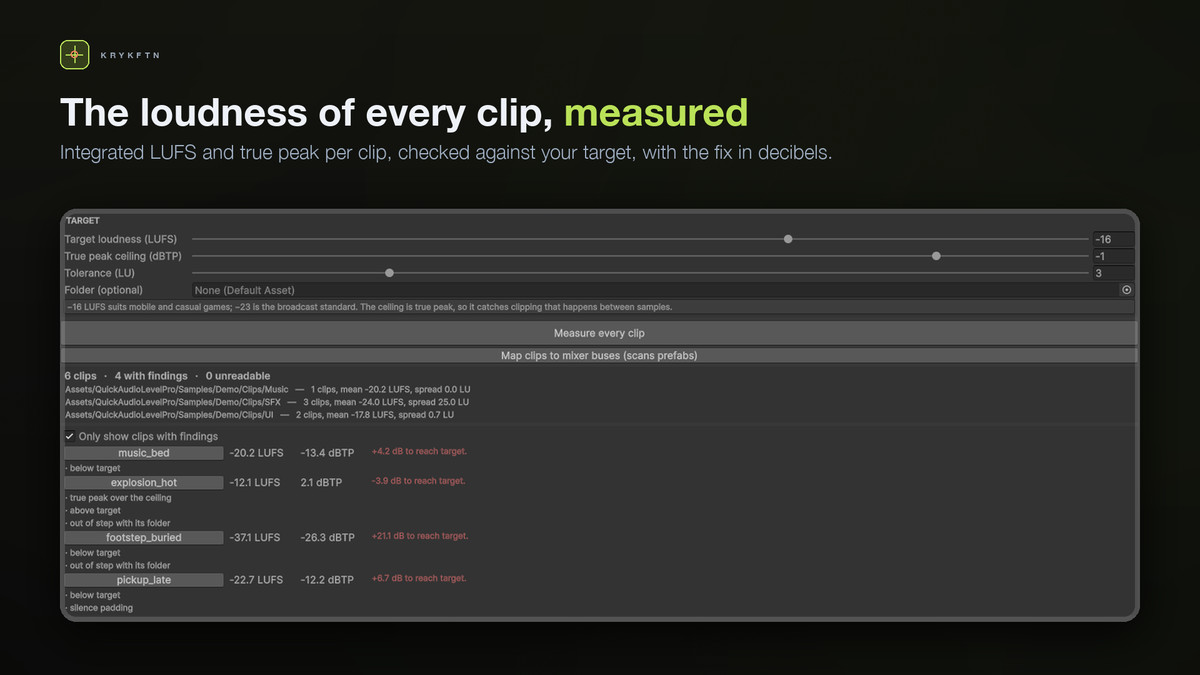
A loudness meter for every AudioClip: real LUFS, true peak and distance from target, measured from the samples, then the same for your mixer buses. Editor-only, and it never modifies your clips.
Lowest recorded price
Get 50% off on Asset Store (opens in new tab)Affiliate link · Purchases support this site
Price history
Last 6 months
USDAsset preview
1 / 2
Quick Audio Level Pro - Loudness Meter (LUFS) screenshot 1
About this asset
The ear is not a measuring instrument. It adapts in seconds, it depends on your monitors and your room, and it cannot give you a number you can act on. Quick Audio Level Pro reads the actual samples of every AudioClip in your project and tells you, in numbers, which sounds clip, which get buried, and which are out of step with the sounds beside them — then does the same for the mixer buses they play through.
WHAT EYES AND EARS MISS
• A clip whose every stored sample sits at −5.6 dBFS can still reach −2.5 dBTP when it plays, because the signal passes between samples. Nothing in Unity shows you this.
• A sound can be 21 dB under the rest of your game and simply never be heard.
• Your files can all be safe while the mix clips anyway, because the bus adds gain after the fact.
• Two footsteps 12 LU apart sound like a bug; an explosion 12 LU above a footstep is correct. Loudness only means something relative to the sounds beside it.
WHAT IT MEASURES
• Integrated loudness — ITU-R BS.1770-4, K-weighted, two-stage gated (LUFS)
• True peak — 4x oversampled, catches peaks between samples (dBTP)
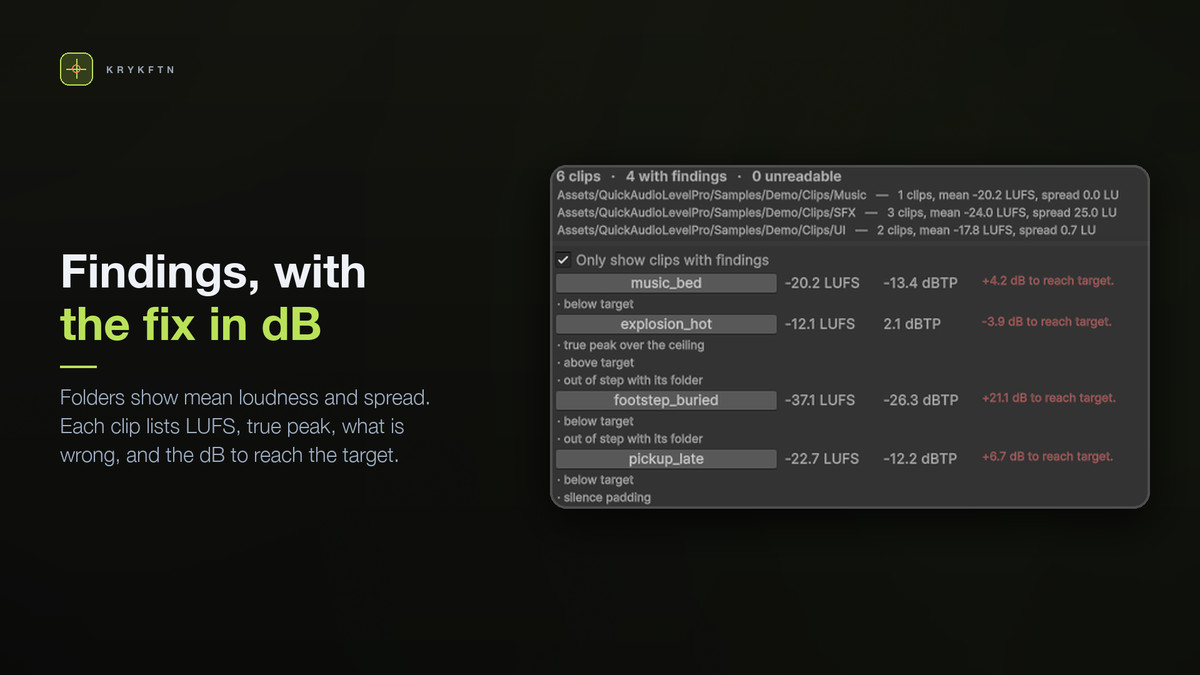
• Distance from target, and the exact dB change that fixes it
• Folder consistency — the spread inside a folder and the clips that break it
• Head and tail silence padding — wasted memory and late-sounding one-shots
MIXER BUSES
Files are only half the problem. The window reads every mixer in the project, maps clips to the group they are routed through, rolls the measured loudness up per bus, and flags what only appears there: a bus whose content clips once the mixer's gain is applied — the group's own volume plus every group above it — even though every file is safe, two buses so close in loudness that one masks the other, and a bus nothing is routed to. A Match target button shows the gain a bus needs and the volume to set in the mixer; nothing is written to your mixer.
Unity stores no link from a clip to a bus — the link only exists on an AudioSource — so the tool finds it by scanning prefabs. A clip no prefab plays through a mixer group is listed as not routed rather than guessed at.
MEASURED, NOT ASSUMED
Every number comes from sample data. Nothing is read from an import setting, which is why the report can disagree with what your project claims — and disagreeing is the only reason it is worth reading. The K-weighting filters are re-derived at each clip's own sample rate, because the constants everyone quotes are for 48 kHz and shift the answer on a 44.1 kHz clip. The EBU Tech 3341 test signals read within 0.01 LU of their reference values, at 48 and 44.1 kHz, gating cases included.
COMPRESSED CLIPS
Measured, not assumed: AudioClip.GetData returns silence for CompressedInMemory, Streaming, and anything with Load In Background on — and in those cases loadState still reads Loaded, so it cannot be trusted as the signal. Four of six ordinary import configurations would make a naive tool call your loudest clip silent. This tool decompresses such a clip temporarily — including the active platform's override, which the editor loads instead of the default settings — measures it, and puts your import settings back exactly as they were, even if something throws in between. When it still cannot read the samples it says so rather than reporting zero.
SAMPLE CLIPS
Six deliberately mismatched clips with a written note of what the report should say about each: one that clips at +2.1 dBTP, one 21 dB under target, one with 0.80 s of silence before the sound, and two UI sounds 0.7 LU apart that are correctly left alone.
CLEAN AND SAFE
• 100% Editor-only — nothing ships in your build, zero runtime overhead
• Namespaced code (Krykftn.QuickAudioLevelPro) — no global scope pollution
• Without Unity's Audio module the tool switches itself off quietly instead of filling your console, and a one-click Setup window turns it back on
REQUIREMENTS
• Unity 2022.3 LTS or newer (tested on 2022.3 and Unity 6)
• Unity's Audio module (com.unity.modules.audio) — part of Unity
HONEST LIMITS
Loudness is judged inside a folder, not across the project, so organise your audio into folders that mean something or the consistency check has nothing to compare against. The bus view only sees clips referenced by a prefab's AudioSource; sounds played purely from script cannot be traced this way and are listed as not routed. Bus gain is the mixer's start snapshot: snapshots switched at runtime, exposed parameters set from script, group effects and an AudioSource's own volume are not included. True peak uses 4x oversampling with a 16-tap windowed kernel; on a worst-case inter-sample sine it read 0.13 dB above the ideal, which errs towards reporting clipping but is not a mastering-grade meter. Measuring reads every sample of every clip, so scan a folder rather than everything on a large project.
From the publisher's Asset Store listing.
Technical details
Features:
• Integrated loudness per clip, ITU-R BS.1770-4, with K-weighting biquads re-derived at each clip's own sample rate
• True peak by 4x oversampling — catches clipping that happens between samples
• Per-clip checks: over the ceiling, below or above target, out of step with its folder, head and tail silence padding
• Folder summaries with mean and spread
• Mixer bus view: every group of every mixer, each starting at the gain the mixer gives it (own volume plus parent groups), clips mapped from prefab AudioSources, bus-only mistakes flagged, Match target suggestion
• Reads compressed and streamed clips that Unity otherwise returns as silence, including the active platform's override, and restores import settings exactly
• Six sample clips with a written explanation of the expected report
Supported OS: Windows, macOS, Linux (editor tool)
Technical notes:
• 100% Editor-only — no runtime code ships in a build
• Namespaced under Krykftn.QuickAudioLevelPro
• Editor assembly gated by an assembly-definition constraint on com.unity.modules.audio, so a project without it gets zero compile errors
• Measuring never modifies a clip; import settings are restored even if an exception is thrown
• Unity 2022.3 LTS or newer; tested on 2022.3.62f2 and 6000.3.12f1
Documentation: included as README.md and Documentation/Documentation.md
Compatibility
| Unity version | Built-in | URP | HDRP | Custom |
|---|---|---|---|---|
| 2022.3.62f2 | Compatible | Compatible | Compatible | Compatible |
Editor-only tool with no runtime code, so it is independent of the render pipeline and works the same under Built-in, URP, HDRP and a custom pipeline. Needs Unity 2022.3+ and Unity's own Audio module (com.unity.modules.audio); without it the tool switches itself off quietly instead of filling the console, and a one-click Setup window enables it. No third-party dependencies.
As listed on the Asset Store.