
 View on Asset Store (opens in new tab)
Package details
- Latest version
- 1.0.0
- Last updated
- First released
- Unity version
- 2022.3.62 or later
- Package size
- 258 KB
- Files
- 54
- Views in the past week
- 13
Price tracking
- Last checked
- Tracked since
- Lowest recorded
- $11.19 on
Keywords

Todo Inspector Pro
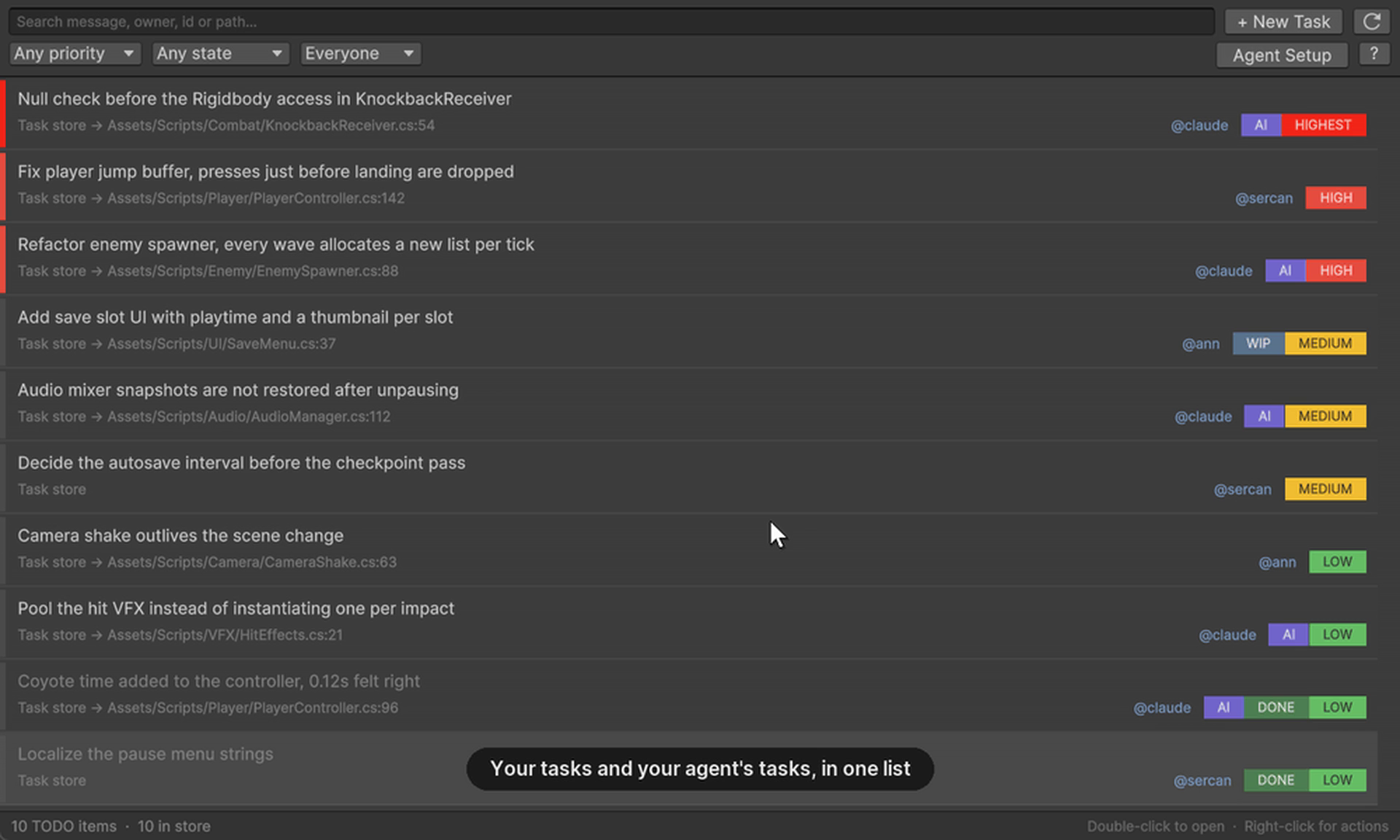
A shared task layer between AI coding agents and your team, inside the Unity Editor. Structured TODOs an agent can read and write, one click of rule-file setup, and one merged list.
Affiliate link · Purchases support this site
Price history
Last 6 months
USDAsset preview
1 / 6

Todo Inspector Pro screenshot 1


About this asset
Your agent found five things. You closed the terminal. They are gone.
Todo Inspector Pro gives AI coding agents and your team one task list, kept in the repo, visible in the Unity Editor.
Your IDE already lists TODO comments. This adds the two things it does not have: structure on the comment, and a second channel the agent can write to without touching the Unity Editor API.
Structured TODOs
A comment carries an owner, priority, state, id and related files — not only a message:
// TODO(@claude, high, src:agent, state:open): missing null check before the Rigidbody access
Filter on any of it. Double-click to land on the line. Your existing // TODO-ann-high comments keep working, unchanged.
A task store an agent can write
Work that does not belong on a specific line — a question, an unfinished refactor, a decision it is not allowed to make — goes into a plain JSON file at Assets/.todoinspector/todos.json. Agents write files; they cannot call the Editor API. In-code TODOs and store records merge into one list in the window.
Both sides write that file, so a save from the Editor is a merge, not an overwrite. An agent closing a task while your window is open does not get undone.
One click of setup
Agent Setup writes the syntax, the tag table and the store path into CLAUDE.md, AGENTS.md and .cursorrules, between markers, leaving the rest of the file alone. After that your agent emits tasks the tool round-trips. No prompt engineering, no pasting the format every session.
From the publisher's Asset Store listing.
Technical details
Features
- Structured TODO comments: owner, priority, state, id, cross-file refs
- JSON task store agents can read and write without the Editor API
- Concurrent-write merge — the Editor and your agent do not overwrite each other
- One-click rule-file setup for CLAUDE.md, AGENTS.md and .cursorrules
- Create tasks for your agent from inside the Editor
- Search plus priority, state and source filters
- Double-click to jump to the file and line; right-click for state, copy and delete
- Off-thread incremental scanning, virtualised list, zero-allocation parse fast path
- Editor-only — no runtime footprint, no dependencies
- Light and dark skin, contrast-checked
- Legacy TODO-user-priority comments still parse
- 121 EditMode tests
Supported OS
Editor-only: Windows, macOS, Linux. Unity 2022.3 LTS or newer. No external dependencies.
Link to documentation
Included in the package: Documentation/Manual.md and Documentation/AgentWorkflow.md
Compatibility
| Unity version | Built-in | URP | HDRP | Custom |
|---|---|---|---|---|
| 2022.3.62f3 | Compatible | Compatible | Compatible | Compatible |
Editor-only: compiles into an Editor assembly, so nothing reaches a player build and any render pipeline works. Unity 2022.3 LTS or newer, including Unity 6. Verified on 2022.3.62f3 and 6000.3.9f1. No external packages, no network access, no API keys. Windows, macOS and Linux editors. Writes only Assets/.todoinspector/todos.json and the agent rule files you pick.
As listed on the Asset Store.