
 View on Asset Store (opens in new tab)
Package details
- Latest version
- 1.0.9
- Last updated
- First released
- Unity version
- 2022.3.62 or later
- Package size
- 68 KB
- Files
- 23
- Favorites
- 2
- Views in the past week
- 28
Price tracking
- Last checked
- Tracked since
- Lowest recorded
- $4.99 on
Keywords
Quick Stat Formula Pro - RPG Stat System
by Krykftn | Advanced Editor Tools & Systems (opens in new tab)
An RPG stat system you can balance: write the damage formula and see every fight at once — a time-to-kill matrix for every attacker and defender level, plus a report that names what is broken.
Affiliate link · Purchases support this site
Price history
Last 6 months
USDAsset preview
1 / 4
Quick Stat Formula Pro - RPG Stat System screenshot 1
About this asset
You cannot balance combat by reading numbers. A hero curve and an enemy curve look fine side by side in the inspector, and then at level 40 something one-shots the player, or a boss becomes a wall, and nobody finds out until a review says so.
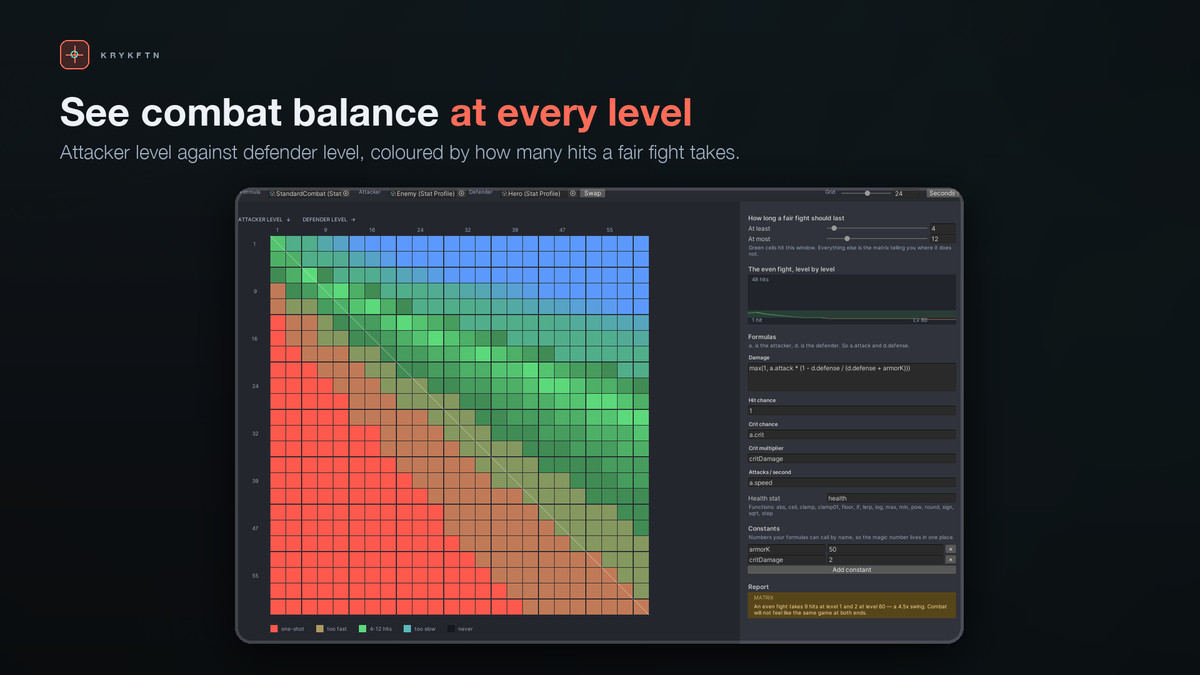
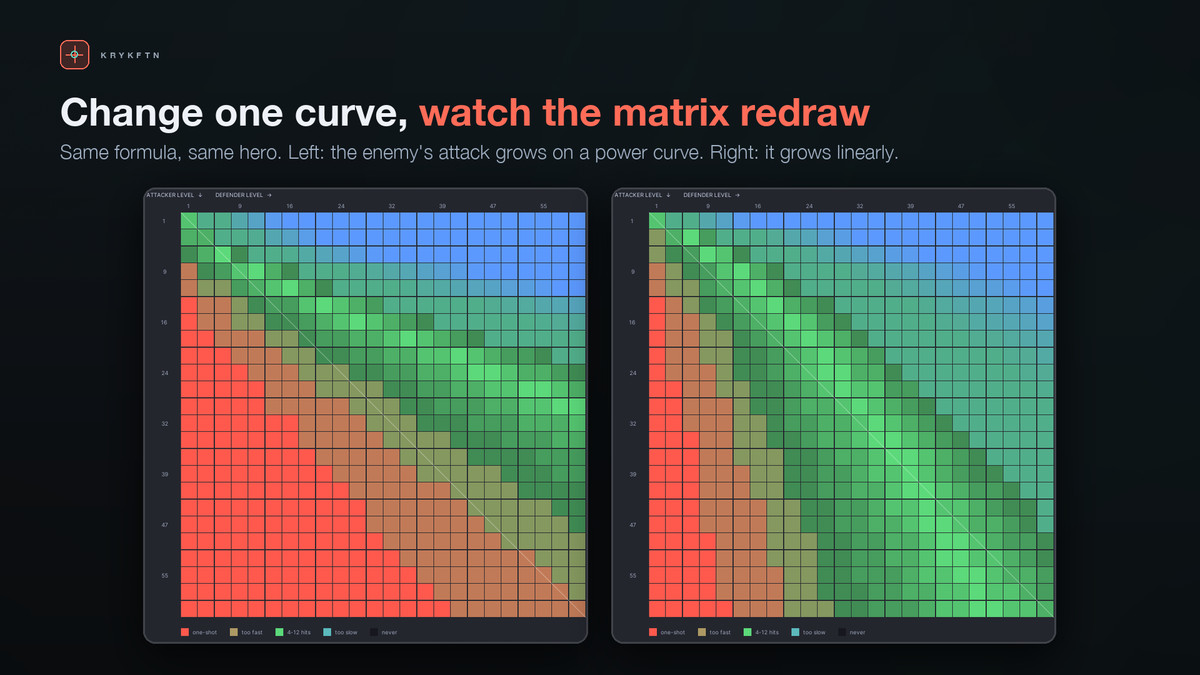
Quick Stat Formula Pro draws the whole thing. Write your damage formula as plain text, point it at two archetypes, and get a time-to-kill matrix: every attacker level against every defender level, coloured by how far that fight is from the length you asked for. Green means the fight lasts as long as you wanted. Red means it is over too fast. Black means nobody wins.
On the sample matchup that ships with the package, an even fight takes 9 hits at level 1 and 2 at level 60, because the enemy's attack grows on a power curve and the hero's defense grows linearly. Nobody catches that by reading the numbers. It is one glance here.
WHAT YOU GET
The time-to-kill matrix — 576 fights evaluated with your own formula and redrawn as you type. Hover any cell for the damage, crit, average, dps, hits and seconds of that exact level pair.
A target band, not a guess — you say a fair fight should take 4 to 12 hits. The colours are measured against that, so the picture is an answer rather than a decoration.
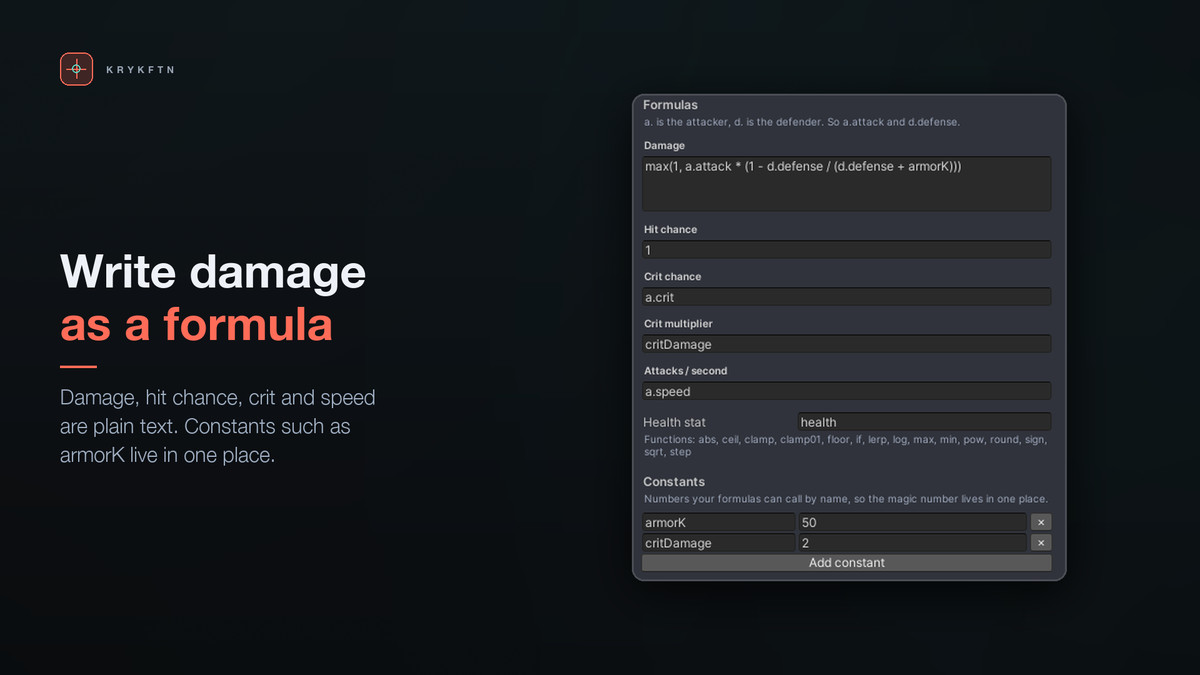
Formulas as text — max(1, a.attack * (1 - d.defense / (d.defense + armorK))). Full operator precedence, brackets, comparisons and 15 functions including min, max, clamp, lerp, step and if. Parse errors appear under the field in words a designer can act on.
A report that reads the same numbers — misspelled stats that silently read as zero, formulas that will not parse, fights nobody can win, one-shots on the diagonal, crit chance that overflows 100% and is being clamped, and scaling that runs backwards so levelling up makes the kill slower.
Five growth models — flat, linear, power, exponential and a curve you draw by hand, per stat, with floors, caps and whole-number rounding.
Buffs and debuffs that stack properly — flat, then percent-add pooled together, then percent-multiply applied one after another. Two +20% percent-add buffs give +40%; two percent-multiply buffs give +44%. Remove them all by whatever applied them.
Seeded rolls — the same seed replays the same fight, in the editor and in your build.
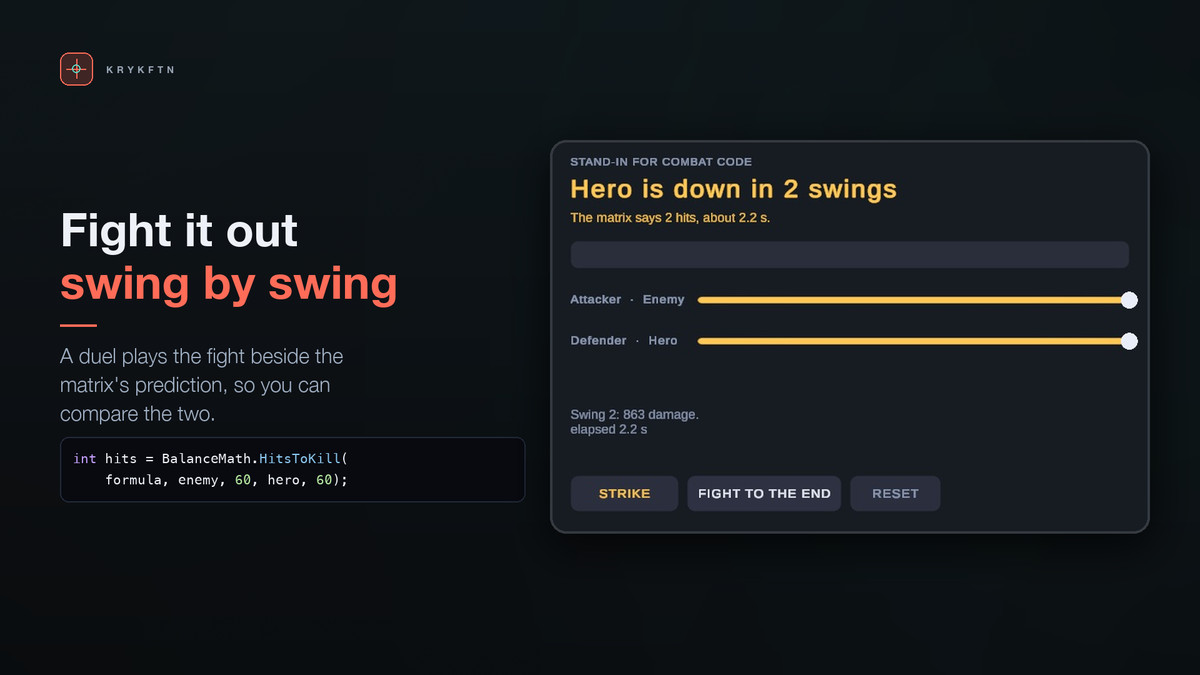
The demo proves it — press Fight To The End in the demo scene and the swing count matches the number the matrix predicted, because both are the same BalanceMath call.
A pure-C# core — the parser is a plain recursive-descent tree. No reflection, no codegen, no hidden scripting backend. It behaves identically in the editor, in a build and on IL2CPP.
Nothing produces NaN — a zero denominator yields 0, sqrt of a negative yields 0, log(0) yields 0. One bad number can never poison the whole table.
USING IT FROM CODE
using Krykftn.QuickStatFormulaPro;
var hero = new StatSheet(heroProfile, level: 12);
hero.AddModifier(new StatModifier("attack", StatModifierKind.PercentAdd, 0.25f, ragePotion));
float attack = hero.Get("attack");
hero.RemoveAllFrom(ragePotion);
var roll = BalanceMath.Roll(formula, hero, enemy, random);
if (roll.landed) enemy.TakeDamage(roll.damage, roll.critical);
int hits = BalanceMath.HitsToKill(formula, hero, enemy);
var matrix = BalanceMatrix.Build(formula, heroProfile, enemyProfile, resolution: 24);
The report is a plain call too, so you can run it in your build pipeline and fail a commit that breaks the curve:
var issues = BalanceReport.Inspect(formula, attacker, defender, matrix);
TRY IT IN 30 SECONDS
1. Import the package.
2. Tools > Quick Stat Formula Pro > Setup Window, then Create Sample Matchup.
3. The balance window opens on Enemy attacking Hero. Follow the white diagonal — that is the even fight. Green at the start, red by the cap.
4. Open the report in the right-hand panel. It has already named the problem.
5. Change the enemy's attack growth from Power to Linear and watch the whole matrix go green.
REQUIREMENTS
Unity 2022.3 LTS or newer. uGUI and TextMeshPro, both of which ship with Unity and are in every standard template. If either is missing the package switches itself off instead of throwing compile errors, and a one-click setup window installs them. No third-party packages, ever. Built-in, URP and HDRP.
Namespace: Krykftn.QuickStatFormulaPro
Full C# source included. No DLLs.
PART OF A BUNDLE
Quick Stat Formula Pro is one of the eight tools in Quick RPG Systems Bundle, together with inventory, crafting, loot tables, skill trees, quests, dialogue and shops. Owning the bundle makes each of the eight a free upgrade.
https://assetstore.unity.com/packages/tools/game-toolkits/quick-rpg-systems-bundle-405658
From the publisher's Asset Store listing.
Technical details
Features:
• Time-to-kill matrix: every attacker level against every defender level, evaluated with your own formula and coloured against the fight length you set
• Target band: say how many hits a fair fight should take; green, red (too fast), blue (too slow) and black (never) cells
• Formulas as plain text with full precedence, brackets, comparisons and 15 functions (min, clamp, lerp, step, if and more); parse errors appear under the field as you type
• Balance report: misspelled stats, formulas that will not parse, unwinnable fights, one-shots on the diagonal, crit chance over 100% and scaling that runs backwards
• Five growth models per stat (flat, linear, power, exponential, hand-drawn curve) with floors, caps and whole-number rounding
• Buffs and debuffs: flat, percent-add and percent-multiply, applied in that order and removable by the object that applied them
• Seeded rolls: the same seed replays the same fight
• Duel demo that resolves hits through the same BalanceMath call the matrix uses
• Code API: StatSheet, StatModifier, BalanceMath.Roll / HitsToKill / SecondsToKill, BalanceMatrix.Build, Formula.Compile
In numbers:
• A 24x24 matrix is 576 fights and redraws as you type
• Across levels 1 to 60 and 200 seeds, the rolled demo fight lands exactly on the predicted hit count in 93% of fights and is never more than one swing off
• Nothing divides by zero: zero denominators, sqrt of a negative and log(0) yield 0, so the table never turns into NaN
Supported OS: all platforms Unity supports
Technical notes:
• Namespaced under Krykftn.QuickStatFormulaPro; runtime, editor and setup assemblies separated
• Pure C# core: a recursive-descent parser, no reflection and no codegen, so it behaves the same on Mono and IL2CPP
• Requires uGUI and TextMeshPro, both shipped with Unity; a Setup window installs them and TMP's essential resources
• Built-in, URP and HDRP
• Unity 2022.3 LTS or newer; full C# source, no DLLs
Documentation: included as README.md and CHANGELOG.md
Compatibility
| Unity version | Built-in | URP | HDRP |
|---|---|---|---|
| 2022.3.62f2 | Compatible | Compatible | Compatible |
Unity 2022.3 LTS or newer. Requires uGUI and TextMeshPro, both shipped with Unity; if either is absent the assemblies are gated off so the project still compiles, and a setup window installs them in one click. The core is pure C# with no reflection or codegen, so it behaves the same on Mono and IL2CPP. Built-in, URP and HDRP. Full C# source, no DLLs.
As listed on the Asset Store.