
 View on Asset Store (opens in new tab)
Package details
- Latest version
- 1.0
- Last updated
- First released
- Unity version
- 2022.3.62 or later
- Package size
- 377 KB
- Files
- 59
- Favorites
- 1
- Views in the past week
- 12
Price tracking
- Last checked
- Tracked since
- Lowest recorded
- $13.99 on
Keywords
The Camera Lab
The Camera Lab is a complete camera solution for Unity: seven camera types, one shared effects stack, and editor tools to get from empty scene to playable quickly.
Affiliate link · Purchases support this site
Price history
Last 6 months
USDAsset preview
1 / 2
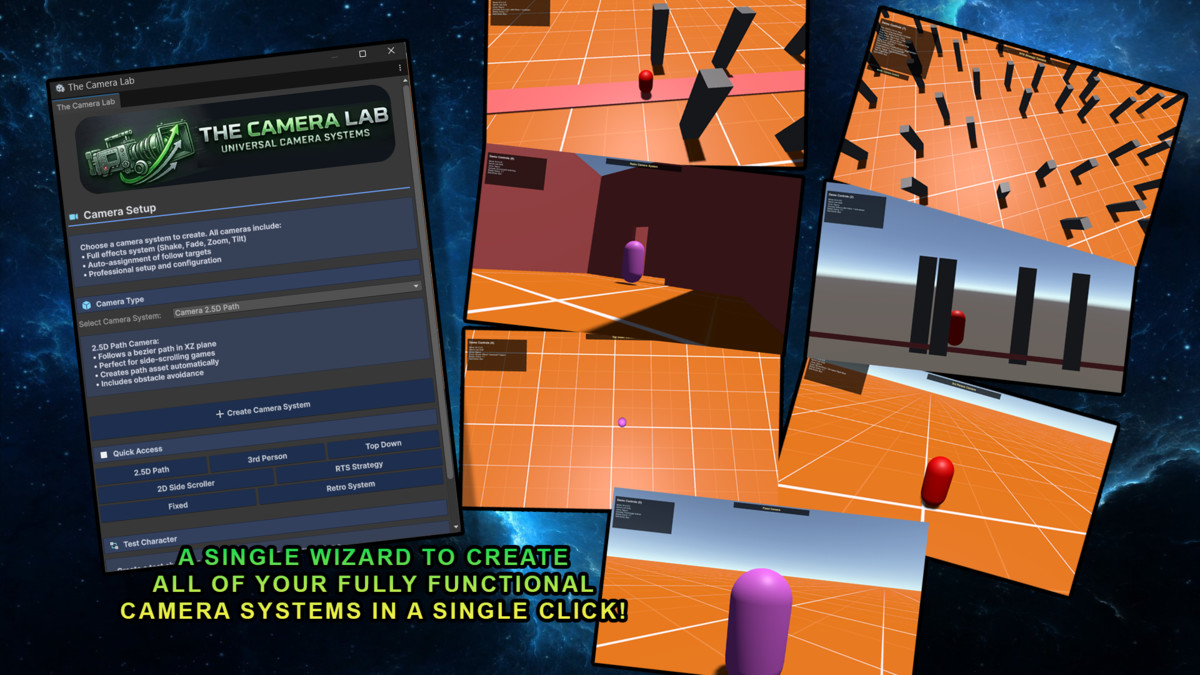
The Camera Lab screenshot 1
About this asset
Overview
The Camera Lab is a complete camera solution for Unity: seven camera types, one shared effects stack, and editor tools to get from empty scene to playable quickly.
You get finished camera rigs—not bare scripts you still have to wire, tune, and debug yourself.
If you're building a first-person game, check out The FPS Lab for a dedicated full FPS framework.
Why The Camera Lab?
Seven Complete Camera Systems
Each setup is full-featured and ready to use:
- 2.5D Path Camera — Side-scrollers and path-follow games with smooth motion along splines ( Example: Little nightmares)
- 2D Side Scroller Camera — Platformers and metroidvania-style games with dead zones, look-ahead, and axis-locked follow
- 3rd Person Camera — Action/adventure style with obstacle avoidance, lock-on, and auto-zoom
- Top Down Camera — RTS and strategy: dome positioning, perspective or orthographic
- RTS Strategy Camera — Pan, edge-pan, drag, zoom, rotate, and bounds for strategy/management style navigation
- Fixed Camera — Static shots: security cameras, cinematics, or anything that stays put
- Retro Camera System — Survival-horror style fixed angles: zone-based switching with Instant, Blink, and Smooth transition modes ( Example: Resident Evil / Bio Hazard)
For first-person projects, The FPS Lab is the recommended asset.
Universal Effects System
One effects layer works across every camera type:
- Camera Shake — 12 presets (Explosion, Impact, Rumble, and more)
- Camera Fade — Fades and full-screen flashes
- Camera Zoom — Dynamic FOV and orthographic size control
- Camera Tilt — Dutch angles
- Color Tint — Damage flashes, mood, atmosphere
Professional Tools
- One-click camera setup
- Auto-assignment for common wiring
- Editors with clear labels and guidance
- Camera Relative Movement Helper (corrects inverted or confusing movement relative to the camera)
Demo
Try It Yourself - Download The Demo (PC)
Use the sample scene to try each camera style and the shared effects in context.
Documentation & Support
Full manual in the editor. Open User Guide on components jumps to the matching section.
From the publisher's Asset Store listing.
Technical details
- 2.5D Path Camera — Side-scrollers and path-follow games with smooth motion along splines ( Example: Little nightmares)
- 2D Side Scroller Camera — Platformers and metroidvania-style games with dead zones, look-ahead, and axis-locked follow
- 3rd Person Camera — Action/adventure style with obstacle avoidance, lock-on, and auto-zoom
- Top Down Camera — RTS and strategy: dome positioning, perspective or orthographic
- RTS Strategy Camera — Pan, edge-pan, drag, zoom, rotate, and bounds for strategy/management style navigation
- Fixed Camera — Static shots: security cameras, cinematics, or anything that stays put
- Retro Camera System — Survival-horror style fixed angles: zone-based switching with Instant, Blink, and Smooth transition modes ( Example: Resident Evil / Bio Hazard)
Compatibility
| Unity version | Built-in | URP | HDRP | Custom |
|---|---|---|---|---|
| 2022.3.62f3 | Compatible | Compatible | Compatible | Compatible |
If you import this into anything other than URP you may get Pink textures but this is for the demo scene only and not detremental to the functionality of the product.
As listed on the Asset Store.