
 View on Asset Store (opens in new tab)
Package details
- Latest version
- 1.0.12
- Last updated
- First released
- Unity version
- 2022.3.62 or later
- Package size
- 157 KB
- Files
- 70
- Views in the past week
- 35
Price tracking
- Last checked
- Tracked since
- Lowest recorded
- $9.99 on
Keywords
Quick Skill Tree Pro
by Krykftn | Advanced Editor Tools & Systems (opens in new tab)
- Price drop
Design talent, tech and perk trees in a visual graph editor, then drop a finished, animated, save-ready skill board straight into your game. No dependencies.
Lowest recorded price
Get 50% off on Asset Store (opens in new tab)Affiliate link · Purchases support this site
Price history
Last 6 months
USDAsset preview
1 / 3
Quick Skill Tree Pro screenshot 1
About this asset
Every RPG, roguelite, survival and idle game wants a skill tree. Building one means a node editor, prerequisite logic, point economy, save data and a UI that makes progress feel good — and that is a week you would rather spend on your game. Quick Skill Tree Pro gives you both halves: a visual graph editor to design the tree, and a finished, animated board to put in front of players.
DESIGN IT VISUALLY
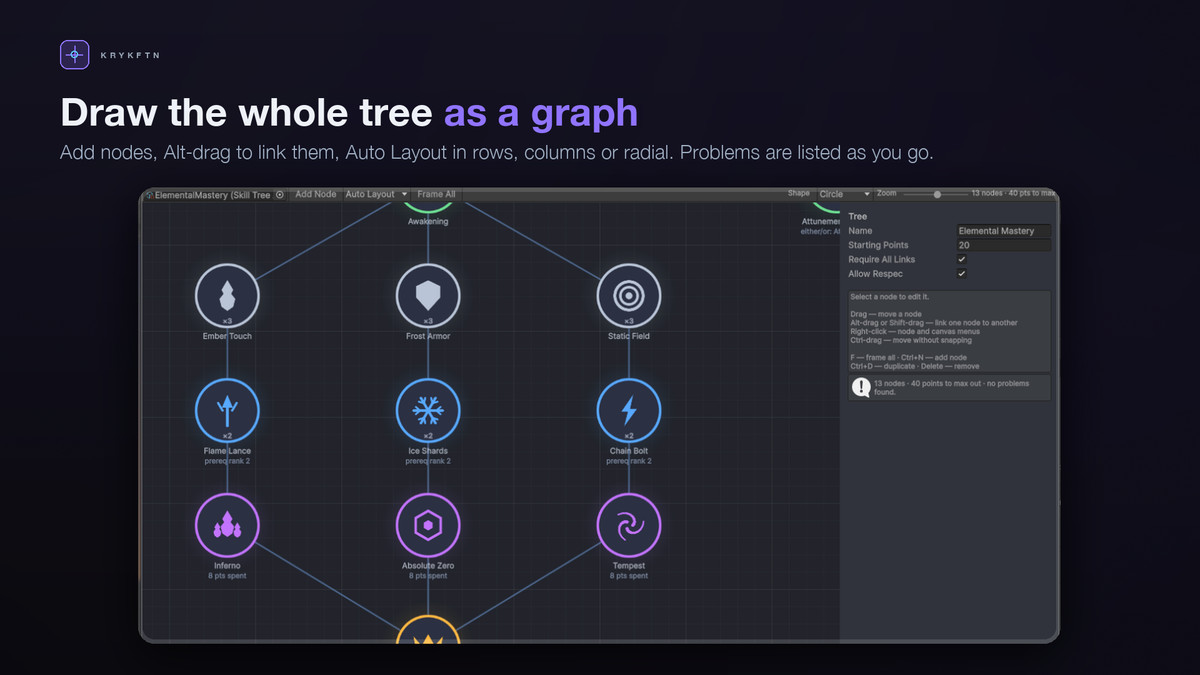
Drag nodes around the canvas, Alt-drag from one node to another to make it a prerequisite, and let Auto Layout arrange the whole graph as rows, columns or a radial constellation. Loops are detected and refused, so a tree can never end up requiring itself. Built-in validation calls out nodes with no skill assigned, duplicated skills, and nodes no player could ever reach.
A BOARD THAT READS AT A GLANCE
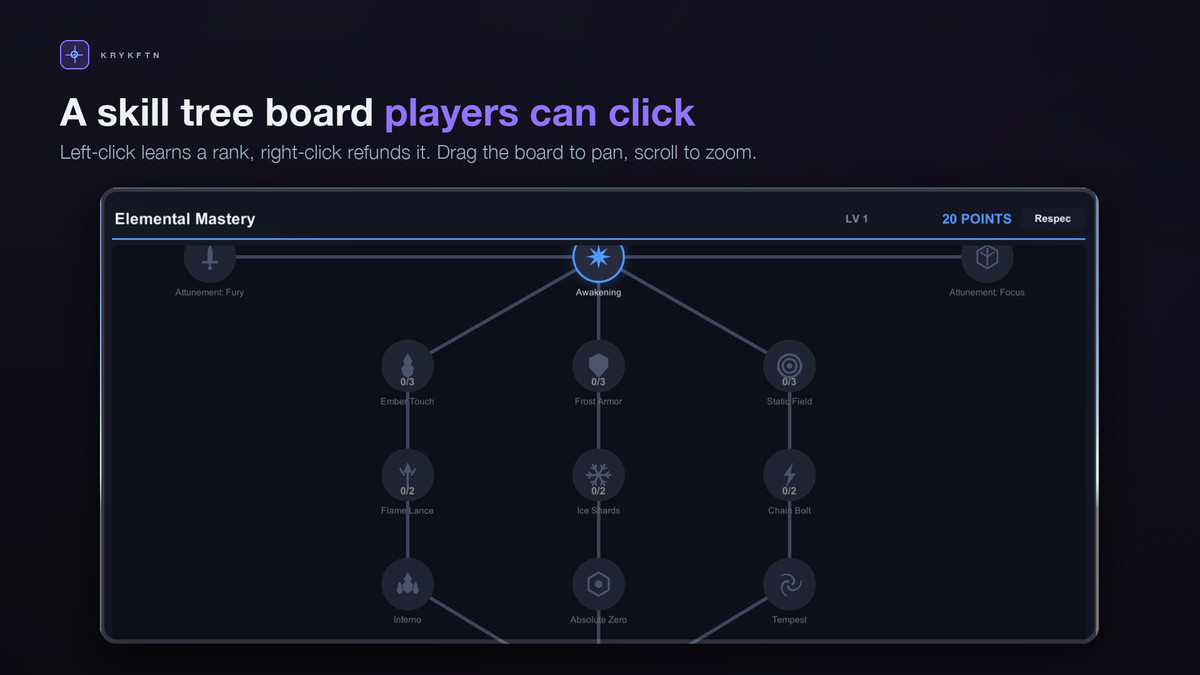
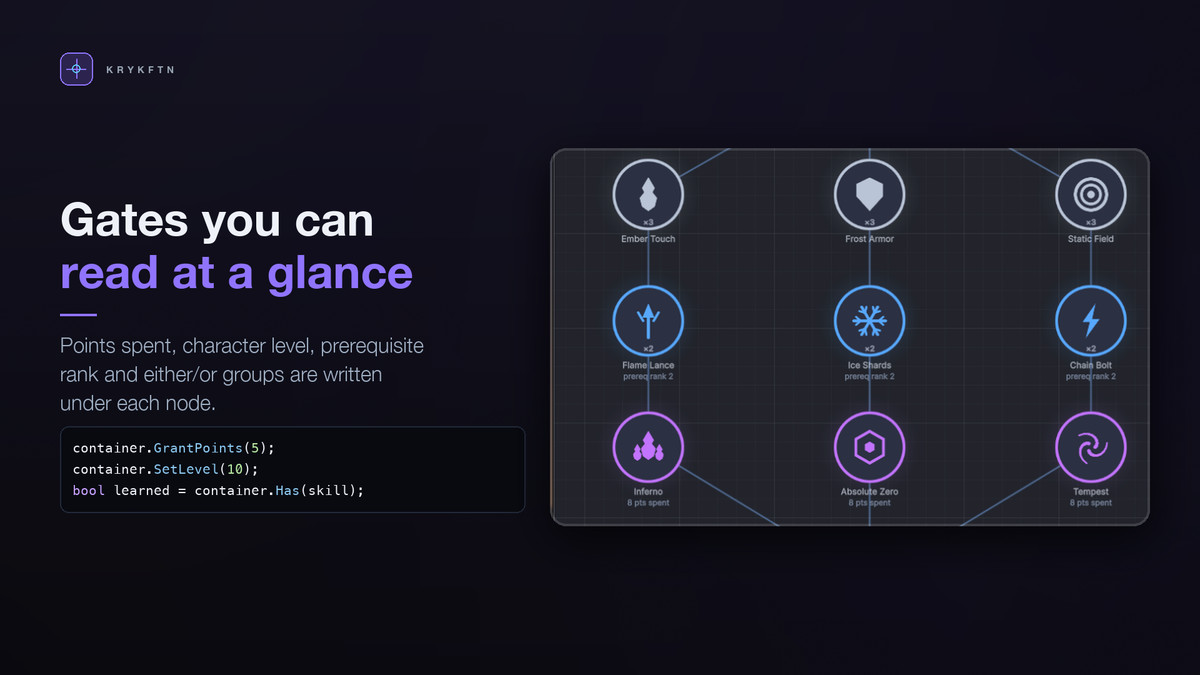
Locked skills sit dim. Skills you can afford right now pulse. Links fill outward from the prerequisite as progress flows through the tree, and learning a rank fires a burst of light. Hovering a node tells the player what it does and exactly why it is still locked: "Requires Frost Armor at rank 2", "Spend 3 more points in this tree", "Requires level 5". No mystery locks.
GATES THAT MATCH REAL GAMES
Mix four kinds of requirement on any node. Prerequisites with AND or OR logic and a minimum rank. A points-spent tier gate, the classic talent-tree rule. A character level. And mutually exclusive groups, where taking one option visibly rules the other out. Refunds are checked against all of them, so a player can never strand a skill they already own — and when a refund is blocked, the tooltip says why.
CLEAN UNDER THE HOOD
The whole system is a plain C# model: ranks, points, prerequisites, refunds, change events. The UI is a separate, optional layer, so you can drive the model straight from gameplay code. Save and load to JSON, PlayerPrefs or a file. Ranks are stored against skill ids, so editing your graph later never corrupts an existing save.
NO DEPENDENCIES
uGUI and Unity's built-in font. No TextMeshPro, no Input System, no third-party packages. Every node shape, ring, glow and panel is generated procedurally, so there is nothing to import and everything stays crisp at any size. Works on Built-in, URP and HDRP.
GET RUNNING IN 30 SECONDS
Tools > Quick Skill Tree Pro > Setup Window > Create Demo. Press Play and start spending points. Then open the Graph Editor and make it yours.
Full C# source included.
PART OF A BUNDLE
Quick Skill Tree Pro is one of the eight tools in Quick RPG Systems Bundle, together with inventory, crafting, loot tables, quests, dialogue, stat formulas and shops. Owning the bundle makes each of the eight a free upgrade.
https://assetstore.unity.com/packages/tools/game-toolkits/quick-rpg-systems-bundle-405658
From the publisher's Asset Store listing.
Technical details
Visual node graph editor: drag to move, Alt-drag to link, right-click menus, cycle detection
Auto Layout in three shapes: rows (talent tree), columns (tech tree), radial (constellation)
Built-in validation: nodes with no skill, duplicate skills, unreachable nodes
Keyboard shortcuts: F frame all, Ctrl+N add node, Ctrl+D duplicate, Delete remove
Multi-rank skills with a cost per rank, and links that can require a specific rank
Four gate types on any node: prerequisites (AND / OR), points-spent tier gate, character level, mutually exclusive groups
Orphan-safe refunds and one-click full respec, with the blocking reason shown in the tooltip
Pure C# SkillTreeModel with change events; the UI layer is separate and optional
Save / load to JSON, PlayerPrefs or file, keyed by skill id so graph edits never break old saves
Pan and zoom board with tooltips showing tier, branch, rank, description and lock reason
5 themes: Arcane, Constellation, Circuit, Ember, Verdant
4 node shapes (circle, hexagon, diamond, square) and 3 link styles (straight, elbow, curved)
13 sample icons included, tinted per skill tier or left as authored
Unlock burst animation and pulsing on skills you can currently afford
onSkillRankChanged and onRespec UnityEvents for sound, VFX and stat hooks
One-click demo builder: canvas, panel, point counter, respec button, every node and link
Zero dependencies: uGUI and Unity's built-in font. No TextMeshPro, no Input System
Render pipelines: Built-in, URP and HDRP (the UI is pipeline independent)
Unity 2022.3 LTS or newer
Full C# source included, documented and commented
Compatibility
| Unity version | Built-in | URP | HDRP |
|---|---|---|---|
| 2022.3.62f2 | Compatible | Compatible | Compatible |
uGUI and plain C#, so it runs unchanged on Built-in, URP and HDRP. No shaders or materials ship with it: every node shape, ring and glow is procedural and text uses Unity's built-in font. The one requirement is com.unity.ugui; without it the assemblies switch off with zero compile errors and a Setup window installs it. The demo builder picks the Input System UI module when it is installed.
As listed on the Asset Store.