
 View on Asset Store (opens in new tab)
Package details
- Latest version
- 1.1.0
- Last updated
- First released
- Unity version
- 2022.3.62 or later
- Package size
- 360 KB
- Files
- 157
- Views in the past week
- 18
Price tracking
- Last checked
- Tracked since
- Lowest recorded
- $34.99 on
Keywords

Runtime Dashboard Toolkit - Charts, Gauges & Data Tables
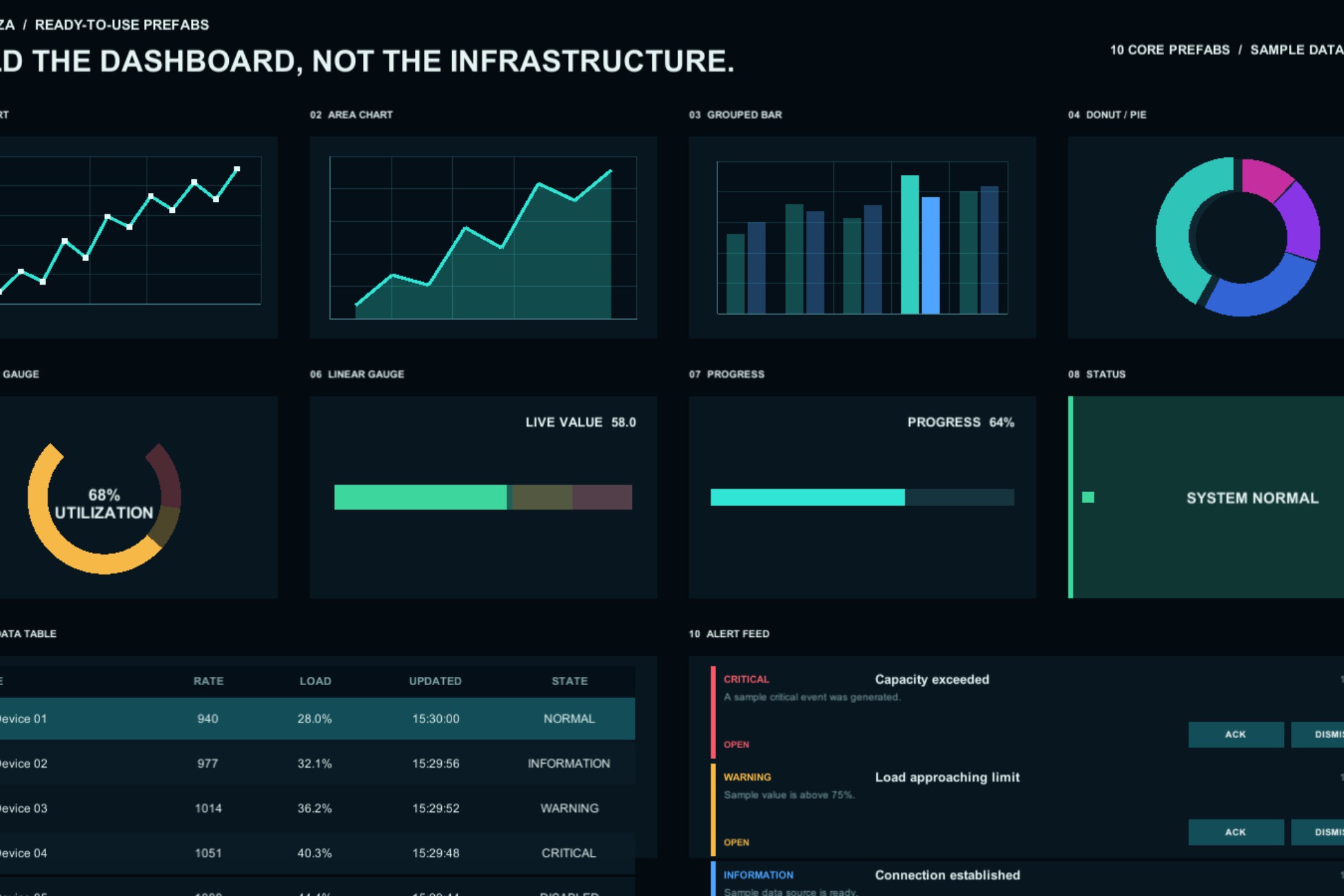
Build runtime uGUI dashboards with charts, gauges, sortable data tables and alerts. Includes 10 prefabs, demo scenes and C# data-binding examples.
Affiliate link · Purchases support this site
Price history
Last 6 months
USDAsset preview
1 / 6

Runtime Dashboard Toolkit - Charts, Gauges & Data Tables screenshot 1


About this asset
Turn your game and simulation data into readable runtime dashboards. Runtime Dashboard Toolkit combines line, area, bar and donut charts with gauges, progress indicators, sortable tables and alert feeds in one uGUI toolkit.
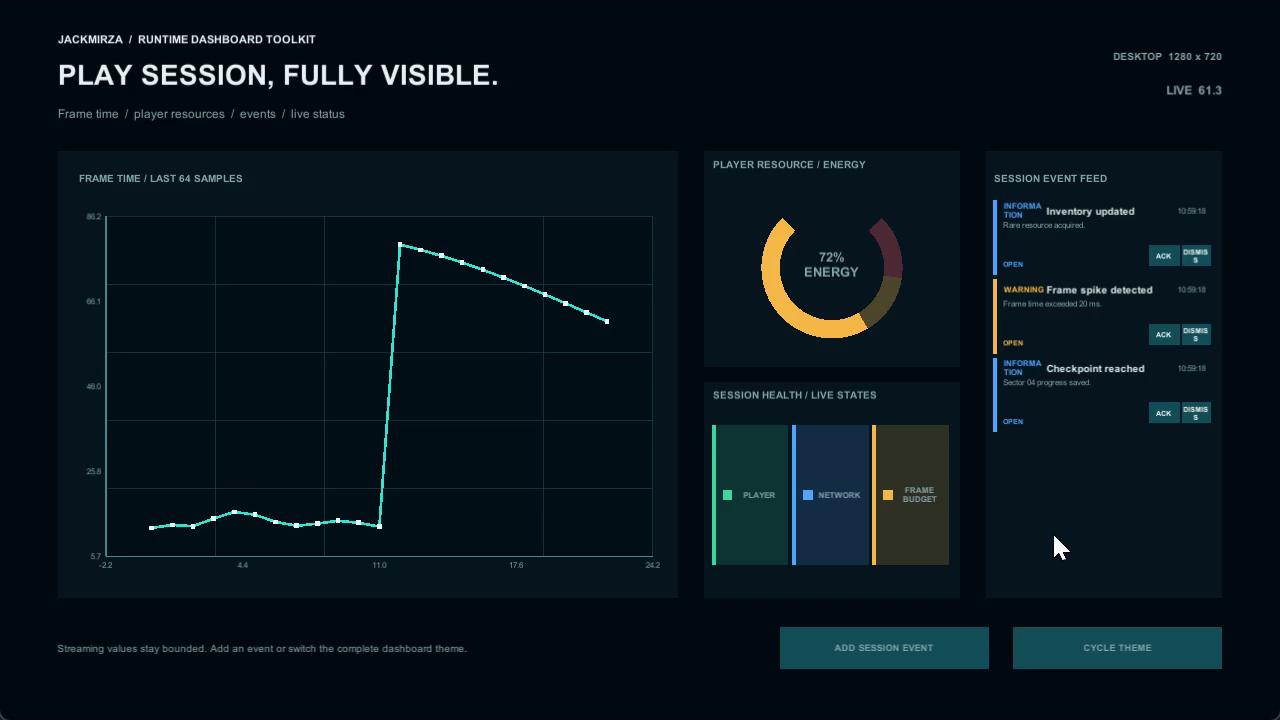
Start with a prefab, connect your values and customize the theme. Display frame-time trends, resource levels, production metrics or operations data supplied by your own systems.
BUILD WITH 10 REUSABLE UI COMPONENTS
• Line and area charts for changing values and trends.
• Grouped bar charts for category comparisons.
• Donut and pie charts for proportions.
• Circular and linear gauges for bounded values.
• Progress and status indicators for task and system states.
• Pooled data tables with sorting, filtering, paging and row selection.
• Alert feeds with acknowledge and dismiss actions.
CONNECT THE DATA YOU ALREADY HAVE
Push values through direct C# calls, connect event-driven sources, share values through ScriptableObjects, or explore the included Inspector-sample and local JSON flows. Bounded chart histories retain recent samples, while tables and alerts reuse their row pools. Data collection, network connections, authentication and remote API clients are supplied by your project.
LEARN FROM WORKING EXAMPLES
Explore the Game Telemetry, Management Dashboard and Operations Dashboard demos, then inspect every core component in the Prefab Gallery. Eight included scenes demonstrate charts, indicators, data sources, tables and alerts. Theme assets and responsive dashboard examples provide a starting point for your own layout.
The Quick Start, API reference, data-binding guide and included C# sample show how to replace sample data and connect real values. Open the gallery from the Tools menu while keeping your current scenes open.
VERSION 1.1.0 IMPROVEMENTS
This maintenance update improves chart rendering, tooltip placement, gauge/progress refreshes, table paging and reconfiguration, and data-binding and theme subscription handling. Included regression tests cover these behaviors. Existing public APIs and serialized fields are retained.
SETUP AND COMPATIBILITY
Current maintenance validation uses Unity 2022.3.62f2, Built-in Render Pipeline and Screen Space Overlay uGUI. Unity UI (uGUI) 1.0.0 is required on that editor. The toolkit uses Canvas-native procedural graphics and includes no custom runtime shaders or materials.
Demo buttons use the legacy Input Manager or Both input handling. Input System-only projects need their own compatible EventSystem/input module and actions. Optional PlayMode scene tests require the documented eight scenes in Build Settings.
Unity 6 and URP/HDRP checks in the documentation describe an earlier source snapshot; they are historical compatibility records rather than fresh validation of every 1.1.0 maintenance change.
The runtime operates offline without accounts, analytics, subscriptions or external API calls. No third-party runtime code, fonts or artwork are bundled; scenes use the editor’s built-in legacy runtime font. Third-party notices are included.
Start with the Prefab Gallery, choose a component and connect your data through the included Quick Start.
From the publisher's Asset Store listing.
Technical details
Version 1.1.0
• 10 core prefabs and 8 example/demo scenes, theme assets and C# samples.
• Line, area, grouped bar and donut/pie charts.
• Circular/linear gauges, progress/status indicators, pooled tables and alert feeds.
• Direct C#, events, ScriptableObjects, Inspector samples and local JSON data examples.
• Current tested baseline: Unity 2022.3.62f2, Built-in Render Pipeline, Screen Space Overlay uGUI; requires Unity UI (uGUI) 1.0.0.
• Separate runtime, editor, sample and test assemblies. Unity Test Framework is optional for running included tests; scene-test prerequisites are documented.
• 441 EditMode + 156 PlayMode cases passed on the exact reviewed archive. Local Asset Store Tools validation: 36 passing checks.
• Demo controls use legacy Input Manager or Both. Input System-only hosts supply a compatible input module/actions.
• Historical Unity 6/URP/HDRP compatibility records are labeled separately in Documentation/COMPATIBILITY.md.
• Root: Assets/RuntimeDashboardToolkit
• Namespace: Jackmirza.RuntimeDashboard
• Offline runtime; no external API clients, custom runtime shaders or separately bundled fonts.
• Documentation: included Quick Start, API reference, data-binding guide and compatibility guide.
• Support: https://jackmirza-unity-assets.vercel.app/#support
Compatibility
| Unity version | Built-in | URP | HDRP |
|---|---|---|---|
| 2022.3.62f2 | Compatible | Not listed | Not listed |
Tested maintenance baseline: Unity 2022.3.62f2, Built-in, Screen Space Overlay uGUI; requires uGUI 1.0.0. No custom materials/shaders or pipeline-specific runtime code. Unity 6/URP/HDRP documentation records earlier-source tests only. Demo buttons use legacy Input Manager or Both; Input System-only hosts supply their input module.
As listed on the Asset Store.