
 View on Asset Store (opens in new tab)
Package details
- Latest version
- 1.2.0
- Last updated
- First released
- Unity version
- 6000.0.26 or later
- Package size
- 1.5 MB
- Files
- 75
- Favorites
- 1
- Views in the past week
- 9
Price tracking
- Last checked
- Tracked since
- Lowest recorded
- $27.99 on
Keywords
- Search for animation clip
- Search for prefab browser
- Search for Technical Artist
- Search for easing
- Search for Workflow Tools
- Search for keyframe editor
- Search for particle system
- Search for animation editor
- Search for Curve Editor
- Search for psd importer
- Search for Editor Extension
- Search for shader property animation

Animate UI for Unity Like After Effects
A practical Unity Editor toolkit for faster UI animation, keyframe editing, material animation, PSD importing, particle reuse, and everyday asset workflows.
Affiliate link · Purchases support this site
Price history
Last 6 months
USDAsset preview
1 / 7
Animate UI for Unity Like After Effects screenshot 1
About this asset
Tools, workflows, and 17 English PDF guides:
https://hermityin.github.io/motilayer-tools/
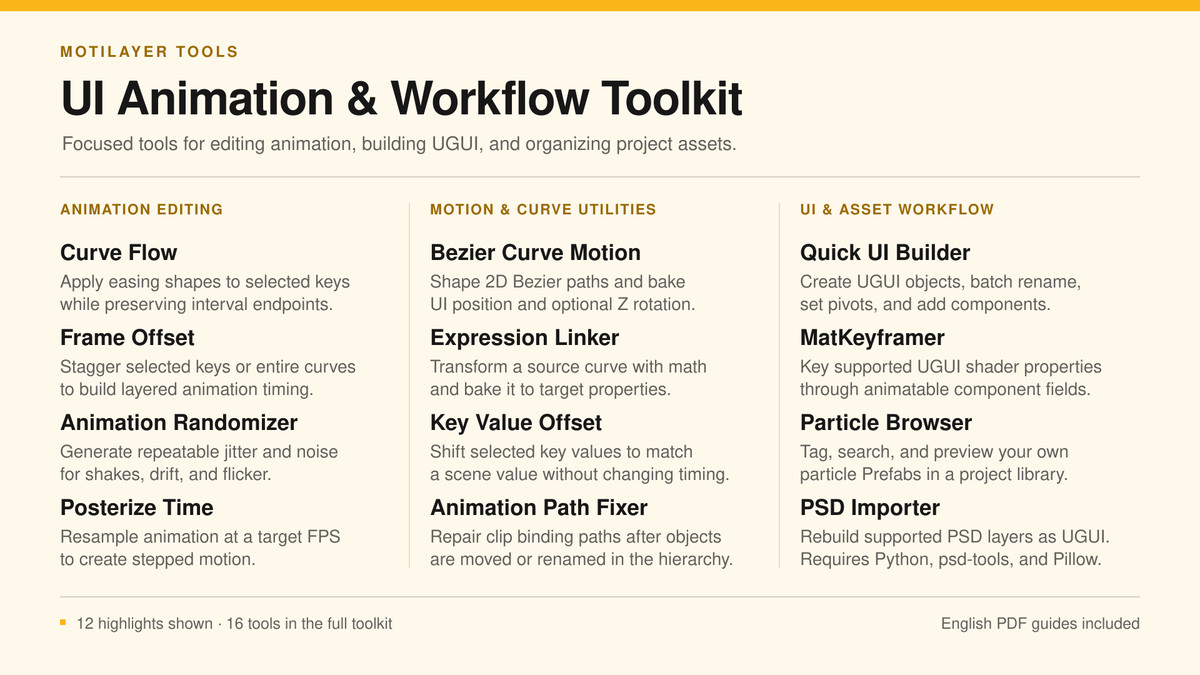
UI Animation & Workflow Toolkit is a collection of focused Unity tools built for UI animators, motion designers, technical artists, and developers who want to reduce repetitive Editor work.
ANIMATION & KEYFRAME TOOLS
• Animation Copier — copy a source and its children to multiple matching target hierarchies in the current clip, preserving original rotation keys and supporting Undo.
• Curve Flow — apply a reusable easing curve to multiple selected keyframe ranges while preserving their start and end values.
• Frame Offset — stagger selected animation curves and keyframes to build cascades and sequential motion.
• Key Value Offset — adjust selected keyframe values without rebuilding animation curves manually.
• Posterize Time — convert smooth animation timing into controlled stepped motion.
• Animation Randomizer — add configurable variation to animation timing and values.
• Expression Linker — capture source keyframes, enter an expression, then apply it to selected target keyframes in time order.
• Seamless Loop — align cyclic animation properties to a shared loop with adjustable timing tolerance and a live duration preview.
• Bezier Curve Motion — create and bake path-based motion.
• Animation Path Fixer — repair animation binding paths after hierarchy changes.
• Apply Last Frame — apply the final state of an Animation Clip to a target object.
• Keep Last Frame Only — create a clean final-state clip from an existing animation.
UI & MATERIAL WORKFLOW
• MatKeyframer — animate shader float, color, texture transform, and Vector4 properties through independent material instances.
• Quick UI Builder — speed up common UGUI construction tasks.
ASSET & EFFECT WORKFLOW
• Resource Reference Finder — find asset users and unused assets within loaded scenes or the current Prefab Stage, with folder browsing, progress and Inspector multi-selection.
• Batch Rename — preview and rename assets or Hierarchy objects while retaining .meta files and GUIDs.
• Texture Unmult — batch-remove black backgrounds from PNG and true-color TGA source images.
• Asset Favorites — organize and reopen frequently used project assets.
• Prefab Browser — find and browse prefabs using hierarchy path matching.
• Particle Browser — preview, collect, import, and reuse particle prefabs.
• PSD Importer — import PSD/PSB files from the Project context menu or Tools menu, export visible PSD layers and rebuild the hierarchy as a UGUI prefab, including layout and text information. Exported textures are padded to dimensions divisible by four.
WHY USE IT?
Instead of repeatedly editing curves, shifting keys, rebuilding UI hierarchies, searching for effects, or manually reconstructing PSD layouts, the toolkit turns these jobs into focused, repeatable actions inside the Unity Editor.
DOCUMENTATION
The package includes the 17 existing English PDF guides and a new English version 1.2.0 workflow guide covering the four added tools, updated PSD and Curve Flow workflows, setup, menus and limitations.
IMPORTANT
The animation-selection tools operate on editable Animation Clips and the active Unity Animation window. The PSD workflow requires a local Python installation and the Python packages listed in its guide. Please review the included documentation before using operations that modify or remove project content.
From the publisher's Asset Store listing.
Technical details
- • Unity version: uploaded and tested for submission with Unity 6 (6000.0.26f1)
- • Editor tools target Unity's built-in Animation Clip and UGUI workflows
- • Render-pipeline independent Editor functionality
- • Separate Runtime and Editor assemblies
- • MatKeyframer supports 4 Float slots, 4 Color slots, 2 texture offset/scale slots, and 2 Vector4 slots
- • Animation tools support editable numeric Animation Curves; requirements vary by tool
- • Curve Flow requires at least two selected keys per processed property
- • Full or partial Undo support is provided where indicated in each tool guide
- • PSD Importer requires Python and the dependencies documented in the included PSD Importer guide
- • PSD Importer exports visible layers, hierarchy/layout data, supported text properties, and textures padded to dimensions divisible by four
- • Includes 21 functional tools, 17 existing English PDF guides and the English 1.2.0 workflow supplement
- • Animation Copier supports numeric and object-reference tracks on matching child hierarchies
- • Resource scans inspect serialized references within loaded scenes or the current Prefab Stage
- • Texture Unmult supports PNG and 24/32-bit true-color TGA; modifies source files in place, without Unity Undo
- • Project and Hierarchy context menus use UI Animation Toolkit
- • No required Asset Store package dependencies
- • No runtime overhead from Editor-only tools
- • Menu root: Tools > UI Animation Toolkit
- Supported OS: Windows. Other desktop operating systems are not currently claimed as tested.
- Important compatibility note: Some animation tools read the active Animation window and its selected keyframes through Unity Editor APIs. These tools are Editor-only and are not included in player builds.
Compatibility
| Unity version | Built-in | URP | HDRP | Custom |
|---|---|---|---|---|
| 6000.0.26f1 | Compatible | Compatible | Compatible | Compatible |
Most tools are Editor-only and render-pipeline independent. Built-in, URP, HDRP, and custom render pipelines are supported for the Editor workflow. MatKeyframer animates properties exposed by the assigned material shader; actual visual compatibility depends on that shader. The PSD Importer requires a local Python installation as described in the included guide.
As listed on the Asset Store.