
 View on Asset Store (opens in new tab)
Package details
- Latest version
- 1.0
- Last updated
- First released
- Unity version
- 2022.3.62 or later
- Package size
- 1.4 MB
- Files
- 33
- Views in the past week
- 5
Price tracking
- Last checked
- Tracked since
- Lowest recorded
- $4.99 on
Keywords

Project Doctor
- Price drop
The pre-ship checkup for your Unity project — 20 automated checks, safe one-click fixes.
Lowest recorded price
Get 50% off on Asset Store (opens in new tab)Affiliate link · Purchases support this site
Price history
Last 6 months
USDAsset preview
1 / 2
Project Doctor screenshot 1
About this asset
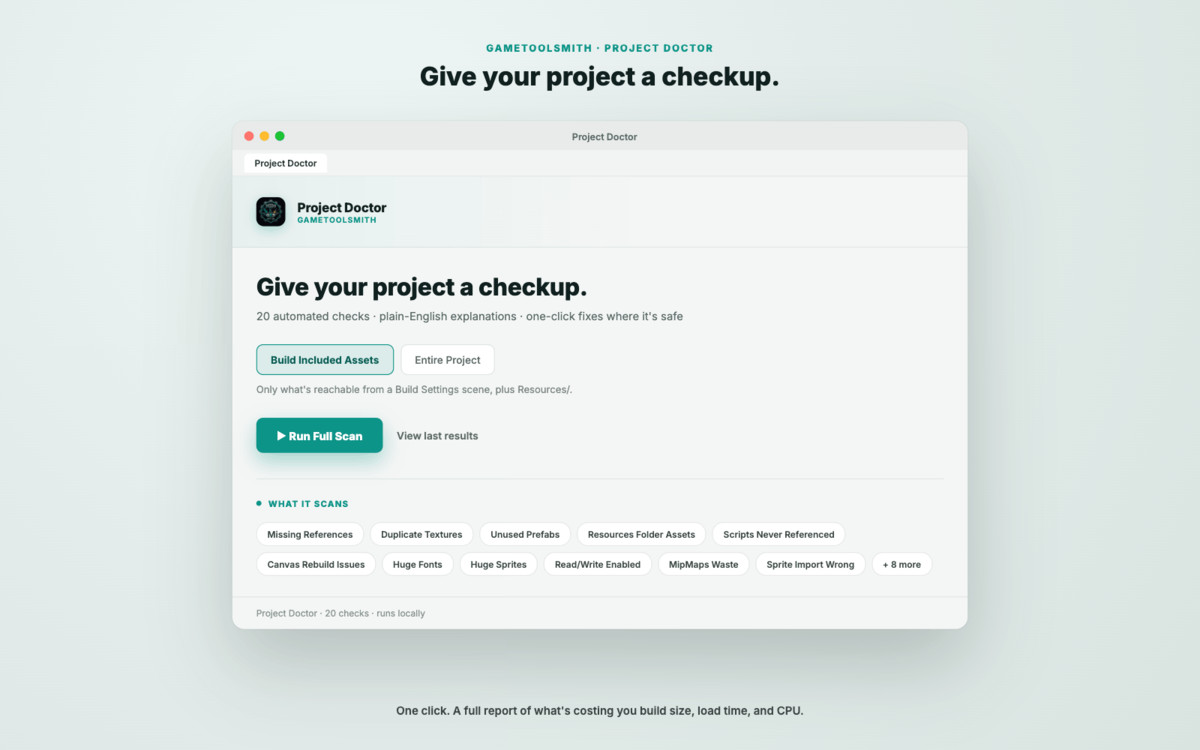
Press one button. Project Doctor scans your entire project and tells you what's wrong — in plain English.
Every Unity project accumulates the same kinds of rot over time: missing references nobody noticed, duplicate textures nobody deduplicated, prefabs nobody deleted, import settings nobody double-checked. Individually these are minor. Across a few thousand assets, they add up to bloated builds, avoidable hitches, and bugs that only show up in production.
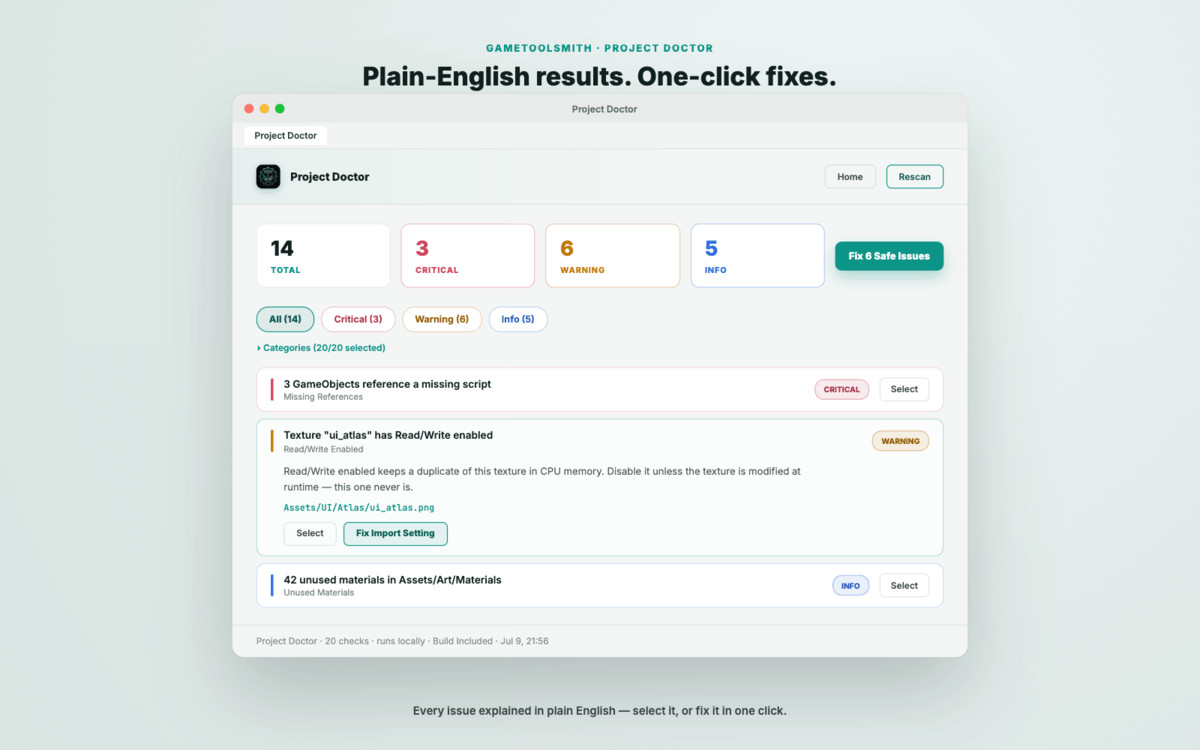
Project Doctor runs 20 targeted checks across your project and reports every issue it finds with a severity rating (Critical / Warning / Info), a plain-English explanation of why it matters, and — where it's safe to do automatically — a one-click Fix button. Nothing gets touched unless you tell it to.
Scan the way you actually ship. By default, Project Doctor scans only what's reachable from your Build Settings scenes plus your Resources folders — the assets that actually end up in your build. Switch to Entire Project mode any time you want a full audit, including unused packages and old prototypes. Scoping to build-included assets keeps scans fast even on large, long-running projects.
Built for triage, not just discovery. Results are filtered by severity first — Critical, Warning, Info — because that's how you actually decide what to fix today versus what can wait. Filter further by category if you want to drill into one specific type of problem.
Safe by design. Project Doctor never mutates your project on its own. Auto-fixable issues (bad texture import settings, missing mipmaps, wrong compression, and similar) are applied only when you click Fix, or Fix All Safe Issues for a batch pass — and even then, only importer-level and component-level changes that don't delete or restructure anything. Read-only checks (unused prefabs, duplicate textures, unreferenced scripts, and others) give you a Select button so you can review and act with full context in the Unity Editor, not blind auto-deletion.
What it checks
- Missing References
- Duplicate Textures
- Unused Prefabs
- Resources Folder Assets
- Scripts Never Referenced
- Canvas Rebuild Issues
- Huge Fonts
- Huge Sprites
- Read/Write Enabled (textures)
- MipMaps Waste
- Sprite Import Settings
- Audio Compression Settings
- Animation Curves (oversized)
- Particle Count (too high)
- Empty Lifecycle Methods (Update/FixedUpdate with no body)
- Raycast Target Waste (UI Graphics)
- Audio Listener Issues (duplicates/missing)
- Editor Code Leaking Into Builds
- Unused Materials
- Always Included Shaders Bloat
Key Features (bullet list for the feature section)
- One-click full project scan across 20 checks covering references, assets, textures, audio, UI, animation, particles, and code hygiene
- Every issue includes a plain-English explanation and a severity rating — not just a filename
- Build Included Assets scope by default (fast — scans only what's reachable from your build), with an Entire Project option for full audits
- Severity-first filtering (Critical / Warning / Info) with an optional category refinement
- One-click Fix for safe, non-destructive issues; Fix All Safe Issues for batch cleanup
- Select-in-Editor for issues that need your judgment rather than an automatic fix
- Editor-skin-adaptive UI (matches your light or dark Unity theme automatically)
- Runs entirely inside the Unity Editor — no external services, no network calls, no telemetry
- Nothing is modified unless you explicitly click Fix
From the publisher's Asset Store listing.
Technical details
- Editor-only tool. Ships as Editor scripts under an Editor/ folder; adds zero runtime overhead and is stripped from player builds automatically by Unity.
- Deterministic, rule-based analysis. Every check is implemented against Unity's own Editor APIs — AssetDatabase, SerializedObject/SerializedProperty, TextureImporter, AudioImporter, AnimationUtility, PrefabUtility, EditorSceneManager, and GraphicsSettings — plus static C# source analysis for a small number of code-hygiene checks. No black-box scoring.
- Build-aware scope. "Build Included Assets" mode computes the actual dependency closure from your Build Settings scenes (via recursive AssetDatabase.GetDependencies) plus everything under any Resources/ folder, so the scan reflects what genuinely ships — not everything sitting unused in the project.
- Performance. On a real production project (~2,800 prefabs, ~4,800 textures, ~98 scenes), Build Included Assets scope reduced the effective scan set to a few hundred assets and completed in under 4 seconds; a full Entire Project scan on the same project takes longer by design, since it's intentionally exhaustive.
- Non-destructive by default. Scene inspection opens Build Settings scenes additively and read-only, without disturbing scenes you already have open, and closes only the scenes it opened itself. Prefab fixes are applied through PrefabUtility.EditPrefabContentsScope so edits are scoped and safe. No check ever deletes an asset automatically.
Compatibility
| Unity version | Built-in | URP | HDRP | Custom |
|---|---|---|---|---|
| 2022.3.62f3 | Compatible | Compatible | Compatible | Compatible |
As listed on the Asset Store.