
 View on Asset Store (opens in new tab)
Package details
- Latest version
- 1.0.0
- Last updated
- First released
- Unity version
- 6000.0.81 or later
- Package size
- 81 KB
- Files
- 29
- Views in the past week
- 18
Price tracking
- Last checked
- Tracked since
- Lowest recorded
- $9.99 on
Keywords
Pixel Painter - Sprite & Pixel Art Editor
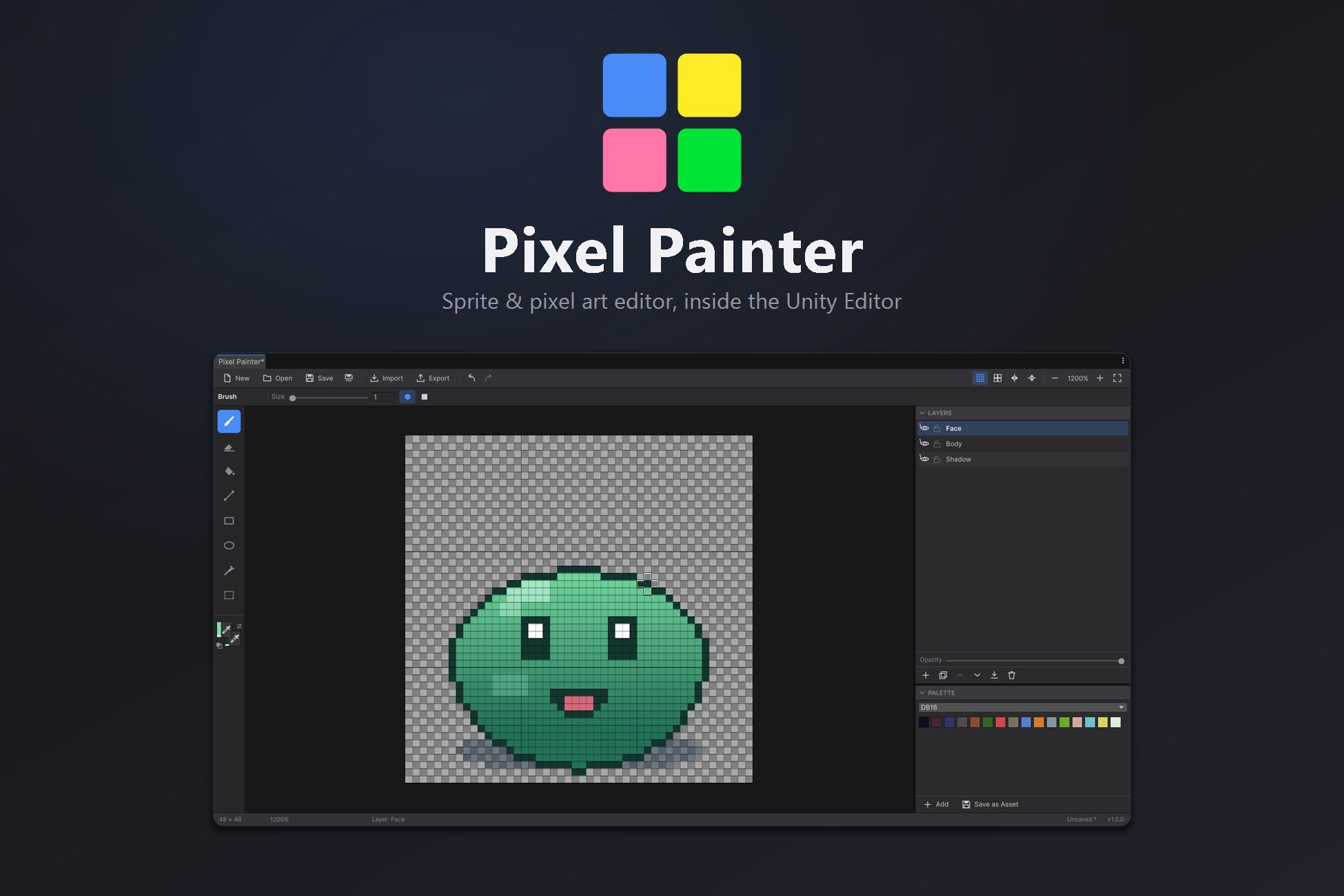
Draw sprites without leaving Unity. A full pixel art editor with 32 layers, live seamless tiling preview, built-in palettes and 1x-8x PNG export. Saves straight into your project.
Affiliate link · Purchases support this site
Price history
Last 6 months
USDAsset preview
1 / 4

Pixel Painter - Sprite & Pixel Art Editor screenshot 1


About this asset
Stop leaving Unity to draw a 32x32 sprite.
Every placeholder icon, every tileset tweak, every "make that hitbox two pixels smaller" turns into the same round trip. Switch to another app. Edit. Export. Alt-tab back. Wait for the import. Check it in the scene. Repeat.
Pixel Painter removes the round trip. It is a complete pixel art editor that runs as a Unity Editor window, so the sprite you are drawing and the game you are drawing it for finally live in the same place.
A real layer stack. Up to 32 layers per canvas, each with independent opacity, visibility and lock state. Sketch on one, ink on another, keep a reference underneath. Reorder, duplicate and merge down as the piece comes together. The undo history is named, so you always know what you are stepping back through, and it stays inside a memory budget you control.
Seamless tiles you can trust. A live 3x3 tiling preview surrounds the canvas with its own repeats, dimmed so the working tile stays in focus. Strokes wrap around the edges as you make them, which means a texture is seamless while you are drawing it — not after you have built the level and spotted the seam. Mirror axes keep symmetric sprites and characters true.
Selections that do not commit early. Marching-ants selection with a floating clipboard stamp you can move freely and drop only when it sits right. Nothing is written into the layer until you say so, and an active selection masks every paint tool, so you can work inside a region without disturbing the rest of the sprite.
Palettes built for pixel art. DB16, PICO-8, Sweetie 16 and Grayscale are included. Build your own, save it as a project asset, and reuse it across every canvas in the game so the art stays on-model.
Export that respects your pixels. PNG at 1x, 2x, 4x or 8x with nearest-neighbour scaling, so nothing blurs on the way out. Existing PNGs and JPGs come back in as a new canvas or as an extra layer. Finished canvases live in your project as assets you can reopen any time.
Built for Unity 6. Written entirely in UI Toolkit, so it looks and behaves like a native Editor panel: resizable docks, collapsible sections, and a theme that follows your light or dark skin. One Editor-only assembly, no dependencies, and nothing from it ships in your build.
From the publisher's Asset Store listing.
Technical details
Features
- 8 drawing tools: brush, eraser, flood fill, line, rectangle, ellipse, eyedropper, rectangular select
- Brushes from 1 to 64 pixels, circle or square, with a live footprint preview on the canvas
- Up to 32 layers per canvas, with per-layer opacity, visibility and lock
- Reorder, duplicate, rename and merge down layers
- Live 3x3 seamless tiling preview, with strokes wrapping across the canvas edges
- Horizontal and vertical mirror drawing axes
- Rectangular selection with marching ants and a floating, non-destructive stamp
- Full clipboard support: copy, cut and paste within and between canvases
- 4 built-in palettes: DB16, PICO-8, Sweetie 16 and Grayscale
- User palettes saved as reusable project assets
- PNG export at 1x, 2x, 4x and 8x with nearest-neighbour scaling
- PNG and JPG import, as a new canvas or as a layer in the current one
- Canvases saved as project assets, reopening exactly as they were left
- Work survives script recompiles and play mode
- Named undo history with a configurable memory budget
- Configurable pixel grid with a major-line step
- Light and dark themes that follow the Unity Editor skin
- Canvas sizes up to 1024 x 1024
- Editor-only assembly with zero runtime footprint
Supported OS
- Windows, macOS and Linux — the package is Editor-only C# with no platform-specific code, so it runs anywhere the Unity Editor runs.
Unity version
- Unity 6 (6000.0) or later.
Scripting and dependencies
- One Editor-only assembly definition, Peykarimeh.PixelPainter.Editor.
- No third-party dependencies and no package manager requirements.
- Render pipeline independent — the tool is Editor UI only and draws nothing at runtime.
Compatibility
| Unity version | Built-in | URP | HDRP | Custom |
|---|---|---|---|---|
| 6000.0.81f1 | Compatible | Compatible | Compatible | Compatible |
As listed on the Asset Store.