
 View on Asset Store (opens in new tab)
Package details
- Latest version
- 1.1.0
- Last updated
- First released
- Unity version
- 2022.3.62 or later
- Package size
- 268 KB
- Files
- 76
- Views in the past week
- 31
Price tracking
- Last checked
- Tracked since
- Lowest recorded
- $21.00 on
Keywords
- Search for Build Regression
- Search for Build Size
- Search for build size optimization
- Search for build optimization
- Search for Build Size Analyzer
- Search for Texture Compression
- Search for duplicate assets
- Search for Build Report
- Search for mobile optimization
- Search for Build Size Diff
- Search for App Size
- Search for build optimization tool

Sizely — Build Size Auditor for Unity
See what your players actually download, file by file and asset by asset. Bloat warnings, version-to-version diff, and a CI check that fails when the build outgrows its budget.
Affiliate link · Purchases support this site
Price history
Last 6 months
USDAsset preview
1 / 8
Sizely — Build Size Auditor for Unity screenshot 1

About this asset
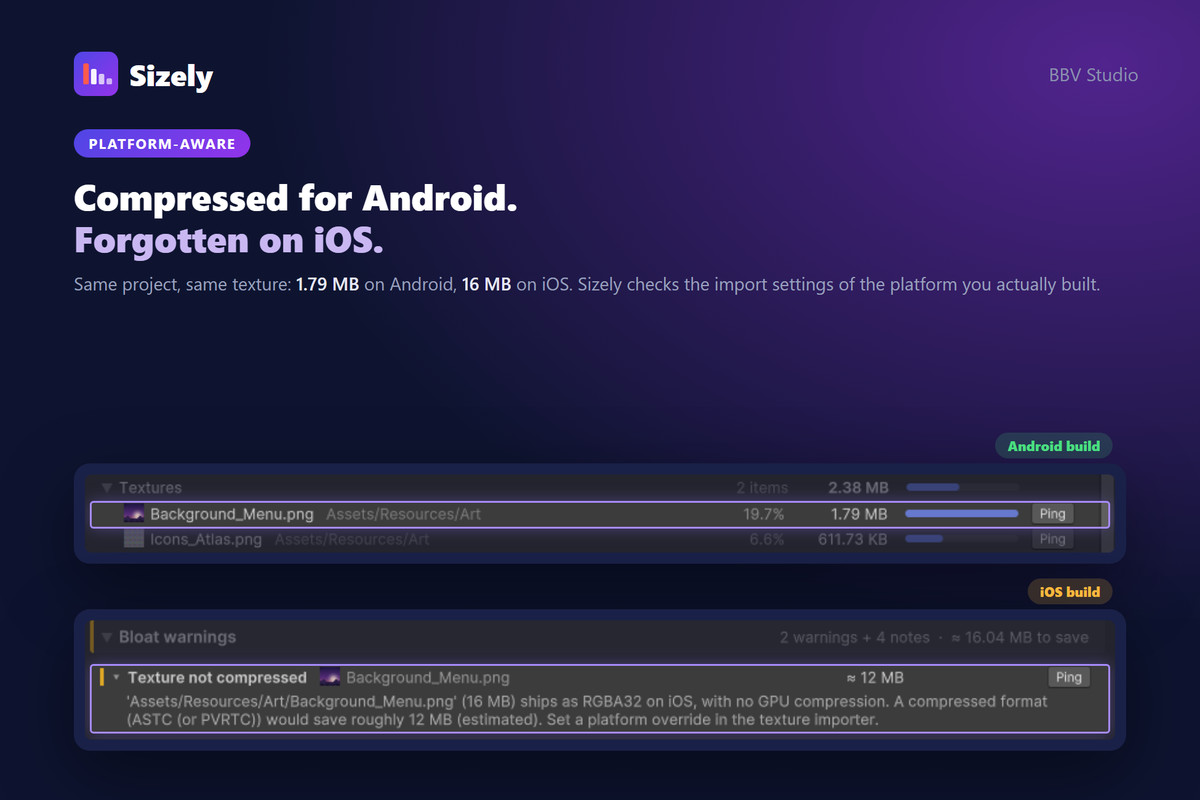
One release, the menu background went from 1.79 MB to 16 MB. Nobody noticed: the build just got a bit heavier, like it does every release. APK Analyzer said data.unity3d had grown. It couldn't say which of three thousand assets did it, or why.
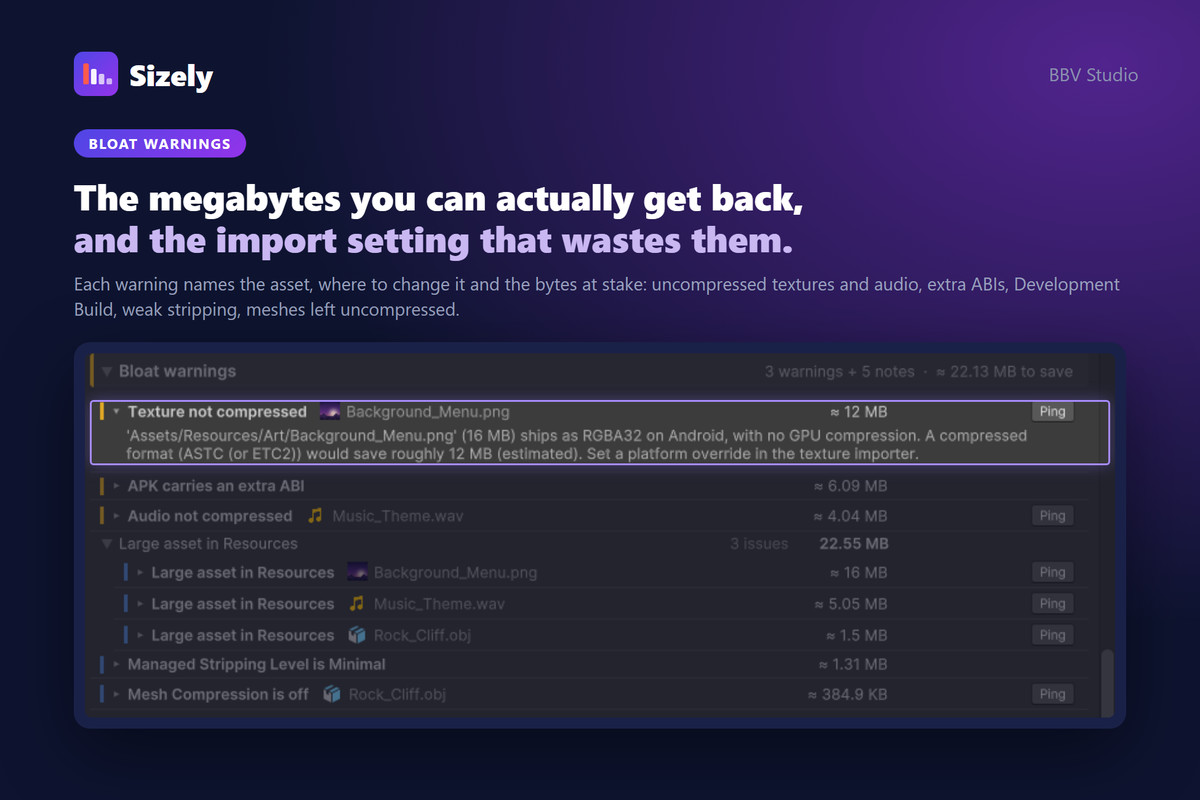
Sizely answers both. It reads Unity's own BuildReport, maps the size back to real project assets, and tells you why each one is big in the language of your project: 'Assets/Resources/Art/Background_Menu.png (16 MB) ships as RGBA32 on Android. A compressed format would save roughly 12 MB.'
Why not the free tools?
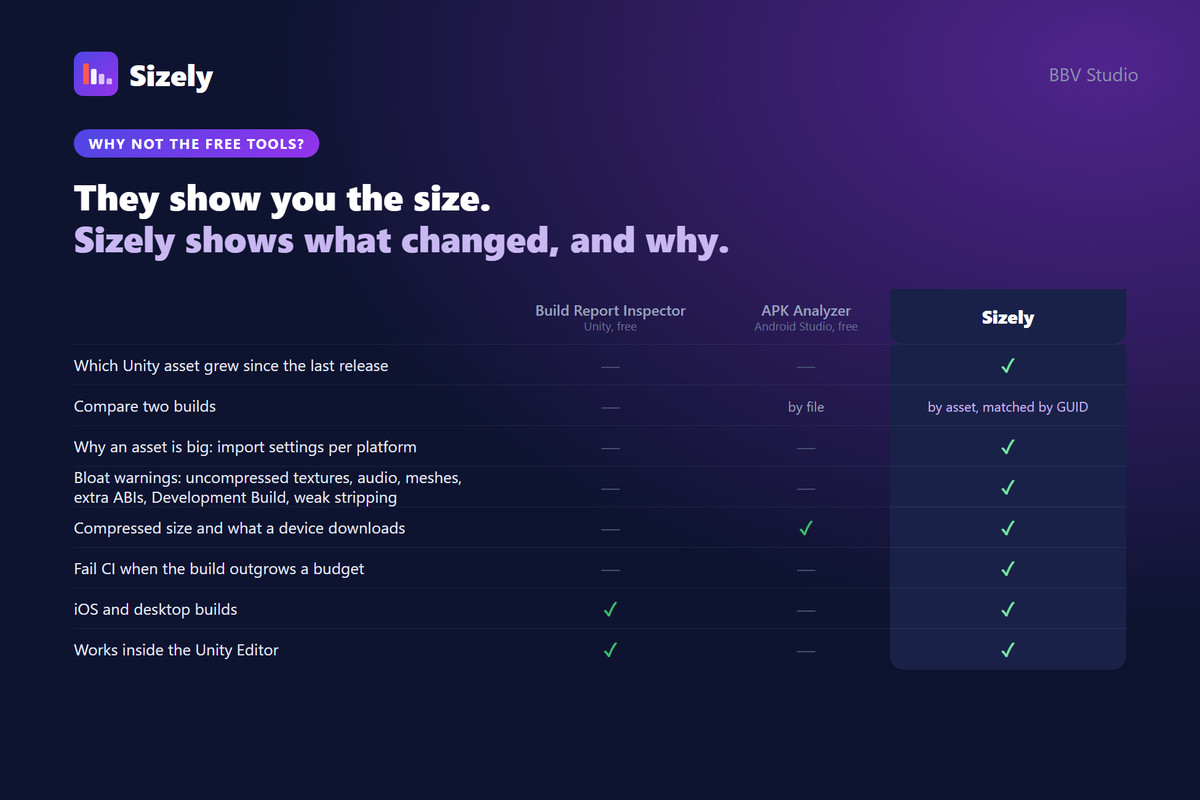
Unity's Build Report Inspector shows what is inside one build, at uncompressed sizes. Android Studio's APK Analyzer compares two APKs, but file by file: it can tell you data.unity3d grew, not which asset inside it did. Sizely connects the two and adds what neither does:
- Which Unity asset grew since the last release, matched by GUID
- Why it is big: import settings checked for the platform you actually built
- What a device downloads, read from the APK or app bundle itself
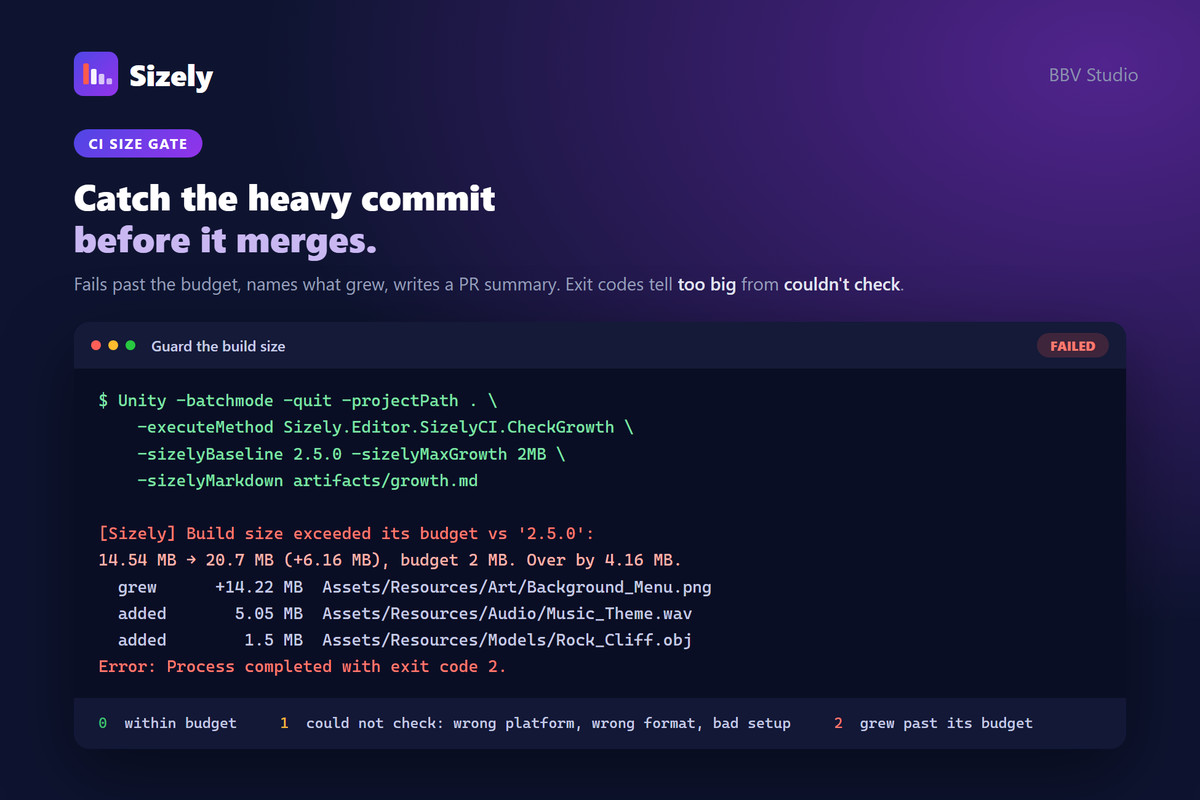
- A CI check that fails the pipeline when the build outgrows its budget
What a device actually downloads (Android)
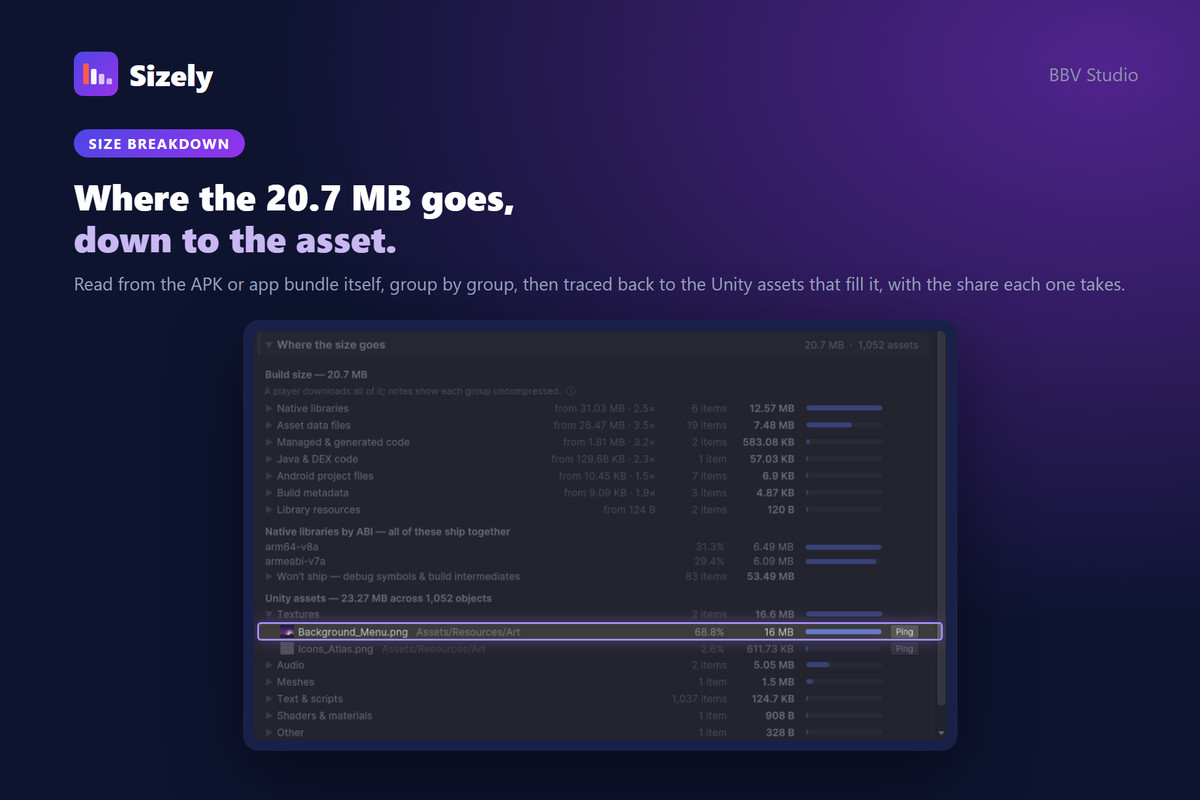
Sizely opens the APK or app bundle it just built and shows what every group of files takes inside it, compressed, beside the same content uncompressed. On one real project the native libraries were 248 MB in the build report and 80 MB in the archive. For an app bundle it also subtracts the metadata Google Play strips and the ABI other devices get: a 159.84 MB bundle came out at about 100 MB on a phone.
Compare builds
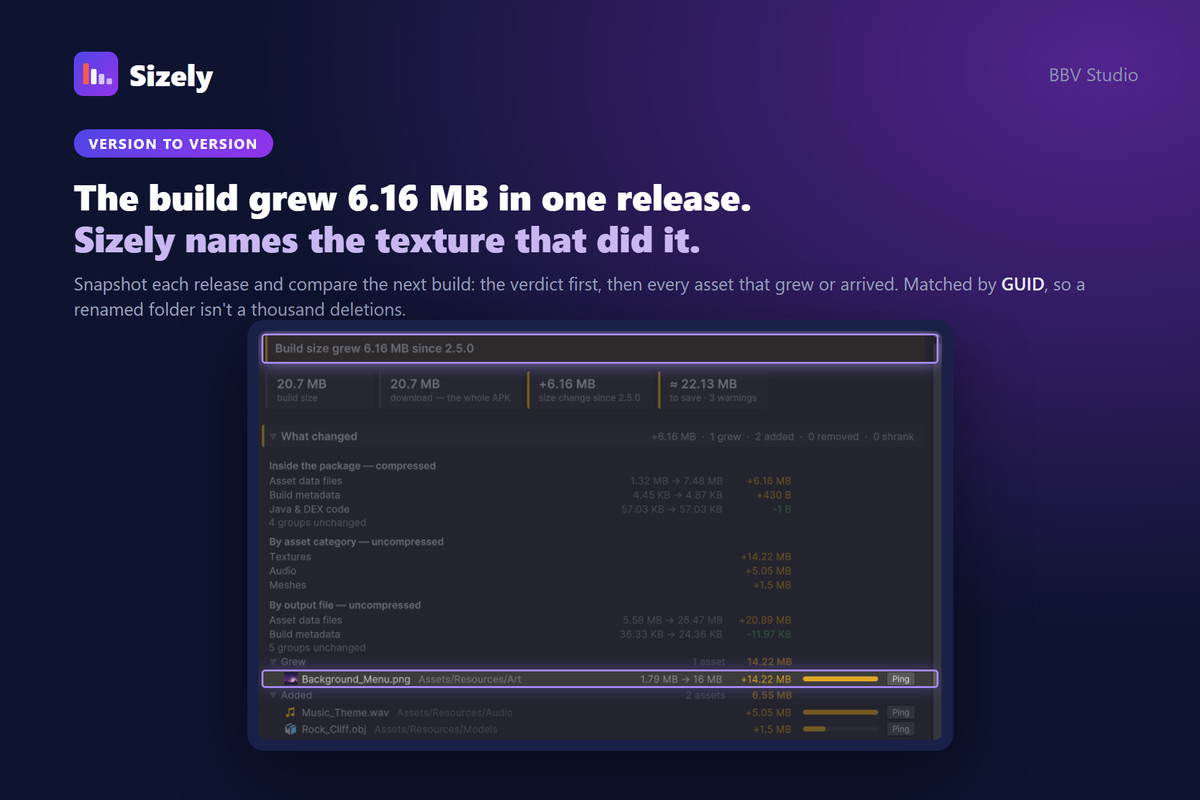
- Save a snapshot for each release and diff the next build against it
- The verdict first, then the change by asset category, by output file and per asset: grew, shrank, added, removed
- Assets matched by GUID, not path. On a real pair of builds where a package had been renamed, path matching reported 1110 additions and 1067 removals; by GUID it was 60 and 17
Find bloat, for the platform you built
- Uncompressed and oversized textures
- Uncompressed audio
- Models with Mesh Compression off
- Assets packed into the build more than once
- Large assets force-included under Resources/
- Development Build left on, and a weak Managed Stripping Level
- Extra ABIs in an APK, with the exact saving
- Compression is read from each asset's importer override for the build's platform, so a texture compressed for Android but left as RGBA32 for iOS is caught on the iOS build
- Assets in read-only packages (registry, Git, built-in) fold into one line, so the list is what you can actually fix
Honest numbers
Sizely refuses comparisons that cannot mean anything rather than show a misleading delta: two different platforms, or an APK against an app bundle. In CI both exit with a "could not check" code, not a failure.
Guard build size in CI
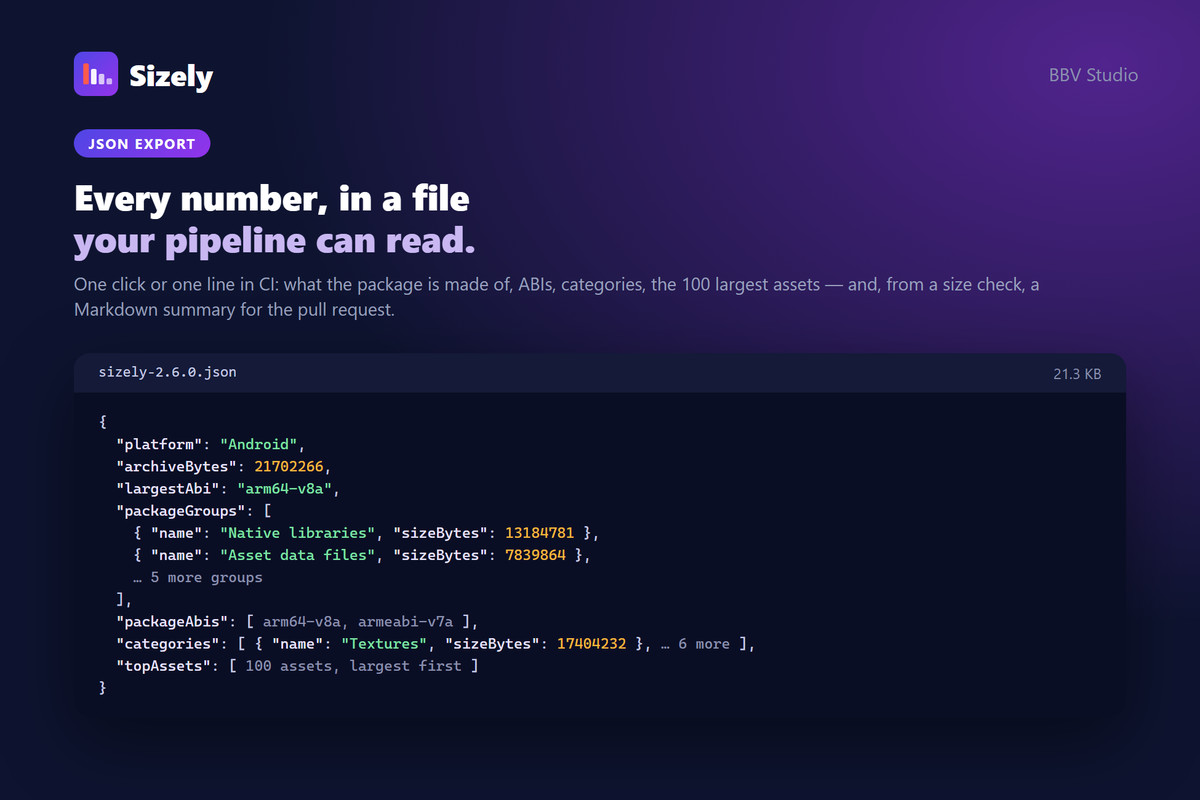
Run the same comparison headless after a player build. Set a growth budget and fail the pipeline when the build exceeds it; the log names the biggest contributors. Separate exit codes tell a real regression (2) from a setup problem (1). The same run writes a JSON report and a Markdown summary ready to post as a pull-request comment.
Build normally, then open Window → Sizely → Analyze Build. There is no extra capture step: Sizely receives the BuildReport from Unity's build pipeline as each build finishes, and an open window picks it up on its own.
Supported platforms: Android (APK/AAB), iOS and Windows. The download estimate is Android only, since iOS and desktop builds produce no single archive.
Unity: 2022 LTS – Unity 6
Editor-only and read-only: Sizely never builds a player, modifies your assets or writes anything into your Assets folder.
From the publisher's Asset Store listing.
Technical details
- Download breakdown (Android) — Sizely opens the APK or app bundle it just built and reports what each group of files occupies inside it, compressed, beside the same content uncompressed and the ratio between them.
- Honest download estimate — an app bundle carries every ABI and metadata the store strips; Sizely counts one ABI plus everything shared and names the ABI it assumed. An APK is reported whole, because it is downloaded whole.
- Build size breakdown — see the package size, shipped output files, asset categories and the largest individual assets in each.
- Cross-build diff — compare against a saved snapshot: a one-line verdict, then changes by category and output file, and assets that grew, shrank, were added or removed. Assets are matched by GUID, so moving or renaming a folder is not mistaken for deleting and re-adding its contents.
- Bloat warnings — find uncompressed or oversized textures, uncompressed audio, models with Mesh Compression off, assets packed more than once, large assets under Resources/, Development Build left on, a weak Managed Stripping Level and extra ABIs in an APK, with estimated savings.
- Platform-aware checks — texture compression checks use the importer overrides for the platform that was actually built.
- Runs in CI — check build growth against a saved baseline and fail the pipeline when it exceeds a size budget. Exit codes distinguish a real regression from a setup problem. The same run writes a JSON report and a Markdown summary for a pull-request comment.
- JSON reports — export build analysis and diff results for CI artifacts or further tooling.
- Per-version snapshots stored as JSON — commit them to compare build size across releases. Comparisons that cannot mean anything are detected and flagged rather than producing misleading numbers: two different platforms, or an APK against an app bundle.
- Automatic BuildReport capture — every player build is captured as it finishes; no separate capture step or dependency on temporary Library/ files.
- Incremental-build support — when Unity omits packed asset data, Sizely carries it over from the last full build for that platform and clearly marks it as carried over.
- Editor-only, read-only — Sizely never builds a player, modifies your assets or adds runtime code to your build.
- Unity 2022 LTS → Unity 6. Verified build targets: Android (APK / App Bundle), iOS and Windows.
Compatibility
| Unity version | Built-in | URP | HDRP | Custom |
|---|---|---|---|---|
| 2022.3.62f2 | Compatible | Compatible | Compatible | Compatible |
As listed on the Asset Store.