
 View on Asset Store (opens in new tab)
Package details
- Latest version
- 1.0
- Last updated
- First released
- Unity version
- 2022.3.62 or later
- Package size
- 231.4 MB
- Files
- 45
- Favorites
- 1
- Views in the past week
- 8
Price tracking
- Last checked
- Tracked since
- Lowest recorded
- $21.00 on
Keywords

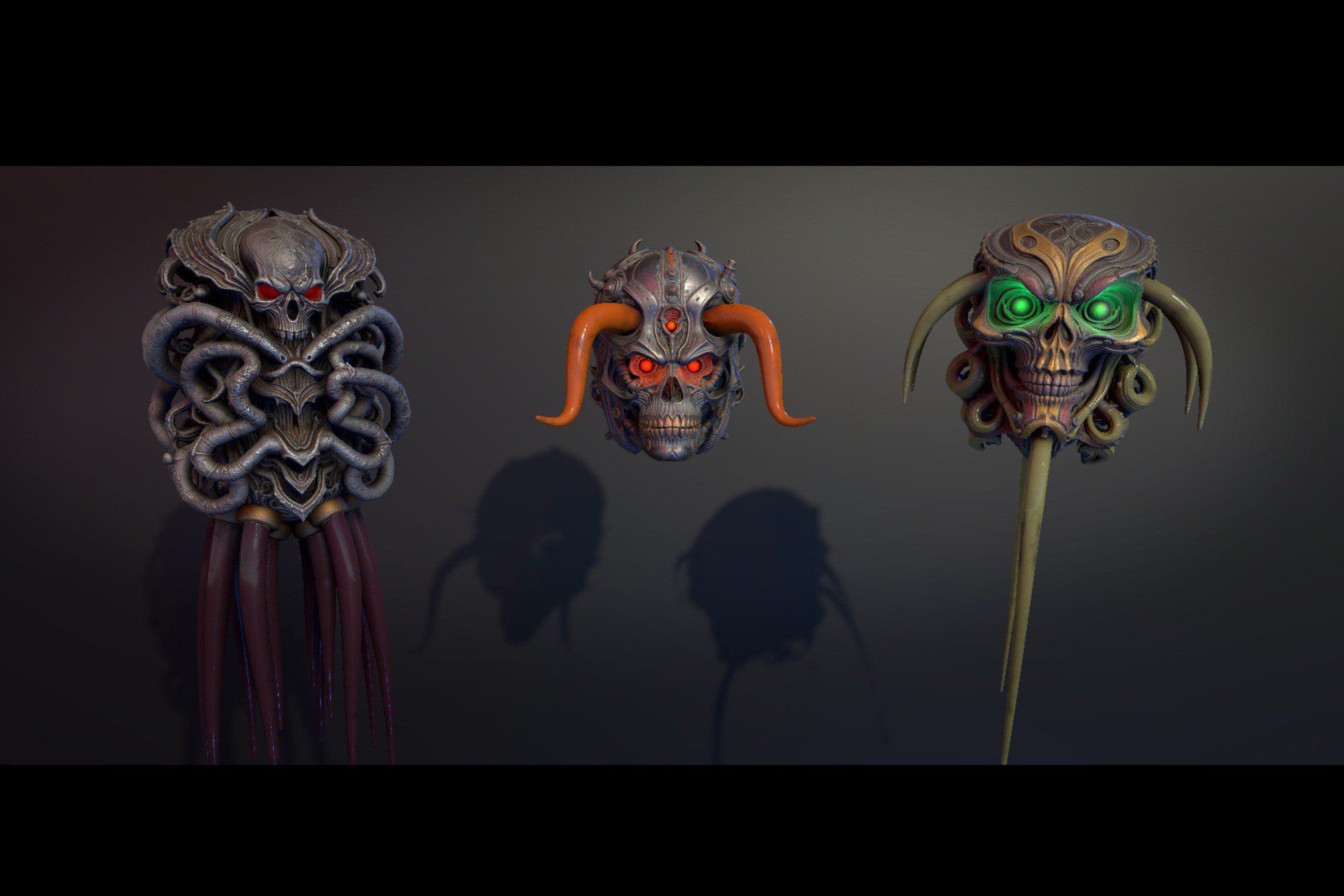
3 Servitor Robot Skulls - Grim Dark Scifi - Procedurally Animated
A collection of 3 Servitor Skulls for Grim Dark Scifi settings. Includes LODs and materials for Built-in, URP, and HDRP render pipelines.
Affiliate link · Purchases support this site
Price history
Last 6 months
USDAsset preview
1 / 10

3 Servitor Robot Skulls - Grim Dark Scifi - Procedurally Animated screenshot 1





About this asset
3 Servitor Robot Skulls - Grim Dark Scifi - Procedurally Animated is a curated pack of stylized Servitor Robot Skulls designed for dark fantasy worlds.
Each Servitor Skull is optimized for real-time use and includes multiple LOD levels for performance scalability.
Procedural Animations
Each Skull is animated using procedural animations (see the video files). They react to being moved or rotated meaning you dont have to set up any animation triggers, events etc. Just control their movement and rotation and they will procedurally create the correct response movements. For instance to give it a "being hit"-animation you can just move the main gameobject of the robot skull a distance back, the procedural script will detect this and create a motion out of it (as shown in the videos).
Note1: Camera Frustum Performance
To save on performance, assign your cameras to the Visibility Hook scripts camera field (attached to the main prefab gameobject). This turns the procedural scripts off whenever no camera is looking at them which saves on performance.
Note2: URP Lights
URP uses different light intensities. Either set the point lights at the eyes of the robots intensity to 0.05 or use the demo scenes "URP/HDRP Material Switcher" gameobject that automatically does that when it also sets the materials.
Features
- 3 Servitor Robot Skulls
- Grim Dark Scifi / stylized art direction
- PBR materials
- Multiple LODs per Robot Skull
- Consistent scale and orientation for game-ready use
- Demo scene for preview and inspection
Render Pipeline Support
This asset includes separate materials for:
- Built-in Render Pipeline
- Universal Render Pipeline (URP)
- High Definition Render Pipeline (HDRP)
No project settings are modified on import.
An optional editor-only helper is included to assist with material assignment in URP and HDRP.
Screenshots
All screenshots were taken on the Built-in Render Pipeline and contain no post processing.
Demo Scene
A lightweight demo scene is included for preview purposes.
From the publisher's Asset Store listing.
Technical details
Models
- Number of robots: 3
- Meshes per robot: 2
- LODs per robot: 6
- Approx. triangle count (LOD0): ~50,000
- Lowest LOD triangle count: ~5,000
- Scale: 1 unit = 1 meter
- Orientation: Z forward, Y up
- Pivot: At base
Textures & Materials
- Texture resolution: 4K (4096×4096)
- Mask Map (R = Metallic, G = Occlusion, B = Edge (unused), A = Smoothness)Texture types included: Albedo / Base Color Normal
- PBR workflow
- Separate materials provided per render pipeline
Scripts:
- The project contains 3 Scripts: Visibility Hook (where you decide the radius for when the robot animations should be culled), SimpleVerletTail (which creates dynamic tentacle movement) and HoverInertia (which creates the main reactive physical response + the hover movement of the robot).
Compatibility
- Supported platforms: All platforms supported by Unity
- HDRPRender pipelines: Built-in URP
Additional Notes
- No third-party dependencies
- No project settings are modified on import
Compatibility
| Unity version | Built-in | URP | HDRP |
|---|---|---|---|
| 2022.3.62f2 | Compatible | Compatible | Compatible |
Fully compatible with Built-in, URP, and HDRP. A custom material-switching utility is included (in the demo scene) to automate the conversion process, ensuring seamless integration into any 3D project.
As listed on the Asset Store.