
 View on Asset Store (opens in new tab)
Package details
- Latest version
- 1.5.3
- Last updated
- First released
- Unity version
- 6000.0.75 or later
- Package size
- 659 KB
- Files
- 85
- Favorites
- 1
- Views in the past week
- 4
Price tracking
- Last checked
- Tracked since
- Lowest recorded
- $9.99 on
Keywords

Modular Labs - Debug Tool
A powerful, attribute-driven runtime debug overlay that empowers developers to expose gameplay variables, trigger methods, and visualize real-time data directly in-game with minimal setup.
Affiliate link · Purchases support this site
Price history
Last 6 months
USDAsset preview
1 / 3
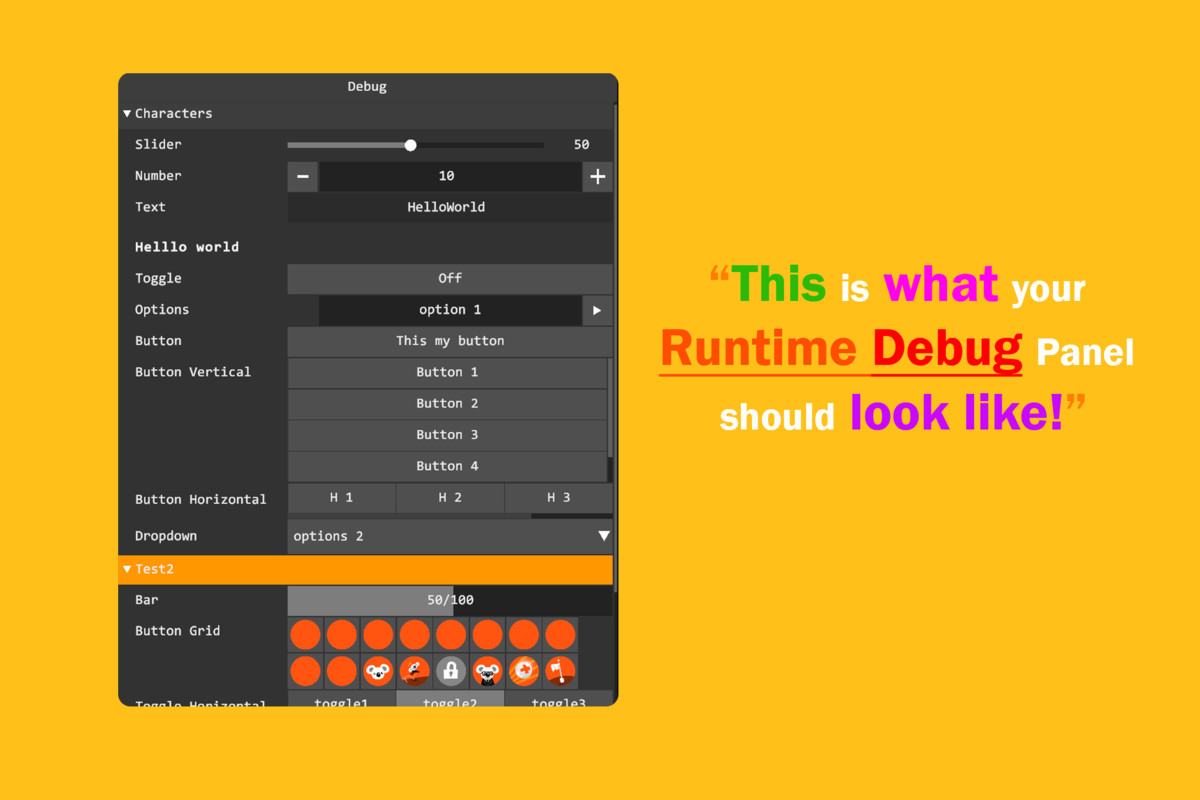
Modular Labs - Debug Tool screenshot 1
About this asset
📖 Documentation | 🛠️Support
⚠️ Dependencies
Modular Labs Debug Tool is a professional-grade runtime debugging framework that revolutionizes how you iterate on game balance, test gameplay mechanics, and troubleshoot issues. Perfect for game developers, level designers, QA teams, and anyone who needs instant access to game data during play sessions.
What Makes It Special?
Stop wrestling with complex debug UI systems. With Modular Labs Debug Tool, you can expose any variable, method, or game parameter to a beautiful, interactive in-game panel in just a few lines of code. Our attribute-driven architecture handles all the UI complexity for you, letting you focus on what matters: your game.
Key Benefits:
✨ Instant Integration - No complex UI setup required. Simple handler-based system gets you up and running in minutes.
⚡ Real-Time Iteration - Tweak gameplay values, test logic branches, and trigger events without restarting your game. Speed up your development workflow dramatically.
🎛️ Comprehensive Controls - Sliders, toggles, buttons, text fields, dropdowns, progress bars, and more. Over 15 different input types to suit any debugging need.
📊 Organize Your Data - Group related debug variables into logical sections. Keep your debug panel clean and navigable, no matter how many parameters you're tracking.
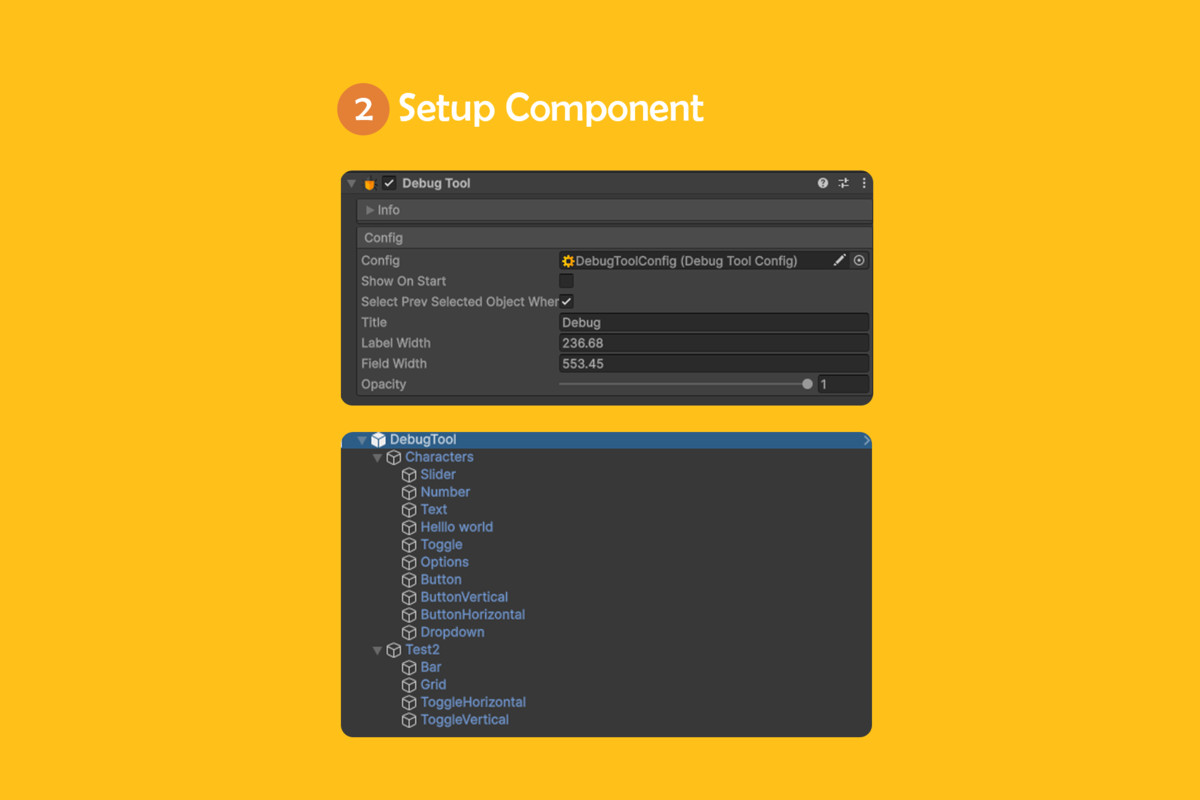
🎨 Fully Customizable - Adjust label width, field width, panel opacity, dimensions, and title. Style the debug tool to match your game's aesthetic.
🚀 Event System Integration - Built-in event system lets you react to debug tool interactions. Perfect for triggering special behaviors or logging debug sessions.
⌨️ Smart Navigation - Easy keyboard and mouse navigation through your debug parameters.
📦 Production Ready- Optimized performance with smooth scrolling support for any number of debug fields.
🔧 Extensible Architecture - Create custom field types by extending the base handler classes. Unlimited possibilities.
Perfect For:
- Game Developers: Speed up gameplay iteration and balance testing
- Level Designers: Adjust difficulty, spawn rates, and environmental parameters on the fly
- QA Teams: Test edge cases and reproduce bugs faster
- Artists: Live-preview shader parameters, colors, and visual effects
- Data Scientists: Monitor AI behavior, pathfinding, and decision-making in real-time
Features at a Glance:
- ✅ 15+ built-in field types (sliders, toggles, buttons, text, dropdowns, and more)
- ✅ Dynamic field organization into groups
- ✅ Real-time value updates during gameplay
- ✅ Customizable UI dimensions and styling
- ✅ Easy-to-extend architecture for custom field types
- ✅ Complete working samples included
- ✅ Full event system for advanced debugging workflows
Built for Developers, by Developers
Modular Labs Debug Tool is part of the comprehensive Modular Labs ecosystem, designed with real-world game development in mind. From indie studios to large teams, developers trust this framework to accelerate their development pipeline.
Get Started Instantly
Includes complete sample project demonstrating all features. Learn from working examples and integrate into your project within minutes.
From the publisher's Asset Store listing.
Technical details
🎯 Field Types (15+ Options)
Input Fields:
- Numeric Input - Direct number entry with validation
- Text Input - String input fields for naming, URLs, commands
- Slider - Precise value adjustment with min/max/step configuration
- Dropdown Menu - Single selection from predefined options
- Options/Radio Buttons - Multiple choice selection
Interactive Controls:
- Buttons - Single action triggers with custom labels
- Button Grid - Multiple buttons in organized grid layout
- Horizontal Button Layout - Side-by-side button arrangement
- Vertical Button Layout - Stacked button arrangement
- Toggle Switch - Boolean on/off controls
- Horizontal Toggle Layout - Multiple toggles in a row
- Vertical Toggle Layout - Multiple toggles in a column
Display Elements:
- Progress Bar - Visual value representation (0-100%)
- Header - Organizational section headers
- Field Headers - Individual field labeling
🏗️ Architecture Highlights
Handler-Based System:
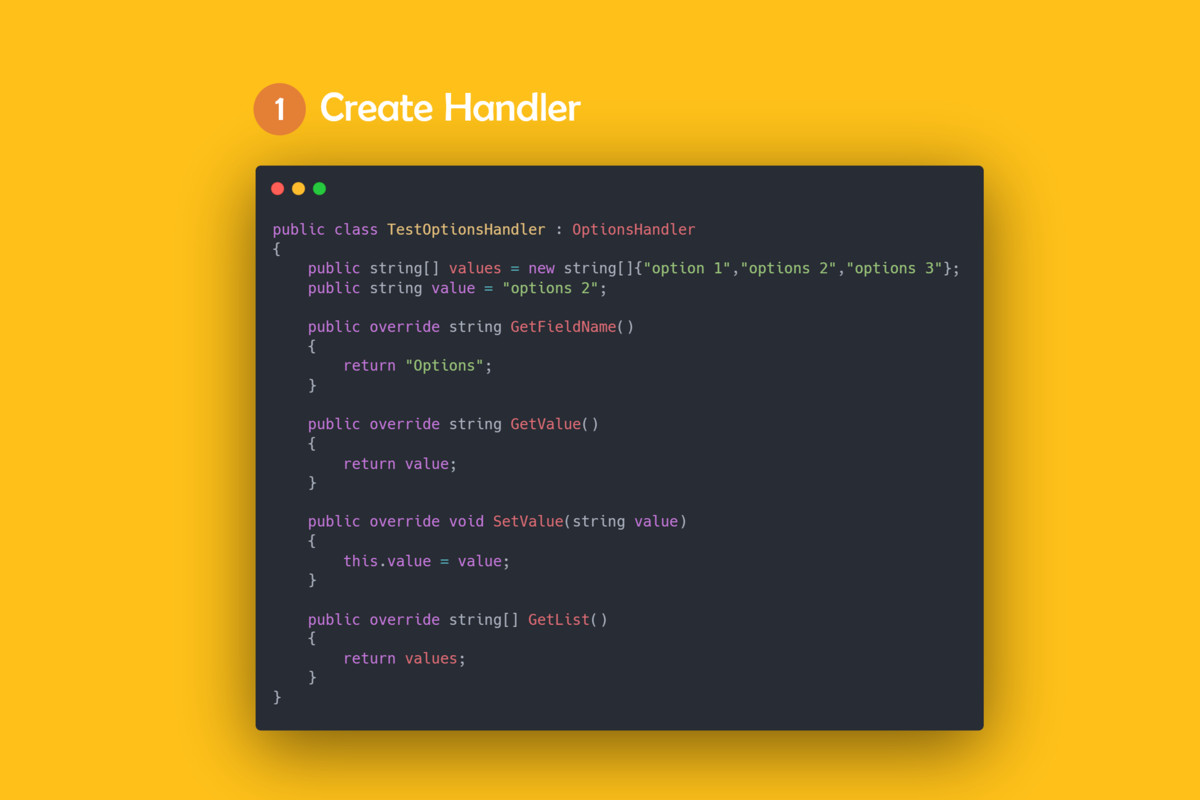
- `FieldHandler<T>` - Base class for all debug fields
- Simple Get/Set pattern for synchronizing game values
- Automatic UI generation based on field type
- Type-safe implementation
Supported Field Types:
- `FieldType.Slider` - Range-based input
- `FieldType.Toggle` - Boolean control
- `FieldType.Button` - Single action
- `FieldType.Text` - String input
- `FieldType.Number` - Numeric input
- `FieldType.Dropdown` - Selection list
- `FieldType.Options` - Radio button group
- `FieldType.Bar` - Progress visualization
- `FieldType.Header` - Visual separator
- And more...
🎨 UI System
Canvas-Based Architecture:
- Canvas integration for flexible positioning
- Full RectTransform support for responsive design
- GraphicRaycaster for precise input handling
- ScrollRect support for unlimited fields
Customization Options:
- Dynamic width/height adjustment
- Label and field width control
- Opacity/transparency control
- Custom title per debug tool instance
- Title can be shown/hidden dynamically
Compatibility
| Unity version | Built-in | URP | HDRP | Custom |
|---|---|---|---|---|
| 6000.0.75f1 | Compatible | Compatible | Compatible | Compatible |
As listed on the Asset Store.