
 View on Asset Store (opens in new tab)
Package details
- Latest version
- 1.2.1
- Last updated
- First released
- Unity version
- 6000.5.8 or later
- Package size
- 8.3 MB
- Files
- 174
- Views in the past week
- 11
- Requires
Price tracking
- Last checked
- Tracked since
- Lowest recorded
- $14.99 on
Keywords
Scylla Chroma
Scylla Chroma is a feature-packed color palette- and gradient editor for Unity.
Affiliate link · Purchases support this site
Price history
Last 6 months
USDAsset preview
1 / 5
Scylla Chroma screenshot 1
About this asset
IMPORTANT: This tool requires Scylla Core.
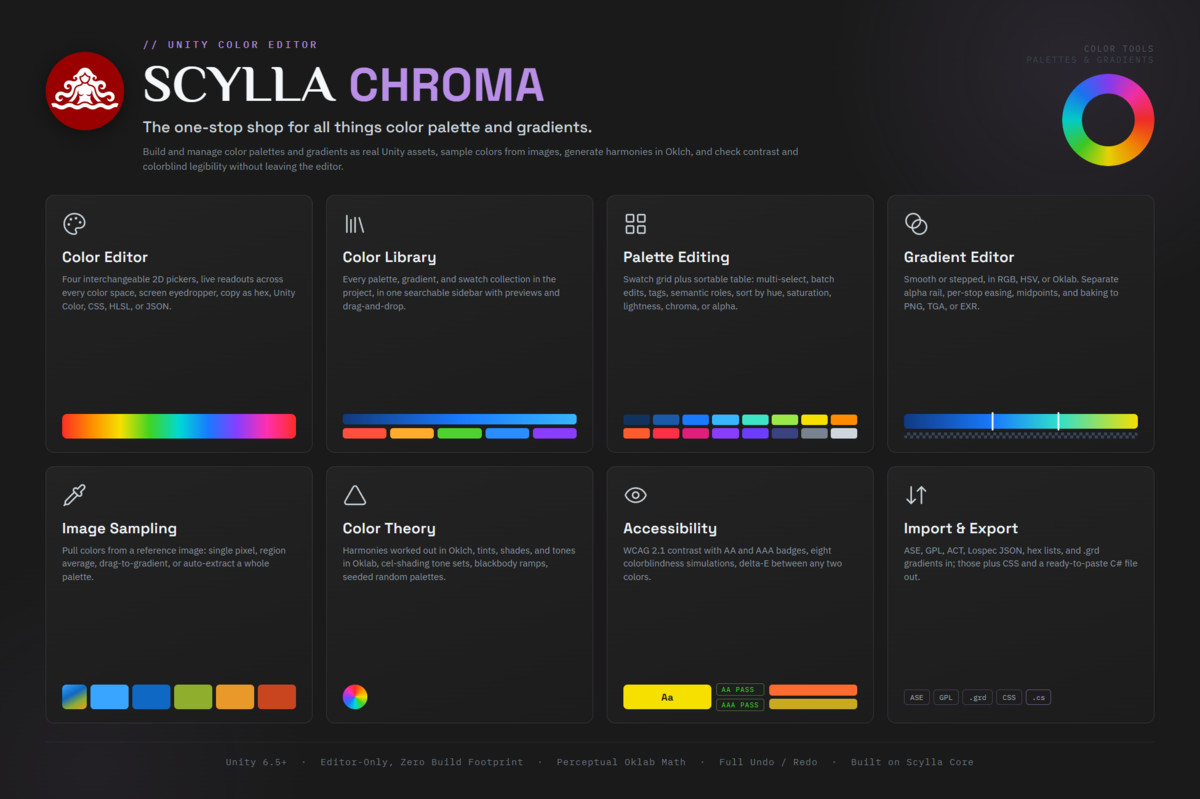
Scylla Chroma brings all color work in Unity into one editor. It builds and stores color palettes, creates advanced color gradients, picks colors from the screen, samples colors and gradients from images, generates color harmonies, checks contrast and color blindness legibility, compares palettes and recolors textures.
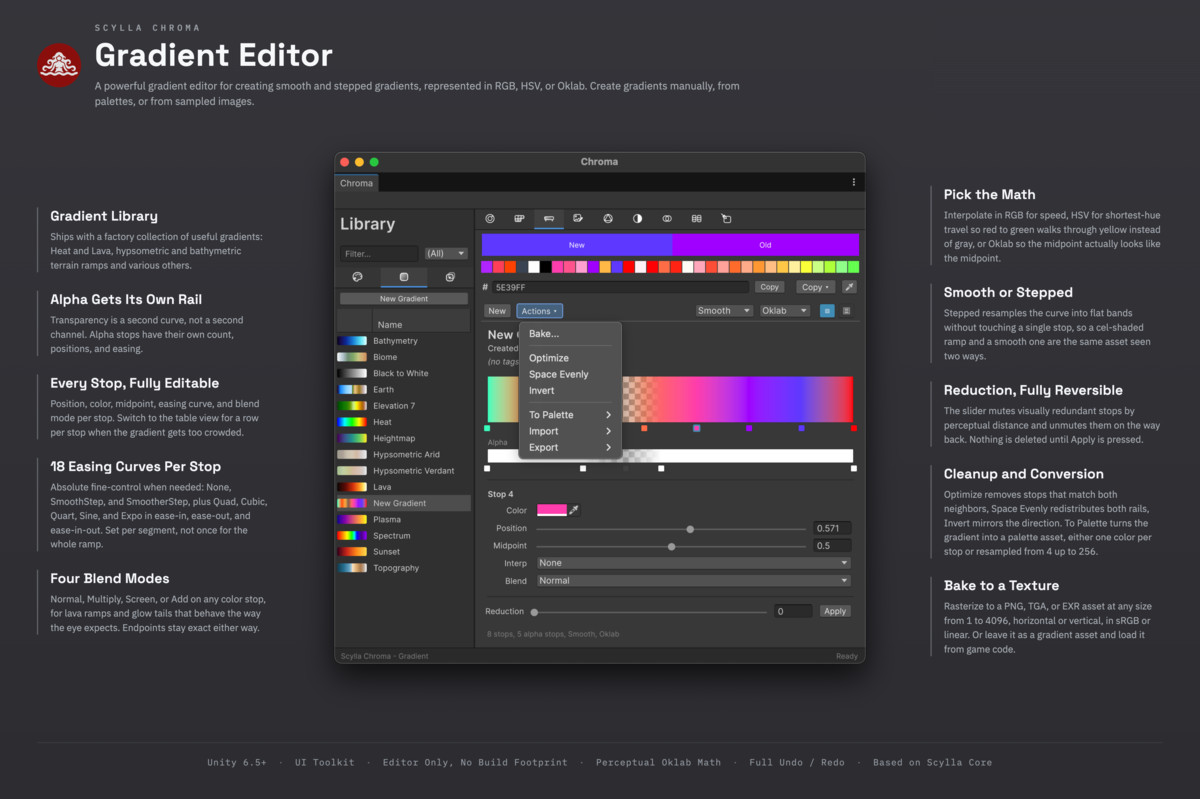
Chroma creates Scylla palette and gradient assets. Palettes can be loaded and used in game code. Gradients can be smooth or stepped, blend in RGB, HSV or Oklab color space, have independent alpha stops, and support non-destructive step reduction.
===== FEATURES =====
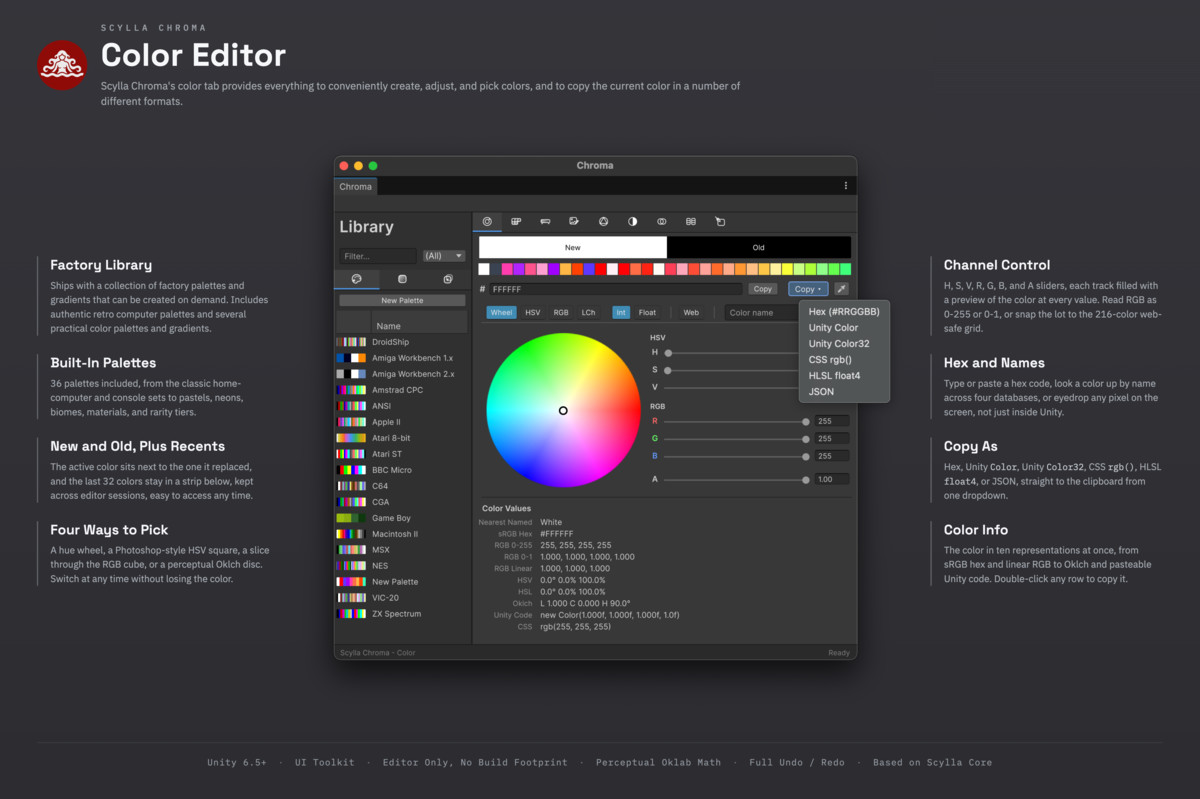
- Color editor: Four interchangeable 2D pickers (HSV wheel, HSV square, RGB cube slice, Oklch lightness and chroma plane), channel sliders in integer or float, hex input and output, alpha, and a live readout across every color space at once. A color name field resolves to the nearest named color, and a screen eyedropper, a history of recent colors and one-click copying as hex, Unity color values, CSS, shader code or JSON are included. A web-safe toggle reduces colors to the classic 216-color palette when a project needs it.
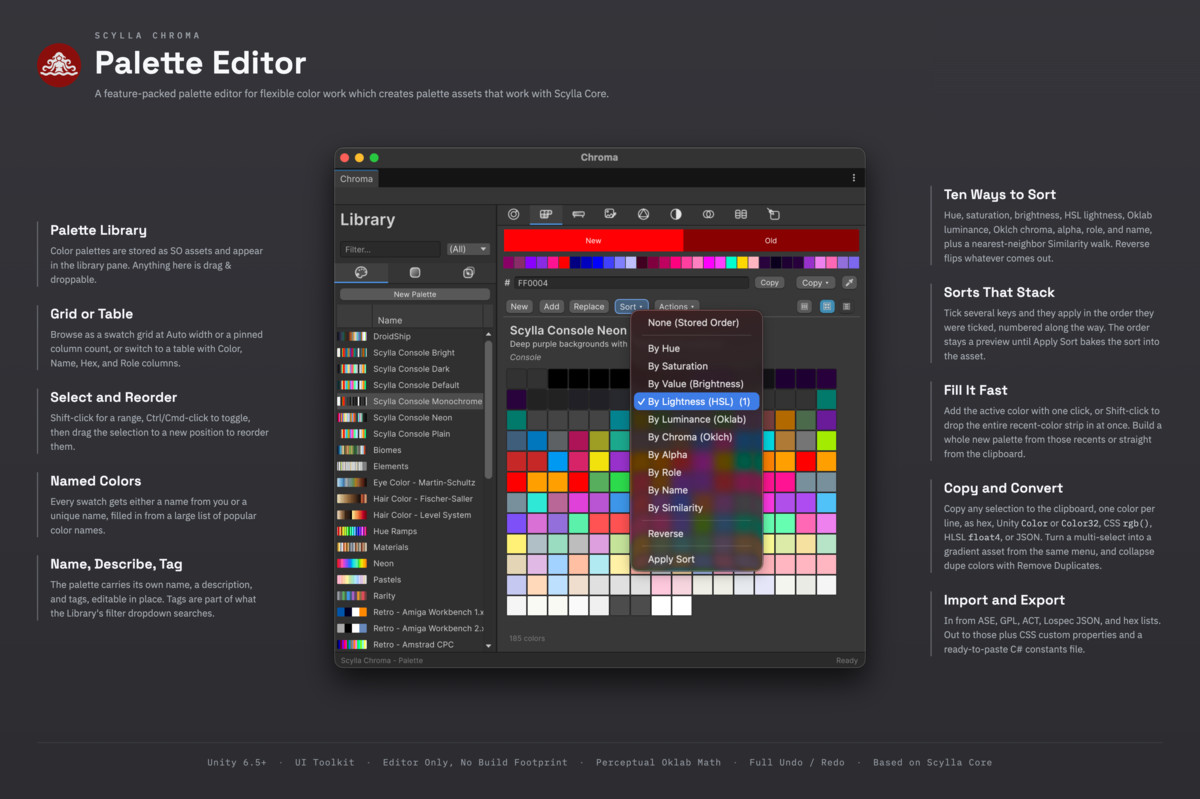
- Color library: Every palette, gradient and swatch collection in the project, in one searchable sidebar with previews and drag and drop. Double-clicking a color asset in the Project window opens it in Chroma.
- Palettes that behave like a database: A swatch grid and a sortable table, side by side. Multi-select, drag to reorder, batch edits, tags, lock flags and semantic roles. Sort by hue, saturation, lightness, chroma or alpha, and copy a whole selection as text in any of six formats.
- Gradient editor with perceptual blending: Smooth or stepped gradients in RGB, HSV or perceptual Oklab. A separate alpha rail with its own stops and easing, per-stop easing from fifteen easing curves, per-stop blend modes, midpoint handles, and a non-destructive Reduction slider that thins a dense gradient without deleting anything until the change is applied. Gradients bake to PNG, TGA or EXR, convert to and from palettes, and can have up to 4096 stops.
- Color mixer: Blend two colors and see the result side by side in sRGB, linear RGB, Oklab and HSV, with a ratio slider and one-click creation of a palette or gradient from the result.
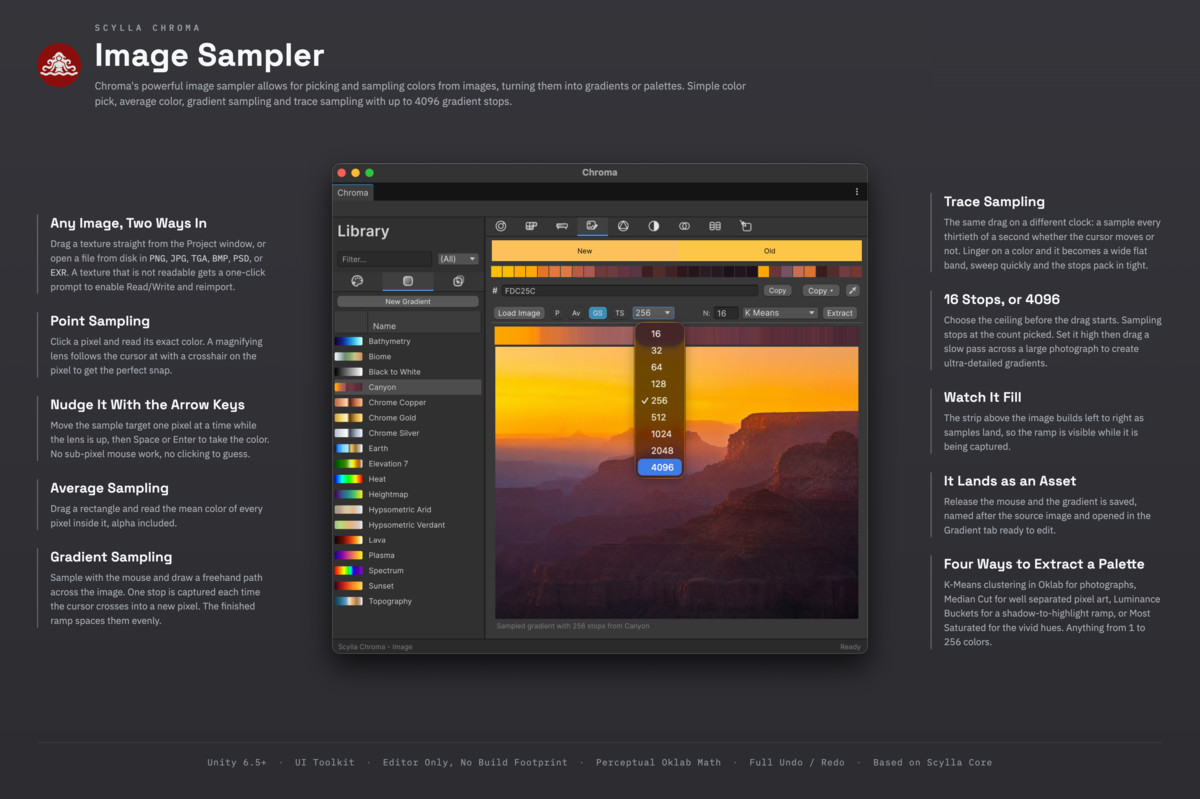
- Image sampling and extraction: Load a reference image and take colors from it: a single pixel under a magnifier, a region average, a freehand drag that becomes a gradient, or a motion-timed trace. A whole palette can also be extracted automatically with one of four methods (K-means in Oklab, median cut, luminance buckets or most-saturated).
- Color theory: Harmonies calculated in Oklch (complementary, triadic, analogous and more), tints, shades and tones in Oklab, seeded random palettes, cel-shading tone sets, blackbody ramps, and noise-driven palettes where each color follows coherently from the one before it.
- Color accessibility checks: WCAG 2.1 contrast with AA and AAA ratings, simulation of eight types of color blindness, Oklab color difference between any two colors, nearest named color lookup across CSS Level 4, X11 and RAL, correlated color temperature, and statistics per palette.
- Compare and recolor: Compare two palettes by the perceptual distance between their nearest entries, or remap a texture from one palette to another in Oklab and save the result as a PNG.
- Palette and gradient import and export: Palettes import from ASE, GPL, ACT, Lospec JSON, hex lists and Chroma's own format, and export to ASE, GPL, Lospec JSON, CSS, C# and Chroma's own format. Gradients round-trip through Chroma's format and import from Photoshop gradient files, both the legacy and the current layout, including files with several gradients.
===== DESIGNED FOR UNITY WORKFLOWS =====
- Native to Scylla Core: Palettes and gradients are Scylla Core color assets that game code can read directly.
- Full undo and redo on everything, like Unity's own tools.
- Built with UI Toolkit, the UI system of Unity's own editor windows.
- Perceptual color math throughout: Oklab and Oklch are used where it matters, so blends and sorting look right to the eye.
===== LINKS =====
From the publisher's Asset Store listing.
Technical details
- Unity version: 6.5 or later
- Type: editor-only Scylla Tool (no runtime code, no build footprint)
- Language: C# (.NET Standard 2.1, managed code only; no unsafe blocks, no native plugins)
- Distribution: precompiled editor DLL, built with UI Toolkit
- Render pipelines: agnostic (Chroma authors color data, it does no rendering)
- Required Scylla packages: Scylla Core (sold separately)
- Palette formats: import ASE, GPL, ACT, Lospec JSON, hex lists, Chroma JSON; export ASE, GPL, Lospec JSON, CSS, C#, Chroma JSON
- Gradient formats: Chroma JSON round-trip; import Photoshop .grd (GRD3 and GRD5, multi-gradient)
- Texture bake formats: PNG, TGA, EXR
- Editor platforms: Windows, macOS, Linux (the color assets it produces work on every Unity build target)
- License: Unity Asset Store standard EULA (single-seat)
- Documentation: scyllaframework.com
- API Docs: apidocs.scyllaframework.com
- Support: Discord
Compatibility
| Unity version | Built-in | URP | HDRP |
|---|---|---|---|
| 6000.5.8f1 | Compatible | Compatible | Compatible |
As listed on the Asset Store.