
 View on Asset Store (opens in new tab)
Package details
- Latest version
- 1.0
- Last updated
- First released
- Unity version
- 6000.3.7 or later
- Package size
- 971 KB
- Files
- 5
- Views in the past week
- 6
Price tracking
- Last checked
- Tracked since
- Lowest recorded
- $4.99 on
Keywords

Asset Graveyard
Hunt down every dead asset hiding in your project. Scan, inspect, and quarantine unused files in one click — before they bloat your next build.
Affiliate link · Purchases support this site
Price history
Last 6 months
USDAsset preview
1 / 2
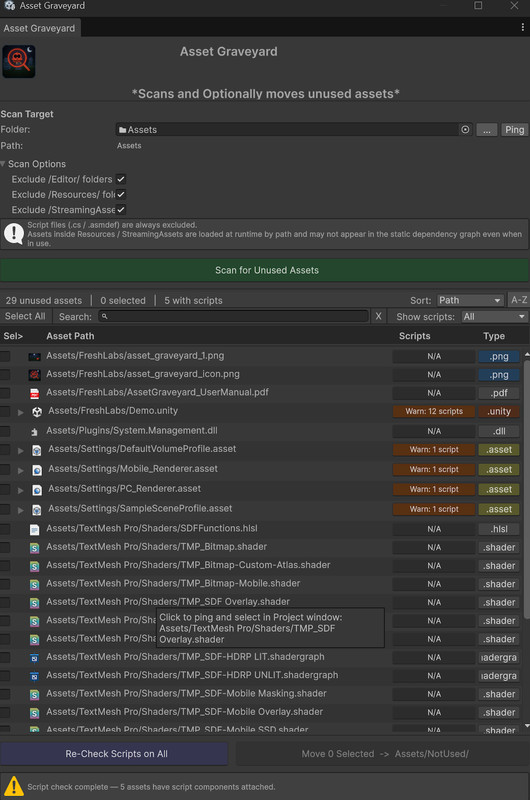
Asset Graveyard screenshot 1
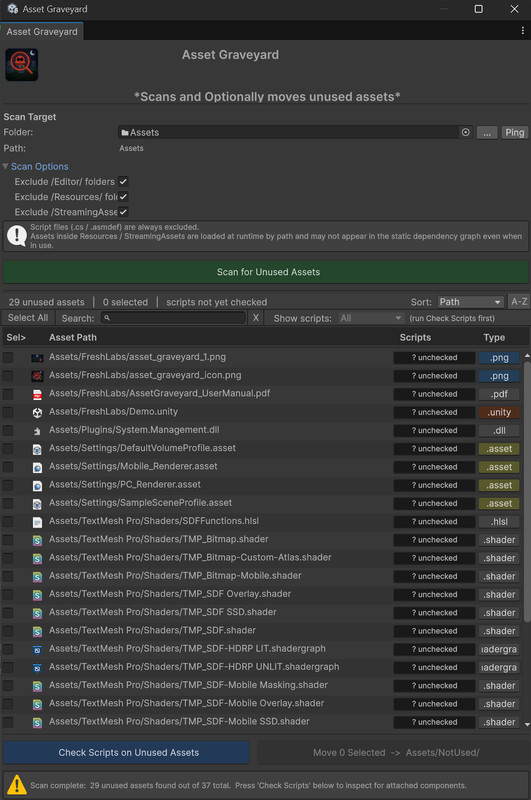
About this asset
Point it at any folder. Hit scan.
In seconds, Asset Graveyard cross-references your entire dependency graph and surfaces every asset that nothing in your project actually uses — sorted, filterable, and ready to act on.
Then go one step further with the built-in Script Check: load every unused prefab and scene and inspect them for attached MonoBehaviours, ScriptableObjects, and broken missing-script references. Because moving a prefab with live code on it is a bad day waiting to happen.
When you're ready, bulk-move everything to a quarantine folder — Assets/NotUsed/ — with your original folder structure fully intact. No broken GUIDs. No orphaned .meta files. Just a cleaner project.
Who It's For
- Developers shipping their first build and discovering it's 300MB heavier than expected
- Teams merging long-running feature branches full of prototype leftovers
- Anyone who's ever opened the Project window and thought "what even is this file?"
- Full USER Manual PDF documentation included
Works With Everything!
Asset Graveyard is a pure Editor utility with zero runtime footprint. It works identically with URP, HDRP, and the Built-In Render Pipeline — no configuration required.
Requires Unity 6.0 or later.
*May compile on older versions, but cannot promise anything.*
A note on safety: Asset Graveyard never deletes anything. It moves assets to a recoverable quarantine folder so you can verify your project is intact before committing to a cleanup. Your project, your call.
From the publisher's Asset Store listing.
Technical details
Features
🔍 Smart dependency scanning — powered by Unity's own AssetDatabase.GetDependencies() so results match exactly what your build would include
📋 Script inspection — detects MonoBehaviours, ScriptableObjects, and missing script references on unused prefabs and scenes, with full GameObject hierarchy paths
📁 Safe bulk-move — preserves original folder structure under Assets/NotUsed/, keeps GUIDs intact, handles name collisions automatically
🎯 Sortable, searchable results — filter by name, type, or script status; colour-coded extension badges for instant visual scanning
🗂 Flexible folder targeting — drag-and-drop any folder from the Project window, or use the browser; last-used folder remembered between sessions
⚙️ Configurable exclusions — independently exclude Editor, Resources, and StreamingAssets folders with one toggle each
Compatibility
| Unity version | Built-in | URP | HDRP | Custom |
|---|---|---|---|---|
| 6000.3.7f1 | Compatible | Compatible | Compatible | Compatible |
TMPro elements used.
As listed on the Asset Store.