
 View on Asset Store (opens in new tab)
Package details
- Latest version
- 0.2.2
- Last updated
- First released
- Unity version
- 6000.0.78 or later
- Package size
- 71.0 MB
- Files
- 553
- Favorites
- 25
- Views in the past week
- 63
Price tracking
- Last checked
- Tracked since
- Lowest recorded
- $30.00 on
Keywords

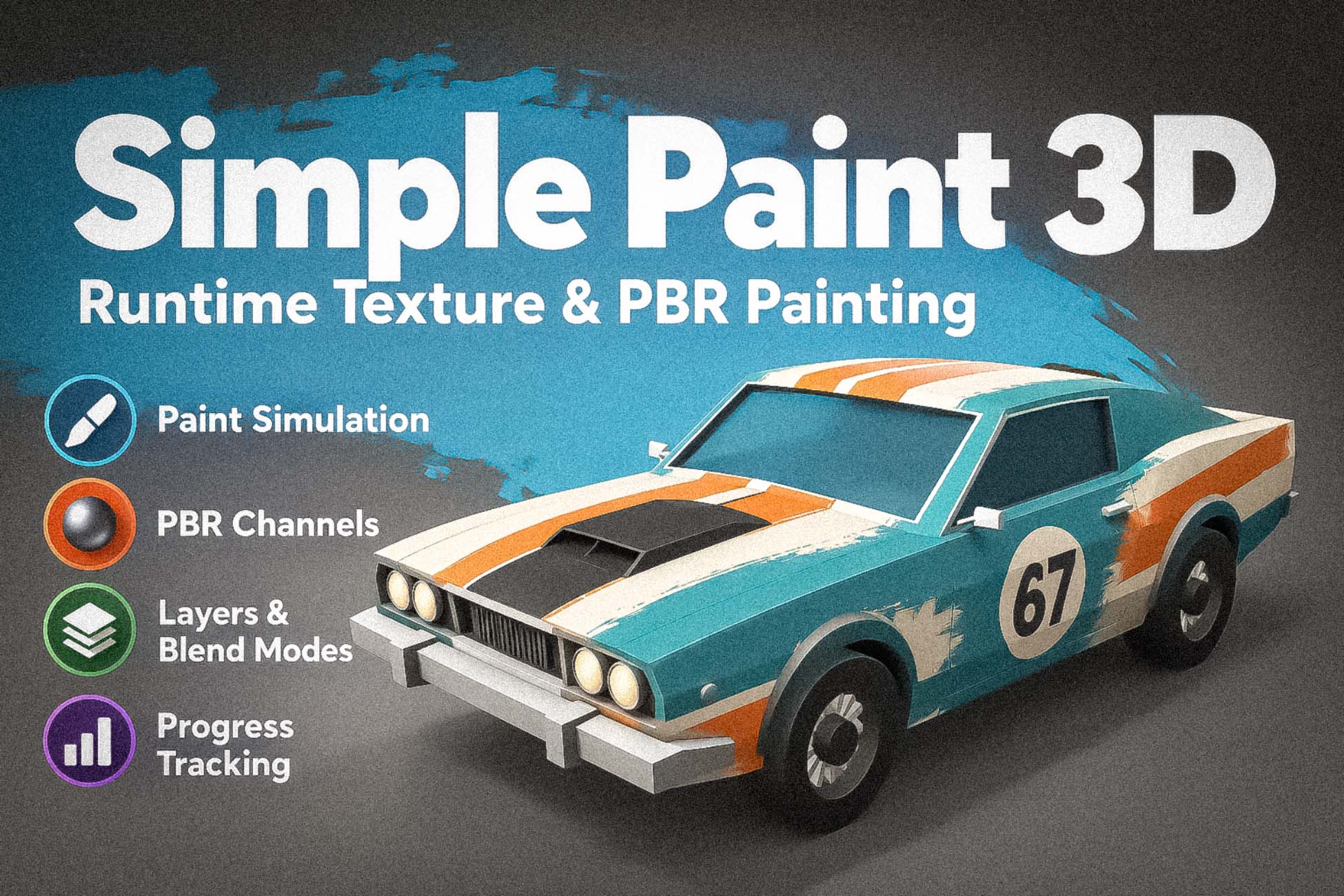
Simple Paint 3D - Runtime Texture & PBR Painting
Paint every PBR channel of a mesh at runtime: layers with real blend modes, wet paint that runs and drips, splats from physics and particles, and a tracker that knows how much is painted.
Affiliate link · Purchases support this site
Price history
Last 6 months
USDAsset preview
1 / 19

Simple Paint 3D - Runtime Texture & PBR Painting screenshot 1


About this asset
💬 DISCORD | 📖 DOCUMENTATION | 🎓 TUTORIALS | 🎮 DEMO
Most runtime painting tools put colour on a mesh.
Simple Paint 3D paints the whole material — and the paint can stay wet.
Shoot a moving character and watch the paint run down it while it keeps punching. Wipe a grimy window and let the game know the moment it is clean. Sweep a flamethrower across a box and scorch every surface the flame passes through. One stroke can write colour, metallic, smoothness and normal relief at once, onto layers with real blend modes, while your game runs.
Ten demo scenes show it as game mechanics, not as a whiteboard: a coloring book, a pottery studio, a sticker booth, a paint-gun range, a flamethrower, a glass cleaner, a haunted portrait, a spray-paint booth and a water-balloon fight.
Try it in your browser first: https://deepwave.itch.io/simple-painter-unity-demo
━━━━━━━━━━━━━━━━━
WHAT YOU GET
━━━━━━━━━━━━━━━━━
▶ PAINT THE WHOLE MATERIAL, NOT JUST ITS COLOUR
• A channel is any shader property you name: base colour, metallic, smoothness, a normal map, emission, an alpha or burn mask your own shader reads
• Three value types — Color, Scalar and Normal — each with the blend modes that make sense for it: 8 for colour (Normal, Multiply, Add, Min, Max, Screen, Overlay, Soft Light), 5 for scalars, 7 for normals (Lerp, RNM, UDN, Whiteout, Overlay, Max Slope, Subtract)
• Every channel holds its own stack of layers: visibility, opacity, a starting texture and a blend mode. Add and remove layers at runtime and pick the active one
• One brush carries a list of inks, so a single stroke can write several channels at once
▶ PAINT THAT STAYS WET
• Three GPU fluid solvers for the Simulation Canvas — add one component, swap it for another:
– Viscous: MLS-MPM paint that stays pinned until enough gathers, then flows downhill with viscosity and cohesion
– Ink: an Eulerian grid solver with vorticity confinement, for swirling, low-viscosity blooms
– Film: a height field that pools on flat faces, runs down steep ones and dries into a stain — the cheapest of the three
• A flow field decides where paint goes: a gravity direction, optional gust and micro-noise turbulence, optional influence from a normal map
• One simulation feeds several channels through per-channel thickness curves — a wet sheen on smoothness and raised relief on the normal map, from the same paint
• Works on skinned meshes: the paint-gun demo drips on an animated boxing dummy
▶ IT KNOWS HOW MUCH IS PAINTED
• The Progress Tracker reports a live 0–1 value for a channel: how much has been painted (Fill) or removed (Erase)
• Count coverage, a scalar value, a colour within a tolerance, or one red, green or blue component
• Restrict the count to the mesh's real UV islands, to your own mask texture, or to nothing
• Asynchronous GPU readback with a downsample factor and an update interval — measuring never stalls the frame
• An OnUpdated event on every tracker, plus scene-wide GlobalProgress and AllReady for "clean every car in the lot"
• In the demos, the glass cleaner fills a bar, and the haunted portrait fires a scare the moment it is wiped clean
▶ PAINT FROM ANYTHING
• Screen: mouse, pen and touch in one device. Pen and touch report real pressure. Whichever touches first owns the stroke, so a stray mouse nudge can't hijack a pen stroke, and a second finger can end the stroke so pinch-zoom doesn't smear. Optional brush-footprint hover preview; strokes that start over UI can be refused
• Collider: paints Unity's own contact points, with minimum and maximum impact speed and an impact-speed-to-pressure response
• Particle Collision: paints where particles land, each landing with its own random seed so a burst scatters (uses the Collision module's collision messages)
• Particle Pierce: paints every surface a particle flies through, sized from the particle — no Collision module needed
• Object: a transform's pose is the mark, with no raycast at all — rollers, rubber stamps, carried decals. One projector can straddle several objects
• Ray and contact devices share one stamp block: size, roll, and alignment flush to the surface or square to whatever approached it
▶ STROKES, BRUSHES AND FILLS
• Five stroke methods: Direct, Drag Dot, Line, Bezier (smoothed through a sliding window) and Anchored (a decal you drag to resize and rotate)
• Spacing, jitter and dash patterns for Line and Bezier
• Size, rotation, opacity and jitter can follow pressure, distance, speed, time, stroke direction or randomness, each through a curve you draw
• Standard Brush: a soft circle, a texture mask or none, with hardness and a texture atlas — a sticker pack or a set of spray patterns is one texture
• Region Fill with four scopes: the connected solid piece, one UV island, a smooth patch up to the nearest hard crease, or a single triangle
• Erase is a checkbox on the brush or the fill, not a separate tool
• Facing-angle culling, so thin double-sided surfaces are not painted through
• Swap input and brush at runtime with PaintTool.SwitchInput and SwitchPaint
▶ BUILT FOR REAL MESHES
• Skinned meshes: the live animated pose is baked once per frame, so paint lands on a moving, deforming character. Paintable Link lets cheap bone-parented colliders forward their hits to the real target
• UV seams are found and stitched automatically when the canvas starts — no pre-processing step, no extra component (the mesh needs Read/Write enabled)
• Three canvas types: Multi Channel (layers), Simulation (wet paint) and Single Target (one channel, no layers — the cheapest)
• Retarget a canvas at runtime with SetTarget; its render textures are reused
▶ A GPU PIPELINE THAT STAYS OUT OF THE WAY
• Painting runs on the GPU: stamps, layer compositing and simulation are render-texture passes, not CPU pixel loops
• One pooled command buffer per frame, recorded in five ordered phases; pooled render textures, commands and materials
• Job System batch raycasting for dense strokes
• The Simulation Canvas warms up its shader variants at load, so the first wet stroke doesn't hitch
• Automatic render-texture format fallback where float targets are unsupported (WebGL)
• Every pooled render texture is released when the Paint Engine shuts down
▶ TOOLING THAT TELLS YOU WHY NOTHING IS PAINTING
• Scene Diagnostics window (Tools > Deepwave > SimplePainter > Scene Diagnostics) scans the open scene for the setups that make painting silently do nothing, and says how to fix each one
• In builds, the same silent failures are reported once per cause in the player log: no Paint Engine, a tool with no paint config, a Paintable no canvas targets, a missing mesh, inks that match no channel
• Custom inspectors for canvases, channels, layers, brushes and inputs, and component icons in the Inspector
━━━━━━━━━━━━━━━━━
IS THIS FOR YOU?
━━━━━━━━━━━━━━━━━
BUY IT IF players paint, clean, spray, splat or scorch things in your game — a cleaning or restoration sim, a paint shooter, a coloring or customization game, a horror reveal — and you want the paint to change the material and the game to know about it. Programmers get full C# and HLSL source; designers get ten demo scenes to start from.
SKIP IT IF you need to paint textures in the Scene view while authoring (this paints at runtime — in Play Mode and in builds), if you need undo/redo or saving paintings built in, or if you want vertex painting or terrain splat-map painting.
━━━━━━━━━━━━━━━━━
NOT INCLUDED — SAID PLAINLY
━━━━━━━━━━━━━━━━━
• No undo/redo of strokes
• No save/load system for paintings — each channel's paint is a RenderTexture you can reach with GetPaintBuffer and store yourself
• No in-editor (Scene view) painting
• No networking or multiplayer synchronisation
━━━━━━━━━━━━━━━━━
TECHNICAL
━━━━━━━━━━━━━━━━━
• Unity 6000.0 LTS and newer
• Built-in, URP and HDRP: painting uses command buffers and blits, nothing pipeline-specific, and channels bind to whatever shader properties your materials use
• The demo scenes use URP materials; convert them in a Built-in or HDRP project. The flamethrower box uses a URP Shader Graph
• Requires the Input System, Burst and Mathematics packages; the demo scenes also use TextMesh Pro
• Paintable objects need a collider for pointer, collision and particle input, and Read/Write enabled for seam stitching and region fill
• Full C# and HLSL source, no DLLs: 201 runtime scripts in 10 assemblies, an editor assembly, 30 shader files
• link.xml included for IL2CPP managed stripping
• Namespace Deepwave.SimplePainter; includes Deepwave Core
WHAT IS INCLUDED
• Runtime and shader source
• Editor tooling: inspectors, drawers, Scene Diagnostics, shader-settings generator
• Ten demo scenes with models, textures, brush atlases and presets for channels, inputs, strokes and tools
• README with a five-minute quick start, Quick Guide (HTML) and CHANGELOG
━━━━━━━━━━━━━━━━━
SUPPORT
━━━━━━━━━━━━━━━━━
• Email support, typically answered within one working day
From the publisher's Asset Store listing.
Technical details
• Paint every PBR channel at runtime: colour, metallic, smoothness, normals, masks
• Layers per channel, with 8 colour, 5 scalar and 7 normal blend modes
• Wet paint: three swappable GPU fluid solvers — viscous, ink and film
• Progress Tracker: live % painted or erased, masked to real UV islands, async
• Mouse, pen and touch in one device, with real pen and touch pressure
• Paint from physics contacts, particle landings and particles flying through
• Rollers and stamps: an object's pose paints, no raycast needed
• Five stroke methods: direct, drag dot, line, Bezier, anchored decal
• Region fill: solid piece, UV island, smooth patch or single triangle
• Works on skinned meshes; UV seams stitched automatically
• Ten demo scenes built as game mechanics
• Full C# + HLSL source · Built-in / URP / HDRP
Compatibility
| Unity version | Built-in | URP | HDRP |
|---|---|---|---|
| 6000.0.78f1 | Compatible | Compatible | Compatible |
As listed on the Asset Store.