
 View on Asset Store (opens in new tab)
Package details
- Latest version
- 1.3.0
- Last updated
- First released
- Unity version
- 6000.3.7 or later
- Package size
- 215 KB
- Files
- 152
- Favorites
- 3
- Views in the past week
- 18
Price tracking
- Last checked
- Tracked since
- Lowest recorded
- $5.99 on
Keywords
Event Monitor - C# Event Debugger
- Price drop
Automatically trace C# events and UnityEvents in Play Mode — SUB, UNSUB, and INVOKE with no manual logging. Redux-style timeline, live subscribers, and time travel in the Editor.
Lowest recorded price
Get 90% off on Asset Store (opens in new tab)Affiliate link · Purchases support this site
Price history
Last 6 months
USDAsset preview
1 / 9
Event Monitor - C# Event Debugger screenshot 1

About this asset
Stop guessing who subscribed, unsubscribed, or fired your events.
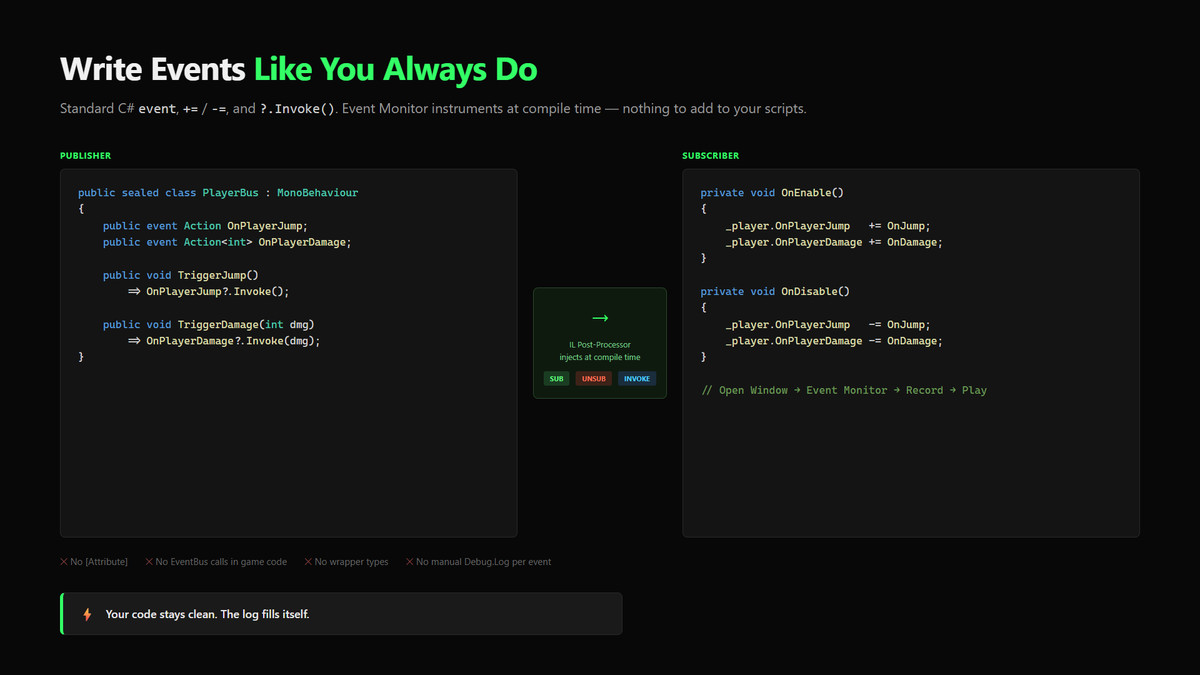
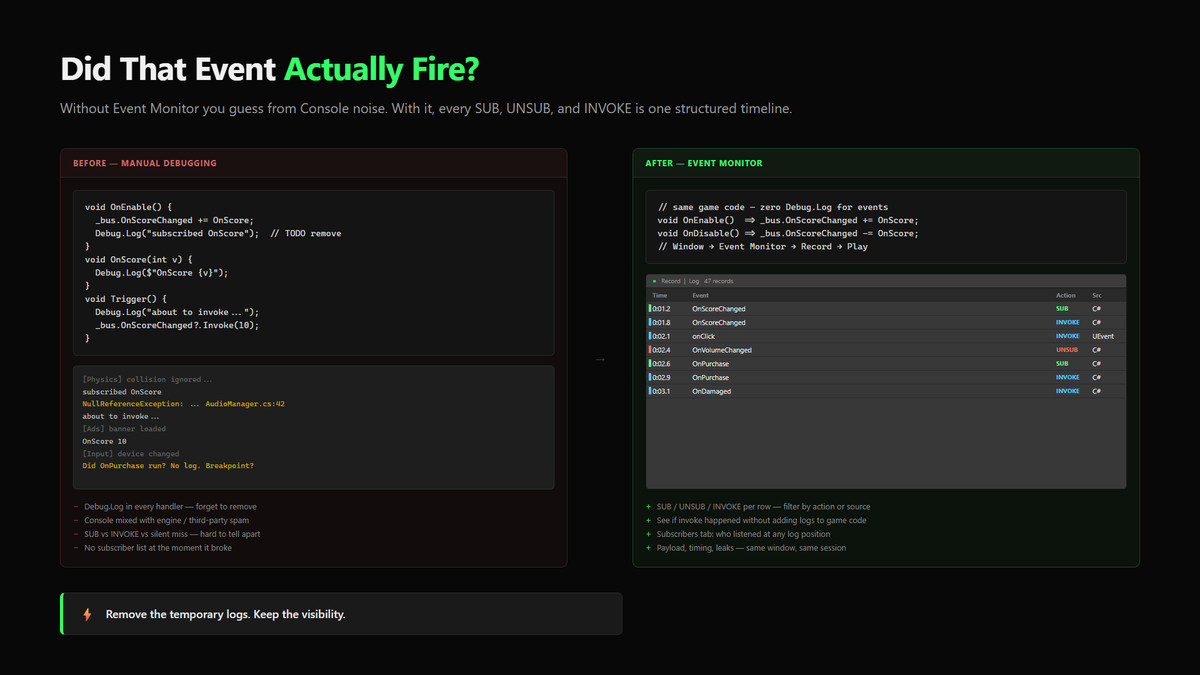
Event Monitor records C# events and UnityEvents in Play Mode — SUB, UNSUB, and INVOKE — with no attributes, no wrappers, and no hand-written Debug.Log calls in your game code.
WHAT YOU GET
• Timeline — every subscribe, unsubscribe, and invoke in order
• Live subscribers — see who is listening right now
• Time travel in the Editor — scrub the event history while debugging
• Zero invasive setup — IL post-processing + optional runtime scan
• Plug and play — Window → Event Monitor → Record → Play Mode
WHO IT IS FOR
Teams shipping event-driven Unity projects who need to debug real listener flow — not replace their event system with another bus.
QUICK START
1. Install the package
2. Open Window → Event Monitor
3. Enable Record
4. Enter Play Mode and watch SUB / UNSUB / INVOKE on the timeline
COMPATIBILITY
• Unity 6 LTS and ALL previous until 2021.3.45f2
• Built-in / URP / HDRP compatible (editor tool)
• Requires Mono Cecil (com.unity.nuget.mono-cecil)
NOT AN EVENT FRAMEWORK
Observes existing C# events and UnityEvents. Does not replace them.
DOCS & SUPPORT
• Docs: https://pawelca.github.io/apps/public/eventmonitor/
• Support: https://pawelca.github.io/apps/public/eventmonitor/troubleshooting/support.html
FAQ
Is it plug and play? Yes — Record + Play Mode.
Rewrite my events? No.
Coding required? Not for basic capture.
From the publisher's Asset Store listing.
Technical details
KEY FEATURES:
Zero-setup instrumentation (IL Post-Processor)
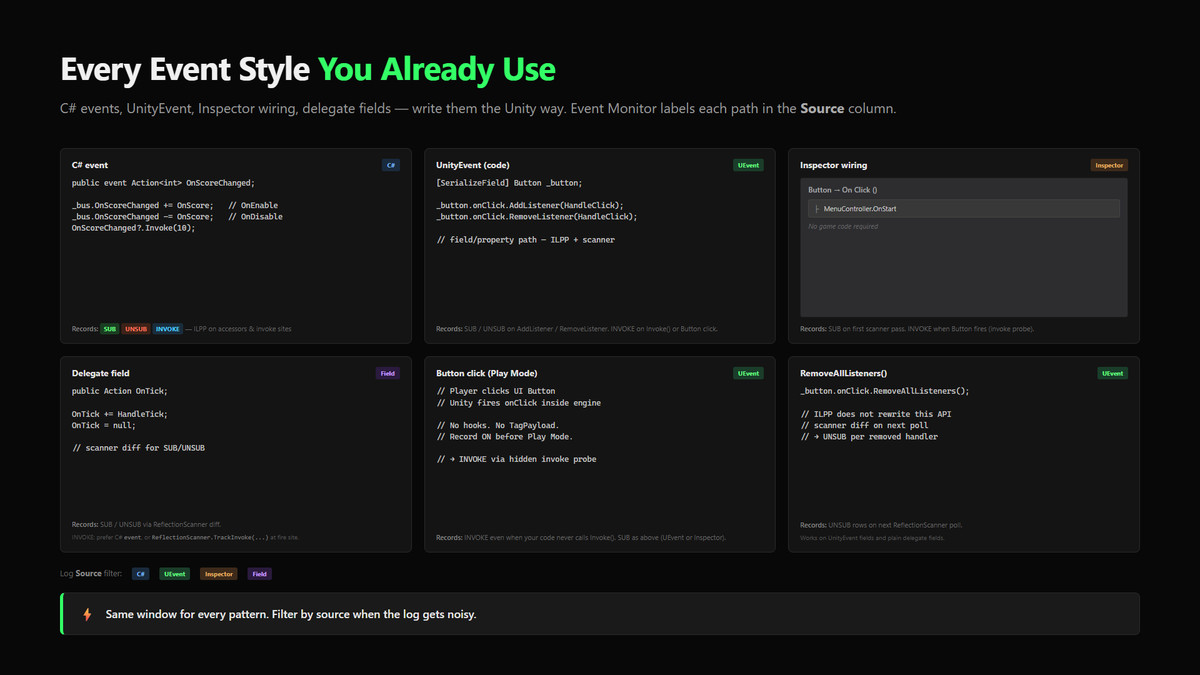
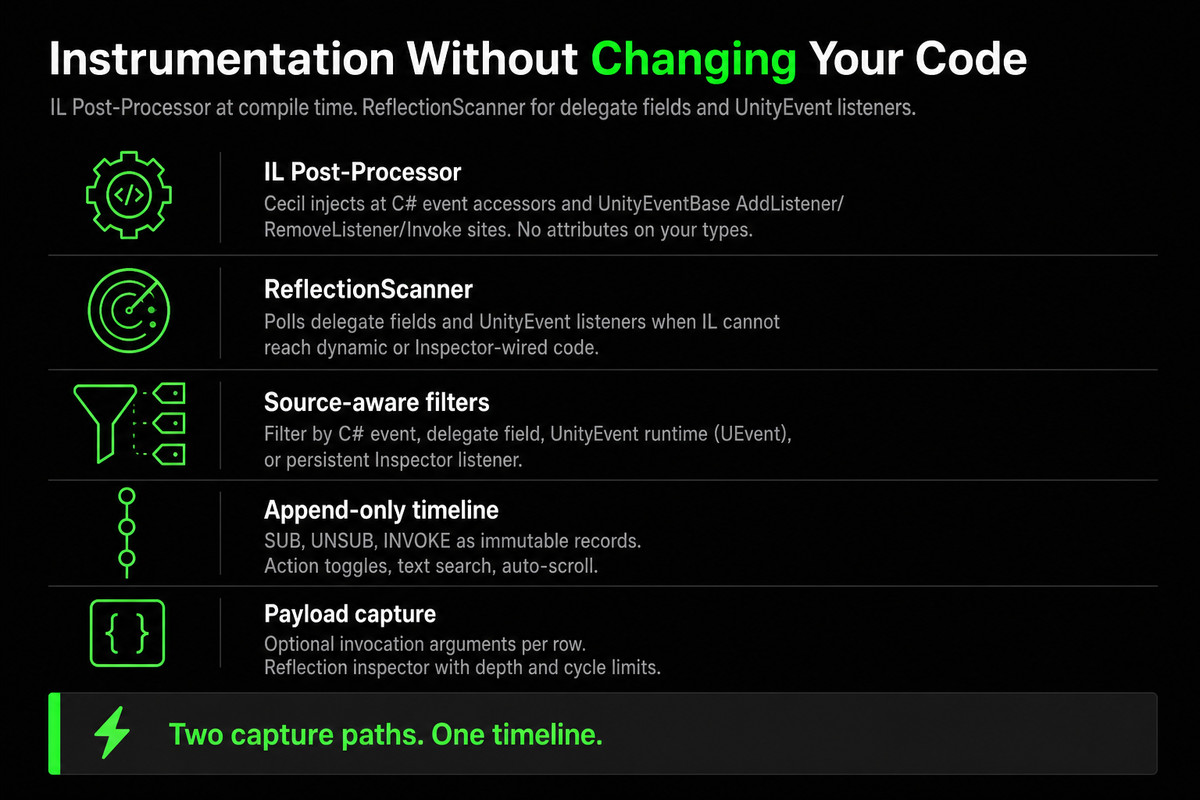
Injects tracking into C# event += / -= / ?.Invoke() and UnityEvent AddListener / RemoveListener / Invoke call sites after compilation.
UnityEvent & UI support
Tracks UnityEvent, Button.onClick, Inspector-wired persistent listeners, and engine-driven UI clicks via an invoke probe — Source labels distinguish C#, UEvent, and Inspector.
Append-only timeline
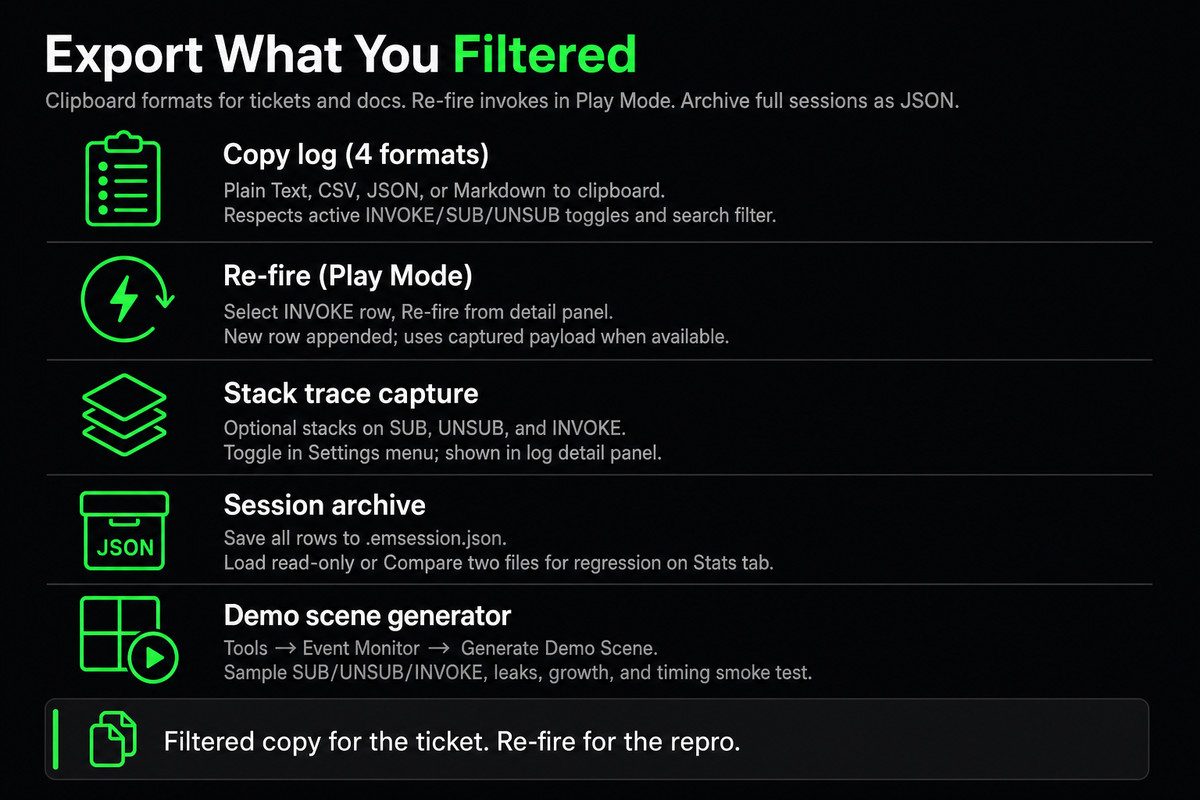
Every SUB / UNSUB / INVOKE is an immutable record — filter by action, source, and text search.
Optional payload capture
Toggle Payload to capture invocation arguments; Details inspects payload objects (depth/item limits, cycle-safe).
Live subscribers & time travel
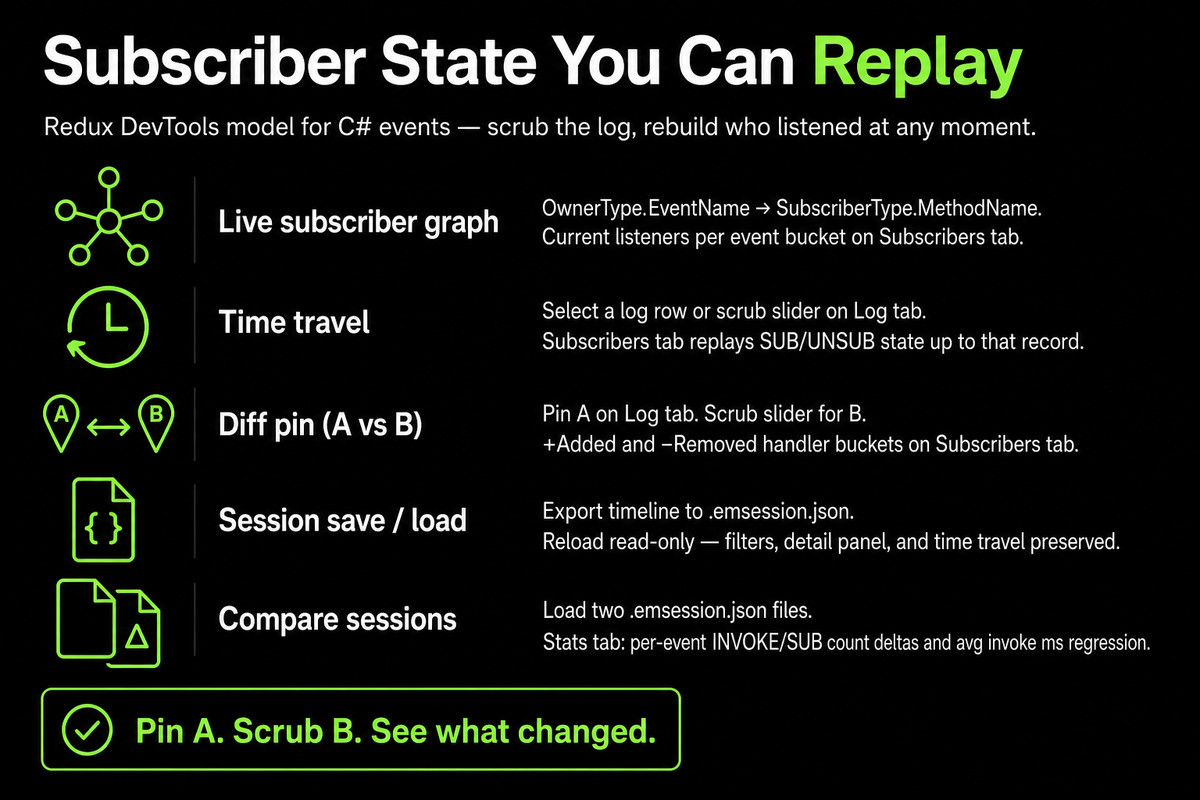
See OwnerType :: EventName → SubscriberType :: MethodName. Scrub the log to replay subscriber state on the Subscribers tab (SUB/UNSUB replay; log does not rewind).
Stats & hottest events
Session totals, invoke counts, and top events grouped by Owner.Event (e.g. PromoDemoPlayerBus.OnPlayerJump, not a generic name alone).
Session save/load & compare
Export .emsession.json; reload read-only; compare two sessions with per-event deltas.
Diff view, re-fire, leaks, timing
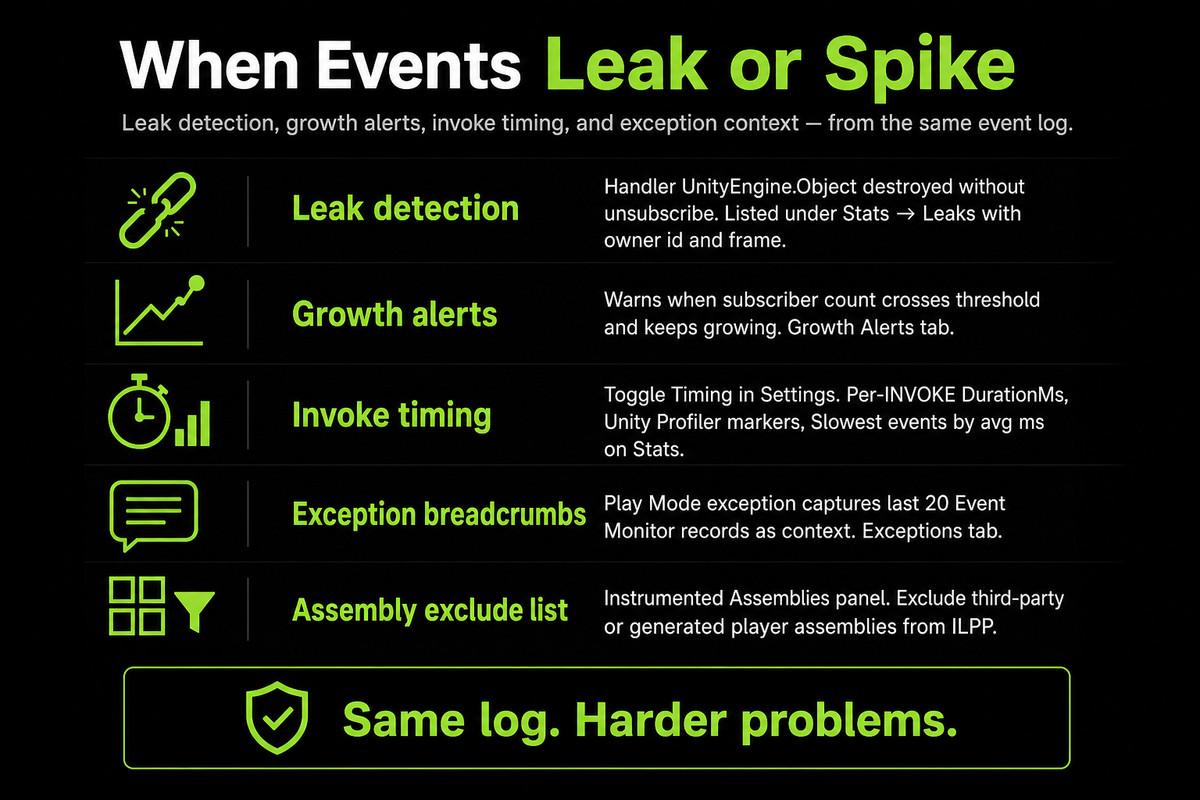
Pin two log rows for subscriber diff; Re-fire selected INVOKE in Play Mode; leak detection for destroyed handler targets; optional invoke DurationMs and slowest-events chart.
Exception breadcrumbs & growth alerts
Last 20 timeline records when Unity logs an exception; threshold-based subscriber growth warnings.
Assembly filters & ILPP diagnostics
Exclude assemblies from instrumentation; optional compile-time ILPP logs in the Console.
One-click demo scene
Tools → Event Monitor → Generate Demo Scene — labeled buttons, HUD, showcase sequence for leaks, growth, timing, and exceptions.
WHO IS IT FOR?
- Teams using C# events, UnityEvents, or UI Button.onClick who need visibility without logging everywhere.
- Intermediate+ Unity developers; beginners can start with the demo scene and Quick Start.
- Not a runtime analytics SDK, Profiler replacement, or general logger — Editor / Play Mode only.
COMMON QUESTIONS
Do I need to change my game code?
No for standard C# events and typical UnityEvent usage. Open the Event Monitor window before Play, enable Record, and use instrumented assemblies. Plain delegate fields may need TrackInvoke for INVOKE only — see docs.
Does it work with custom dispatchers?
Direct ?.Invoke() is supported; custom dispatch paths may need restructuring or TagPayload — see IL limitations in docs.
READ MORE
Compatibility
| Unity version | Built-in | URP | HDRP | Custom |
|---|---|---|---|---|
| 6000.5.9f1 | Compatible | Compatible | Compatible | Compatible |
| 6000.3.7f1 | Compatible | Compatible | Compatible | Compatible |
As listed on the Asset Store.