
 View on Asset Store (opens in new tab)
Package details
- Latest version
- 0.2.0
- Last updated
- First released
- Unity version
- 6000.4.6 or later
- Package size
- 1.4 MB
- Files
- 13
- Views in the past week
- 4
Price tracking
- Last checked
- Tracked since
- Lowest recorded
- $4.99 on
Keywords

Import Scheduler
Who wants to import packages one at a time??? No one! Queue them up and import them all in sequence, streamlining the process.
Affiliate link · Purchases support this site
Price history
Last 6 months
USDAsset preview
1 / 2
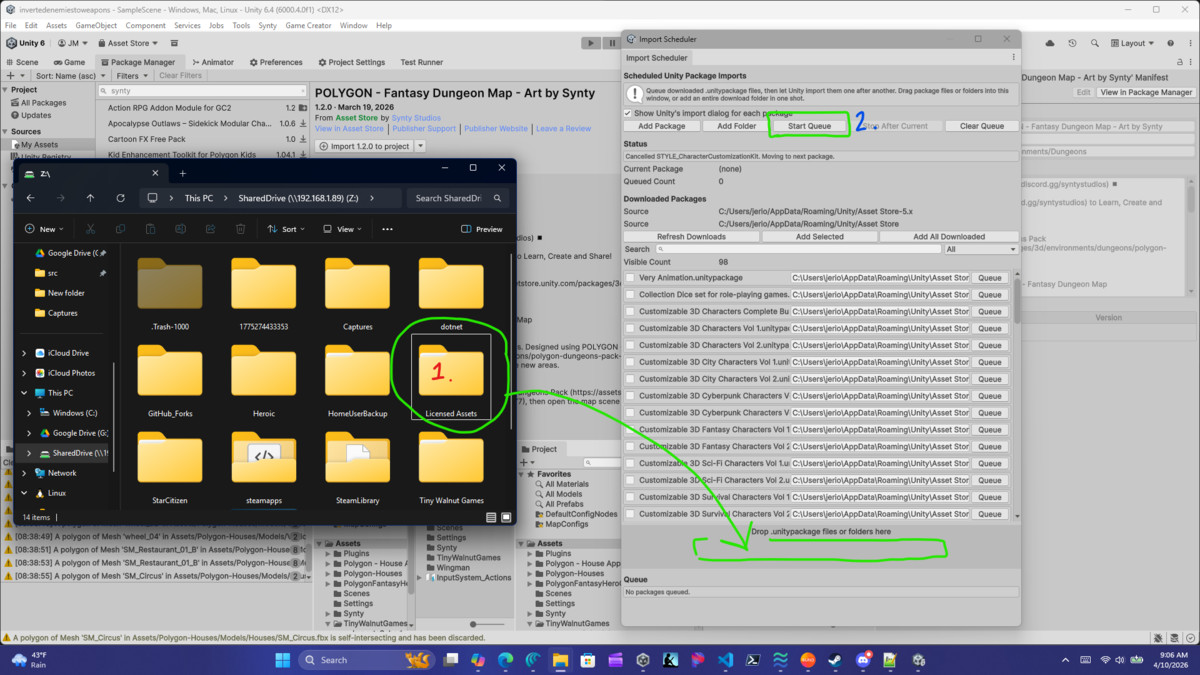
Import Scheduler screenshot 1

About this asset
The editor is perfectly happy to let you multi-select assets for download and then immediately forget that importing them one by one is a terrible use of time.
.
Import Scheduler fixes that gap. It scans the editor's downloaded caches, lets you search and filter what is already on disk, builds an import queue, and then processes each package one after another while Unity settles between imports.
- Open `Tools > Import Scheduler`.
- Download the packages you want through the asset manager as usual.
- In the `Downloaded Packages` section, search or filter the discovered cache.
- Select the packages you want and click `Add Selected`, or use `Add All Downloaded` if you are feeling aggressive.
- Decide whether you want the editor's package import dialog to appear for each package.
- Click `Start Queue`.
- Any editor dialog window that requires your input will show at the appropriate time, so make sure you stick around - we're not completely automated for safety!
The scheduler waits for the editor to finish importing, recompiling, and returning to the editor before starting the next package.
From the publisher's Asset Store listing.
Technical details
- Online documentation! https://tiny-walnut-games.gitbook.io/import-scheduler
- Supports Windows and Linux.
- Import Scheduler has been tested on Ubuntu 25.1
- Mac support is largely unknown as I have no means to test it
- Discovers downloaded package files from the default editor cache folders.
- Lets you search and filter both the downloaded list and the active queue.
- Queues imports in sequence instead of forcing you through a repetitive manual loop.
- Survives script reloads and continues once the editor is ready again.
- Supports drag and drop, single-file add, folder add, and bulk queueing from discovered downloads.
Compatibility
| Unity version | Built-in | URP | HDRP | Custom |
|---|---|---|---|---|
| 6000.4.6f1 | Compatible | Compatible | Compatible | Compatible |
This package contains only editor scripts, documentation, and images for the documentation. It contains one demo scene in which a single image is displayed, showing a quick rundown of how to use the tool.
As listed on the Asset Store.