
 View on Asset Store (opens in new tab)
Package details
- Latest version
- 1.0
- Last updated
- First released
- Unity version
- 2022.3.56 or later
- Package size
- 182 KB
- Files
- 3
- Favorites
- 2
- Views in the past week
- 9
Price tracking
- Last checked
- Tracked since
- Lowest recorded
- Free on
Keywords

Instant Scene Switcher
Switch Unity scenes instantly from the toolbar or Ctrl+Alt+S. Custom presets, Build Settings sync, drag & drop. Free.
Affiliate link · Purchases support this site
Price history
Last 6 months
USDAsset preview
1 / 2
Instant Scene Switcher screenshot 1

About this asset
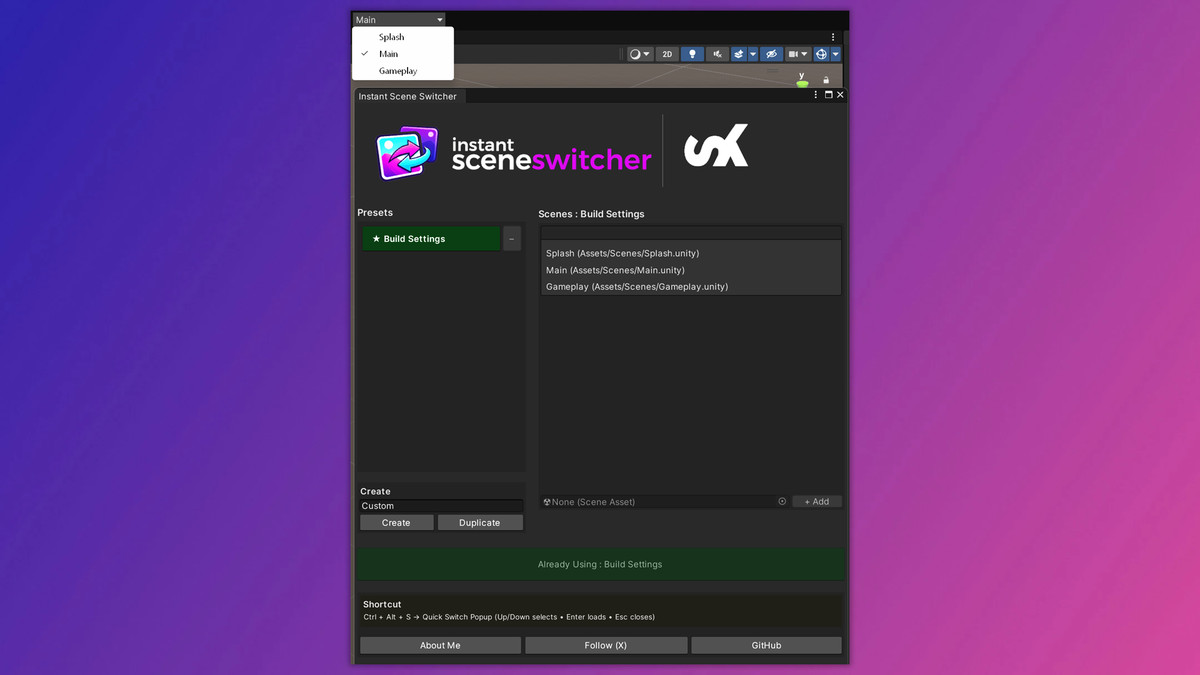
Instant Scene Switcher - Stop wasting time hunting for scenes. This free Unity Editor tool puts a scene selector dropdown directly in your Unity toolbar, letting you jump between scenes in a single click - no menus, no Project window digging, no interruptions to your flow.
Switch scenes instantly from the toolbar dropdown, or hit Ctrl+Alt+S anywhere in the Editor to open a compact quick-switch popup. Navigate with arrow keys and press Enter to load — all without touching your mouse.
Organize your scenes into custom presets tailored to your workflow. Working on a specific feature? Create a preset with only the scenes you need.
The built-in Build Settings preset automatically mirrors your enabled build scenes, so you always have the right set ready.
Drag and drop scenes directly into any preset, reorder them in seconds, and apply presets with one click. The toolbar dropdown updates instantly to reflect whatever preset is active.
Key Features:
- Toolbar scene dropdown - always visible, zero clicks to reach
- Ctrl+Alt+S quick-switch popup with keyboard navigation
- Custom named scene presets
- Easy Scene management
- No runtime overhead - Editor only
From the publisher's Asset Store listing.
Technical details
- Editor-only plugin (zero runtime impact, stripped from builds)
- Unity toolbar injection via UIElements and IMGUIContainer
- ScriptableSingleton settings saved to ProjectSettings/ (version-control friendly)
- Preset system with GUID-based identification and full CRUD support
- Build Settings preset auto-syncs with EditorBuildSettings.scenes
- Quick-switch popup via Unity ShortcutManager (Ctrl+Alt+S)
- Hash-based dirty checking to minimise unnecessary toolbar redraws
- No external dependencies — Unity Editor API only
- Works with Unity 6.3 new toolbar and previous versions as well
Compatibility
| Unity version | Built-in | URP | HDRP |
|---|---|---|---|
| 6000.3.10f1 | Compatible | Compatible | Compatible |
| 2022.3.56f1 | Compatible | Compatible | Compatible |
As listed on the Asset Store.