
 View on Asset Store (opens in new tab)
Package details
- Latest version
- 1.0.2
- Last updated
- First released
- Unity version
- 2022.3.20 or later
- Package size
- 33 KB
- Files
- 17
- Favorites
- 1
- Views in the past week
- 16
Price tracking
- Last checked
- Tracked since
- Lowest recorded
- $7.99 on
Keywords
Background Audio for iOS: Lock Screen & Now Playing Controls
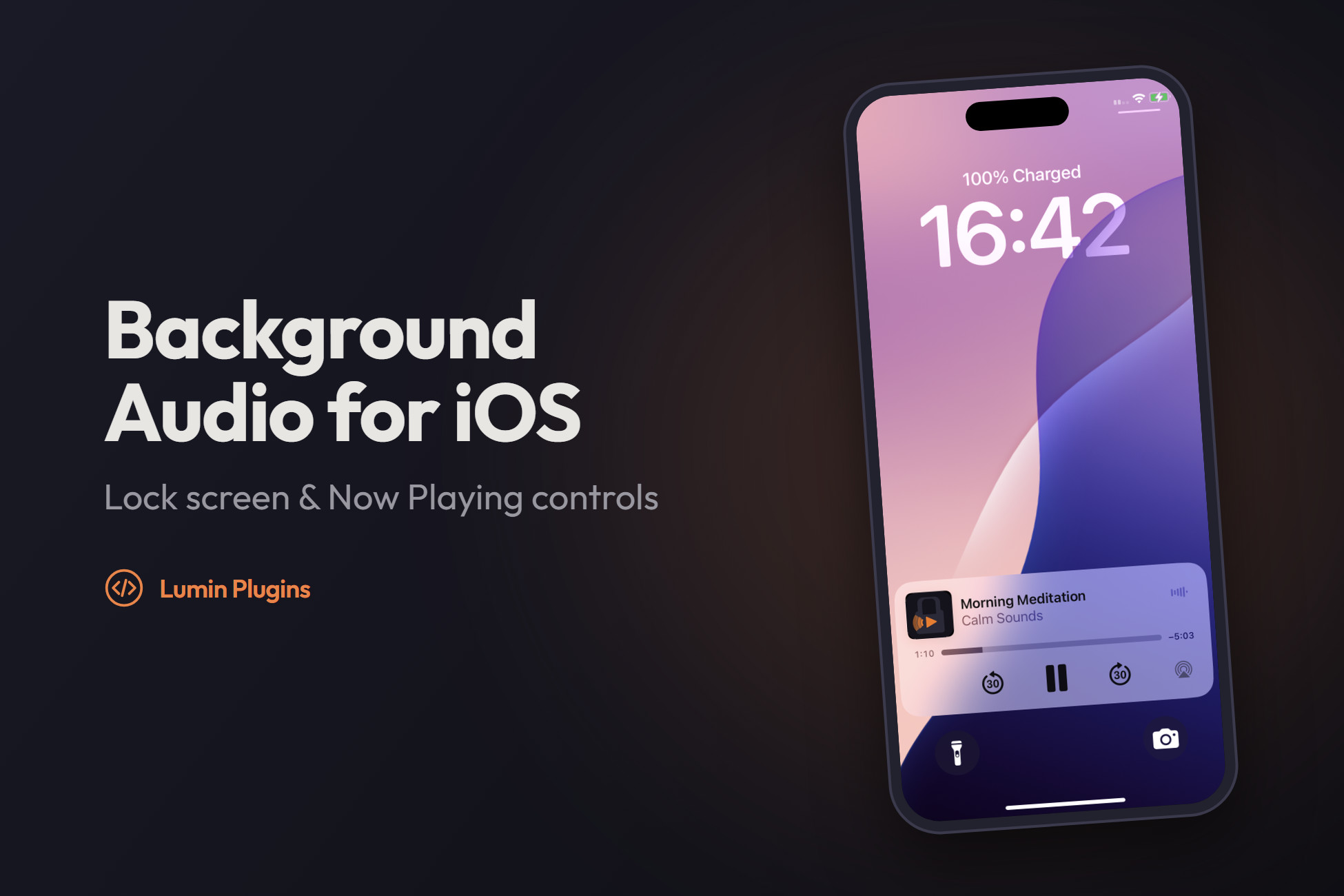
Keep audio playing when the iPhone locks, with native lock screen and Control Center play, pause, seek and ±30 s skip. One C# call. No Xcode setup.
Affiliate link · Purchases support this site
Price history
Last 6 months
USDAsset preview
1 / 3

Background Audio for iOS: Lock Screen & Now Playing Controls screenshot 1


About this asset
Your Unity app's audio stops the moment the iPhone locks. This fixes it with one line of C#.
Background Audio for iOS plays your track through Apple's native AVPlayer, so it keeps going when the screen locks or the user switches apps. Your app also appears on the lock screen and in Control Center with real transport controls, just like Podcasts or Spotify.
Built for: meditation & sleep apps, podcasts, audiobooks, guided workouts, language lessons, radio/streaming players, and games with a "keep listening" music mode.
QUICK START
1. Import the package.
2. Add BackgroundAudioReceiver to a GameObject in your first scene.
3. Call:
using LuminPlugins.BackgroundAudioiOS;
iOSBackgroundAudio.StartBackground("https://example.com/audio/episode.mp3", "Evening Meditation", "My App", durationMs: 0);
iOSBackgroundAudio.Pause(); iOSBackgroundAudio.Play(); iOSBackgroundAudio.Seek(90000); iOSBackgroundAudio.Stop();
4. Build for iOS. Lock the phone and the audio keeps playing.
REQUIREMENTS
• Unity 2022.3 LTS or Unity 6
• iOS 14+ device. Tested on an iPhone 11 running iOS 18
• Xcode for building. Works with Built-in, URP and HDRP (no rendering code)
• Sample scenes use TextMeshPro (import TMP Essential Resources when Unity asks)
LIMITATIONS (please read)
• iOS only. For Android, see Background Audio for Android.
• Lock-screen artwork is always your app icon. Per-track cover art is not supported yet (planned for v1.1).
• The ±30 s skip buttons are shown instead of next/previous track. There is no built-in playlist or queue; call StartBackground with the next track yourself.
• Plays one stream at a time through native AVPlayer. Unity AudioSource / AudioMixer effects do not apply to it.
• Remote URLs must be HTTPS (Apple App Transport Security) unless you add your own ATS exception.
FAQ
Q: Can't I just tick "Audio, AirPlay and Picture in Picture" in Xcode?
That can keep a Unity AudioSource alive in some cases, but you get no lock screen or Control Center controls, no Now Playing info and no interruption handling. This package does all of that, and sets the background mode for you.
Q: Does it work with Unity's AudioSource / AudioClip?
Playback is native (AVPlayer), so you pass a URL or file path rather than an AudioClip. Keep using AudioSource for SFX alongside it.
Q: Will it pass App Store review?
It uses only public Apple APIs (AVFoundation, MediaPlayer). Apple expects the audio background mode to be used for audio the user is actively listening to, such as music, podcasts or meditation.
Q: Do I need to edit the Xcode project?
No. A post-build script edits Info.plist and links the frameworks on every build.
Q: Can I play files bundled with the app?
Yes. Pass a local path, for example one built from Application.streamingAssetsPath.
Q: Does it run in the Editor?
Calls are safe no-ops in the Editor. Test on a device.
WHAT'S NEW IN 1.0.1
• Unity 2022.3 LTS support (plus Unity 6)
• Works with Domain Reload disabled
• Neutral receiver object name (LuminBackgroundAudio)
• New UI Player Demo scene; restyled TextMeshPro sample UI
SUPPORT
• Documentation: included in the package (Documentation/README.md and SetupGuide.md)
• Support: [email protected]. We usually reply within 24 hours. Please include your Unity version, iOS version and the Xcode log filtered by "BG-Audio".
• Third-party notice: this package contains no third-party code or libraries.
Phone screenshots captured on device.
From the publisher's Asset Store listing.
Technical details
• Plays through screen lock and app switching, using the AVAudioSession playback category
• Lock screen & Control Center controls: play / pause, draggable seek bar, 30-second skip back / forward
• Now Playing info: track title, artist, elapsed time and duration, with your app icon as the artwork
• Stream or play local files: HTTPS URLs or on-device file paths (MP3, AAC/M4A and other formats AVPlayer supports)
• Handles real-world interruptions: pauses for phone calls, Siri and alarms, resumes afterwards, and pauses when headphones are unplugged
• Progress callbacks: position, duration and play state about twice a second, so you can drive your own Unity UI
• Zero Xcode configuration: a post-build script adds the audio background mode to Info.plist and links AVFoundation + MediaPlayer automatically
• No AudioSource conflicts: native playback runs separately, so Unity audio stays free for SFX and UI
• Safe everywhere: calls are no-ops in the Editor and on other platforms, so you don't need #if UNITY_IOS guards
• Domain Reload friendly: works with Enter Play Mode Options (Domain Reload disabled)
• Tiny footprint: one Objective-C++ file and two runtime C# scripts, no third-party dependencies
• Two sample scenes: Basic Demo and a UI Player Demo with play/pause, stop and a seek slider (TextMeshPro UI)
Compatibility
| Unity version | Built-in | URP | HDRP | Custom |
|---|---|---|---|---|
| 2022.3.20f1 | Compatible | Compatible | Compatible | Compatible |
iOS only. Works with all render pipelines — audio playback runs in native Objective-C++ code, completely independent of Unity's rendering stack. Requires iOS Build Support installed via Unity Hub.
As listed on the Asset Store.