
 View on Asset Store (opens in new tab)
Package details
- Latest version
- 1.0
- Last updated
- First released
- Unity version
- 2022.3.62 or later
- Package size
- 87 KB
- Files
- 17
- Favorites
- 1
- Views in the past week
- 12
Price tracking
- Last checked
- Tracked since
- Lowest recorded
- $4.99 on
Keywords
In-Game Clock / Calendar System
- Price drop
Complete in-game clock, calendar, and event system for Unity games
Lowest recorded price
Get 50% off on Asset Store (opens in new tab)Affiliate link · Purchases support this site
Price history
Last 6 months
USDAsset preview
1 / 6
In-Game Clock / Calendar System screenshot 1


About this asset
A complete, production-ready time management and calendar system for Unity games. This package provides everything you need to implement realistic in-game time progression, calendar displays, and date-based event management.
Core Features
Time Management
- Real-time game clock with customizable time scales (1 real second = X game seconds)
- Pause/resume functionality
- Support for any start time and date
- Automatic day/month/year progression
Calendar System
- Full interactive calendar with month/year navigation
- Visual indicators for today's date and events
- Click to select specific dates
- Dynamic highlighting of event days
Event Management
- Add one-time or recurring annual events
- Date-based event queries and filtering
- Event triggering system with callbacks
- Event completion tracking
- Customizable event colors
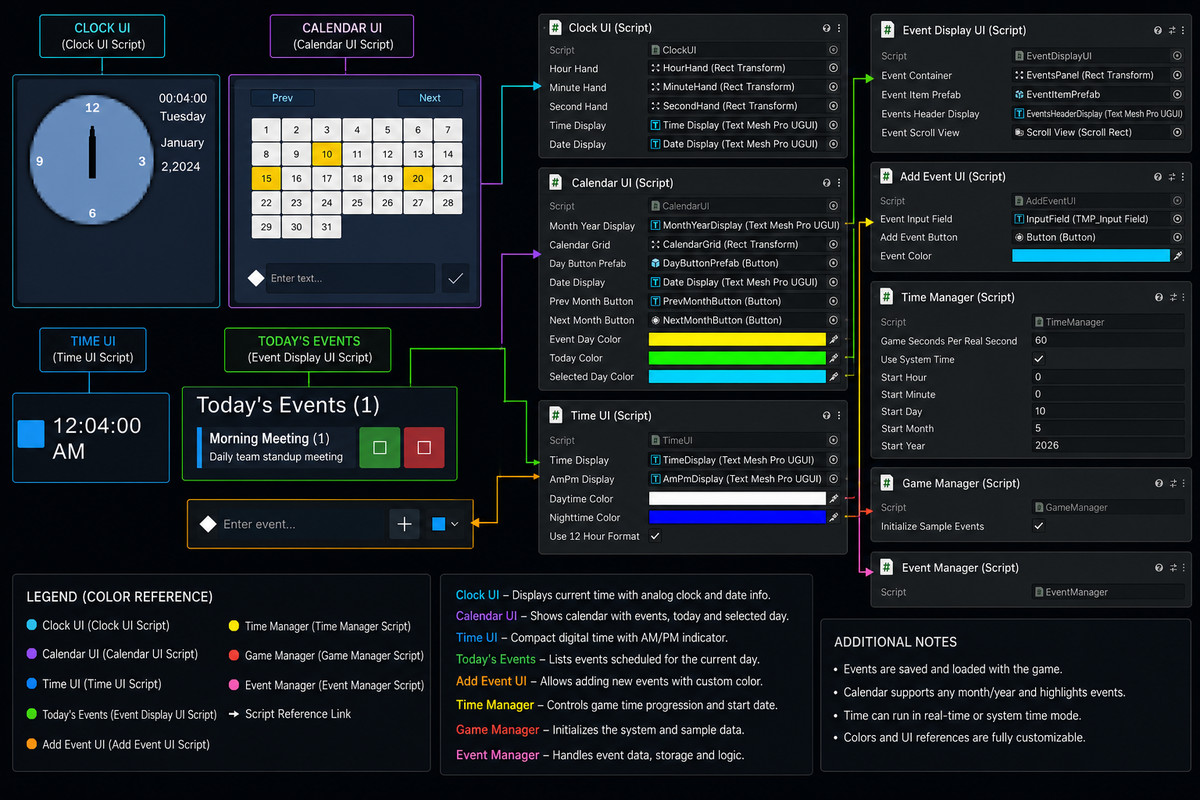
Multiple UI Displays
- Digital time display (12/24 hour format)
- Analog clock with rotating hands
- Full month calendar view
- Today's events list
- Upcoming events preview (next N days)
- Debug panel for testing
Customization
Fully Customizable:
- ✅ Time scales (speed up/slow down game time)
- ✅ Time formats (12-hour AM/PM or 24-hour)
- ✅ UI colors (daytime/nighttime, event indicators, today marker)
- ✅ Starting date and time
- ✅ Event colors and properties
- ✅ UI layouts and displays
Code Architecture:
- Event-based system with observer pattern
- Singleton managers for global access
- Serializable event data structures
- Complete C# source code with documentation
From the publisher's Asset Store listing.
Technical details
⏰ Time Management
- Real-time game clock with millisecond precision
- Customizable time scale (1 real second = X game seconds)
- Pause and resume functionality
- Set specific time and date programmatically
- Automatic day/month/year progression
- Leap year support
- Day of week calculation
📅 Calendar System
- Full interactive monthly calendar view
- Month/year navigation with buttons
- Today indicator with visual highlighting
- Event day highlighting
- Click to select specific dates
- Dynamic calendar grid generation
- Calendar state persistence
🎯 Event Management System
- Create unlimited events
- One-time and recurring annual events
- Event unique IDs for easy reference
- Event descriptions and titles
- Custom event colors
- Event completion tracking
- Date range queries
- Upcoming events preview (configurable days ahead)
- Event filtering by date/month/range
🎨 Multiple UI Components
- TimeUI - Digital clock display (12/24 hour format)
- ClockUI - Analog clock with rotating hands
- CalendarUI - Interactive monthly calendar
- EventDisplayUI - Today's events list
- UpcomingEventsUI - Next N days preview
- All components update in real-time
🔧 Customization Options
- Adjustable game time speed multiplier
- 12-hour or 24-hour time format
- Custom UI colors for different times of day
- Event highlight colors
- Today date indicators
- Selected date highlights
- Starting date and time configuration
📡 Event System Architecture
- Observer pattern with delegates/events
- Real-time callbacks on time changes
- Date change notifications
- Hour change events
- Day change events
- Event triggering system
- Event added/removed notifications
🛠️ Developer Tools
- Debug GUI panel built-in
- Time control buttons for testing
- Quick-advance days function
- Event list inspection
- Upcoming events preview tool
- Console logging with timestamps
- Performance optimized queries
🎮 Game Integration
- Singleton pattern for global access
- DontDestroyOnLoad for scene persistence
- Compatible with any game genre
- No external dependencies (except TextMeshPro)
- Works with existing UI systems
- Performance optimized
📚 Documentation & Examples
- Full API reference documentation
- Quick Start guide (5-minute setup)
- Detailed setup tutorial (Ukrainian + English)
- Code comments and documentation
- Example GameManager with sample events
- Usage code examples
- Troubleshooting guide
💾 Data & Serialization
- Serializable event data structures
- DateTime integration
- Event completion state persistence
- Easy save/load compatible structure
🔄 Event Callbacks Available
- OnTimeChanged(hour, minute, second)
- OnDateChanged(day, month, year)
- OnHourChanged(hour)
- OnDayChanged(day)
- OnEventAdded(GameEvent)
- OnEventRemoved(GameEvent)
- OnEventTriggered(GameEvent)
- OnDayEventsChanged(List<GameEvent>)
⚡ Performance Features
- Optimized event queries with dictionary lookups
- Efficient time calculations
- Minimal GC allocations
- Configurable update frequency
- No polling overhead
Compatibility
| Unity version | Built-in | URP | HDRP | Custom |
|---|---|---|---|---|
| 2022.3.62f3 | Compatible | Compatible | Compatible | Compatible |
As listed on the Asset Store.