
 View on Asset Store (opens in new tab)
Package details
- Latest version
- 1.3
- Last updated
- First released
- Unity version
- 6000.3.9 or later
- Package size
- 424 KB
- Files
- 16
- Favorites
- 6
- Views in the past week
- 5
Price tracking
- Last checked
- Tracked since
- Lowest recorded
- Free on
Keywords

Simple Archives Extractor
Archive Extractor is a lightweight editor extension that adds a context menu action for archive files in the Unity Project
Affiliate link · Purchases support this site
Price history
Last 6 months
USDAsset preview
1 / 1
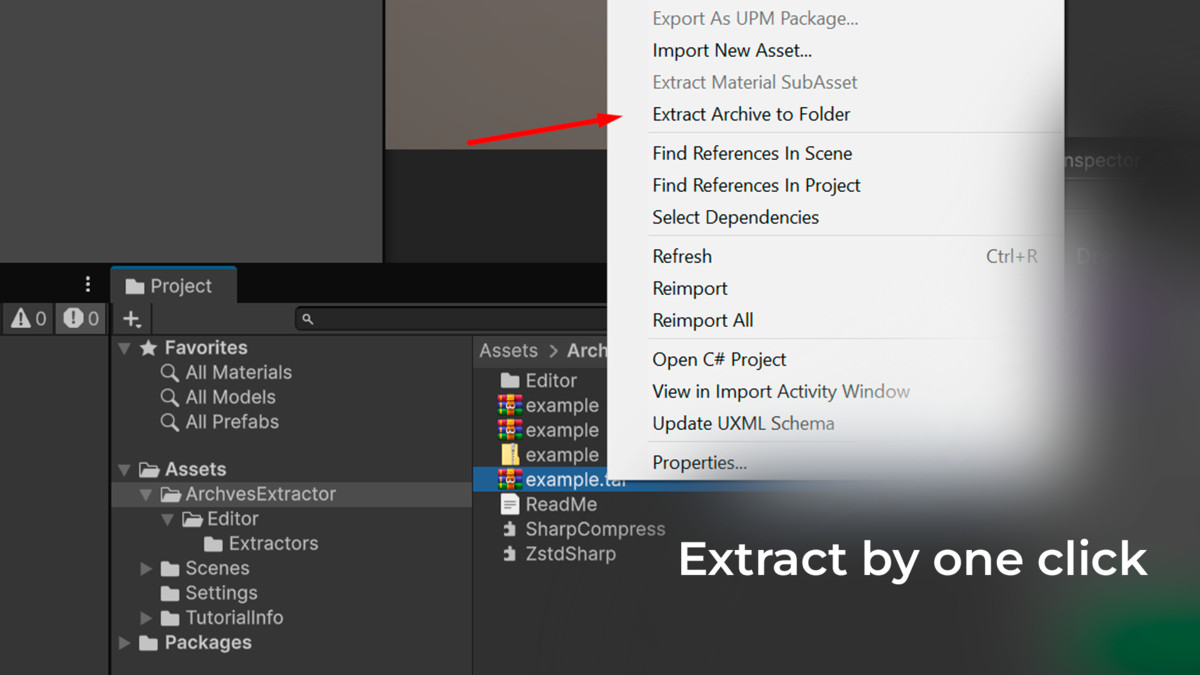
Simple Archives Extractor screenshot 1
About this asset
Archive Extractor for Unity
Extract archives directly inside the Unity Editor from the Project window.
Archive Extractor is a lightweight editor extension that adds a context menu action for archive files in the Unity Project window and extracts them into a folder next to the selected archive.
It is designed for teams and solo developers who regularly import external content packs, source files, or archived assets into Unity projects and want a simple in-editor workflow.
Features
- Extract archives directly from the Unity Project window
- Creates an output folder next to the archive using the archive file name
- Simple editor workflow with no external executable requirements
- Supports common archive formats through managed .NET libraries
- Works inside the Unity Editor without command-line tools
Supported Formats
- .zip
- .rar
- .7z
- .tar
- .tar.gz
How It Works
1. Select an archive file in the Unity Project window
2. Right-click the file
3. Choose the extract action from the context menu
4. The archive is extracted into a folder with the same name as the archive, next to the original file
5. Unity refreshes the AssetDatabase automatically
Example
If you have:
`Assets/Imported/my_pack.rar`
The extracted files will be placed in:
`Assets/Imported/my_pack/`
Use Cases
- Importing downloaded asset packs into Unity projects
- Unpacking source archives from artists or collaborators
- Reviewing archived content without leaving the Unity Editor
- Speeding up pipeline and content setup workflows
Requirements
- Unity 2021.3 or newer recommended
- Editor-only tool
- No runtime component
- No external command-line archive tools required
From the publisher's Asset Store listing.
Compatibility
| Unity version | Built-in | URP | HDRP | Custom |
|---|---|---|---|---|
| 6000.3.9f1 | Compatible | Compatible | Compatible | Compatible |
Requirements
- Unity 2021.3 or newer recommended
- Editor-only tool
- No runtime component
- No external command-line archive tools required
As listed on the Asset Store.