
 View on Asset Store (opens in new tab)
Package details
- Latest version
- 1.0.0
- Last updated
- First released
- Unity version
- 6000.0.42 or later
- Package size
- 67 KB
- Files
- 25
- Views in the past week
- 7
Price tracking
- Last checked
- Tracked since
- Lowest recorded
- $21.00 on
Keywords

Build Boss — Build Pipeline & CI/CD Automation
Save build settings as reusable profiles, chain pre/post build steps, and run headless CI/CD builds from GitHub Actions, Jenkins, or GitLab CI — all from one Unity editor window.
Affiliate link · Purchases support this site
Price history
Last 6 months
USDAsset preview
1 / 4
Build Boss — Build Pipeline & CI/CD Automation screenshot 1
About this asset
Stop fighting Unity's build system. Start shipping.
Build Boss is a build pipeline manager that replaces Unity's scattered, manual build process with a single, unified editor window. Save your entire build configuration as a reusable profile — platform, scenes, scripting backend, compression, stripping level, defines, and more. Automate pre-build and post-build steps without writing a single line of code. Diagnose build failures with structured, searchable logs. Run headless builds from your CI/CD pipeline.
Whether you're a solo developer shipping to multiple platforms or a team managing complex build configurations, Build Boss eliminates the friction between "code complete" and "shipped."
No more manually toggling settings for each platform. No more forgetting to increment the version number. No more cryptic build failures buried in Console noise.
Build Boss is the build tooling that every studio eventually tries to build internally.
Build Profiles
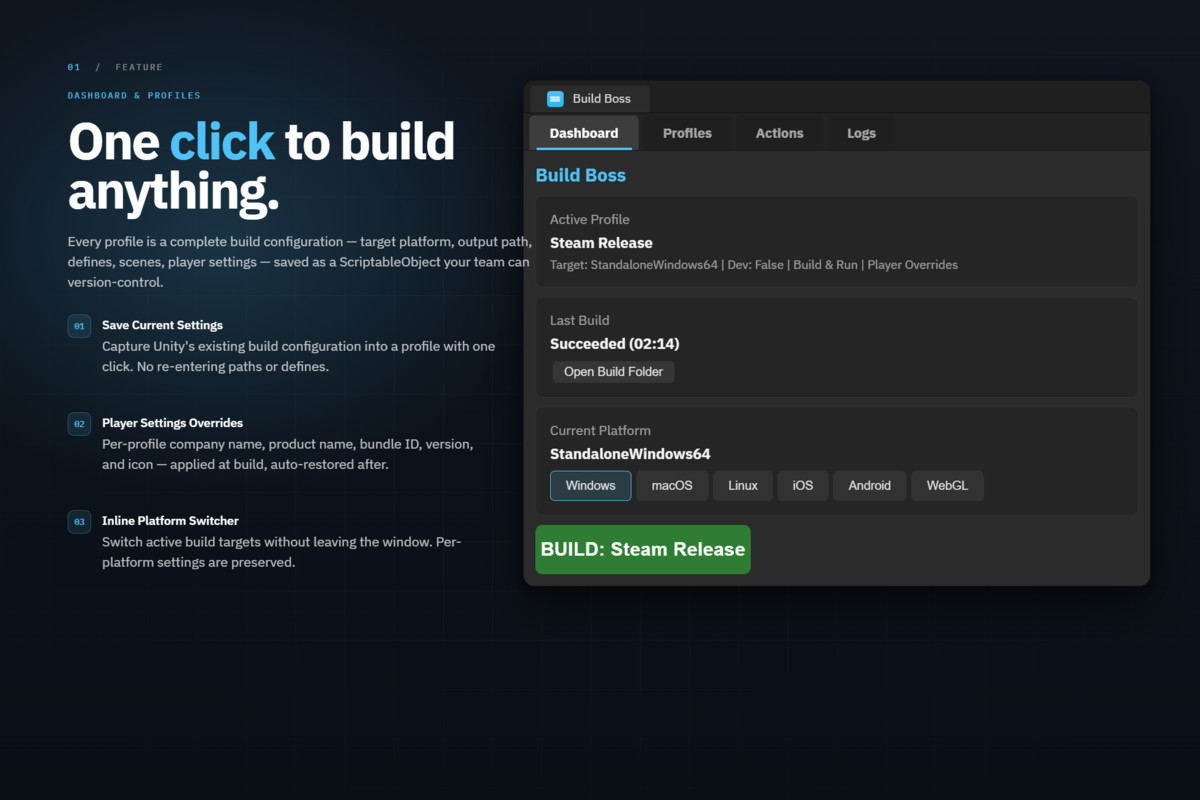
Save and load complete build configurations with one click. Each profile captures everything: target platform, scene list, output path, scripting backend, IL2CPP settings, compression method, managed stripping level, scripting defines, development build toggle, and build options. Switch between "Dev Build," "Release," "Demo," and per-platform profiles instantly. Profiles are ScriptableObject assets — VCS-friendly with clean YAML diffs, shareable across your team.
Pre/Post Build Actions
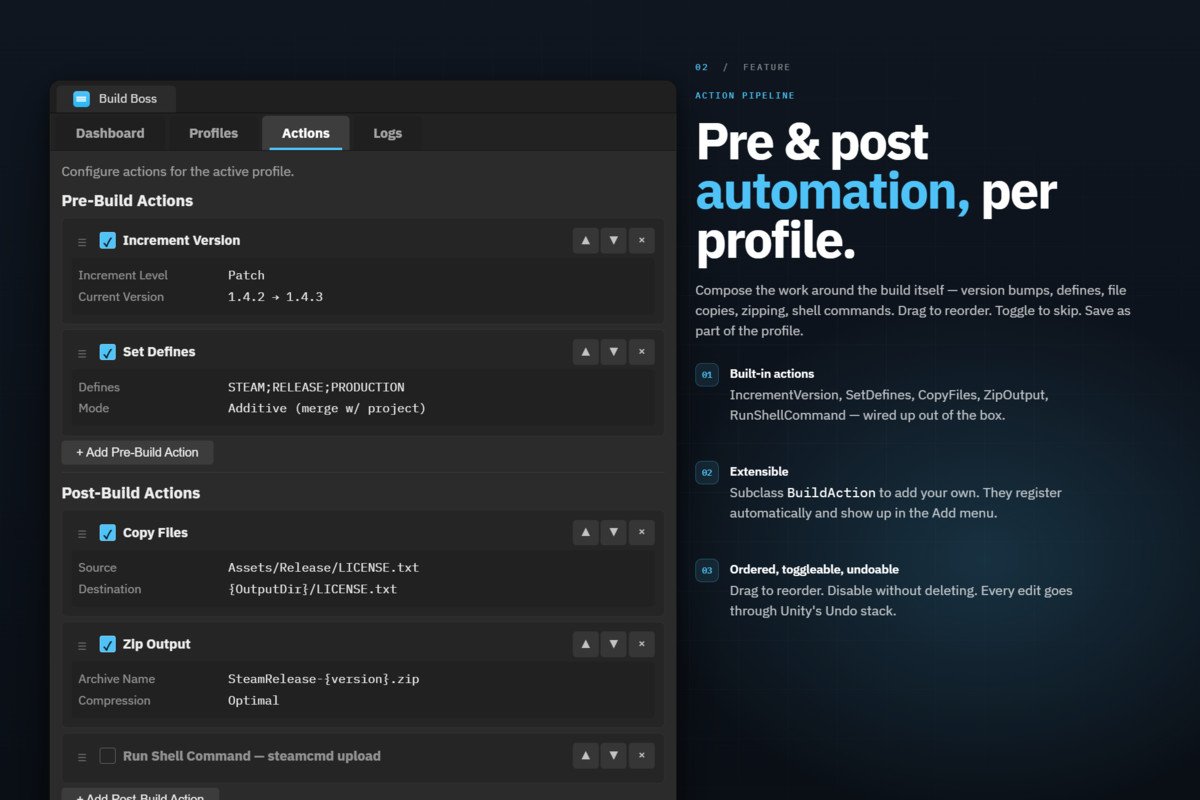
Automate your build pipeline with drag-and-drop actions — no code required:
- Increment Version — Auto-bump major, minor, or patch version before every build
- Set Scripting Defines — Apply build-specific defines (RELEASE, ANALYTICS, etc.) with automatic restoration after build
- Copy Files — Copy config files, ReadMe, or additional data alongside your build output
- Zip Output — Compress the build into a distributable archive with configurable compression
- Run Shell Command — Execute any script with token replacement ({OUTPUT_PATH}, {PROFILE_NAME})
Actions run in configurable order. Enable, disable, or reorder without removing them. Need a custom action? Extend the BuildAction base class and register it — your action appears in the dropdown automatically.
Platform Quick-Switcher
Switch platforms with one click from the Dashboard. Build Boss automatically saves your current platform's settings and restores them when you switch back. No more re-entering your Android defines after switching to Windows and back.
Build Log Dashboard
Every build produces a structured, persistent log. Browse past build sessions, filter by severity (Info, Warning, Error), and search by keyword. Color-coded entries with severity indicators make it easy to spot problems at a glance. Logs persist across editor sessions.
CI/CD Ready
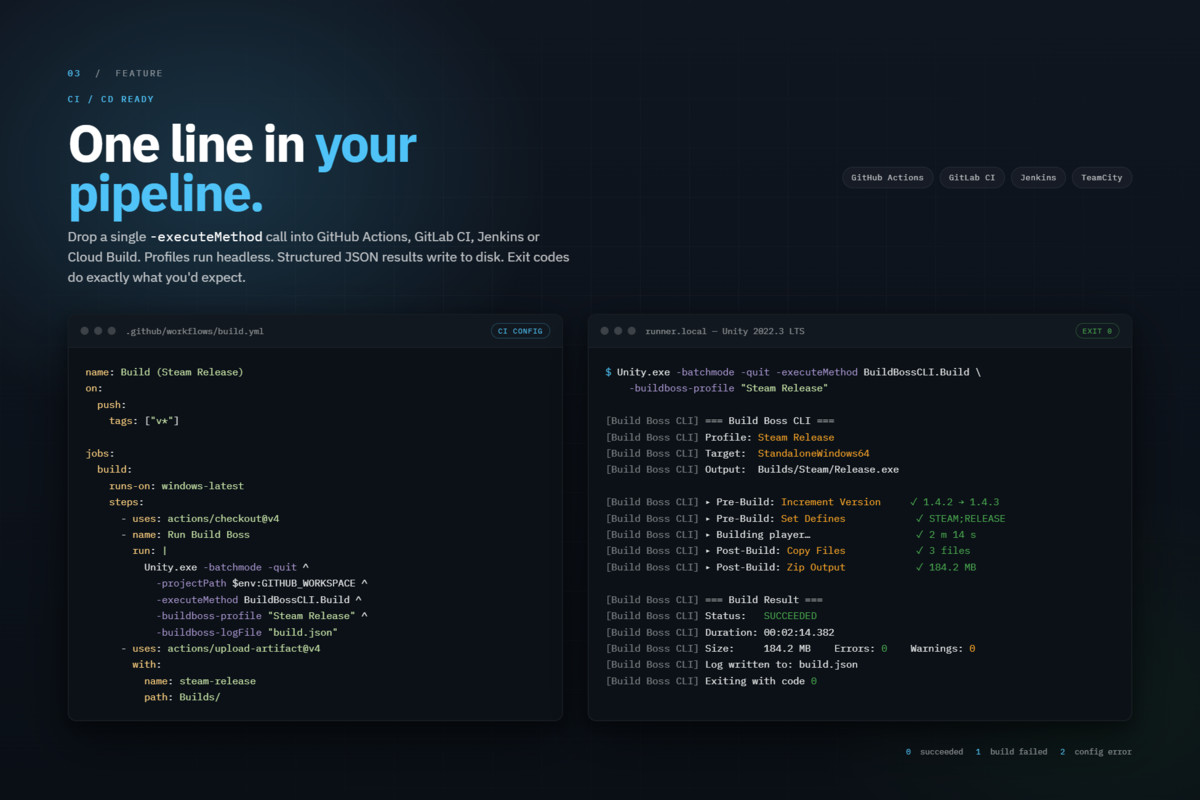
Build Boss includes a full command-line interface for headless builds. Use your Build Boss profiles directly from GitHub Actions, Jenkins, GitLab CI, or any CI/CD system. Get structured JSON build reports with success/failure, duration, build size, error counts, and full log output. Proper exit codes for pipeline integration. Example configs included.
Full Settings Coverage
Target platform, scene list, output path, scripting backend (Mono/IL2CPP), IL2CPP compiler configuration, compression method, managed stripping level, scripting define symbols, development build toggle, build subtarget (Unity 6), Android bundle version code, clean build toggle, and additional BuildOptions flags.
Compatibility
Unity 2022.3 LTS and newer (including Unity 6). Editor-only — no runtime assembly, zero impact on builds. All platforms supported.
From the publisher's Asset Store listing.
Technical details
Build Profiles — Save and switch complete build configs with one click
Pre/Post Build Actions — Automate version bumps, file copies, zips, shell commands, and define management
Platform Quick-Switcher — One-click platform switching with automatic settings save/restore
Build Log Dashboard — Structured, searchable, persistent build logs with severity filtering
CI/CD Command Line — Headless builds with JSON reports for GitHub Actions, Jenkins, GitLab CI
Extensible Action System — Create custom build actions with a simple API
Full Settings Coverage — Compression, stripping, subtarget, Android version code, and more
Unity 6 Compatible — Supports Unity 2022.3 LTS through Unity 6 with version-specific APIs
VCS Friendly — Profiles are ScriptableObjects with clean YAML diffs
Zero Runtime Overhead — Editor-only package, no impact on your player builds
Compatibility
| Unity version | Built-in | URP | HDRP | Custom |
|---|---|---|---|---|
| 6000.0.42f1 | Compatible | Compatible | Compatible | Compatible |
As listed on the Asset Store.