
 View on Asset Store (opens in new tab)
Package details
- Latest version
- 0.1.3
- Last updated
- First released
- Unity version
- 6000.0.73 or later
- Package size
- 7.6 MB
- Files
- 701
- Favorites
- 7
- Views in the past week
- 12
Price tracking
- Last checked
- Tracked since
- Lowest recorded
- Free on
Keywords

Maths Engine
Maths Engine is a Unity plugin that allows designers to visually configure mathematical formulas using ScriptableObjects, Prefabs, and config assets instead of hardcoded code.
Affiliate link · Purchases support this site
Price history
Last 6 months
USDAsset preview
1 / 3
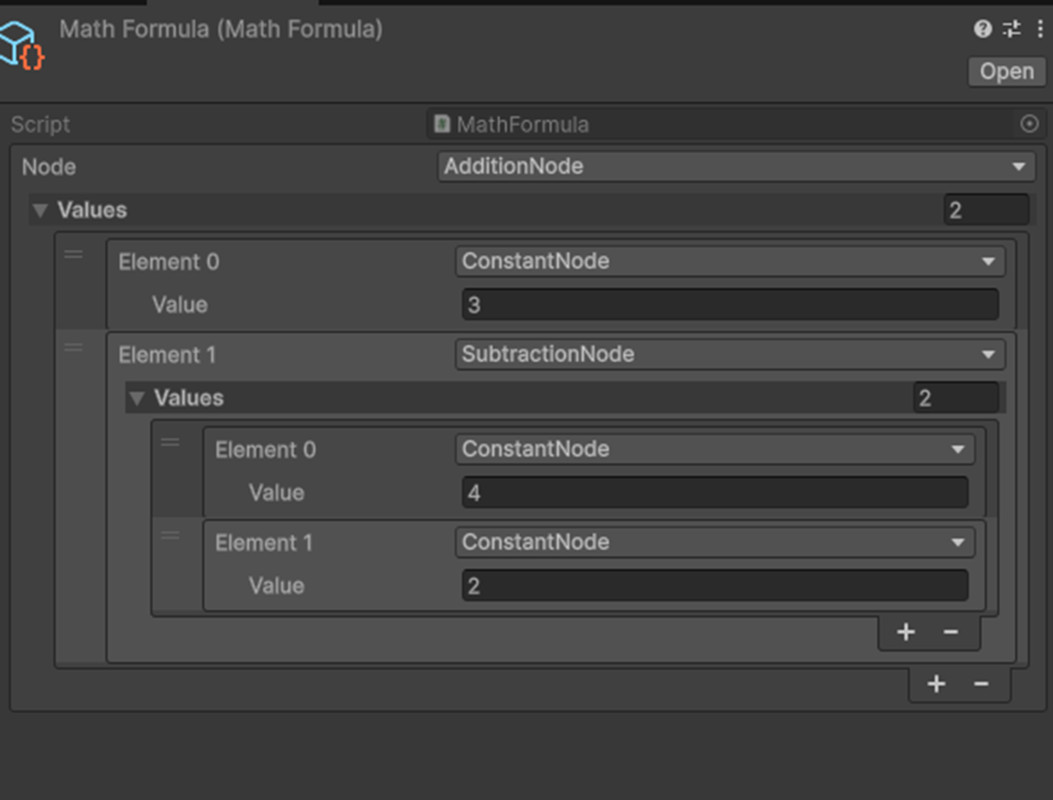
Maths Engine screenshot 1

About this asset
MathsEngine is a modular, node-based math evaluation system for Unity. Define any mathematical formula as a reusable ScriptableObject graph and evaluate it at runtime with a single line of code — no hardcoded logic, no formula spaghetti in your MonoBehaviours.
Whether you're building RPG damage calculations, AI scoring, procedural generation curves, or physics rules, MathsEngine keeps your math clean, inspectable, and entirely designer-friendly.
☄️ HIGHLIGHTS ☄️
– Node-Based Formula Graphs – ScriptableObject-Driven – Runtime Parameter Support – Live Equation Preview – Arithmetic, Trig, Utility & Random Nodes – AnimationCurve Integration – Unity Time Nodes – Fully Extensible Custom Nodes – Package Manager (UPM) Ready
• Node-Based Formula Graphs: Build complex expressions by composing small, reusable nodes into a tree. Nodes reference other nodes as inputs, and the graph evaluates from root to leaf to produce a single float result.
• ScriptableObject-Driven: Formulas are stored as MathFormula assets in your project. Tweak values directly in the Inspector without touching code — ideal for designers and non-programmers.
• Runtime Parameter Support: Pass dynamic values — player stats, enemy attributes, game state — into any formula at runtime using a simple variadic API: float result = formula.Calculate(playerAttack, enemyDefense);
• Live Equation Preview: Every formula auto-generates a human-readable equation string via ToEquation(), displayed directly in the Inspector for instant debugging and validation. e.g. (5 + 3) * 2 = 16
• Rich Built-In Node Library:
- Arithmetic: Add, Subtract, Multiply, Divide, Modulo, Power, Absolute, Negate
- Trigonometry: Sin, Cos, Tan, Atan2, Deg2Rad, Rad2Deg
- Utility: Min, Max, Clamp, Lerp, InverseLerp, SmoothStep, MoveTowards, PingPong
- Animation: AnimationCurve evaluation from any node value
- Time: Time, DeltaTime, FixedDeltaTime
- Constants: ConstantNode
- Random: UnityRange, XorShift32 RNG
• Fully Extensible: Create custom nodes by subclassing BaseMathNode and implementing Calculate() and ToEquation(). Custom nodes integrate into any MathFormula graph with no additional setup.
• UPM Ready: Installed directly via Unity Package Manager using a Git URL — no .unitypackage import required.
☄️ REQUIREMENTS ☄️
Unity Version: Compatible with Unity Package Manager (UPM). Minimum tested version not yet officially specified — verify against your project's Unity version before installing.
Dependencies: No third-party package dependencies. Relies solely on built-in UnityEngine APIs (Mathf, AnimationCurve, Time, Random).
Scripting Backend: Compatible with both Mono and IL2CPP.
Render Pipeline: No render pipeline dependency. This is a pure runtime/logic package — compatible with Built-in, URP, and HDRP.
Platform Support: No platform-specific restrictions. Pure C# runtime logic runs on all Unity-supported platforms.
☄️ INSTALLATION ☄️
- Open Window → Package Manager
- Click + → Add package from git URL
- Enter: https://github.com/arijeetbaruah/Maths-Engine.git?path=Packages/com.arijeet.mathsengine/MathsEngine
📖 Documentation: https://arijeetbaruah.github.io/Maths-Engine/
From the publisher's Asset Store listing.
Technical details
Uses Editor code and abstact classes to implement a easy to use maths configuration code
Compatibility
| Unity version | Built-in | URP | HDRP | Custom |
|---|---|---|---|---|
| 6000.0.73f1 | Compatible | Compatible | Compatible | Compatible |
As listed on the Asset Store.