
 View on Asset Store (opens in new tab)
Package details
- Latest version
- 1.0.1
- Last updated
- First released
- Unity version
- 2021.3.45 or later
- Package size
- 265 KB
- Files
- 5
- Favorites
- 1
- Views in the past week
- 2
Price tracking
- Last checked
- Tracked since
- Lowest recorded
- $5.00 on
Keywords

Easy AssetBundle Builder
Visual AssetBundle editor for Unity with group management, dependency analysis, duplicate detection, and multi-platform builds. Replaces manual inspector tagging.
Affiliate link · Purchases support this site
Price history
Last 6 months
USDAsset preview
1 / 4
Easy AssetBundle Builder screenshot 1
About this asset
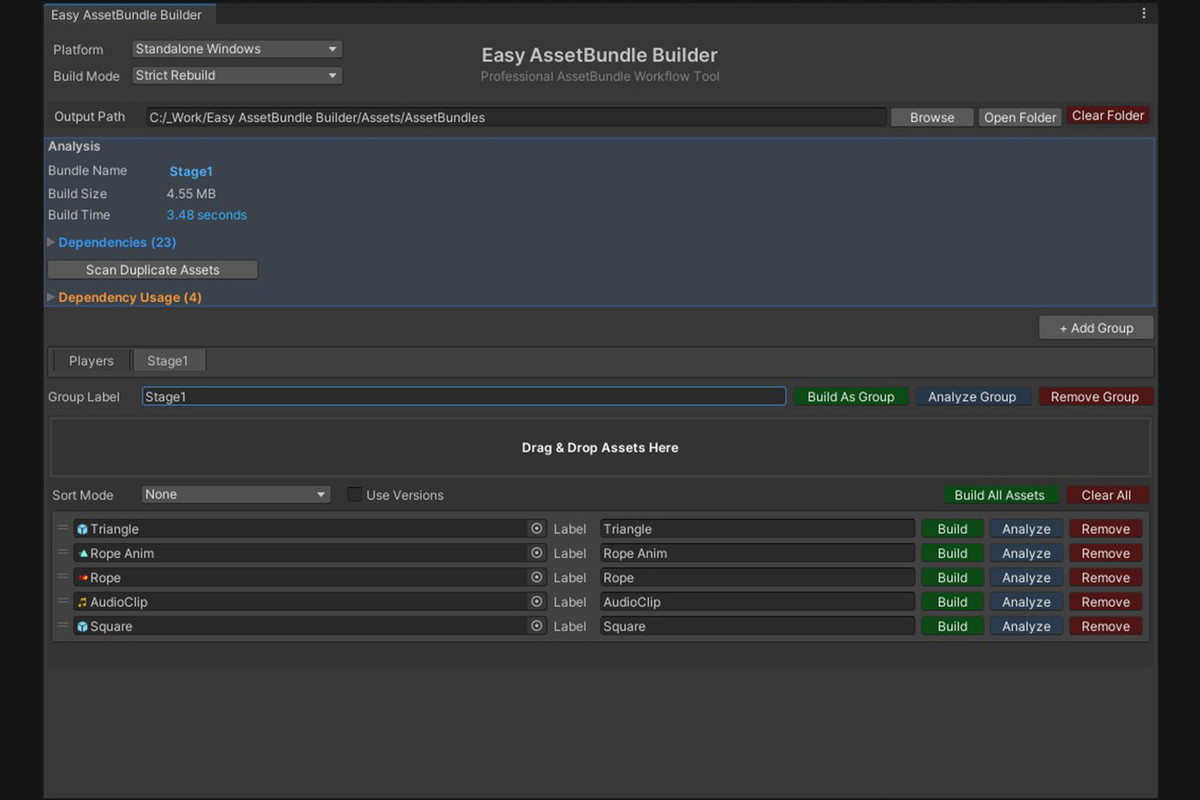
Easy AssetBundle Builder is a powerful custom Editor tool for Unity that streamlines the process of creating, organizing, analyzing, and building AssetBundles. It replaces Unity’s default manual workflow with a visual, data-driven system designed for professional production pipelines.
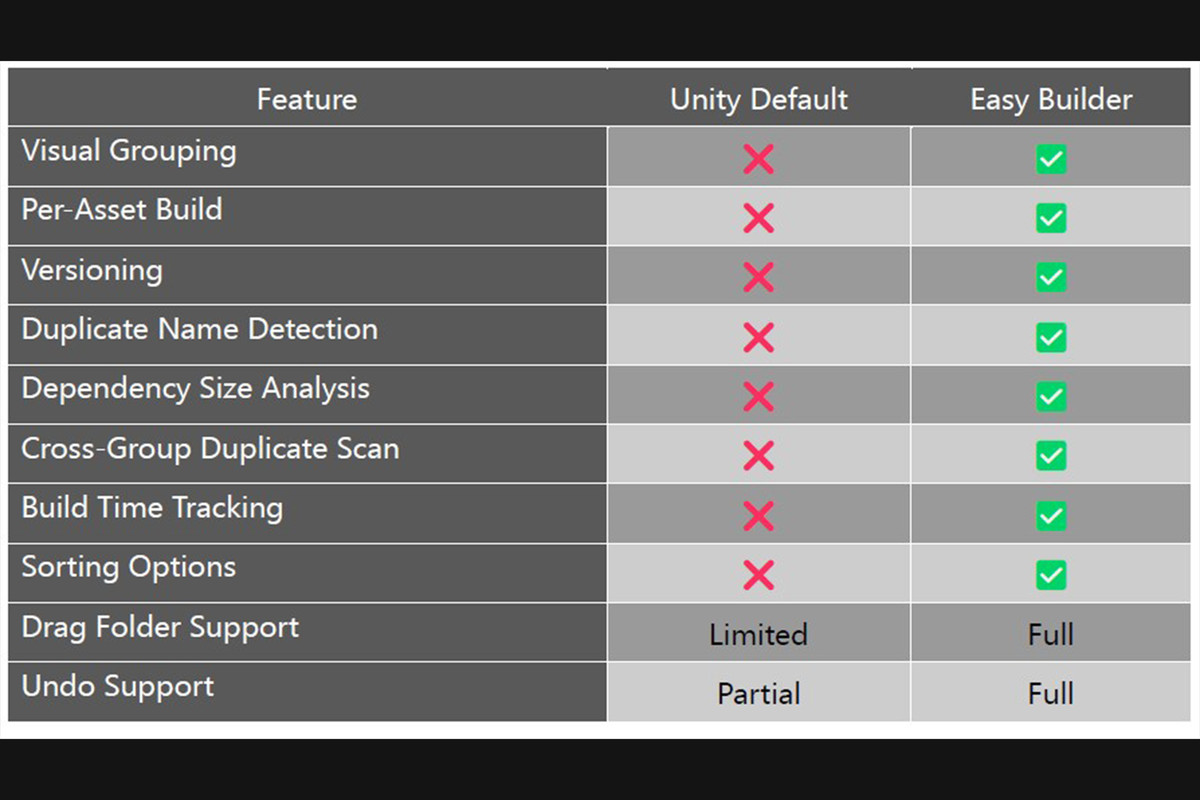
Unlike the default workflow, which relies on heavy manual configuration and inspector tags, this tool provides full visibility and control through a dedicated interface.Key
Benefits
- Visual Group-Based Management: Organize assets in logical tabs.
- Per-Asset & Per-Group Control: Fine-tune build settings for individual items or entire groups.
- Built-in Versioning: Simple but powerful version tagging for assets and groups.
- Deep Dependency Analysis: Automatically map and inspect asset dependencies.
- Duplicate Detection: Instantly identify and resolve assets duplicated across multiple bundles.
- Comprehensive Metrics: Track build time, total size, and per-bundle sizes for every platform.
- Multi-Platform Targeting: Build for all target platforms from a single window.
- Multiple Compression Modes: Choose from various compression algorithms.
Features in Detail
1. Group-Based Workflow
Manage assets in a flexible, tab-based system.
- Create multiple groups with separate tabs.
- Automatic tab wrapping for an uncluttered UI.
- Independent sorting options per group.
- Assign a unique version number to an entire group.
2. Individual Asset Control
Maintain precise control over every asset in the list. Each asset supports:
- A custom, override label.
- A custom, override version number.
- Automatic detection of duplicate bundle names with an "Auto-Fix" option.
- The ability to be skipped or ignored during the build process.
3. Versioning System
Implement a clear versioning strategy (e.g., Player_v3).
- The version suffix can be toggled globally to be applied or ignored during the build.
4. Sorting Modes
Quickly reorganize your view with multiple sorting modes.
- Individual Asset Sorting:
- None (Manual Drag & Drop)
- Name (Ascending / Descending)
- Type
- Date Added (Newest / Oldest First)
- Dependency View Sorting:
- Name (Ascending / Descending)
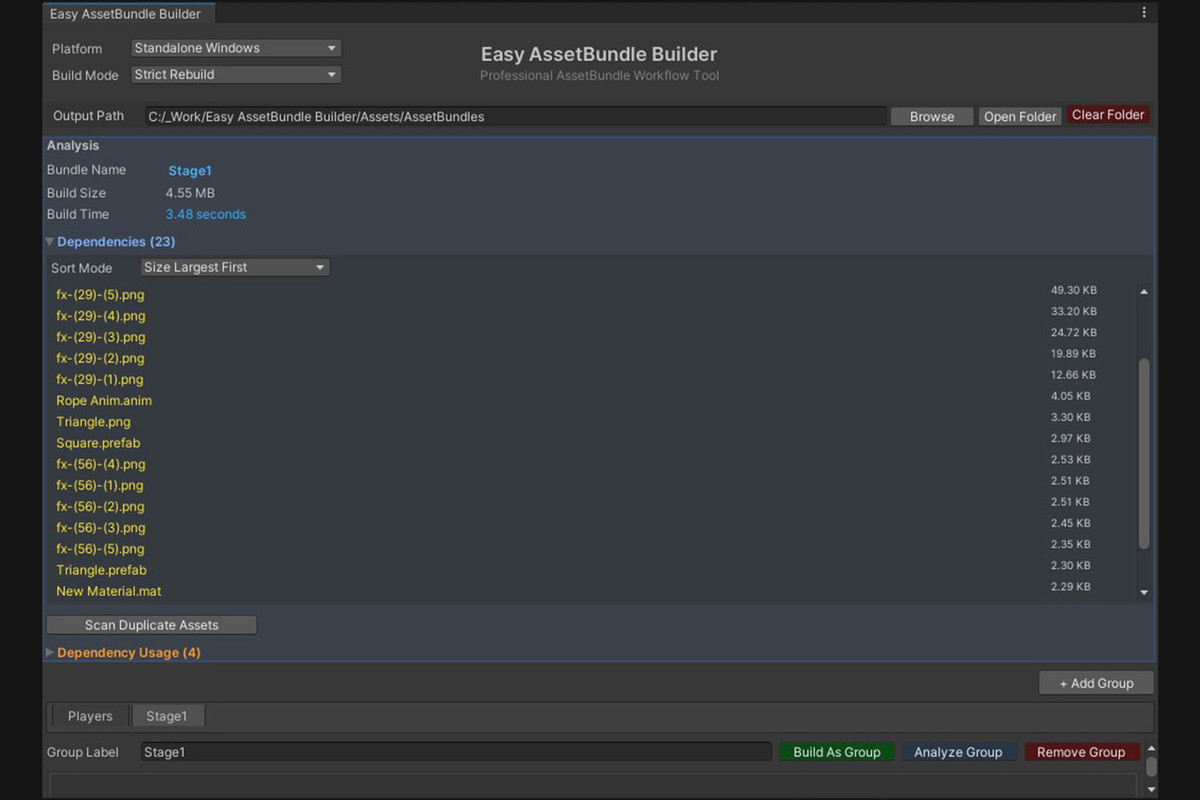
- Size (Largest / Smallest First)
- Type
5. Build Metrics
After every build, the tool provides instant, actionable data:
- Total build time (in seconds).
- Overall build size.
- A detailed breakdown of individual bundle sizes.
- Persistent per-platform size tracking for historical comparison.
6. Dependency Analyzer
Gain full visibility into what makes up your bundles.
- Utilizes AssetDatabase.GetDependencies(assetPath, true) to map all dependencies.
- Displays a clear list of every dependent asset and its file size.
- "Click-to-Ping" functionality to instantly locate any asset in the Project view.
7. Duplicate Detection System
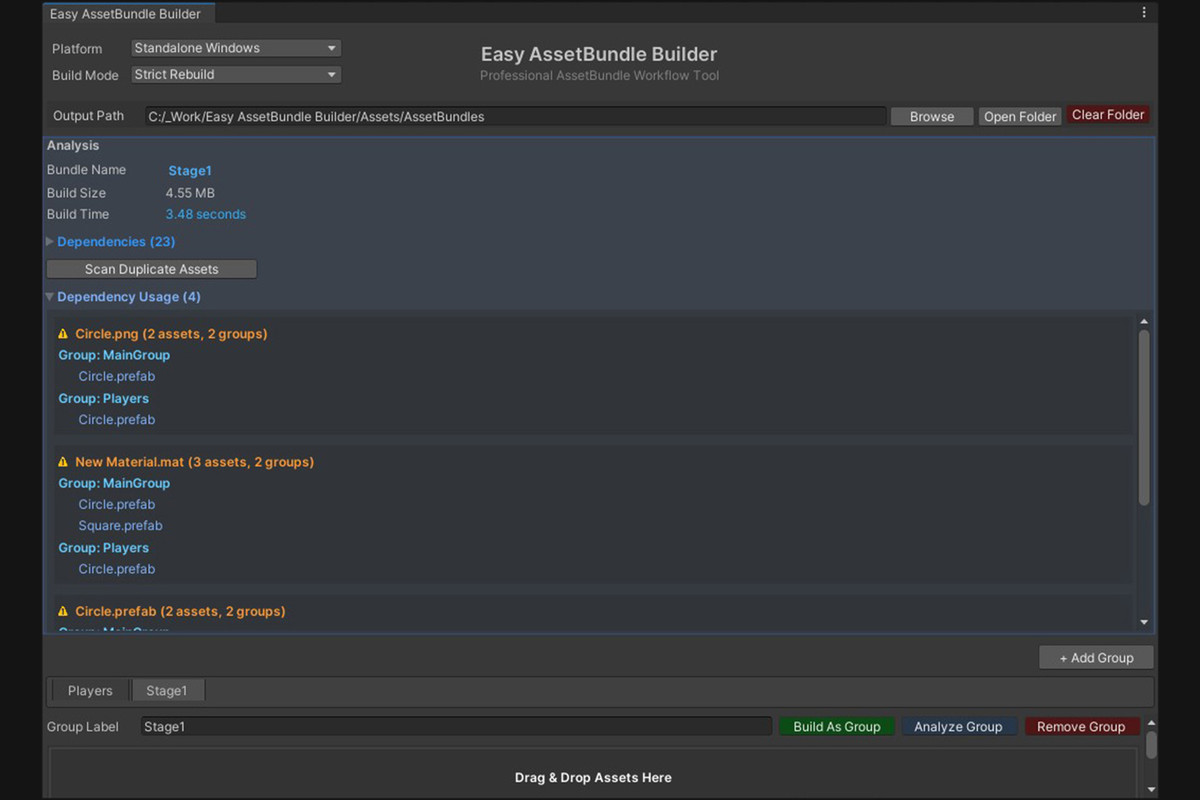
Prevent asset bloat by identifying dependencies shared across multiple groups.
- The system builds a dictionary: Dependency → Group → Asset List.
- Dependencies used in multiple groups are flagged with a color-coded severity scale:
- Yellow: Used in 2 groups.
- Orange: Used in 3+ groups.
- Red: Indicates a high-impact, heavy duplication.
8. Output Folder Management
Streamlined management of your build destination.
- Automatically create the target output folder if it doesn't exist.
- Safely clear the output folder before a new build.
- Automatically refresh the AssetDatabase after a build.
- Auto-select the newly built bundle in the Project view for quick access.
9. Drag & Drop System
A fast and intuitive way to populate your groups.
- Supports dragging and dropping single assets.
- Supports dragging and dropping entire folders.
- Performs recursive asset discovery on dropped folders.
- Automatic filtering to ensure only valid asset types are added.
10. Undo Support
Work with confidence, knowing every action is reversible.
- Uses Undo.RecordObject(...).
- Fully integrated with Unity's native Undo system (Ctrl+Z / Cmd+Z).
From the publisher's Asset Store listing.
Technical details
Built With
- Unity EditorWindow
- UnityEditorInternal.ReorderableList
- BuildPipeline API
- AssetDatabase API
Unity Version Compatibility
- Unity 2019.4 or higher
- Supports all platforms supported by Unity's AssetBundle system
Platform Support
- Windows
- macOS
- Linux
- iOS
- Android
- WebGL
- PlayStation
- Xbox
- Nintendo Switch
- tvOS
File Details
- Main Script File: EasyAssetBundleBuilder.cs
- Data Container: EasyAssetBundleBuilderData.asset (ScriptableObject)
- Supporting Scripts: 8 editor scripts
- Total File Size: Approximately 250 KB
Dependencies
- No external DLLs required
- Pure C# implementation
- Uses only built-in Unity APIs
Key Classes
EasyAssetBundleBuilderWindow
- Main EditorWindow implementation
- Handles UI rendering and user interactions
AssetBundleGroup
- Container class for asset groups
- Stores group label, version, and asset list
AssetEntry
- Individual asset data container
- Stores asset reference, label, version, and timestamp
EasyAssetBundleBuilderData
- ScriptableObject for data persistence
- Saves all groups and settings
Core APIs Used
BuildPipeline.BuildAssetBundles()
- Primary build method for AssetBundles
- Supports all compression options and build targets
AssetDatabase.GetDependencies()
- Recursive dependency tracking
- Used for dependency analysis and duplicate detection
EditorUtility.DisplayDialog()
- User confirmation dialogs
- Warning and error messaging
Undo.RecordObject()
- Full Unity Undo system integration
- Supports Ctrl+Z / Cmd+Z for all actions
FileInfo.Length
- Real disk size calculation for dependencies
- Accurate file size reporting
Data Storage
- Project-based configuration saved inside Assets folder
- Version control friendly
- Team collaboration ready
- No external files or databases required
Build Options Supported
Compression Modes
- Uncompressed
- LZ4
- LZ4HC
- LZMA
Build Options
- Force Rebuild
- Chunk Based Compression
- Disable Write Type Tree
- Ignore Type Tree Changes
- Append Hash to AssetBundle Name
- Strict Mode
- Dry Run Build
Performance
- Batch processing for large asset collections
- Optimized dependency scanning
- Minimal Editor performance impact
- Fast build times even with hundreds of assets
Scripting Define Symbols
- No custom scripting defines required
- Works out of the box
Source Code
- Full C# source code included
- Well-commented for easy customization
- Modular architecture for extending functionality
Compatibility
| Unity version | Built-in | URP | HDRP | Custom |
|---|---|---|---|---|
| 6000.6.0f1 | Compatible | Compatible | Compatible | Compatible |
| 2021.3.45f2 | Compatible | Compatible | Compatible | Compatible |
As listed on the Asset Store.