
 View on Asset Store (opens in new tab)
Package details
- Latest version
- 1.1
- Last updated
- First released
- Unity version
- 6000.3.19 or later
- Package size
- 164.6 MB
- Files
- 248
- Favorites
- 12
- Views in the past week
- 63
Price tracking
- Last checked
- Tracked since
- Lowest recorded
- $150.00 on
Keywords

MediaPipe for Unity Web | Hand, Face & Pose Tracking, Audio/Text AI & AR
- Price drop
Integrate MediaPipe Solutions Tasks for Web and unlock real-time AI, face tracking, computer vision, audio, and text capabilities for browser-based applications — including detection and segmentation
Lowest recorded price
Get 40% off on Asset Store (opens in new tab)Affiliate link · Purchases support this site
Price history
Last 6 months
USDAsset preview
1 / 10

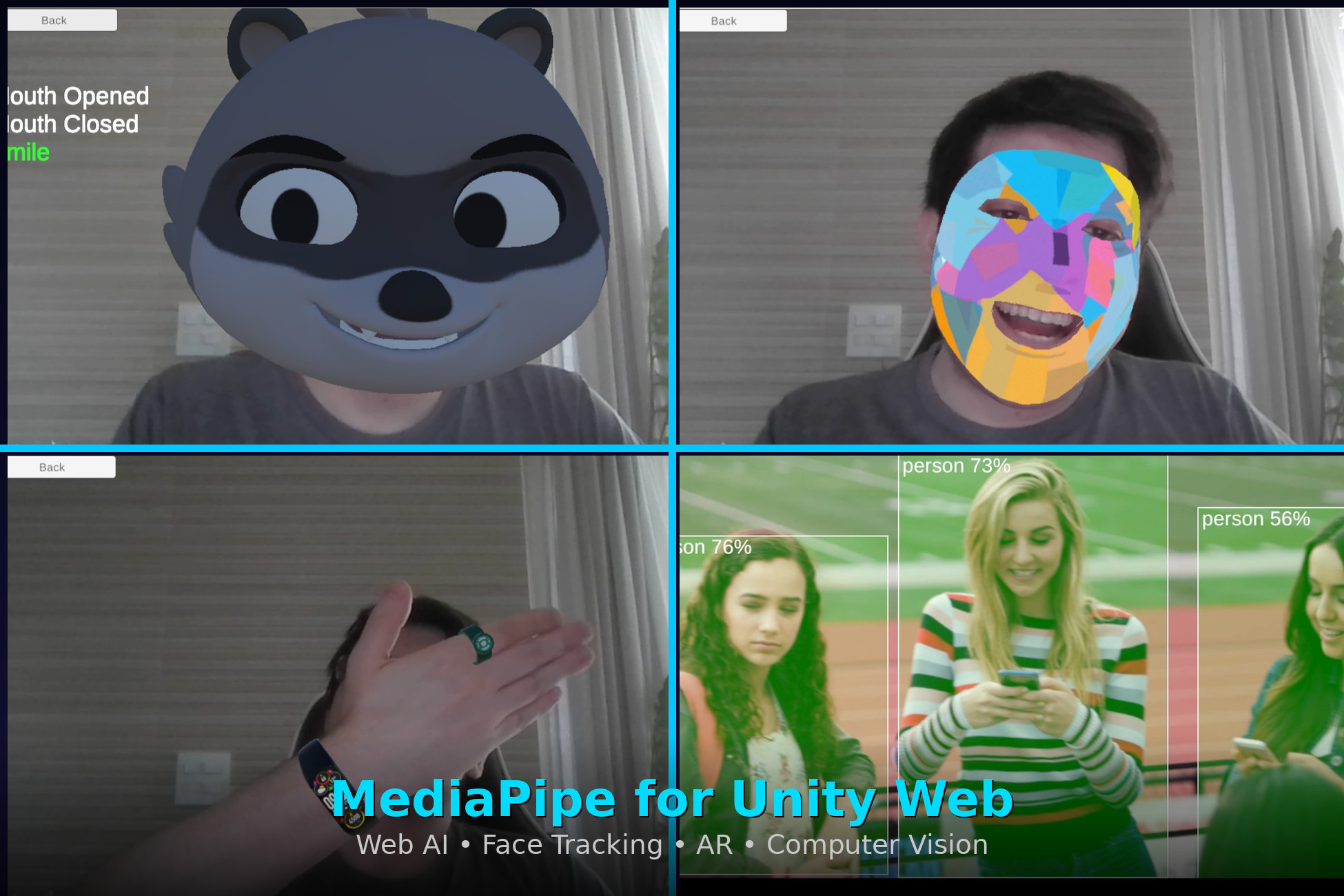
MediaPipe for Unity Web | Hand, Face & Pose Tracking, Audio/Text AI & AR screenshot 1


About this asset
Integrate MediaPipe Solutions Tasks for Web directly into Unity and bring real-time machine learning to your Web projects. Access powerful AI capabilities across computer vision, audio processing, and text analysis — all running directly in the browser.
Build advanced augmented reality effects, gesture-driven interactions, face and body tracking systems, intelligent object detection pipelines, and language-aware features inside Unity Web.
✅ Designed for Web
Built specifically for Unity Web, the plugin bridges Unity and the MediaPipe Web runtime efficiently and cleanly.
✅ Official API Structure
The architecture mirrors the official MediaPipe Solutions Tasks JavaScript API, making the integration largely self-documenting. Developers can leverage existing documentation, examples, and established patterns to accelerate development.
✅ High Performance & Low Overhead
Built with performance and memory efficiency as core priorities, the plugin is optimized for real-time browser-based applications. It delivers fast execution and remains lightweight enough for mobile web deployments.
✅ Broad Task Support
The plugin currently supports a comprehensive range of MediaPipe Solutions Tasks for Web across three primary domains:
🔊 Audio
📝 Text
👁 Vision
- Object Detection
- Image Classification
- Image Segmentation
- Interactive Segmentation
- Gesture Recognition
- Hand Landmark Detection
- Image Embedding
- Face Detection
- Face Landmark Detection
- Pose Landmark Detection
✅ Custom Model Support
Developers can integrate their own machine learning models trained with tools such as MediaPipe Model Maker or TensorFlow. This enables project-specific ML workflows such as custom object detection, domain-specific image classification, specialized audio analysis, and custom text processing directly in the browser.
What Can You Build?
• Browser-based AR face filters and visual effects powered by face detection and landmark tracking
• Gesture-controlled interfaces using real-time hand landmark detection and gesture recognition
• Pose-driven character animation and interactive avatar systems
• Object detection overlays and intelligent scene-aware interactions
• Background removal and segmentation-based visual effects
• Image and text classification workflows running entirely client-side
• Audio classification systems for browser-based applications
• Language detection and embedding-powered text features
Asset uses MediaPipe under Apache 2.0 License; see Third-Party Notices.txt file in package for details.
🧩 MORE ASSETS FOR UNITY WEB
Take your Unity Web projects even further with these powerful companion plugins — all built with the same focus on performance, clean API design, and seamless WebGL integration.
📷 Augmented Reality WebGL — Image Tracking WebAR Bring Image AR directly to the browser — no app download required. Anchor 3D content to real-world image targets with fast, accurate natural-feature tracking. Supports simultaneous multi-image tracking and works seamlessly across Chrome, Safari, Edge, and Firefox on both desktop and mobile. → View on Asset Store
🎥 Recorder WebGL The only Unity plugin built specifically to record gameplay video in WebGL builds. Capture in-game audio, microphone input, or both — with configurable framerate, pause/resume support, and export to MP4 or WebM. Everything runs client-side, no server required. → View on Asset Store
🔥 WebGL API for Firebase Unlock the full Firebase suite inside Unity WebGL — Authentication, Firestore, Realtime Database, Storage, Analytics, Messaging, App Check, Performance, and more. The official Firebase Unity SDK doesn't support WebGL; this plugin fills that gap with a clean, comprehensive integration. → View on Asset Store
ENJOYING THE PLUGIN?
If you like my plugin, please consider leaving a review! Reviews help tremendously with visibility and prevent the asset from getting buried on the Asset Store. They also motivate me to keep improving, updating, and supporting the plugin.
Thank you for your support! :)
From the publisher's Asset Store listing.
Technical details
🔧 Input Type Support
👁 Vision Tasks
When using the Vision library, the following Unity types are supported out of the box:
🎥 Video & Camera Input
Vision tasks support real-time analysis from:
This enables analysis of:
- Live webcam feeds
- Pre-recorded video files
🔊 Audio Tasks
When using the Audio library, the plugin supports:
📝 Text Tasks
When using the Text library, the plugin supports:
📘 Familiar API & Official Example Parity
The plugin mirrors the official MediaPipe Tasks for Web API structure, allowing you to follow the official documentation and examples directly when building your experiences.
All official Web examples have been implemented, with additional extended samples included for Unity integration.
For example, to reference the Object Detection example:
- Open the MediaPipe Solutions Guide
- Navigate to Object Detection → Web
- Open the Code Example (CodePen)
The corresponding functionality and structure are available within this Unity package, making it easy to translate official JavaScript examples into Unity Web workflows.
⚠️ Editor Limitation
The plugin does not run inside the Unity Editor.
It works only in the actual build.
This is due to browser/WebAssembly and runtime-specific dependencies that are not available in Editor mode.
Compatibility
| Unity version | Built-in | URP | HDRP | Custom |
|---|---|---|---|---|
| 6000.3.19f1 | Compatible | Compatible | Not listed | Compatible |
The plugin is render pipeline–agnostic and compatible with Built-in and URP. Example shaders were created using URP, as it is the default render pipeline when creating a project in Unity 6. If using a different pipeline, minor shader modifications may be required. Core functionality is unaffected.
As listed on the Asset Store.