
 View on Asset Store (opens in new tab)
Package details
- Latest version
- 2.2.0
- Last updated
- First released
- Unity version
- 2022.3.62 or later
- Package size
- 2.0 MB
- Files
- 202
- Favorites
- 4
- Views in the past week
- 13
Price tracking
- Last checked
- Tracked since
- Lowest recorded
- $13.99 on
Keywords
- Search for prefab validator
- Search for QA tool
- Search for asset validation
- Search for build validation
- Search for scene validator
- Search for Missing Reference
- Search for broken reference
- Search for Dependency Graph
- Search for Project Cleaner
- Search for ci/cd
- Search for Missing Scripts
- Search for find unused assets

RefSafe Pro – Project Validator & Cleaner
RefSafe Pro scans scenes, prefabs, and ScriptableObjects for missing scripts, broken references, and duplicates—with auto-fix, CI/CD support, and a studio-grade editor UI.
Affiliate link · Purchases support this site
Price history
Last 6 months
USDAsset preview
1 / 5
RefSafe Pro – Project Validator & Cleaner screenshot 1
About this asset
Why RefSafe Pro – Project Validator & Cleaner for Unity?
🌐 Website
RefSafe Pro is a production-ready Unity Editor validation suite designed to detect missing scripts, broken references, and project integrity issues across your entire Unity project — before they ship.
Discussion
Unity projects grow. Prefabs change. Scripts get renamed. Materials lose shaders. Addressables drift. References disappear silently. The problems often surface only at runtime — or worse, after shipping.
RefSafe Pro catches them early, fixes them in place, and integrates directly into your team's CI/CD pipeline.
What RefSafe Pro Does
RefSafe Pro scans:
- Open scenes
- All scenes in Build Settings
- Entire project scenes
- Prefabs
- ScriptableObjects
- Materials, shaders, layers, and project settings
- Only changed assets (incremental mode)
It detects:
- Missing MonoBehaviour scripts
- Broken serialized object references
- Duplicate components
- Broken UnityEvent persistent listeners
- Invalid or undefined layers
- Invalid materials and shader errors
- Missing prefab instances
- Broken Addressable AssetReferences
- Suspicious transform positions
- Deleted scenes still in Build Settings and more
- Orphan entries in Addressables groups
- Prefab variant component overrides (opt-in)
All results are structured, categorized, and easy to navigate.
Built for Production Workflows
RefSafe Pro is designed for developers and studios who need deterministic validation across the full release pipeline — from authoring to CI to shipping.
Core scanning:
- Project-wide and scope-targeted scanning
- Scene validation without manually opening scenes
- Prefab, ScriptableObject, and project-settings validation
- Async frame-based scanning — editor stays responsive
- Cancel support, scan duration metrics, and severity classification (Critical / Warning / Info)
- Incremental "Changed Only" mode for fast iteration
- Auto-scan on asset changes with toast notifications
Auto-fix and triage:
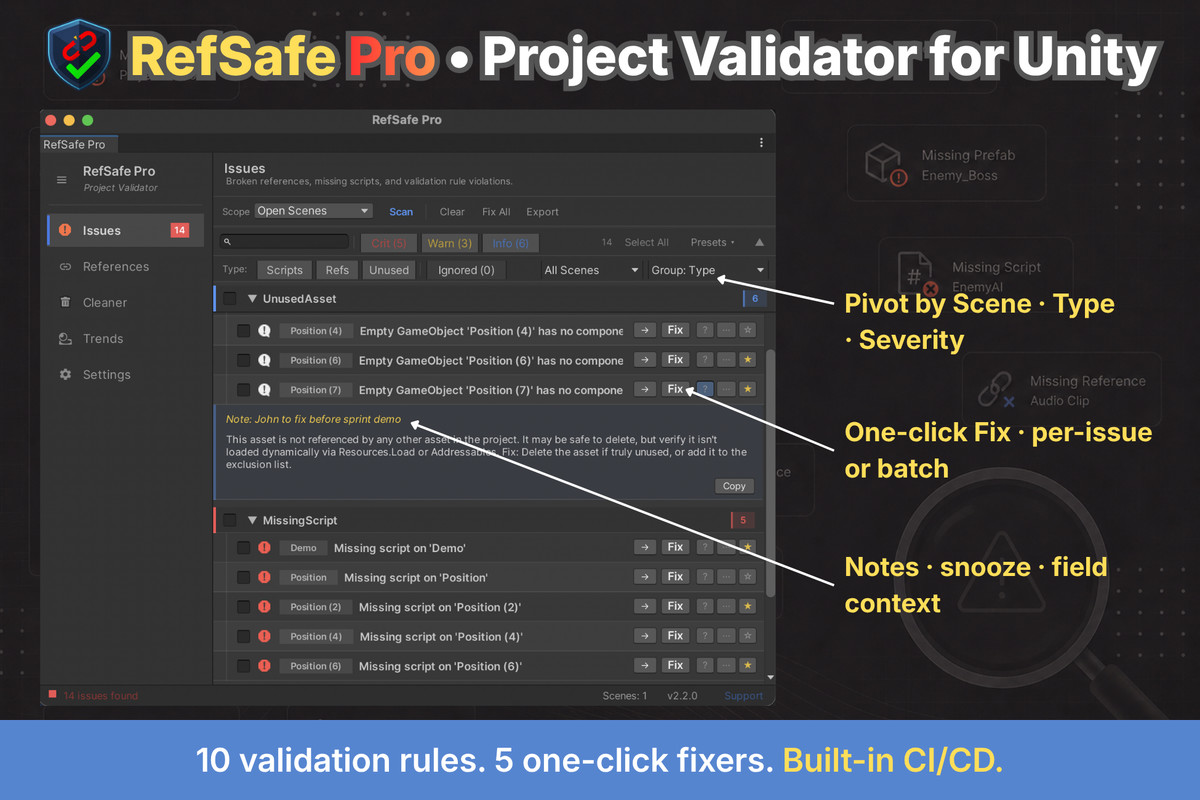
- One-click fixers for missing scripts, duplicate components, broken prefab instances, and deleted build scenes
- Multi-select with batch "Fix Selected" and "Ignore Selected."
- Stable hash-based ignore list that survives sessions
- Scan diff — see new vs. resolved issues across runs
- One-click fixers for missing scripts, missing references, duplicate components, broken prefab instances, and deleted build scenes
- Smart "Replace with..." suggestions for missing references
- Snooze issues for 1/7/30 days, attach per-issue notes, pin issues to the top
- Group by Scene/Asset, Issue Type, or Severity
- Saved filter presets
Project Cleaner — safe by default:
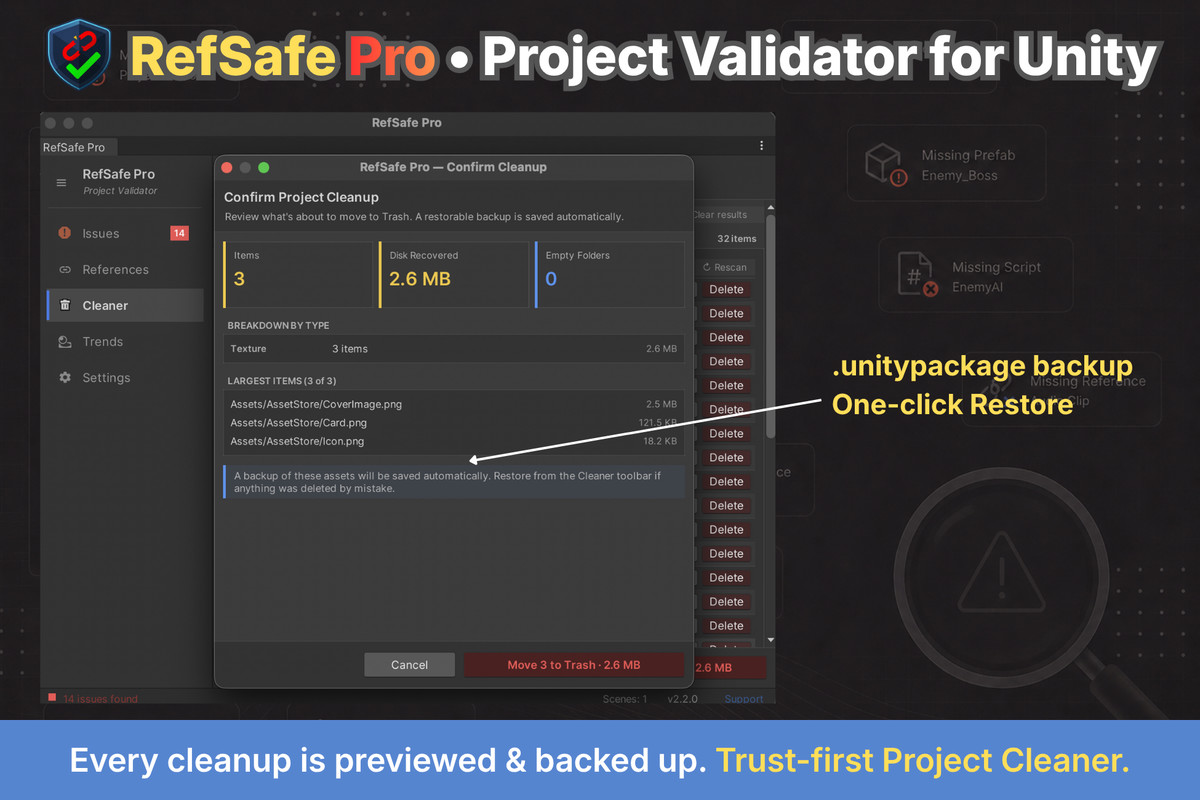
- Dry-run preview before every batch delete — counts, disk recovered, type breakdown, and the 10 largest items
- Automatic .unitypackage backup written before the delete, one-click Restore
- "Why was this flagged?" expander on every unused-asset row
- Protected Assets list — sprite atlases, Input System actions, Localization and more excluded out of the box, extensible with your own patterns
- Five analyzers: unused assets, empty folders, duplicate-by-hash (MD5), import-settings audit with one-click Fix, build-weight report
In-editor visibility:
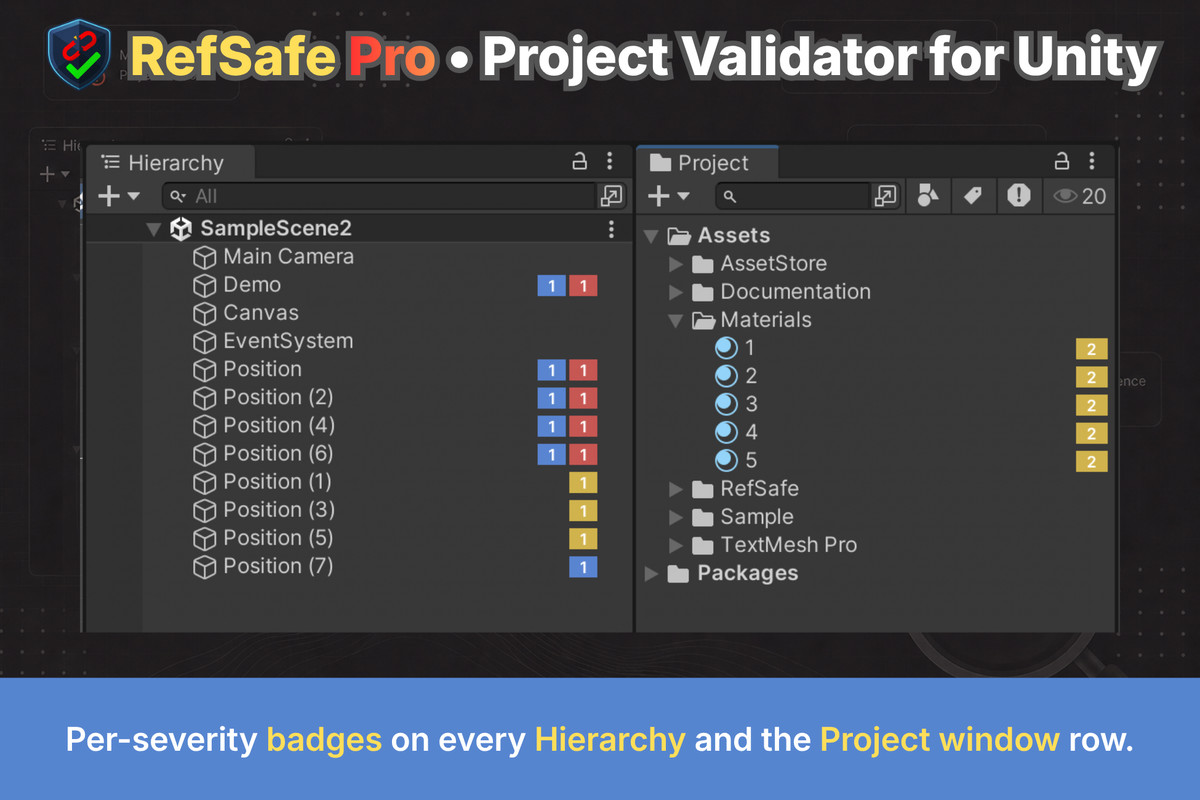
- Per-severity issue pills on every Hierarchy and Project window row
- Optional SceneView beacons above affected GameObjects
- Welcome dashboard with health score, sparkline, and trend delta
- First-run onboarding tour across all four tabs
References Finder:
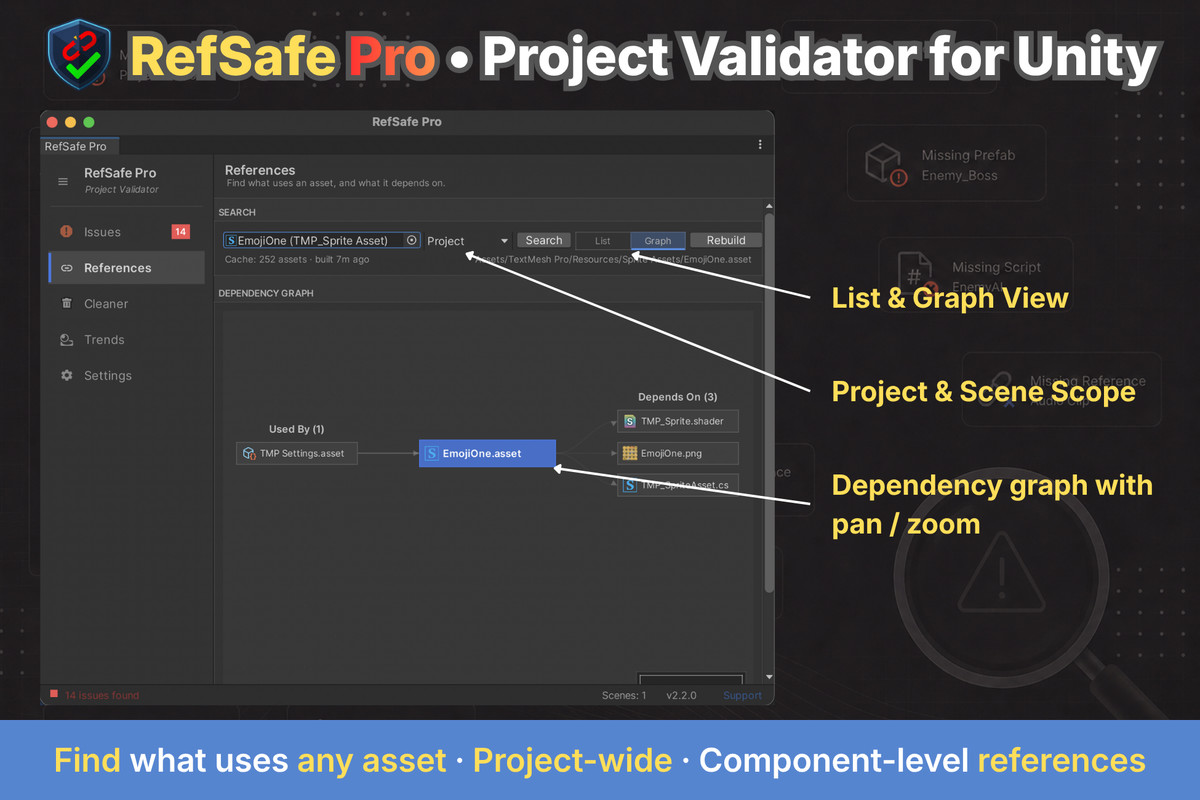
- Bidirectional dependency search — "Used By" and "Depends On" for any asset
- Interactive dependency graph with pan, zoom, and chain navigation
- Public ReferenceSearchAPI for scripting
- Project-wide or Open-Scenes scope, with component-level hits inside live scenes
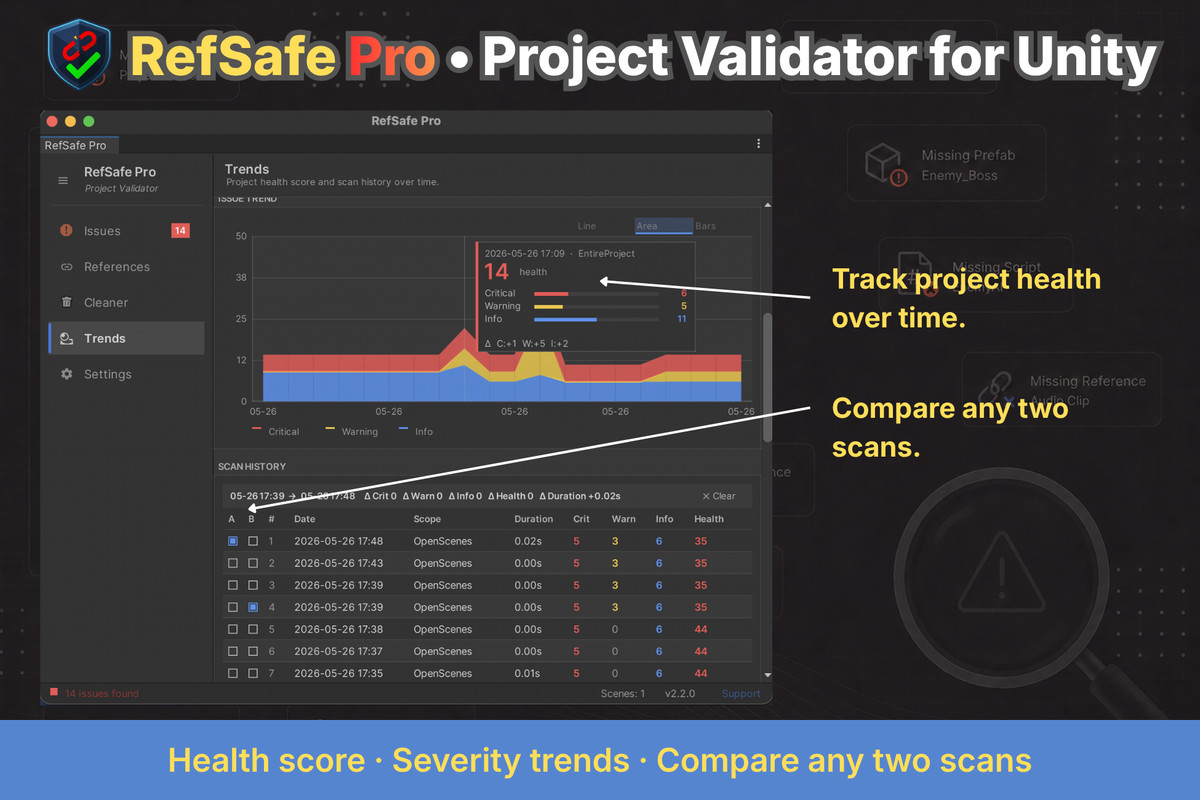
Health Trends:
- Project health score (0–100) with historical tracking
- Critical/Warning/Info trend chart with hover tooltips
- Persistent scan history (last 50 scans)
- Compare any two recorded scans with a delta summary
- Line / stacked-area / grouped-bar chart variants
- Configurable health-score weights per team
Reporting and CI/CD:
- Export reports as CSV, JSON, HTML, TXT, or Markdown
- Headless CLI runner: Unity -batchmode -executeMethod RefSafe.Pro.CliRunner.RunScan
- Configurable fail thresholds and exit codes for CI gates
- Pre-build hook that can block builds on critical issues
- Export as CSV, JSON, HTML, TXT, Markdown, GitHub Actions annotations, or GitLab Code Quality — PRs get inline issue comments.
Studio-grade editor UI:
- Tabbed workflow: Issues, References, Cleaner, Trends
- Dense Odin-inspired layout with full dark/light theme support
- Keyboard shortcuts (Ctrl+Shift+S scan, F5 re-scan, Ctrl+1–4 tabs, and more)
- Drag-and-drop scanning — drop any asset onto the window
- Two-level grouped tree view with multi-select and per-issue help
- Inline Unity documentation links for every issue type
Extensibility (Public SDK):
- [ValidationRule] — author custom rules in your own assembly
- [IssueFixer] — register custom auto-fixers with ordering
- [ReportExporter] — plug in custom report formats
- Hand-rolled DI container with zero external runtime dependencies
- RefSafe.Pro.Core assembly is runtime-safe (noEngineReferences)
Part of the RefSafe Ecosystem
RefSafe is structured as a two-tier validation system:
- RefSafe Lite — Free scene-level reference validation
- RefSafe Pro — Full project-wide validation, auto-fix, references finder, cleaner, trends, and CI/CD integration
Start with scene validation. Scale to a full studio pipeline when you need it.
Why Use RefSafe Pro?
- Prevent runtime errors caused by broken references, missing scripts, and silent asset drift
- Fix issues in place — no manual hierarchy hunting
- Gate builds in CI with deterministic exit codes
- Track project health over time with historical trends
- Find every reference to any asset, in both directions
- Reclaim disk space by cleaning unused assets and empty folders
- Extend with your own rules, fixers, and exporters via a stable public SDK
- Maintain reference integrity in large Unity productions and shipped titles
Support
Need help, found a bug, or want to request a feature?
- GitHub
- Response time: Within 1–2 business days
RefSafe Pro does one thing clearly and reliably:
It keeps your Unity project's references honest — from your editor to your CI server to your final build.
From the publisher's Asset Store listing.
Technical details
Unity Compatibility
- Unity 2021 LTS
- Unity 2022 LTS
- Unity 2023 LTS
- Unity 6
Editor-only tool (does not affect runtime builds).
Validation Scope
RefSafe Pro supports:
- Active scene scanning
- Multi-scene scanning
- Build Settings scene scanning
- Project-wide scene scanning
- Prefab asset scanning
- ScriptableObject asset scanning
- Material, shader, and project settings scanning
- Incremental "Changed Only" scanning (since last scan)
- Path-based exclusions (per-folder)
Unloaded assets are processed safely via editor asset enumeration. Scenes are opened, scanned, and the original scene setup is restored.
Detection Coverage
RefSafe Pro detects:
- Missing MonoBehaviour scripts on GameObjects
- Missing serialized object references in components
- Duplicate components on the same GameObject
- Broken UnityEvent persistent listeners
- Invalid or undefined layer assignments
- Invalid materials and shader compilation errors
- Missing prefab instance roots
- Broken Addressable AssetReference GUIDs (no hard dependency on the Addressables package)
- Suspicious transform positions (NaN / extreme values)
- Deleted scenes still referenced in Build Settings
- Prefab variant component overrides — components removed from the base prefab (opt-in)
- Broken Addressable AssetReference GUIDs and orphan entries in Addressables groups (no hard dependency on the Addressables package)
Each issue includes:
- Asset path
- Scene or prefab name
- GameObject reference (pingable)
- Component type and serialized field
- Severity classification (Critical / Warning / Info)
- Stable hash for cross-session identity (diff, ignore, history)
- Inline explanation and Unity documentation link
Auto-Fix System
Built-in fixers for common issues:
- Missing scripts → remove null MonoBehaviours
- Missing references → clear broken serialized refs on scenes, prefabs, and ScriptableObjects
- Duplicate components → remove duplicates
- Missing prefab instances → unpack
- Deleted build scenes → remove from Build Settings
Missing references also get ranked replacement suggestions — pick the intended
asset from a dropdown instead of hunting for it. Custom fixers register via
[IssueFixer]; custom suggestion sources via IFixSuggestionProvider.
Fixers run per-issue, in batch ("Fix Selected"), or bulk ("Fix All"). Custom fixers can be registered via [IssueFixer].
References Finder
- Bidirectional asset dependency graph (Used By / Depends On)
- Async incremental cache persisted to Library/RefSafePro/AssetMap.json
- Interactive dependency graph view with pan, zoom, and chain navigation
- Public ReferenceSearchAPI for scripting and tooling integration
- Project-wide or Open-Scenes search scope; scene scope reports component-level hits with hierarchy path and component name
Project Cleaner
- Unused-asset detection via reverse dependency map
- Smart exclusions for entry points (Resources, Editor, Plugins, StreamingAssets, build scenes, scripts, asmdefs)
- Empty-folder detection
- Safe deletion via AssetDatabase.MoveAssetToTrash() with confirmation
- Two-layer Protected Assets list — built-in safe defaults (sprite atlases, Input System actions, Localization, lighting data) plus user-defined path and extension patterns
- Empty-folder detection (respects .gitkeep)
- Duplicate detection via size-bucketing + MD5, with a persistent hash cache at Library/RefSafePro/AssetHashes.json — re-scans only hash-changed files
- Import-settings audit — texture Read/Write Enabled and audio Decompress On Load ≥ 1 MB, each with a one-click Fix and a batched Fix All
- Build-weight analyzer — BFS over the dependency graph from every enabled Build Settings scene, reporting the heaviest reachable assets by disk size
- Dry-run preview before every batch delete — total count, disk recovered, breakdown by asset type, and the 10 largest items
- Automatic .unitypackage backup plus JSON manifest written before deletion, under Library/RefSafePro/CleanerBackups/, with one-click Restore
- Deletion via AssetDatabase.MoveAssetToTrash() — recoverable at the OS level
Health Trends
- Project health score (0–100) computed per scan
- Persistent history (last 50 scans) at Library/RefSafePro/ScanHistory.json
- Critical / Warning / Info trend chart with hover tooltips
- Average / Best / Worst summary metrics
- Compare any two recorded scans with a delta summary
- Line / stacked-area / grouped-bar chart variants
- Configurable health-score weights (Critical / Warning / Info) per team
Performance & Control
- Async frame-based scanning via EditorApplication.update (non-blocking editor)
- Synchronous mode for batch-mode / CI runs
- Non-blocking progress bar UI
- Cancellation support for long scans (Escape key)
- Scan duration and per-scope metrics
- Auto-scan on asset changes with 3-second cooldown
- Optimized traversal and zero-allocation IMGUI rendering for large projects
- Performance budgets (p95) on the hot path: hashing, diffing, detection, path filtering
Reporting & Export
Supported export formats:
- CSV
- JSON
- HTML
- TXT
- Markdown
- GitHub Actions annotations (::error / ::warning / ::notice workflow commands)
- GitLab Code Quality (JSON array with fingerprints, consumed by the codequality artifact)
Reports include structured issue metadata suitable for:
- Team review
- QA validation
- Build verification workflows
- CI documentation
- Pull-request comments (Markdown)
Custom export formats can be registered via [ReportExporter].
CI/CD & Build Integration
- Headless CLI entry point: Unity -batchmode -executeMethod RefSafe.Pro.CliRunner.RunScan
- Arguments: --scope, --format, --output, --fail-threshold
- Deterministic exit codes (0 = clean, 1 = issues above threshold, 2 = error)
- Pre-build hook (IPreprocessBuildWithReport) with configurable severity threshold; can block builds on violations
Architecture Notes
- Editor-only assembly (RefSafe.Pro.Editor) plus runtime-safe data assembly (RefSafe.Pro.Core, noEngineReferences: true)
- Hand-rolled dependency injection — zero external runtime dependencies (no VContainer, Zenject, or UniTask)
- Service-oriented composition root via RefSafeApp ([InitializeOnLoad])
- Typed event bus replaces ad-hoc static events
- Public SDK with stable extension points: [ValidationRule], [IssueFixer], [ReportExporter][ValidationRule], [IssueFixer], [ReportExporter], IFixSuggestionProvider
- Manual resolution workflow by default — fixers are explicit, never automatic
- Safe for version-controlled projects (no destructive changes without user action)
- Cache and history stored under Library/ (not committed)
- Compatible with Unity 2021 LTS through Unity 6
Compatibility
| Unity version | Built-in | URP | HDRP | Custom |
|---|---|---|---|---|
| 2022.3.62f2 | Compatible | Compatible | Compatible | Compatible |
As listed on the Asset Store.