
 View on Asset Store (opens in new tab)
Package details
- Latest version
- 1.0
- Last updated
- First released
- Unity version
- 6000.3.5 or later
- Package size
- 569 KB
- Files
- 95
- Views in the past week
- 6
Price tracking
- Last checked
- Tracked since
- Lowest recorded
- $7.99 on
Keywords
Folder & Icon Organizer
Stop scrolling through a wall of yellow folders. Color-code your project, auto-assign icons, see hierarchy at a glance. 75+ icons, live preview. Zero runtime cost.
Affiliate link · Purchases support this site
Price history
Last 6 months
USDAsset preview
1 / 4
Folder & Icon Organizer screenshot 1
About this asset
Organize Your Project Visually – Instantly
Your Project window is a mess. Dozens of identical yellow folders, no visual structure, no way to tell Scripts from Prefabs at a glance.
Folder & Icon Organizer transforms your Project window into a structured, color-coded workspace. Import it, right-click a folder, pick a color. That's it.
No setup. No configuration. No runtime cost.
What Makes It Different
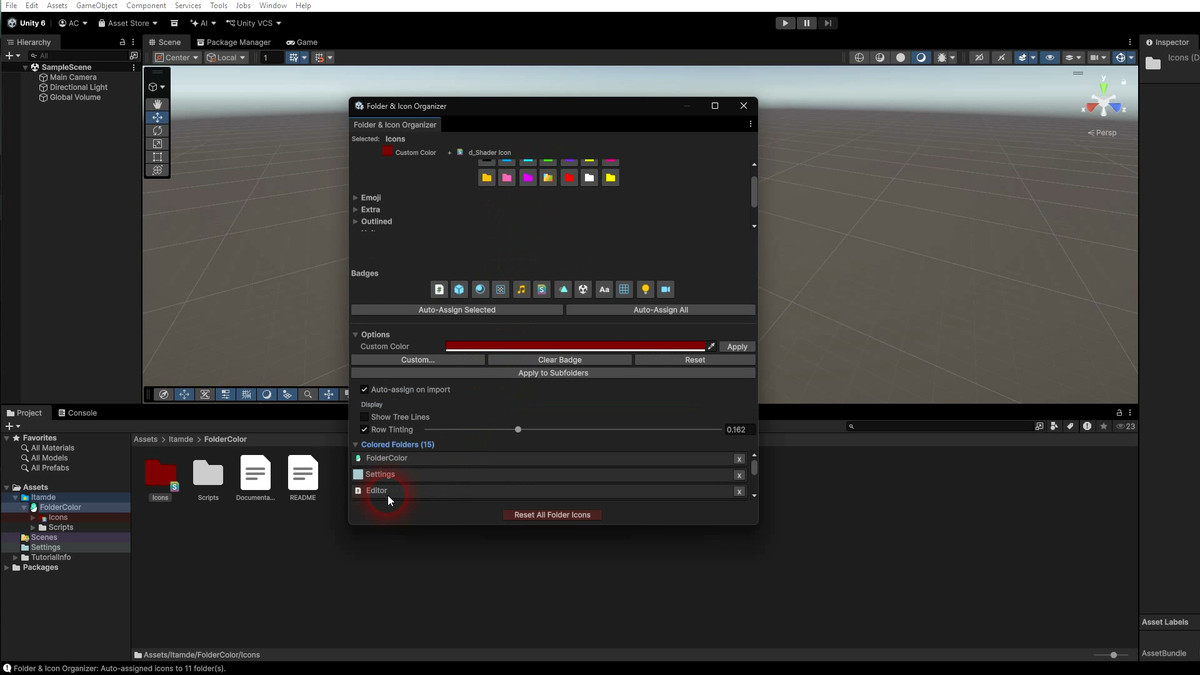
- Auto-assign icons by folder content – the tool scans your folders and assigns matching badges automatically. Scripts, Prefabs, Materials, Textures, Audio – detected and labeled without manual work. One click for a single folder, one click for the entire project.
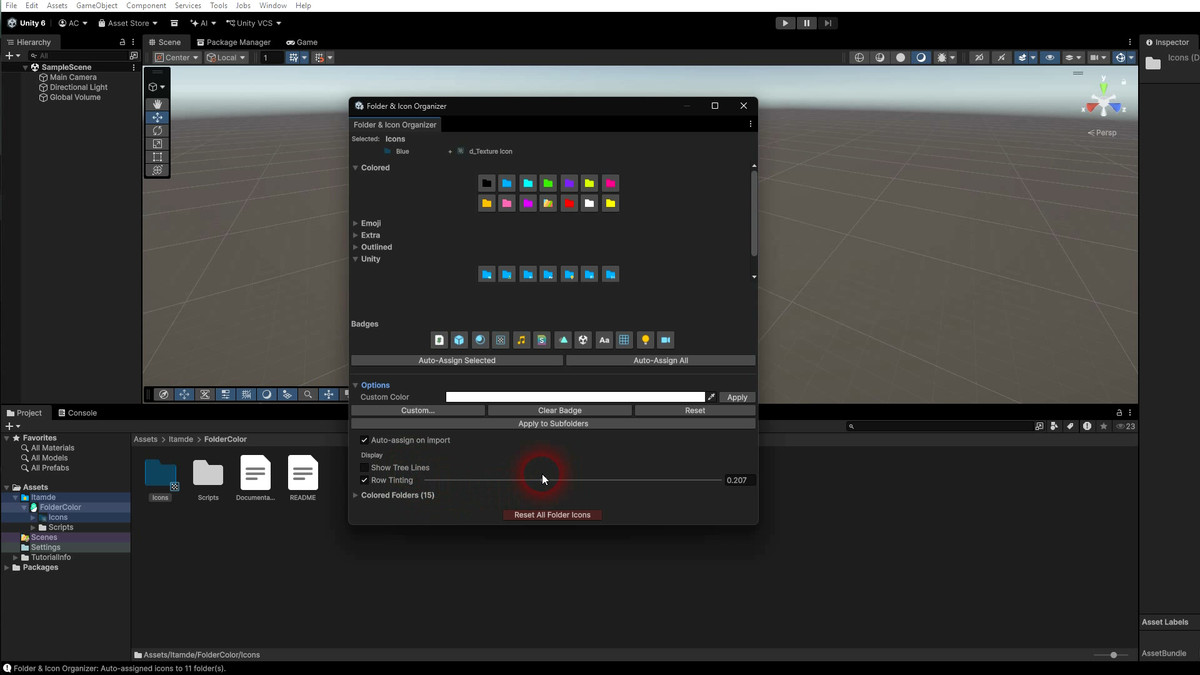
- See your hierarchy at a glance – colored tree lines and row tinting turn the flat folder list into a visual map. Parent colors flow down with gradient fade. You instantly know where you are.
- Preview before you commit – hover any icon and see it applied live on the actual folder. No guessing, no undo loops.
Custom Colors
- 14 curated preset colors for instant use
- Pick any color beyond presets with the built-in color picker
- Access from right-click menu, Alt+Click popup, or Editor Window
Color + Badge Combo
- Overlay a badge on any colored folder – green folder + Script badge, red outlined + Prefab, custom color + Audio
- 12 badge types from Unity's built-in icons: Script, Prefab, Material, Texture, Audio, Shader, Animation, Scene, Font, Mesh, Light, Camera
- Works with Colored, Outlined, and Custom Color bases
5 Icon Packs (75+ icons)
- Colored – 14 solid folder colors
- Outlined – edge-detected outline variants
- Emoji – 27 status/symbol badges (Star, Warning, Lock, Gear, Heart, and more)
- Unity – asset type badges (Prefab, Script, Material, Shader, and more)
- Extra – 10 hand-crafted themed icons (Calm, Energy, Flash, Focus, and more)
Auto-Icon Assignment
- Detects folder content and assigns the right badge automatically
- Colored folders get the badge as an overlay; uncolored folders get a badge on the default icon
- Batch-assign all folders in one click
- Optional auto-assign on import – folders update when you add, move, or delete assets
- Manually assigned icons are never overwritten
Visual Hierarchy
- Colored tree lines – vertical lines match parent folder color with gradient fade for depth
- Row tinting – semi-transparent colored background behind folder rows, adjustable opacity (1%-50%)
- Both work in tree view and list view, toggle on/off from the Editor Window
Subfolder Cascading
- Propagate a color to all subfolders with one click
- Works with colors, badges, and any icon combination
Fast Workflow
- Alt+Click any folder – instant tabbed popup picker
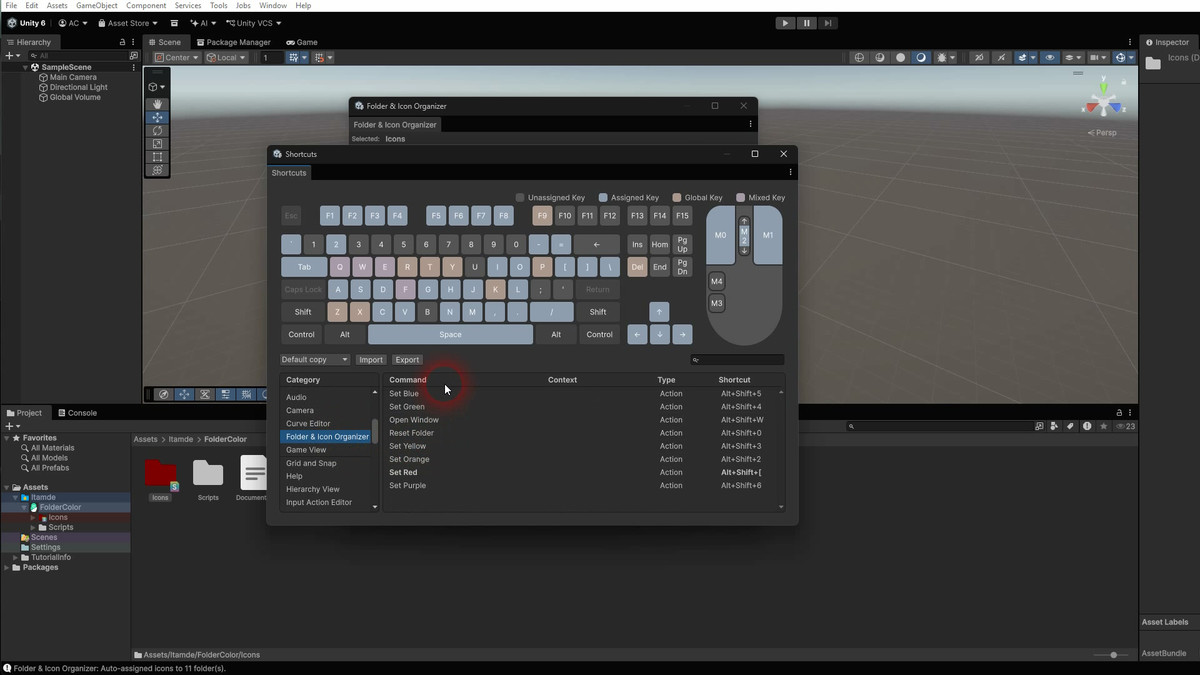
- Keyboard shortcuts – Alt+Shift+1-6 for colors, Alt+Shift+0 to reset, Alt+Shift+W for the window
- Right-click context menu with every option
- Editor Window with collapsible sections
- All shortcuts fully rebindable via Edit > Shortcuts
- Works with any keyboard layout – QWERTY, AZERTY, QWERTZ, Dvorak
Built for Teams
- Settings stored in a single JSON file – commit to version control and share colors across your team
- Full Undo/Redo support (Ctrl+Z / Ctrl+Y)
- Multi-selection – color multiple folders at once
How to Use
- Right-click any folder > Folder & Icon Organizer > pick a color or icon
- Or Alt+Click for the quick popup picker
- Or use keyboard shortcuts for instant assignment
- Or open the Editor Window (Alt+Shift+W) for the full experience
Third-Party Content
Asset uses Unity's built-in editor icons under the Unity Companion License v1.3; see Third-Party Notices.txt file in package for details.
From the publisher's Asset Store listing.
Technical details
Requirements
- Unity 2021.3 LTS or later (compatible through Unity 6)
Performance
- 100% editor-only – nothing included in builds
- Zero runtime cost, zero impact on game performance or build size
- No increase in compile time
- No external dependencies
Architecture
- Proper Assembly Definition files (.asmdef) for clean compilation
- Namespaced under Itamde.FolderColor
- Settings persisted in ProjectSettings/FolderIconOrganizer.json via JsonUtility
- Version control friendly – single JSON settings file, easy to merge
Compatibility
- Light and Dark editor themes
- All keyboard layouts (QWERTY, AZERTY, QWERTZ, Dvorak)
- Windows, macOS, Linux
Package Contents
- 75+ folder icons across 5 packs
- Editor scripts with full source code
- Documentation included
Compatibility
| Unity version | Built-in | URP | HDRP | Custom |
|---|---|---|---|---|
| 6000.3.5f2 | Compatible | Compatible | Compatible | Compatible |
As listed on the Asset Store.