
 View on Asset Store (opens in new tab)
Package details
- Latest version
- 1.0
- Last updated
- First released
- Unity version
- 6000.2.12 or later
- Package size
- 9.4 MB
- Files
- 12
- Favorites
- 5
- Views in the past week
- 4
Price tracking
- Last checked
- Tracked since
- Lowest recorded
- Free on
Keywords
- Search for unity memory profiler
- Search for Unity Performance Tools
- Search for unity optimization toolkit
- Search for memory analyzer
- Search for Unity optimization
- Search for unity asset optimization
- Search for unity low end optimization
- Search for unity development tools
- Search for unity build optimization
- Search for unity scene analyzer
- Search for mobile optimization
- Search for unity scene optimizer

MAG Editor Essentials FREE
MAG Editor Essentials FREE is a professional Unity editor toolkit for memory analysis, performance diagnostics and scene optimization, designed especially for mobile and low-end devices.
Affiliate link · Purchases support this site
Price history
Last 6 months
USDAsset preview
1 / 4
MAG Editor Essentials FREE screenshot 1

About this asset
MAG Editor Essentials FREE is a professional-grade Unity Editor toolkit that provides essential tools for performance analysis, memory auditing, scene diagnostics, and project cleanup.
This free package is designed for mobile developers, low-end device optimization, open-world projects, large scenes, and performance-critical games, offering a production-ready workflow used in real commercial projects.
It allows developers to identify memory spikes, detect heavy assets, remove hidden bugs, clean broken components, analyze scene complexity, and improve editor & runtime performance — all directly inside the Unity Editor.
🔥 Included Tools
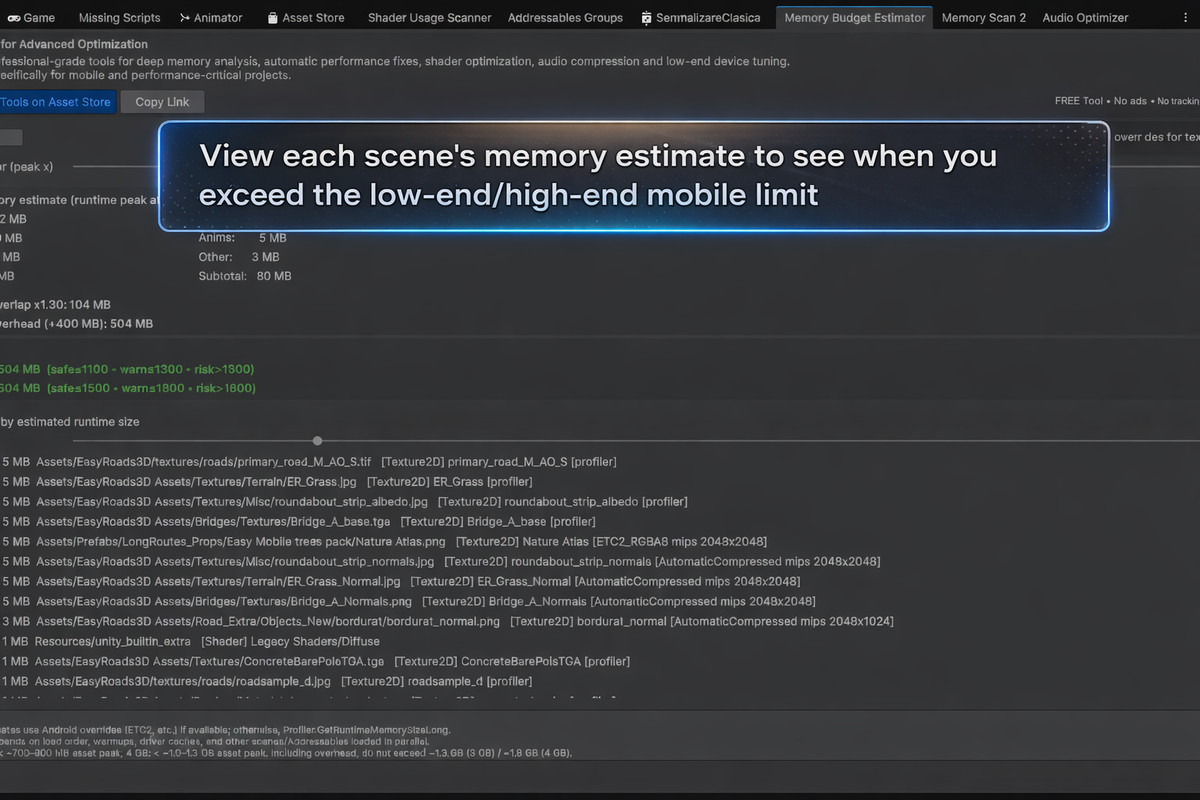
✅ Scene Memory Budget Estimator
Estimates the real runtime memory footprint of the active scene, including:
- Textures
- Meshes
- Materials
- Shaders
- Audio clips
- Animation clips
- Other engine resources
Features:
- Android texture override estimation (ETC2, ASTC, etc.)
- Peak memory simulation using overlap factor
- Engine & managed memory overhead simulation
- Realistic load-time peak calculation
- Risk gauges for 3GB & 4GB mobile devices
- List of top memory-consuming assets with direct ping navigation
Perfect for:
- Mobile optimization
- Low-end device support
- Memory budgeting before release
- Avoiding crashes caused by memory spikes
✅ Selected Object Memory Inspector
Displays detailed runtime memory usage for any selected object or prefab, including all dependencies.
Features:
- Recursive dependency scan
- Real memory size estimation
- Precise breakdown per object
- Helps instantly identify heavy models, prefabs, materials, and textures
Perfect for:
- Finding memory hogs
- Optimizing complex prefabs
- Reducing RAM usage
- Asset-level optimization
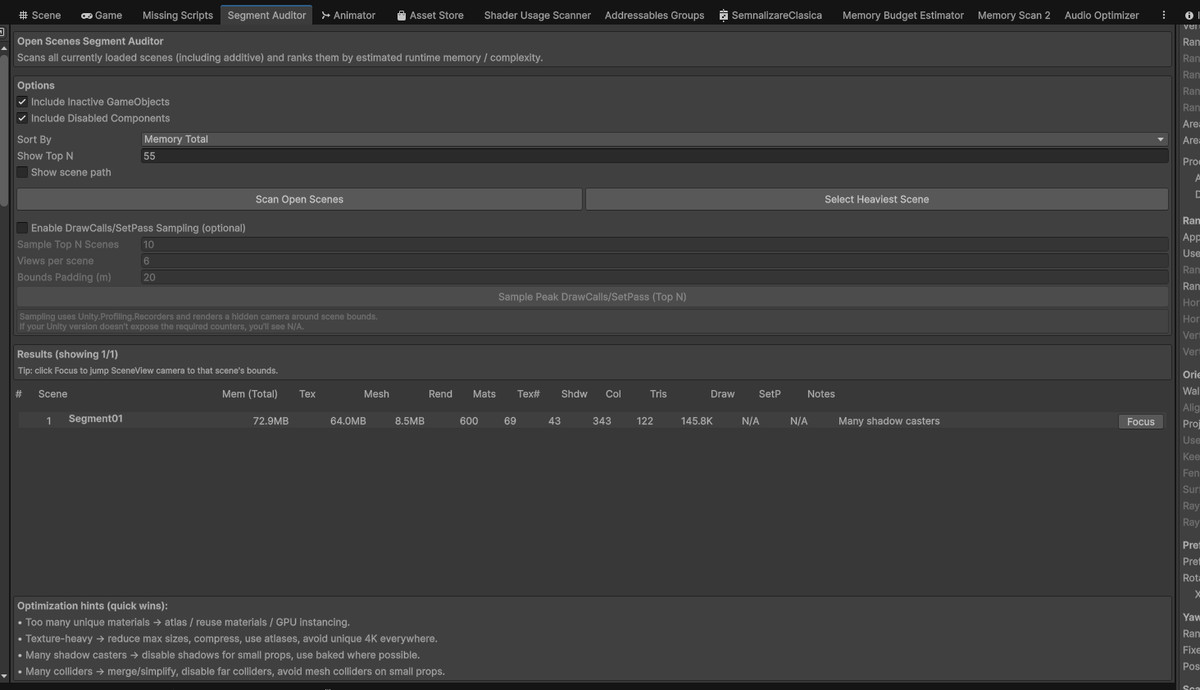
✅ Segment Auditor Window (Scene Complexity Analyzer)
Analyzes scene complexity and memory usage for additive and segmented scenes, ideal for large worlds and streaming setups.
Features:
- Scene memory footprint estimation
- Renderer count
- Collider count
- Triangle & vertex statistics
- Texture & material usage tracking
- Scene focus navigation
- Performance bottleneck detection
Perfect for:
- Open-world games
- Streaming scene setups
- Large environments
- World partitioning optimization
✅ Missing Scripts Cleaner
Scans and removes missing MonoBehaviour references from:
- Current scene
- All open scenes
- All build scenes
- All prefabs in the project
Features:
- Safe preview mode
- One-click cleanup
- Full hierarchy scanning
- Detailed statistics
- Precise object navigation
Perfect for:
- Fixing hidden editor bugs
- Reducing serialization overhead
- Improving editor stability
- Cleaning legacy projects
✅ Opaque Material Alpha Auditor
Detects opaque materials that incorrectly reference alpha textures, which can cause:
- GPU overdraw
- Rendering inefficiencies
- Performance drops on mobile devices
Features:
- Full material scan
- Automatic detection
- Direct object & material ping
- Overdraw risk identification
Perfect for:
- GPU optimization
- Mobile rendering performance
- Shader correctness auditing
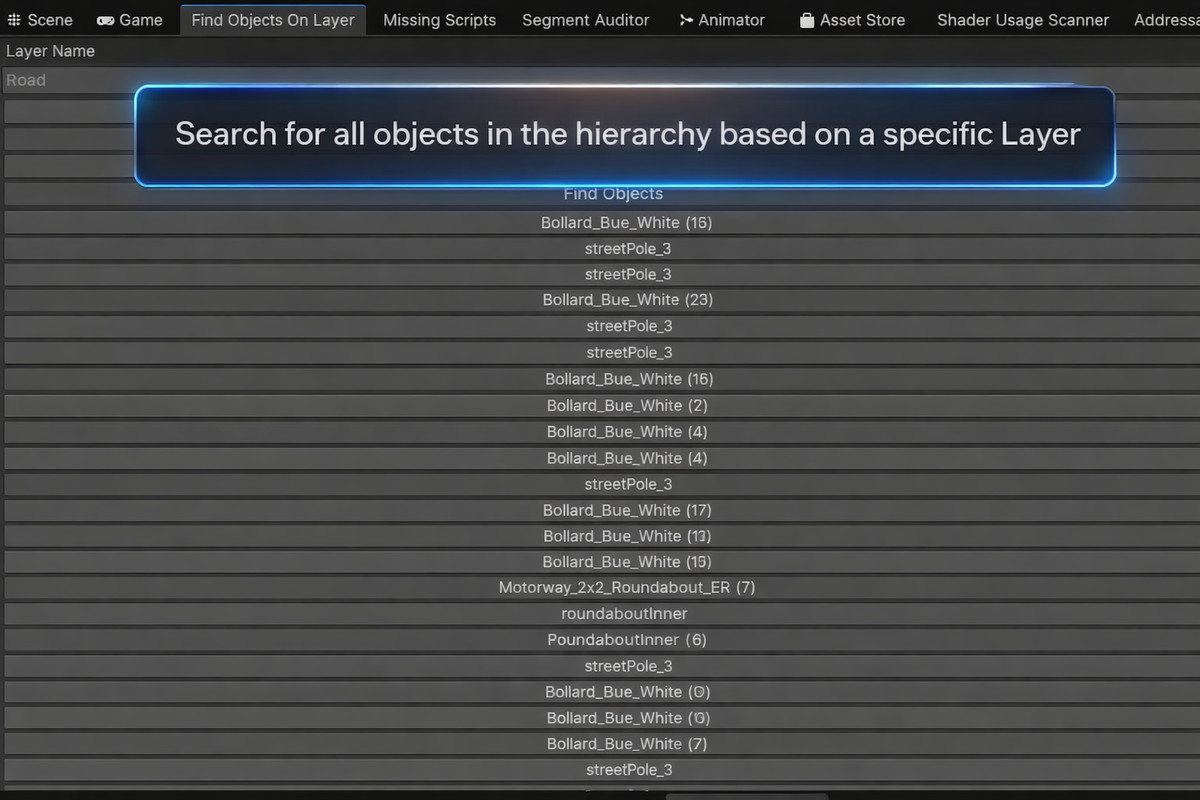
✅ Find Objects On Layer
Utility tool that instantly finds and selects all objects using a specific Unity layer.
Features:
- Fast scene scanning
- Layer-based object filtering
- Batch selection
- Editor navigation shortcut
Perfect for:
- Collision debugging
- Rendering layer validation
- Physics layer analysis
- Culling & optimization workflows
🎯 Designed For
✔ Mobile games
✔ Low-end Android devices
✔ Performance-critical projects
✔ Open-world games
✔ Large-scale scenes
✔ Optimization pipelines
✔ Production-ready workflows
🚀 Benefits
✔ Detect memory spikes before they crash your game
✔ Reduce RAM usage
✔ Improve runtime FPS
✔ Optimize GPU performance
✔ Clean hidden bugs
✔ Improve editor stability
✔ Make projects production-ready
💎 Professional Workflow
MAG Editor Essentials FREE integrates seamlessly into the Unity Editor and provides professional diagnostics & optimization workflows, saving developers hours of manual debugging and profiling.
From the publisher's Asset Store listing.
Technical details
Package Category: Tools
Editor Integration: Yes
Runtime Dependencies: None
Platforms: Windows, macOS, Linux
Target Platforms: Android, iOS, PC, Consoles
Unity Versions: 2020.3+
Compatibility
| Unity version | Built-in | URP | HDRP | Custom |
|---|---|---|---|---|
| 6000.2.12f1 | Compatible | Compatible | Compatible | Compatible |
As listed on the Asset Store.