
 View on Asset Store (opens in new tab)
Package details
- Latest version
- 1.0.1
- Last updated
- First released
- Unity version
- 2021.3.44 or later
- Package size
- 3.4 MB
- Files
- 48
- Favorites
- 1
- Views in the past week
- 8
Price tracking
- Last checked
- Tracked since
- Lowest recorded
- $10.00 on
Keywords

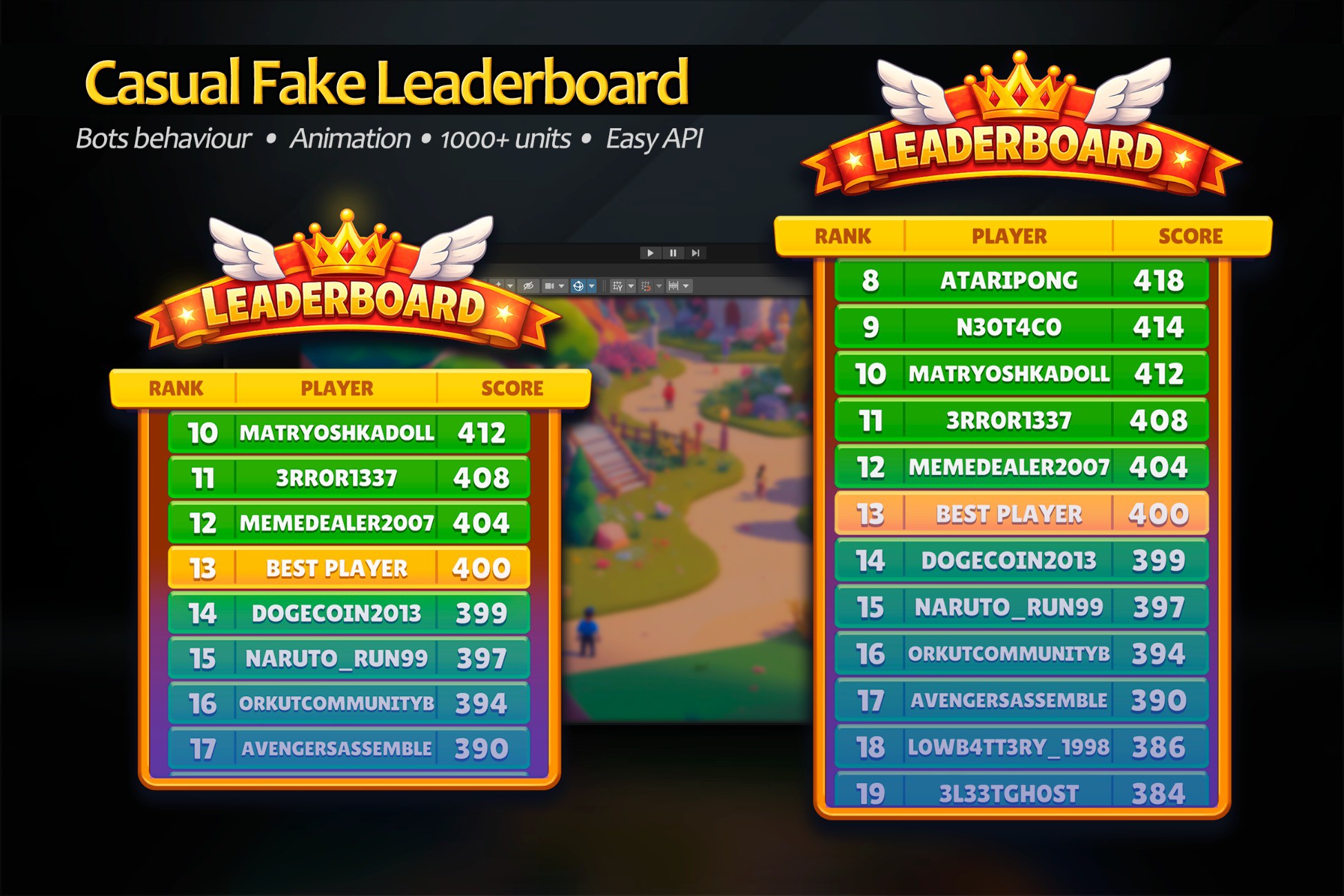
Casual Faked Leaderboard with Bots Activity
Offline Casual Fake Leaderboard for Unity 3d with bots activity, smooth animations. Mobile optimization. Easy API and Implement. No internet/real people required. 1000+ player support. Meta
Affiliate link · Purchases support this site
Price history
Last 6 months
USDAsset preview
1 / 6

Casual Faked Leaderboard with Bots Activity screenshot 1




About this asset
FakeLeaderboard is a lightweight, offline leaderboard system for Unity mobile games. No internet or real players required - bots simulate a competitive ranking experience with smooth animations. Perfect for hyper-casual, arcade, and idle games where competition and instant feedback motivates players.
Features:
2 methods integration to your LevelManager (example class and object provided)
Fully customizable UI
Edit sprites (PSD provided)
Built in Gradients to choose from
Set Layout size
Optimized for mobile with object pooling: handles 1000+ entries on mobile devices.
All data stored locally (player name in PlayerPrefs, scores in persistent file).
Documentation and Example Scene
Ideal for:
- Hyper-casual & social games
- Games without backend infrastructure
- Prototypes requiring quick leaderboard integration (with 2 method calls)
Easy Setup: drag the prefab onto your Canvas and start modifying scores/bots behaviour via simple API calls
Or simply call 2 methods in your LevelManager script with existing bots behaviour.
API is intuitive and easy, well documented
Requirements:
Uses Text Mesh Pro which will be installed on asset importing (will ask permition)
From the publisher's Asset Store listing.
Technical details
-Used in real mobile project "Laser Slasher" (available in GooglePlay). Self created and tested on android and Ios devices
-For good optimization used:
- Internal pool system and LoopScrollRect (Handles even 500-1000+ players in Leaderboard). It's creating and reusing only visible positions on the fly
- Sprites and Default Shaders
- Zero dependencies: Works offline — no backend, SDKs, or internet required
- Mobile-optimized: Object pooling and UI recycling for 60 FPS on low-end devices
- Scalable: Smooth performance with 1000+ leaderboard entries
- Bot system: Auto-generated opponents with unique nicknames and dynamic scoring
- Queue-based animations: Sequential score updates with smooth visual feedback (skippable via API)
- Data safety: Auto-saves final state on app close — no data loss during animations
- Multiple boards: Create separate leaderboards (daily/weekly/all-time) via unique IDs
- Simple API: Intuitive methods like AddScoreToPlayer(), AddScoreToNearBot(), FocusPlayer()
- Storage: Player name → PlayerPrefs; Scores/positions → save file in Application.persistentDataPath
- Customizable UI: Edit sprites, fonts, and layout directly in Unity Canvas
- Drag & drop setup: Single prefab integration — no coding required for basic use
- Unity 2021.3+ compatible: URP/HDRP support via standard UI Toolkit
- Offline Documentation
- Example scene
Compatibility
| Unity version | Built-in | URP | HDRP | Custom |
|---|---|---|---|---|
| 2022.3.49f1 | Compatible | Compatible | Compatible | Compatible |
| 2021.3.44f1 | Compatible | Compatible | Compatible | Compatible |
-Works with Unity 2021 and above
-Uses Text Mesh Pro
-Offline Documentation
-Example scene
-Uses default Sprites
-For good optimization used:
- Internal pool system and LoopScrollRect (Handles even 500-1000+ players in Leaderboard). It's creating and reusing only visible positions on the fly
- Sprites and Default Shaders
As listed on the Asset Store.