
 View on Asset Store (opens in new tab)
Package details
- Latest version
- 1.1.0
- Last updated
- First released
- Unity version
- 2022.3.62 or later
- Package size
- 539 KB
- Files
- 58
- Favorites
- 41
- Views in the past week
- 32
Price tracking
- Last checked
- Tracked since
- Lowest recorded
- Free on
Keywords

Play Mode Changes Saver (Runtime-Saver)
Never lose your Play Mode tweaks again. Capture every change made in Play Mode, compare it side by side with the original and keep exactly what you want – with one click and full Undo.
Affiliate link · Purchases support this site
Price history
Last 6 months
USDAsset preview
1 / 5
Play Mode Changes Saver (Runtime-Saver) screenshot 1


About this asset
Stop losing your Play Mode tweaks! Play Mode Changes Saver records every change you make during Play Mode and lets you keep exactly the ones you want – no setup required.
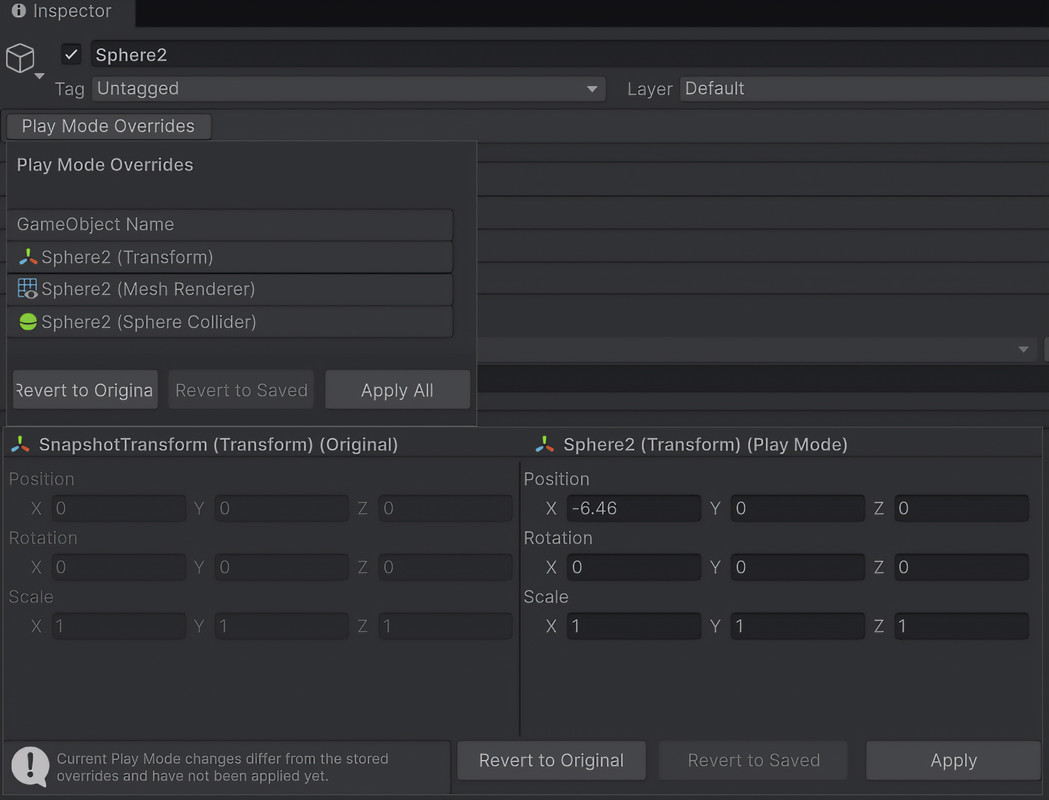
The workflow follows Unity's Prefab Overrides: changed objects get a "Play Mode Overrides" button in the Inspector, a side-by-side view shows original and current values, and you apply or revert per property, per component or per object.
KEY FEATURES
- Automatic tracking – snapshots all GameObjects, components and names when you enter Play Mode. Nothing to configure.
- Inspector integration – a "Play Mode Overrides" panel on every changed GameObject with Apply All, Revert to Original and Revert to Saved.
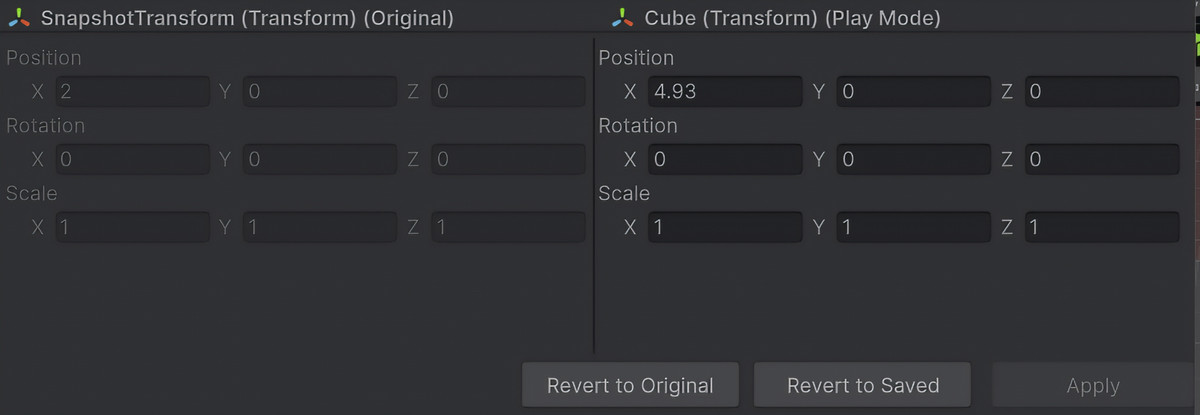
- Side-by-side comparison – original values on the left, current values on the right, per component.
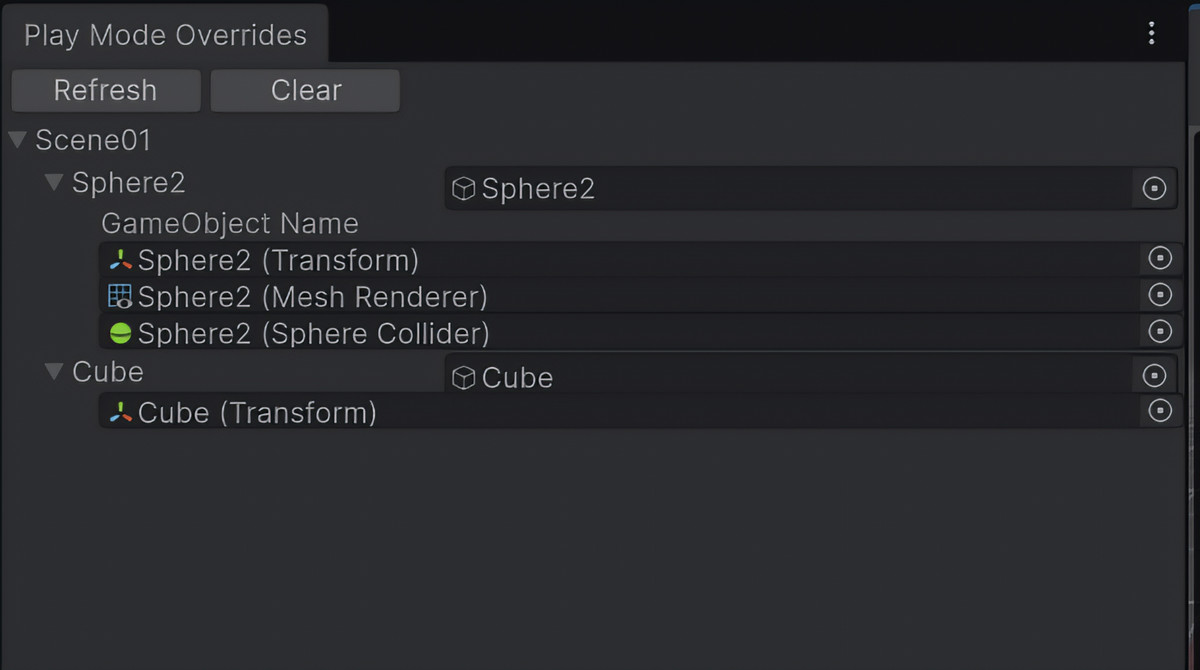
- Overrides Browser (Tools > Play Mode Overrides Browser) – all pending and applied changes of the open scenes in one window, in Edit Mode and Play Mode.
- Guided apply after Play Mode – a dialog asks which changes to keep; changes in other scenes are applied scene by scene.
- Prefab-aware – changes on prefab instances are written to the right instance as regular prefab overrides; the prefab asset stays untouched.
- Reliable object matching – objects are identified by their GlobalObjectId, with the hierarchy path as fallback, so renamed objects and objects with the same name are handled correctly.
- Full Undo/Redo for everything applied after Play Mode.
WHAT IS TRACKED
- Transform and RectTransform (position, rotation, scale, anchors, pivot, size, offsets)
- All serialized fields of built-in components and your own MonoBehaviours: numbers, booleans, strings, enums and flags, colors (incl. HDR), vectors, quaternions, rects, bounds, layer masks, gradients, animation curves, arrays and lists, nested classes and structs, object references
- The enabled state of components and the connected body of joints
- Material assignments on renderers
- GameObject names
LIMITATIONS
- Fields marked [HideInInspector] are not tracked.
- Material instances created at runtime (renderer.material) are not saved; the material slot is left unchanged.
- Objects created at runtime and changes to ScriptableObject assets are not tracked.
REQUIREMENTS
- Unity 2022.3 LTS or newer (tested on 2022.3, 6000.0 and 6000.6).
- Editor-only: nothing ends up in your builds, no runtime overhead.
- Works with the Built-in Render Pipeline, URP and HDRP. The optional demo scenes use Built-in materials and Unity UI (uGUI).
DOCUMENTATION & SUPPORT
A README and a PDF manual are included in the package. Questions, bugs or ideas: open an issue on GitHub (github.com/062Leo/Unity-Runtime-Changes-Saver) or use the contact form linked in the README.
This tool is free. If it saves you time, a rating and a short review on the Asset Store help a lot.
From the publisher's Asset Store listing.
Technical details
- Editor-only: one editor assembly (PlayModeChangesSaver.Editor), all code in the PlayModeChangesSaver namespace.
- No runtime footprint: no runtime code, no runtime overhead, nothing included in player builds.
- No dependencies: no third-party code or packages. The optional demo uses Unity UI (uGUI).
- Unity versions: 2022.3 LTS or newer; tested on 2022.3.62f3, 6000.0.76f1 and 6000.6.4f1.
- Render pipelines: independent of the render pipeline (Built-in, URP, HDRP).
- Menu: Tools > Play Mode Overrides Browser.
- Object identification: via GlobalObjectId, with scene and hierarchy path as fallback; prefab instances are matched across Play Mode and Edit Mode.
- Storage: changes are kept in ScriptableObject assets in the package's Scriptable_Objects folder (created automatically, also when the package folder is moved) and cleared on the next Play Mode start.
- Undo/Redo: full integration for applied changes.
- Enter Play Mode Options: supported, also with Domain Reload and Scene Reload disabled.
- Tested: covered by 250+ automated EditMode tests, including Play Mode round trips.
Compatibility
| Unity version | Built-in | URP | HDRP | Custom |
|---|---|---|---|---|
| 2022.3.62f3 | Compatible | Compatible | Compatible | Compatible |
The tool itself is editor-only and independent of the render pipeline: it works the same in the Built-in Render Pipeline, URP and HDRP.
The optional demo scenes use Built-in Standard materials. In URP or HDRP they appear pink; convert them with Window > Rendering > Render Pipeline Converter, or simply ignore the colors – the demo works either way.
As listed on the Asset Store.