
 View on Asset Store (opens in new tab)
Package details
- Latest version
- 1.0.0
- Last updated
- First released
- Unity version
- 2022.3.62 or later
- Package size
- 1.5 MB
- Files
- 13
- Favorites
- 5
- Views in the past week
- 5
Price tracking
- Last checked
- Tracked since
- Lowest recorded
- Free on
Keywords

EasyLogger - Category Based Log Management
A simple logging system that organizes Unity logs by category with color-coding. Filter by level, enable/disable categories, and keep your console clean and readable.
Affiliate link · Purchases support this site
Price history
Last 6 months
USDAsset preview
1 / 2
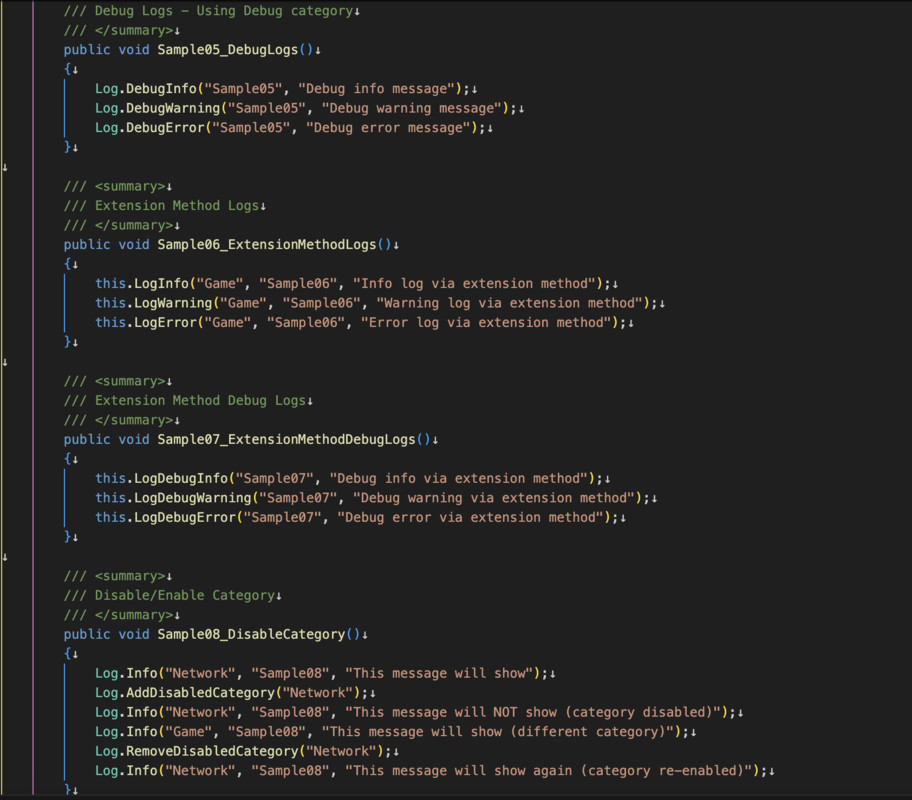
EasyLogger - Category Based Log Management screenshot 1
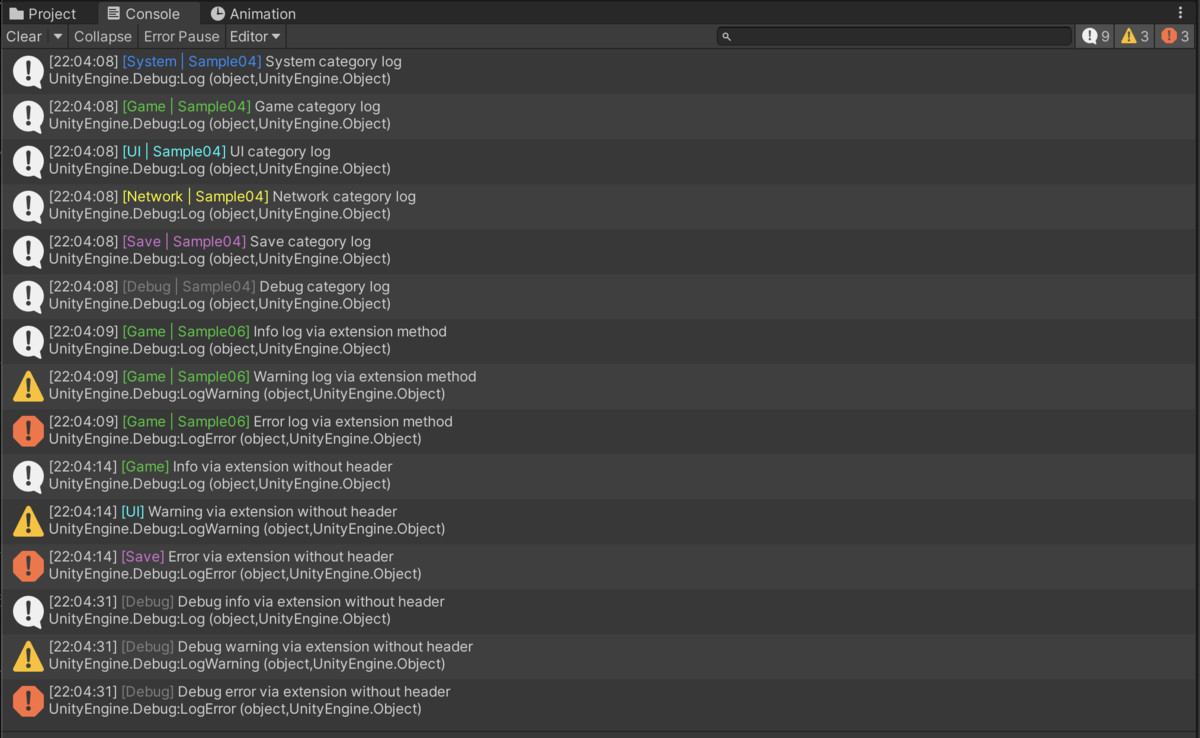
About this asset
Keep your Unity console organized and readable with EasyLogger!
EasyLogger is a lightweight logging system that helps you manage your debug output through color-coded categories and flexible filtering. Whether you're working on a small prototype or a large production game, EasyLogger makes it easy to find the information you need when you need it.
Key Features
Category-Based Organization
- Organize logs by category (System, Game, Network, UI, etc.)
- Each category displays in its own color for instant recognition
- Add custom categories with custom colors for your project needs
Flexible Filtering
- Filter by log level (Info, Warning, Error)
- Enable or disable specific categories during runtime
- Perfect for focusing on specific systems during debugging
Simple API
- One-line logging with categories: Log.Info("Game", "Player spawned")
- Extension methods for Unity Objects
- Optional header parameter for additional context
- Debug category convenience methods
Zero Setup Required
- Works out of the box with sensible defaults
- No configuration files needed
- Just import and start logging
Default Categories
The package includes 6 pre-configured categories:
- System (DodgerBlue) - Core systems
- Game (LimeGreen) - Game logic
- UI (Cyan) - User interface
- Network (Yellow) - Network communication
- Save (Orchid) - Save/load operations
- Debug (Gray) - Debug information
Use Cases
During Development
- Track system initialization sequences
- Monitor network communication
- Debug UI state changes
- Separate gameplay logs from system logs
Team Collaboration
- Different team members can focus on their categories
- Clear visual separation reduces log confusion
- Easy to add project-specific categories
Performance Debugging
- Disable verbose categories to reduce log overhead
- Focus on specific systems without noise
- Quick enable/disable for production builds
What's Included
- Complete source code
- 15 comprehensive samples demonstrating all features
- Full documentation (PDF + online)
- Extension methods for cleaner code
- Support for both header and headerless logging
Perfect For
- Developers who want organized debug output
- Teams working on complex projects
- Anyone tired of cluttered console logs
- Projects that need category-based log filtering
Requirements
- Unity 2021.3 or later
- No external dependencies
Documentation
Complete documentation is included with:
- Quick start guide
- Full API reference
- Best practices
- 15 working examples
- Troubleshooting guide
━━━━━━━━━━━━━━━━━━━━━━━━━━━━
SUPPORT
Email: [email protected]
Discord: https://discord.com/invite/3SkazkZT5u
We're here to help! Questions, feature requests, and feedback are always welcome.
From the publisher's Asset Store listing.
Technical details
Compatibility
Unity Version: 2021.3 or later
Platforms: All platforms supported by Unity
EasyLogger is built as a static utility class with no MonoBehaviour dependencies, ensuring:
- Zero runtime overhead when categories are disabled
- No scene setup required
- Immediate availability after import
- Thread-safe logging operations
API Overview
Core Methods
csharp
// With header
Log.Info(string category, string header, string message)
Log.Warning(string category, string header, string message)
Log.Error(string category, string header, string message)
// Without header
Log.Info(string category, string message)
Log.Warning(string category, string message)
Log.Error(string category, string message)
// Debug category shortcuts
Log.DebugInfo(string message)
Log.DebugWarning(string message)
Log.DebugError(string message)
Extension Methods
csharp
// Use on any UnityEngine.Object
this.LogInfo(string category, string message)
this.LogWarning(string category, string message)
this.LogError(string category, string message)
this.LogDebugInfo(string message)
Category Management
csharp
Log.AddDisabledCategory(string category)
Log.RemoveDisabledCategory(string category)
Log.ClearDisabledCategories()
Log.SetCategoryColor(string category, Color color)
Log Level Control
csharp
Log.SetLogLevel(LogLevel levels)
Log.AddLogLevel(LogLevel level)
Log.RemoveLogLevel(LogLevel level)
Performance
- Minimal memory allocation
- Color formatting only applied when logging is active
- Disabled categories skip all processing
- No reflection or dynamic code generation
- Optimized string formatting
Package Contents
RuskWorks/
└── EasyLogger/
├── Scripts/
│ ├── Log.cs // Main logging class
│ ├── LogEx.cs // Extension methods
│ └── LogLevel.cs // Log level enum
├── Sample/
│ └── Scripts/
│ └── EasyLoggerSamples.cs // 15 working examples
└── Documentation/
└── EasyLogger.pdf // Complete documentation
Integration Notes
- Works seamlessly with Unity's built-in logging system
- Compatible with all Unity Editor versions 2021.3+
- No conflicts with other logging solutions
- Can be used alongside Unity's Debug.Log
- Supports rich text formatting in log messages
Best Practices
Development Builds
csharp
#if DEBUG
Log.SetLogLevel(LogLevel.All);
#else
Log.SetLogLevel(LogLevel.Warning | LogLevel.Error);
#endif
Category Naming
- Use broad categories (System, Game, Network)
- Use headers for specific classes or features
- Keep category names short and memorable
Performance Optimization
- Disable verbose categories in production
- Use headerless logging for simple messages
- Leverage log level filtering for releases
License
Distributed under Unity Asset Store EULA. Free for personal and commercial use. No redistribution permitted.
Compatibility
| Unity version | Built-in | URP | HDRP |
|---|---|---|---|
| 6000.0.58f2 | Compatible | Compatible | Compatible |
| 2022.3.62f2 | Compatible | Compatible | Compatible |
As listed on the Asset Store.