
 View on Asset Store (opens in new tab)
Package details
- Latest version
- 2.0
- Last updated
- First released
- Unity version
- 6000.3.6 or later
- Package size
- 85.6 MB
- Files
- 75
- Views in the past week
- 11
Price tracking
- Last checked
- Tracked since
- Lowest recorded
- $7.99 on
Keywords
- Search for third person camera
- Search for TPS
- Search for Starter pack
- Search for FPS
- Search for Third Person
- Search for Controller
- Search for first person controller
- Search for Third Person Controller
- Search for Horror
- Search for Character
- Search for starter assets third person
- Search for Starter Kit

Third Person Controller – Starter System
- Price drop
SmoothThird-Person Player Starter with full movement, crouch, strafe, run, walk etc. 15 Animator States, advanced camera system, flashlight, door & key system, readable notes, footsteps and more.
Lowest recorded price
Get 33% off on Asset Store (opens in new tab)Affiliate link · Purchases support this site
Price history
Last 6 months
USDAsset preview
1 / 2
Third Person Controller – Starter System screenshot 1
About this asset
StarterSystem V2 ThirdPersonControllerUnity 6 -YazanDev
🆕 Version 2 — What's New
- 🧍 Character + Animations
📝 ABOUT THE DEMO CHARACTER & ANIMATOR
The demo scene uses a simple placeholder character with basic
animations — it is NOT a real character asset and NOT meant to
be a quality character.
I added this simple character and basic animations on purpose —
to PROVE that the Animator Controller and all its states are
fully working and wired correctly and to replace the default capsule and cubes to give the scene life
You are buying the Player Controller System with all its added
feature systems that included — not the character.
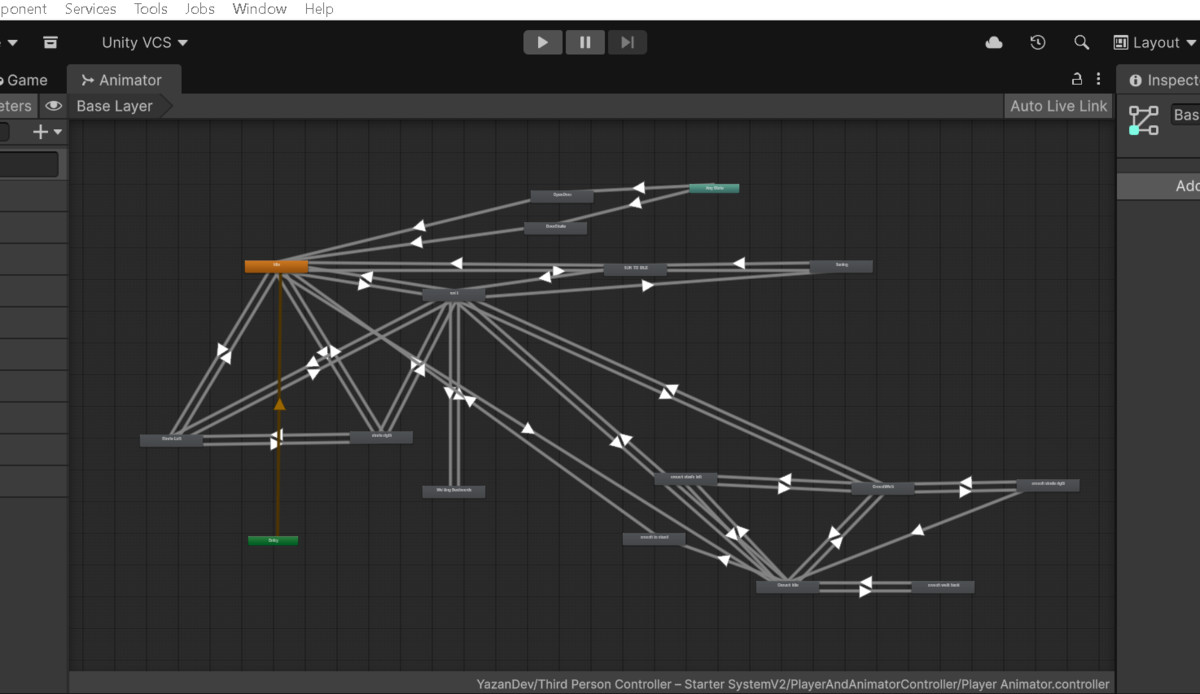
- 🎬 15 Animator States — Expanded from the original 13 states in Version 1, adding new door interaction animations.
- 📷 Smart Camera Collision — Prevents the camera from passing through walls
- 📷 Advanced Camera System — Zoom, Dynamic FOV, Head Bob & Landing Shake
- 📖 Reading Mode
- 🔦 Flashlight System — Dual Spotlights + Sounds
- 🚪 Door & Key System Use the Door System for doors, gates, closets, windows and other interactable objects
- 🔑 Key Pickup + Simple Inventory
- 📝 Readable Notes with TextMeshPro UI
- 🔊 Footsteps & Interaction Sounds
⭐ WHAT V2 ADDS
V2 takes the original movement controller and adds the systems needed to turn it into a stronger foundation for horror, exploration, adventure and third-person games.
You now get:
Movement + Character + 15 Animations + Advanced Camera + Flashlight + Doors & Keys + Readable World Objects + Simple Inventory + Footsteps & Interaction Audio
v1
This Player Starter pack is a complete movement system for TPS games — but you can easily turn it into FPS by controlling cameras in the Inspector. Includes walk, run, crouch, strafe, and full mouse look with 13 Animator states for smooth transitions.
🔗 WATCH REAL CHARACTER DEMO v1
See this system working with Demo characters on UTube:
Video link
it’s a complete player control framework, the perfect base for any game aiming for professional, responsive movement from day one. Build your next FPS, TPS, or horror masterpiece starting here.
Highlights of the system:
- Advanced movement logic with sprint, crouch, and strafe
- Animator with 13 states for natural transitions
- Full mouse look & aiming system
- Ready-to-use player prefab (capsule that u can change) with scripts
- Customizable cameras via Inspector (crouching, aiming, and more)
- Works in URP & HDRP, fully modular
- Optimized for smooth gameplay, prototyping, and production
- Minimal setup required; designed for developers of any skill level
Requirements: - Input System: Both (Old + New)
❤️ Thank You for Your Support
If you like this pack and decide to purchase it, you will receive all future updates for free,
Thank you for supporting YazanDev and trusting my work. I’m continuously working to improve the system and add useful features.
Have a suggestion or need help? Feel free to contact me!
made by
Yazan
From the publisher's Asset Store listing.
Technical details
Requirements: - Input System: Both (Old + New)
For HDRP users:The included flashlight is set up for URP. In HDRP:
- Create a new Spot Light (HDRP compatible)
- Name it Flashlight
- Make it a child of the Player
- Position it in the same place as the old flashlight (hand/chest)
- Drag it into the flashlightLight slot in PlayerFlashlightController
- The toggle (F) and sounds will still work
For materials: Upgrade Materials.
For Directional Light (if needed): Create a new Directional Light
Compatibility
| Unity version | Built-in | URP | HDRP |
|---|---|---|---|
| 6000.3.6f1 | Compatible | Compatible | Compatible |
As listed on the Asset Store.