
 View on Asset Store (opens in new tab)
Package details
- Latest version
- 1.0
- Last updated
- First released
- Unity version
- 2022.3.62 or later
- Package size
- 29 KB
- Files
- 4
- Views in the past week
- 9
Price tracking
- Last checked
- Tracked since
- Lowest recorded
- $9.99 on
Keywords

Screenshot Tool Pro
Capture screenshots with F12 shortcut. 15 presets for Asset Store, Steam, Twitter, Instagram. Supports 4K, transparent PNG, custom resolutions.
Affiliate link · Purchases support this site
Price history
Last 6 months
USDAsset preview
1 / 1
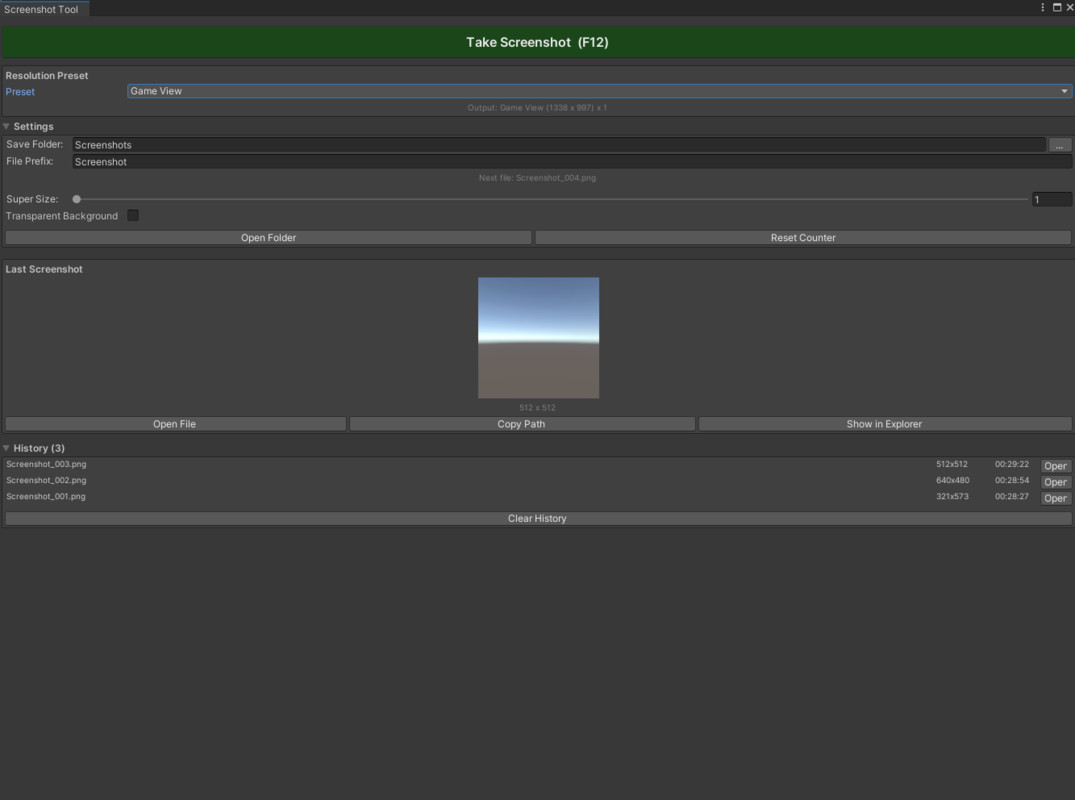
Screenshot Tool Pro screenshot 1
About this asset
Screenshot Tool Pro makes capturing high-quality screenshots effortless.
Why Screenshot Tool Pro?
Unity has no convenient screenshot tool. You need images for Asset Store, Steam, social media. This tool gives you one-click capture with all the right sizes.
One-Click Capture:
- Big capture button in window
- F12 keyboard shortcut — works anywhere
- Instant preview of last screenshot
- Auto-save to folder
15 Resolution Presets:
Asset Store:
- Cover (1200x630)
- Card (420x280)
- Screenshot (1920x1080)
Social Media:
- Twitter Post (1200x675)
- Instagram Square (1080x1080)
- Instagram Story (1080x1920)
- YouTube Thumbnail (1280x720)
Gaming Platforms:
- Steam Header (460x215)
- Steam Capsule (231x87)
Standard:
- 720p, 1080p, 1440p, 4K
Super Resolution:
- 1x, 2x, 4x multipliers
- Create ultra-sharp images
- Great for retina displays
Transparent Background:
- PNG with alpha channel
- Perfect for icons and UI
- One checkbox to enable
Smart Naming:
- Custom prefix
- Auto timestamp
- Auto increment numbering
- Never overwrite files
Quick Access:
- Open screenshot folder
- Reveal last file
- Copy path to clipboard
- Screenshot history
Requirements:
- Unity 2021.3 or newer
- Editor only
From the publisher's Asset Store listing.
Technical details
- Editor only - zero runtime overhead
- Full source code included
- No dependencies
- Works with all render pipelines
- F12 global shortcut
- Settings persist between sessions
Compatibility
| Unity version | Built-in | URP | HDRP |
|---|---|---|---|
| 2022.3.62f3 | Compatible | Compatible | Compatible |
As listed on the Asset Store.