
 View on Asset Store (opens in new tab)
Package details
- Latest version
- 1.1.0
- Last updated
- First released
- Unity version
- 6000.5.0 or later
- Package size
- 31.8 MB
- Files
- 465
- Favorites
- 3
- Views in the past week
- 14
- Requires
Price tracking
- Last checked
- Tracked since
- Lowest recorded
- $15.00 on
Keywords

Astra Health | Damage and Health Management
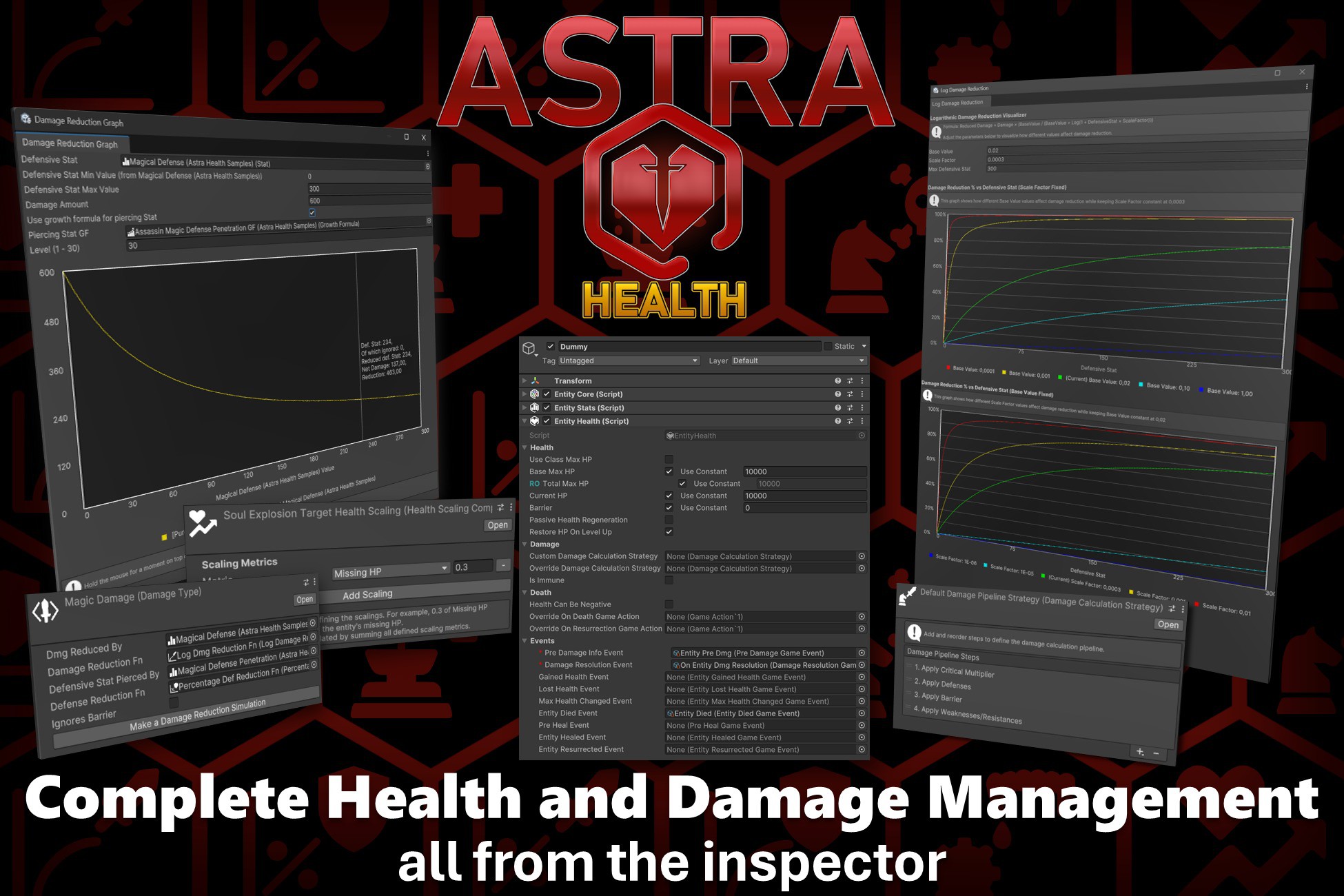
Modular health management & damage calculation for 'Astra Framework'. Extend the core package with a flexible, genre-agnostic health, damage, healing, and lifecycle system for any game.
Affiliate link · Purchases support this site
Price history
Last 6 months
USDAsset preview
1 / 14
Astra Health | Damage and Health Management screenshot 1

About this asset
Docs | API Docs | Unity Forum | Discord Server | Website
Save 33% by buying Astra Framework first
Buy Astra Framework first and you'll save 33% on Astra Health!
✨ Key Features
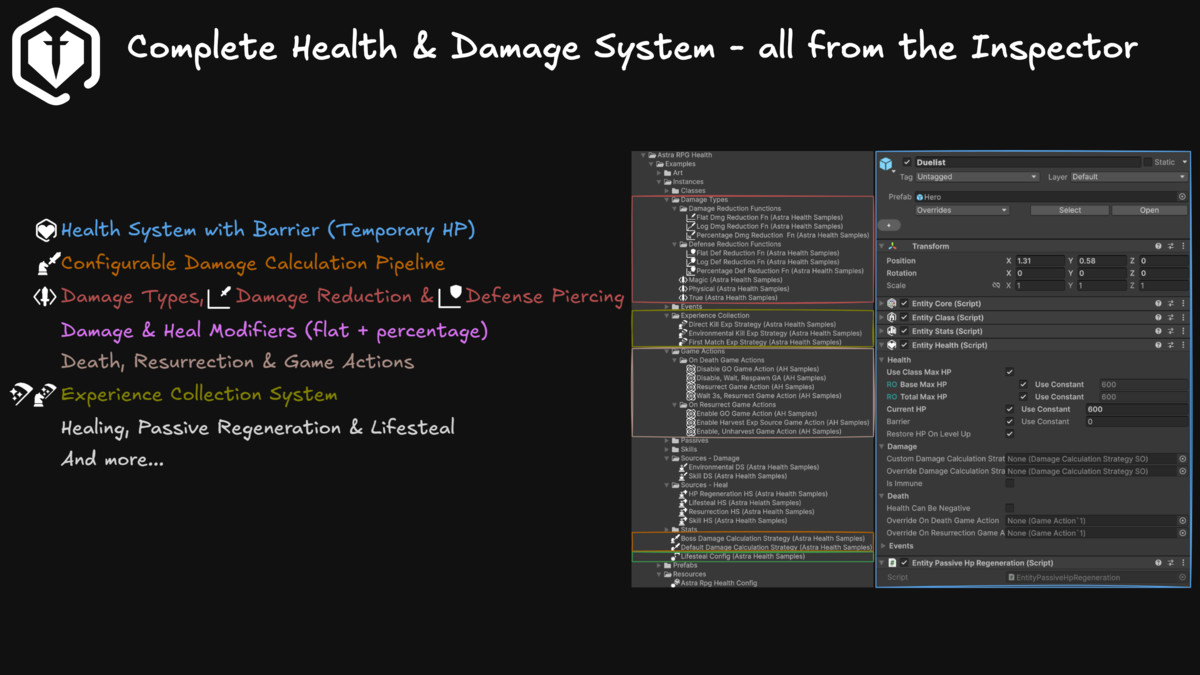
- Health Management: Effortlessly manage entities' max HP, current health, and temporary shields.
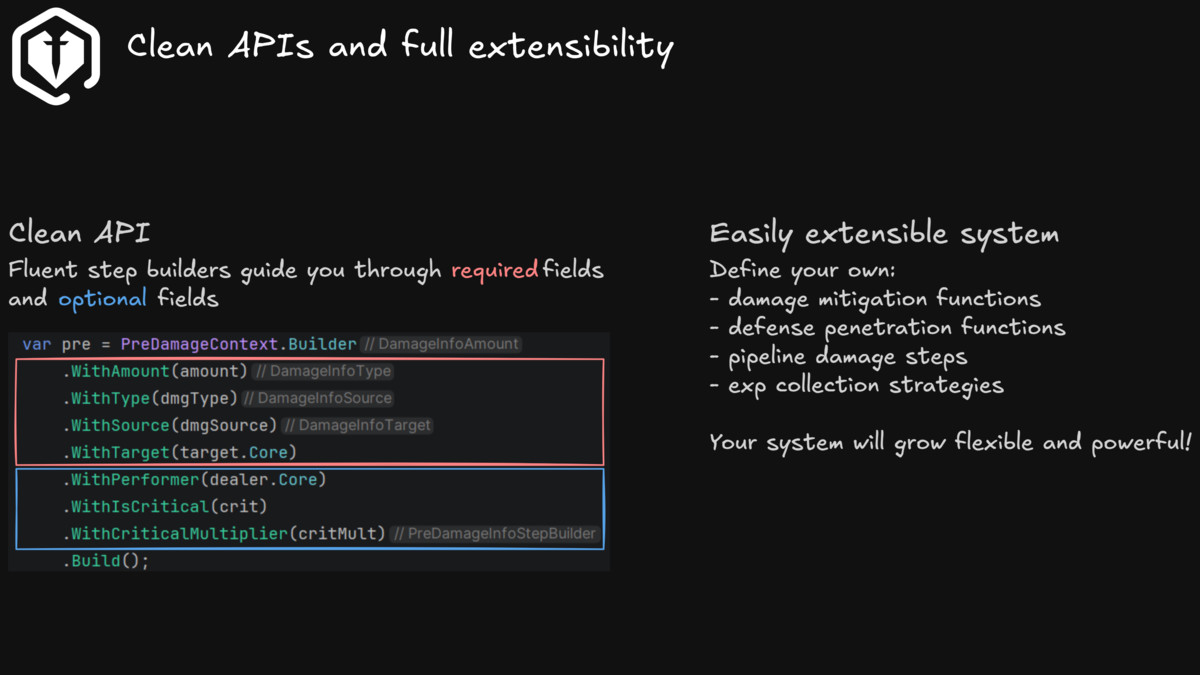
- Damage Calculation: Configure processing steps in any order via inspector (Critical multipliers, defense mitigation, barrier absorption, flat/% modifiers, damage floors/caps, or custom steps).
- Damage Types & Sources: Define custom types (Physical, Chaos, Bleed) and sources (Skill, Trap, Environment) via ScriptableObjects.
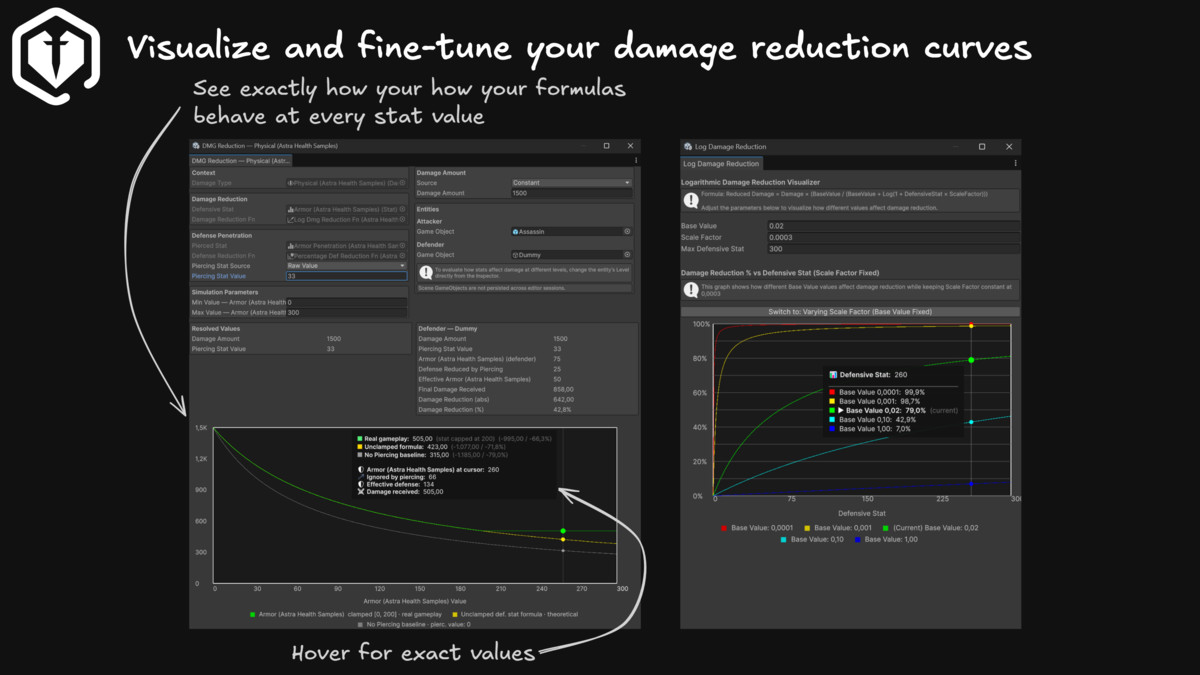
- Advanced Mitigation & Penetration: Bind defensive stats to damage types using Flat, Percentage, Logarithmic (diminishing returns), or custom formulas.
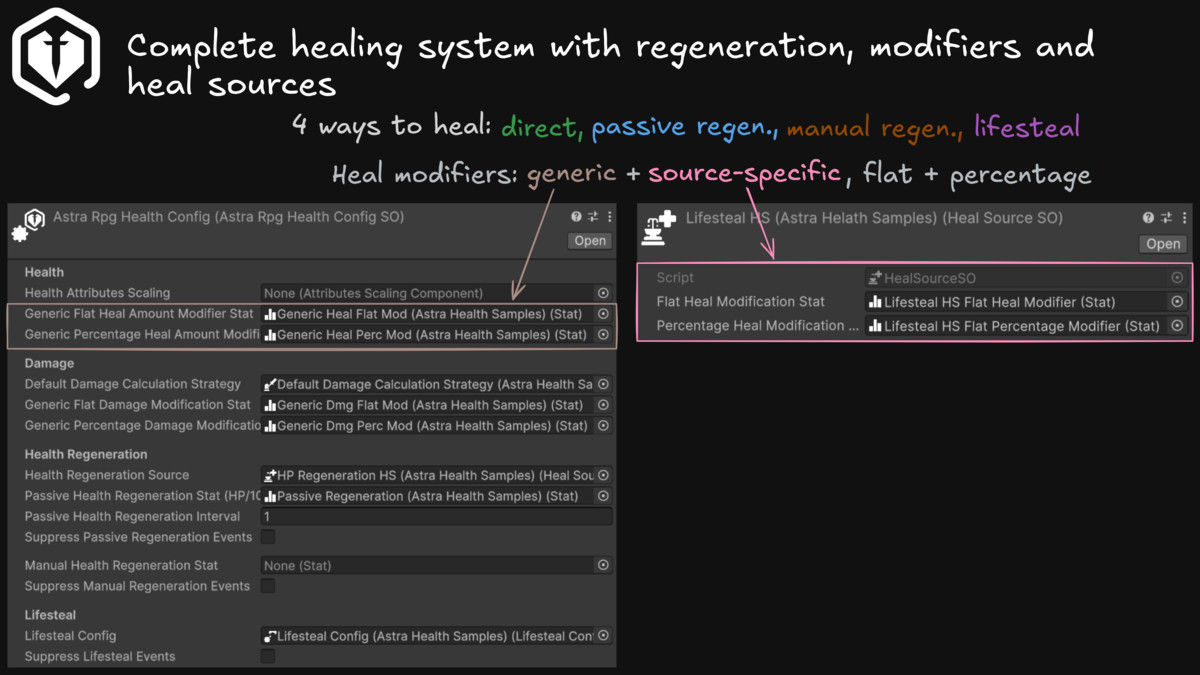
- Deep Heal System: direct heal, passive and manual regeneration ticks, and lifesteal. Define heal sources and use them to fine tune health recovery.
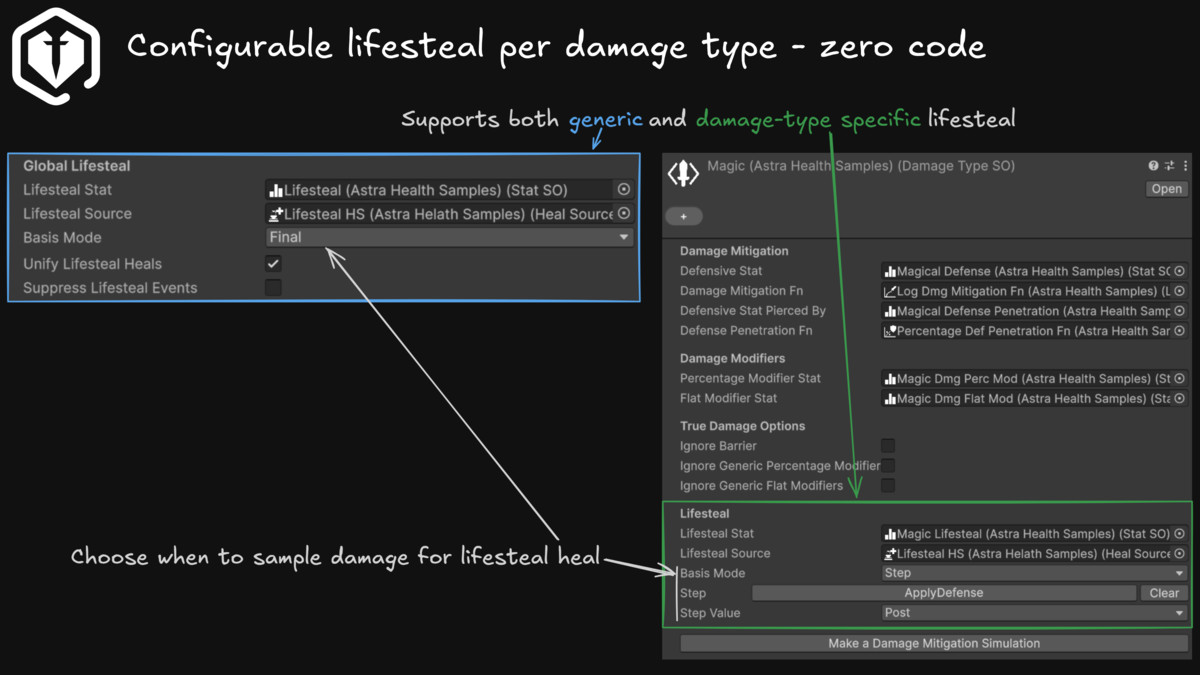
- Lifesteal: Highly customizable logic to inject lifesteal calculation exactly where you need it (raw vs net damage).
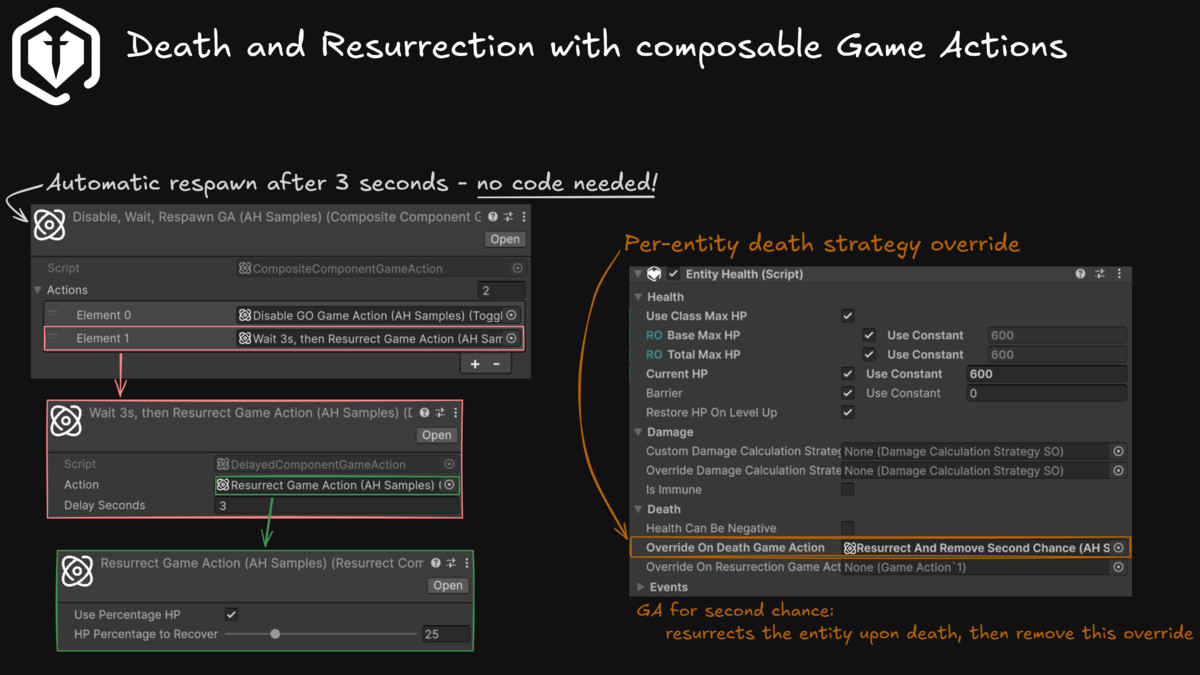
- Lifecycle Actions: Built-in, decoupled strategies for Death (e.g., Destroy Object, Disable Obj, custom Obj Pooling, Last Stand thresholds) and Resurrection.
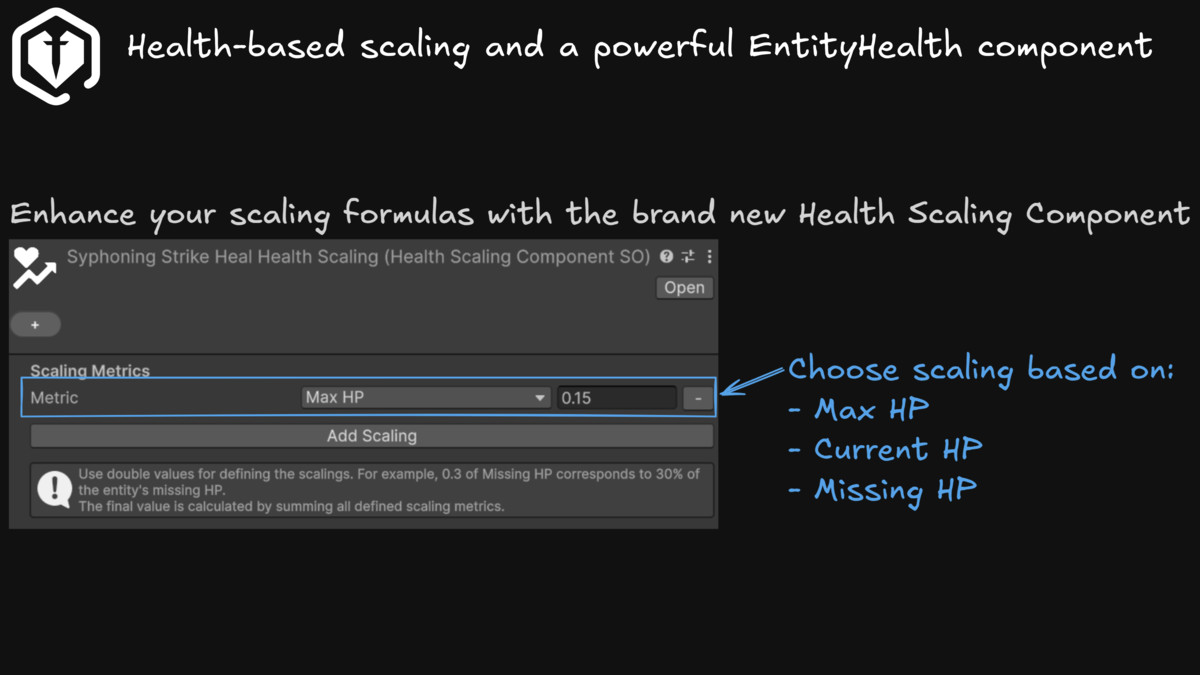
- Health Scaling Component: Dynamically scale gameplay formulas (like Berserk abilities) based on Max, Current, or Missing HP.
- Events: Leverages the core framework's architecture for clean UI, particle, and audio bindings.
⚠️IMPORTANT
This package is shipped as a standard .unitypackage assets package instead of as a UPM package. Unity is currently shifting UPM package publishing to a new portal, and UPM packages cannot be published from here any more.
This doesn't change anything for you. Astra will work anyways. Just make sure to have Astra Framework v2.2.0+ in your project before importing this package.
🤸♂️ Genre agnostic, NOT just for RPGs!
Astra Health is built on top of the newly rebranded Astra Framework. Whether you are developing an FPS, a Survival game, an Action-Adventure, a Strategy game, a roguelike/lite or a classic RPG, this package adapts perfectly to any combat or survival design without any hardcoded limitations.
☝Why Astra?
This package is part of a modular ecosystem that keeps a gentle learning curve and high flexibility for maximum degree of creative freedom.
Read more about Astra advantages in the base package of the framework: Astra Framework.
🧩 Extension for Astra Framework
This package enhances the base framework, lifting the burden of complex combat and damage business logic from your shoulders so you can focus entirely on game design.
(Note: Due to core framework backwards compatibility, underlying namespaces and documentation URLs may still reference the legacy 'AstraRPG' naming).
Third Party Assets
Asset uses Orbitron Font for the sample scene under SIL Open Font License (OFL); see Third-Party Notices.txt file in package for details.
All other sample scene assets (images & sprites) are personally created.
Information & Contact
Or email us at [email protected]
From the publisher's Asset Store listing.
Technical details
Health Management
A new EntityHealth MonoBehaviour is provided to enhance your entities with health management. Any entity with such component can take damage, die, and even resurrect.
Damage Types
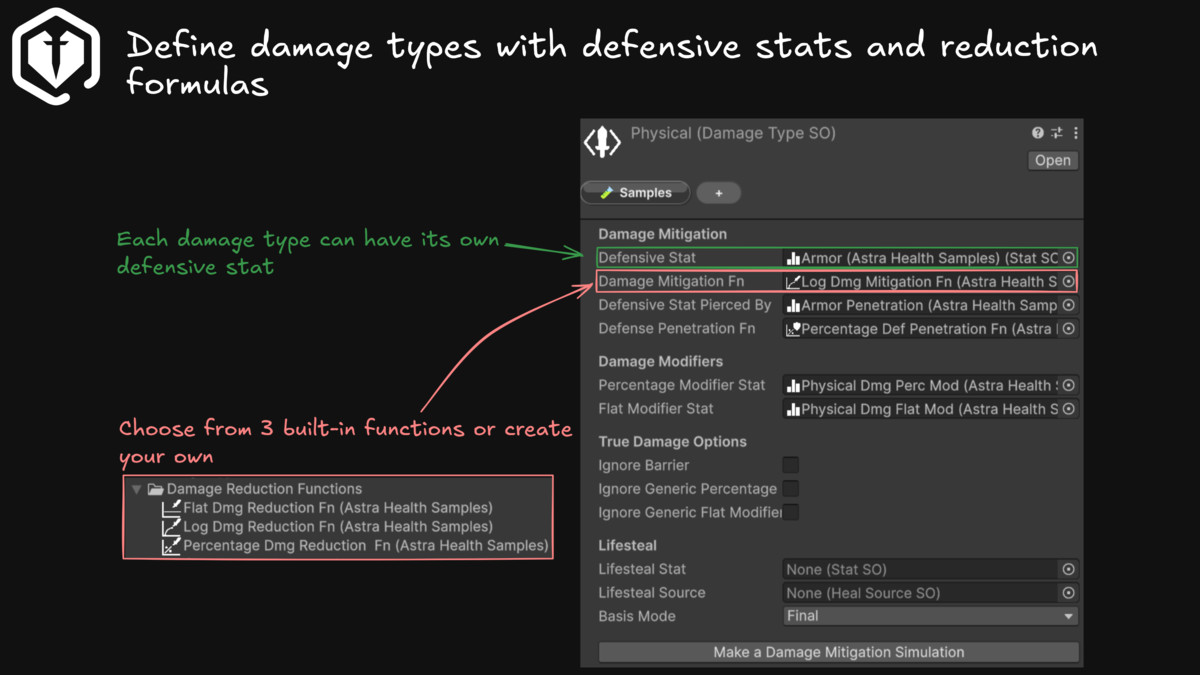
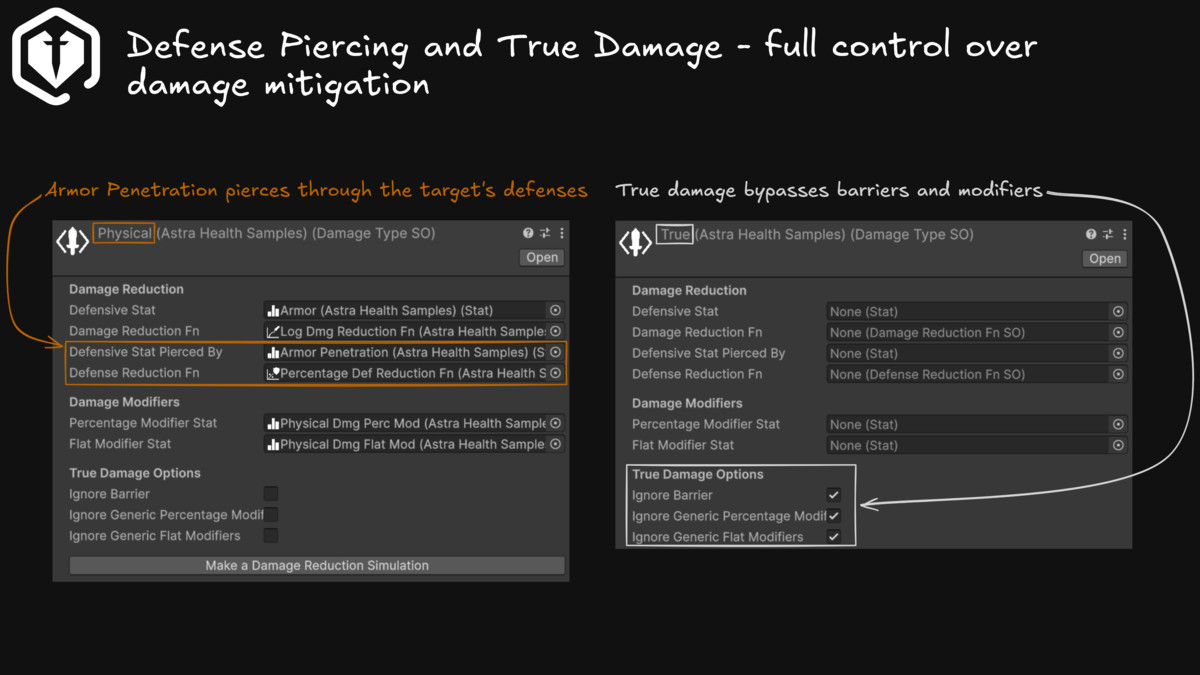
Damage Types are bound to the specific game mechanics. Being them build on top of Scriptable Objects, you'll be able to define your own at will. They are then used to model the defensive statistics and damage mitigation mechanics. For example, "Physical Damage" could be reduced by the "Armor" statistic.
Always while configuring the Damage Type, you can also provide a piercing statistic for the defensive stat. For example, the "Armor Pierce" statistic could be designated to be used to ignore part of the "Armor" when calculating the net damage.
Damage Sources
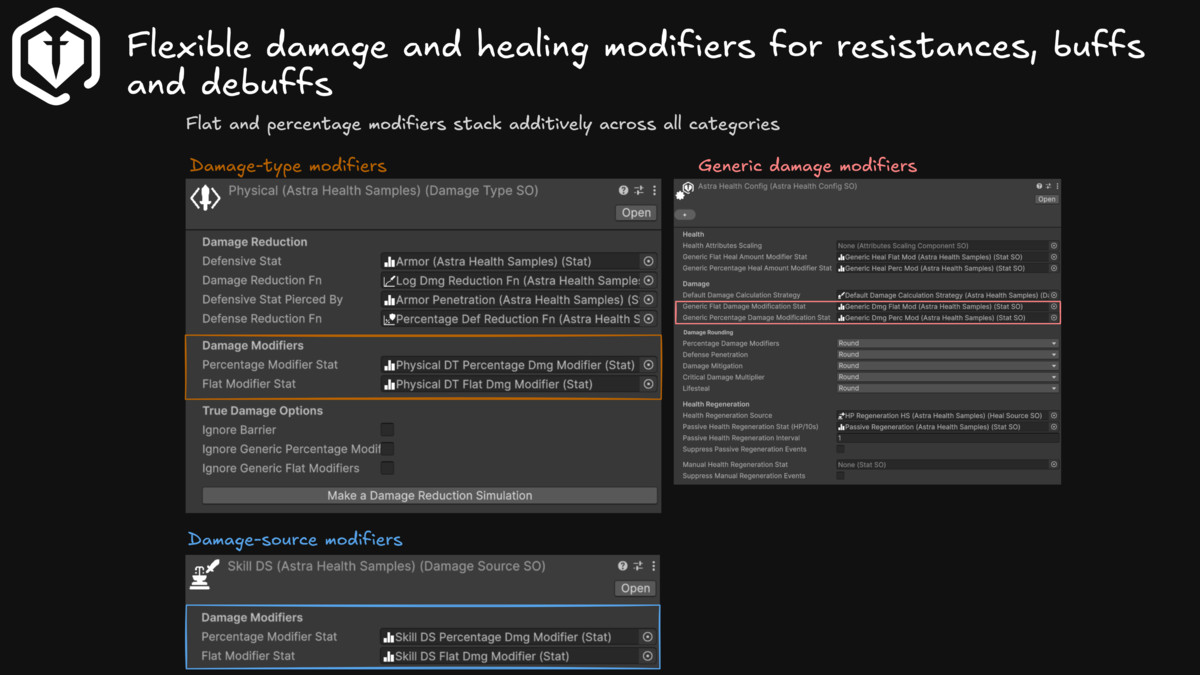
Damage Sources, as for Damage Types, are bound to the specific game you're making. They represent the origin of the damage inflicted on an entity. Examples of Damage Sources include: Skill, Trap, Environment, etc. They can be used to implement specific game mechanics, such as resistances or vulnerabilities to certain sources of damage, or to track in a damage log where the damage came from.
Damage Mitigation Functions
The damage mitigation granted by defensive stats is modeled via mathematical functions. The frameworks comes along with 3 pre-defined and very common functions to be used in your game:
- flat damage mitigation: each point of the defensive stat reduces n points of incoming damage. With n greater or equal to 1. The easiest and most predictable damage reduction function. Eases the balancing of your video-game.
- percentage damage mitigation: the defensive stat expresses the percentage of damage reduction to be applied. Useful for implementing a defense that is effective even when the attacker/defender levels or damage input/defensive stat values difference are very big.
- logarithmic damage mitigation: increments to the defensive stat provide diminishing returns as the value grows more and more. Useful for preventing complete damage negation.
Obviously you can implement your own custom Damage Reduction formulas and use those isntead of the default one if you need. The framework is highly extensible.
Defense Penetration Functions
Similarly to Damage Mitigation Functions, these functions allow to specify how a piercing stat should ignore defense when calculating the net damage to be taken.
The package offers, out of the box, the same flat, percentage, and logarithmic functions.
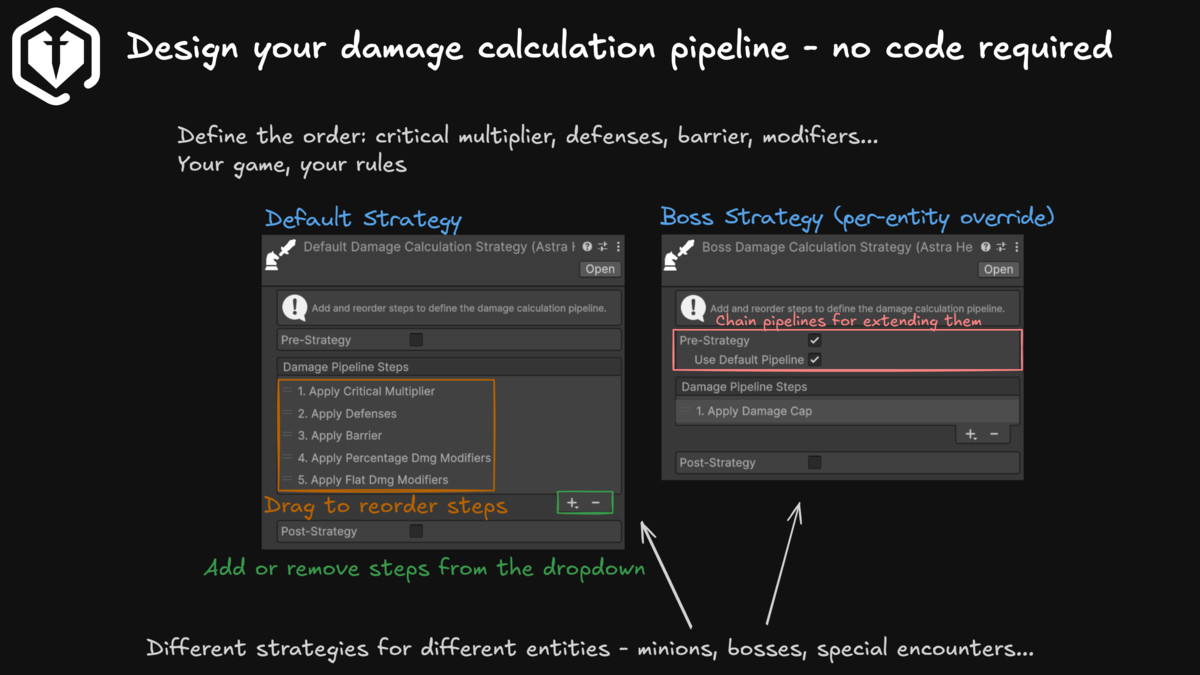
Damage Calculation Pipeline
The Damage Calcluation Pipeline models the process of transforming raw damage, that is the damage an attack/ability/trap/etc. intends to deal to an entity, into the net damage, the actual damage taken from an entity. It can be customized so that the various steps (barrier absorption, defense application, critical multiplier, etc.) are applied in the desired order. The order of application of the steps is not idempotent, therefore, the pipeline can be customized to tailor the execution order to your game's needs.
The package comes along with these pre-defined steps:
- critical multiplier: if the damage to be taken is marked as critical, this steps multiplies the amount of damage by the critical multiplier passed along with the damage context. For now, is the only step that increase the damage amount. Generally put as first step in the pipeline.
- defense mitigation: takes into consideration the defensive stat for the incoming damage type (if any) and any possible defense penetration.
- barrier absorption: with barrier we refer to the temporary hit points that upon damage take precedence over actual HP. This step is responsible for detracting from the amount of damage to be taken by the entity, available barrier, if any.
- percentage damage modifiers application: analogously to flat damage modifiers application, this step applies the percentage damage modifiers.
- flat damage modifiers application: flat damage modifiers are positive or negative flat damage modifications. They are intended to be used as foundations to implement higher level abstractions of damage modifiers buffs/debuffs such as weaknesses, resistences, ecc. This step applies general flat damage modifiers (for all damage types and sources), and also specific flat damage types and sources modifiers.
- damage floor: allows to impose a lower limit for the damage amount being processed. Useful for ensuring a minimum amount of damage.
- damage cap: analogous to damage floor, but imposes an upper limit on the damage amount being processed. Useful for bosses that have traits like "Cannot take more than 10% of the Max HP on single hit". Usually put as last step in the pipeline.
You can configure a default damage calculation strategy to be used, by default, by all the entities. If you need, you can also provide an entity with a custom damage calculation strategy. This enables you, for example, to design certain bosses with additional specific steps. For example, you could use the damage cap step and configure it to cap the damage amount at 10% of the max HP, and grant all bosses a strategy that includes such step. This would prevent the player to cheese the bosses too quickly. Furthermore, you can even override the damage calculation strategy during runtime. For example, you could want to implement a status effect that doubles all the electric damage taken. This can be easily achieved by using a new electric damage multiplier step that tweaks the damage amount whenever the type is electric. As the debuff wears off, the overriding strategy with the extra step is removed and the entity will restart using the default or its custom calculation strategy.
Finally, you can define a new damage calculation pipelines by starting from another. This promotes modularity and prevents duplication of configuration. The Boss damage pipeline with the 10% Max HP damage cap is achieved by decorating the default damage pipeline with the an extra damage cap step.
Therefore, this feature not only allows you to tailor the default damage calculation pipeline to your own game, but also eases the implementation of more complex damage calculation related mechanics, allowing for a robust and flexible damage calculation system.
Heal Sources
Heal Sources are similar to Damage Sources but pertain to healing instead of damage. They represent the origin of the healing received by an entity. Examples of Heal Sources include: Potion, Skill, Regeneration, Lifesteal, Resurrection, Weapon Skill, etc. In some games, Heal Sources can also include Self and Ally. They can be used to implement specific game mechanics, such as bonuses to healing coming form or granted to allies or self, bonus to healing coming from passive HP regeneration, etc.
Lifesteal
Lifesteal is a widely used game mechanic that allows an entity to regain health based on the damage they deal to others. The package provides a highly customizable Lifesteal system that can be tailored to fit the specific needs of your game. You can configure the lifesteal statistic to associate to each damage type you may be interested in, and then also configure which step of the damage calculation pipeline it should apply to: before any step (raw damage), after all the steps (final net damage), before or after defensive statistic damage mitigation, before or damage modifiers mitigation, before or after barrier absorption, etc.
Death
By default, when an entity's health reaches zero, it is considered dead. The package allows also to set a custom death threshold, which can be useful for implementing mechanics such as "down but not out" or "last stand" where an entity can survive till a certain negative health value before dying. Additionally, when an entity dies, a certain Game Action can be executed, allowing for custom behavior upon death, such as triggering events, playing animations, or dropping loot. Beside game mechanics, death strategies to tailor the death behavior to your architecture. For example, if your game uses object pooling, you can implement a Game Action that returns the entity to the pool instead of destroying it. Alternatively, if an entity can resurrect, you could opt for the pre-defined "disable game object" Game Action, which simply disables the entity upon death, allowing for easy resurrection later on.
A default on-death Game Action for all the entities can be set, and custom on-death Game Actions can be assigned to specific entities as needed.
The base package and this one come with several game actions out of the box. You can define plenty of behaviors without even defining your own game actions.
Resurrection
Resurrection is the process of bringing a dead entity back to life. An entity can be resurrected via API, and providing the amount of health to restore, either as a flat value or as a percentage of its maximum health.
Similarly to on-death Game Actions, on-resurrection Game Actions can be used to define custom behavior when an entity is resurrected. The same Game Actions used for death can be used as well with in response to resurrections.
A new Scaling Component: Health Scaling
With the base framework you were able to define scaling formulas on the base of Stats and Attributes. This package extends the expressiveness of those formulas by introducing the Health Scaling Component. This component allows you to scale values based on the entity's health. You can use the maximum health, current health, or missing health as variables.
For example, your Berserk abilities could scale based on how much health the entity is missing, becoming more powerful as the entity gets closer to death.
More Game Events
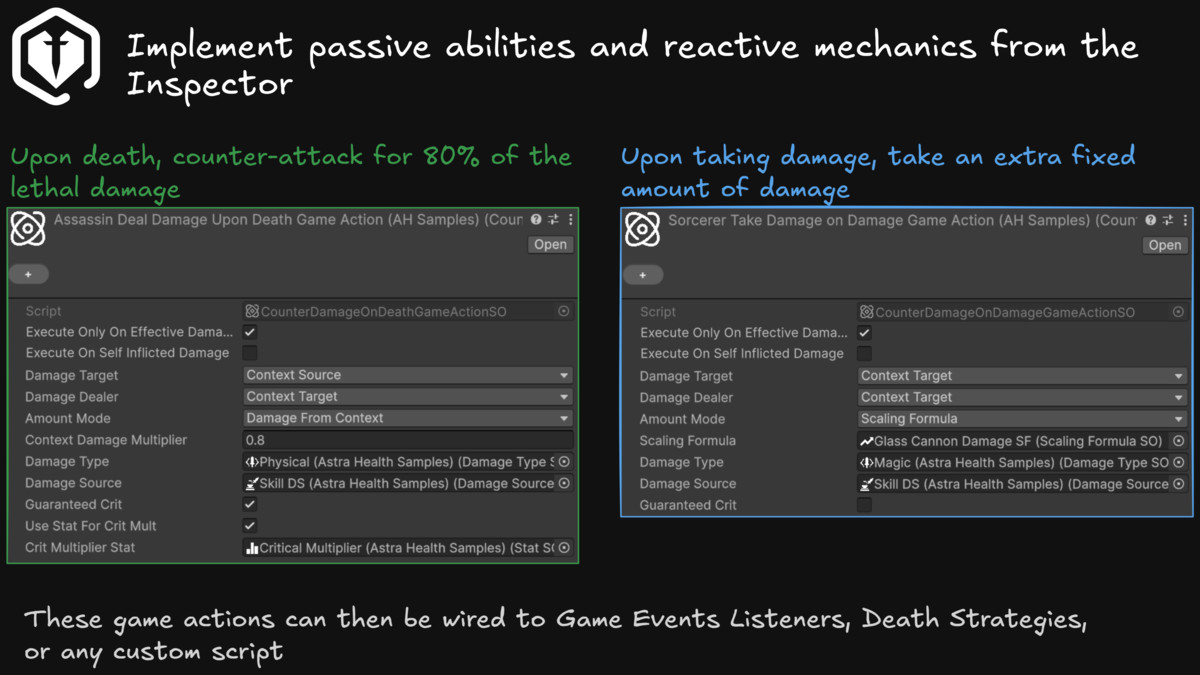
By relying on the powerful and flexible event system of the core package, this package introduces more game events related to health, damage, healing, death, and resurrection. These events can be used to trigger custom behavior in your game, such as applying complex passive abilities, playing sound effects, spawning particles, updating the UI, and much more.
Compatibility
| Unity version | Built-in | URP | HDRP | Custom |
|---|---|---|---|---|
| 6000.5.0f1 | Compatible | Compatible | Compatible | Compatible |
- Unity version 6.2 or higher
- Astra Framework 2.2.0+ required
- In order to have the sample scene working, you need to import Text Mesh Pro Essentials
As listed on the Asset Store.